Computer Upgrades Explained: Why Some Computers Are Impossible to Upgrade (And How to Tell Before You Waste Money)
Adam Fornal
December 17th, 2025
Computer Upgrades Explained: Why Some Computers Are Impossible To Upgrade (And How To Tell Before You Waste Money) 5
Table of Contents
Why Computer Upgrades Feel Like the Sensible Choice
Almost everyone who owns a computer eventually reaches the same point. The machine still turns on, still loads the operating system, and still does what it’s supposed to do — just much slower and with a lot more frustration than before. Programs hesitate before opening, web browsers chew through memory, and even basic tasks feel heavier than they used to. At that moment, the idea of computer upgrades feels like the obvious answer.
Upgrading feels logical because it used to be logical. For years, computers were built around standardised components that could be replaced or improved as needed. If your PC slowed down, you added more memory. If storage filled up, you added another drive. If you wanted better performance, you swapped the processor or graphics card. The computer itself wasn’t disposable; it was something you improved over time.
That expectation hasn’t gone away, but the reality underneath it has changed completely. Modern computers often look upgradeable on the outside while being anything but on the inside. At Kingfisher Computers, we see this disconnect every week. Customers arrive confident that a simple upgrade will solve their problem, only to discover that their system was never designed to accept upgrades in the first place.
This article exists to bridge that gap between expectation and reality. It explains why computer upgrades fail so often, why some machines are effectively impossible to upgrade, and how to tell the difference before you waste money on parts that will never be used.
The Old Assumption That All Computers Can Be Upgraded
The biggest problem with modern computer upgrades is not a lack of knowledge — it’s outdated assumptions. Many people learned how computers work at a time when modular design was the norm. Desktops were big, boxy, and full of removable components. Laptops were thicker, slower, and far more repairable than today’s ultra-thin machines.
Those experiences shaped how people think about computers. If something became slow, you fixed it. If it ran out of space, you expanded it. If it struggled with new software, you upgraded it. That mental model still feels correct, but it no longer matches how most modern systems are built.
Today’s computers are designed very differently. Manufacturers prioritise thinness, weight reduction, cost savings, and fast production. Removable components, spare sockets, and generous cooling solutions all work against those goals. As a result, many systems are designed as fixed-spec devices from day one. They are meant to be used as-is and replaced when they no longer meet requirements.
This shift is rarely explained clearly to buyers. Product listings focus on processor names, storage capacity, and vague performance claims, while quietly ignoring whether any of those components can ever be changed. That silence is where most failed computer upgrades begin.
Why Manufacturers Quietly Limit Computer Upgrades
It’s tempting to assume manufacturers limit computer upgrades to force people into buying new machines. While repeat sales are certainly a benefit, the main driver is manufacturing efficiency. Upgradeable systems are simply harder and more expensive to design.
Every removable component requires space, connectors, structural reinforcement, and testing. Every upgrade path increases complexity, both in hardware design and in customer support. From a manufacturing perspective, a computer with soldered components, a simplified motherboard, and minimal internal access is cheaper to build and easier to assemble at scale.
These design choices also allow for thinner and lighter machines, which sell well. Unfortunately, they come at the cost of flexibility. Once RAM or storage is soldered, it becomes part of the motherboard permanently. Once a custom power supply or proprietary connector is used, standard replacements are no longer an option.
Manufacturers rarely highlight these trade-offs because they are not attractive selling points. Instead, they rely on customers assuming that computer upgrades will be possible later, even when the internal design makes that impossible.
Soldered RAM: The Most Common Reason Computer Upgrades Fail
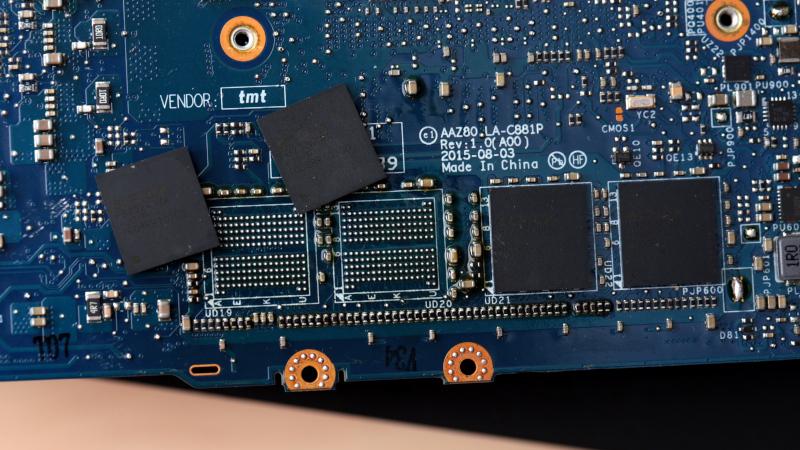
If there is one single design choice that kills more computer upgrades than any other, it is soldered RAM. RAM that is soldered directly to the motherboard cannot be removed, replaced, or expanded. Whatever memory configuration the system ships with is all it will ever have.
This design is now extremely common in modern laptops, ultrabooks, all-in-one PCs, and even some compact desktops. Manufacturers prefer soldered RAM because it reduces part count, saves space, and simplifies manufacturing. It also allows for thinner designs, which are easier to market.
The problem is that RAM is usually the first component to limit performance. Modern operating systems are heavier than they used to be. Web browsers consume large amounts of memory, background services run constantly, and security software adds its own overhead. A system with soldered RAM may feel perfectly fine for the first year or two, then slowly become frustrating as software demands increase.
At that point, traditional computer upgrades would solve the problem — but only if the RAM were replaceable. When it’s soldered, there is no upgrade path. The limitation is permanent, and the only way to escape it is to replace the entire machine.
What makes soldered RAM particularly dangerous is how invisible it is at the point of sale. Most buyers see “8GB RAM” or “16GB RAM” listed in the specifications and assume that number can be increased later if needed. There is almost never a clear indication that the RAM is permanently fixed.
This leads to a very common scenario we see at Kingfisher Computers. A customer buys a laptop with 8GB of RAM, assuming they can upgrade later if performance drops. Two years down the line, the system feels slow, so they purchase additional memory — only to discover that there are no RAM slots at all.
By the time they learn the truth, the return window has often passed, and the upgrade money is wasted. This is one of the most avoidable computer upgrades failures, yet it happens constantly because the limitation is hidden rather than stated outright.
Soldered Storage: When Even SSD Upgrades Are Impossible
Soldered storage introduces an even more serious problem. In systems where the SSD is soldered directly to the motherboard, storage upgrades are completely impossible. Capacity cannot be increased, and performance cannot be improved by replacing the drive.
From a computer upgrades perspective, this design also creates long-term risk. Storage devices fail. When they do, data recovery is often possible if the drive can be removed. With soldered storage, that option disappears. If the storage chip fails, recovery becomes extremely difficult and sometimes impossible without specialist equipment.
In many cases, the only repair option is a full motherboard replacement. That repair is usually so expensive that it makes no financial sense, effectively turning the entire computer into electronic waste because one non-replaceable component failed.
As with soldered RAM, this limitation is rarely made clear when buying the machine. The presence of an SSD creates a false sense of upgradability that simply doesn’t exist.
CPU Upgrades: Why They’re Mostly a Thing of the Past
Processor upgrades are another area where expectations lag behind reality. In laptops, CPU upgrades are essentially nonexistent. Almost all modern laptop processors are soldered directly to the motherboard. If the processor is slow, it cannot be replaced or upgraded in any practical way.
Desktop systems still allow CPU upgrades in some cases, but even here the situation is far more complicated than it used to be. Matching the physical socket is no longer enough. Motherboard chipsets limit which processor generations are supported, and BIOS firmware often blocks newer CPUs entirely.
On top of that, power delivery and cooling systems are designed around specific performance levels. Installing a more powerful processor into a system that was never designed for it can lead to instability, overheating, or reduced performance due to thermal throttling. As a result, many attempted computer upgrades involving CPUs fail even when the part technically fits.
Motherboards: The Hidden Authority Behind Computer Upgrades
The motherboard is the single most important component when it comes to computer upgrades, yet it is also the least understood by most buyers. It controls which processors are supported, how much memory can be installed, what storage types are accepted, and how much power can be delivered safely.
In many prebuilt and budget systems, the motherboard is deliberately limited. These boards may restrict RAM speeds, support fewer processor generations, or use locked BIOS firmware that prevents configuration changes. Some systems use proprietary motherboards that look standard but rely on custom connectors or layouts that block upgrades entirely.
If a system’s BIOS offers very few options, that is usually a strong indication that the manufacturer never intended the computer to be modified. Lack of control is not accidental — it is a design choice that directly limits computer upgrades.
Marketing Language vs Physical Reality
One of the reasons computer upgrades fail so often is that marketing language focuses on performance today, not flexibility tomorrow. Phrases like “fast,” “powerful,” and “future-ready” sound reassuring, but they say nothing about whether the system can actually be improved later.
Manufacturers rarely lie outright. Instead, they omit critical information. They tell you how much RAM the system has, but not whether it can be upgraded. They list SSD capacity, but not whether the drive is removable. They advertise processor performance, but not whether the motherboard supports anything beyond that exact chip.
This creates a gap between what buyers assume and what the hardware actually allows. By the time that gap becomes obvious, it is usually too late to do anything about it.
Power Supplies: The Silent Killer of Computer Upgrades
Power supplies are one of the most misunderstood components in any system, and they are responsible for a huge number of failed computer upgrades. Most people never think about the power supply at all. If the computer turns on, they assume it must be “good enough.” Unfortunately, that assumption falls apart the moment you try to install more demanding hardware.
Many prebuilt computers use low-wattage power supplies that are sized exactly for the components the system ships with. There is no headroom. No margin for future upgrades. As soon as you try to add a more powerful graphics card or processor, the system either refuses to boot, becomes unstable, or shuts down under load.
To make matters worse, many manufacturers use proprietary power supplies. These units may have non-standard shapes, custom connectors, or unusual cable pinouts that prevent them from being replaced with standard off-the-shelf units. Even if a more powerful PSU exists, it may not physically fit the case or connect safely to the motherboard.
This is why so many computer upgrades fail after the part is installed. On paper, everything looks compatible. In reality, the system simply cannot deliver enough power to run the new hardware reliably.
Proprietary Connectors and Custom Parts
One of the most frustrating traps in modern computer upgrades is the use of proprietary connectors. These are connectors that look similar to standard ones but are wired differently, making standard replacement parts unusable or even dangerous.
This is especially common in large-brand prebuilt desktops. The motherboard may use a custom power connector. The front panel wiring may not follow standard layouts. Even cooling fans can use non-standard connectors that prevent replacement or upgrading.
From the outside, the computer looks like a normal PC. Inside, it is closer to a closed ecosystem. These systems are designed to be repaired only with manufacturer-approved parts, which are often expensive or no longer available after a few years.
For computer upgrades, this means that even simple changes can become impossible without replacing large portions of the system.
Cooling: The Invisible Ceiling on Performance
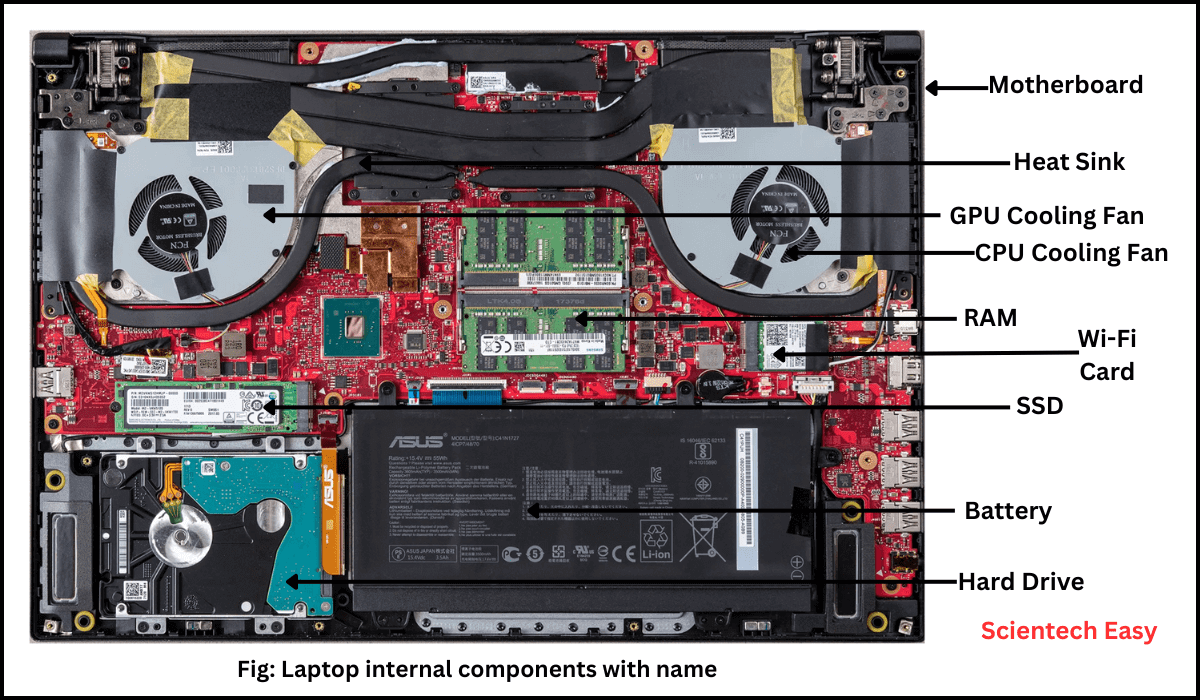
Cooling is one of the most overlooked factors in computer upgrades. Every system is designed around a specific thermal envelope. The cooling solution — fans, heatsinks, airflow paths — is built to handle a known amount of heat.
When you upgrade to a more powerful component, heat output increases. If the cooling system cannot handle that extra heat, the computer will protect itself by reducing performance. This is known as thermal throttling, and it can make upgrades feel pointless or even counterproductive.
In compact systems, laptops, all-in-ones, and small form factor PCs, cooling is already pushed to its limits. There is often no space for larger heatsinks or additional fans. Even if a faster component technically works, it may never reach its full performance because it simply cannot stay cool enough.
This is why computer upgrades must always consider thermal design, not just compatibility lists.
Small Form Factor PCs: When Size Becomes the Limitation
Small form factor PCs are popular because they look neat and take up less space. Internally, however, they are one of the worst platforms for computer upgrades.
These systems often use:
Low-power CPUs
Laptop-grade components
Custom motherboards
Minimal cooling
Limited power delivery
While some small PCs allow minor upgrades such as storage or RAM (if not soldered), meaningful performance upgrades are usually impossible. There is rarely room for a full-size graphics card, and power supplies are often custom and low-wattage.
The mistake people make is assuming that “desktop” automatically means “upgradeable.” With small form factor systems, that assumption often leads straight to wasted money.
All-in-One PCs: The Worst of Both Worlds
All-in-one PCs deserve special mention because they cause an enormous amount of confusion. They look like desktops. They are marketed like desktops. Internally, they behave like laptops.
Most all-in-one systems use laptop-class CPUs, laptop RAM, and custom motherboards. Many have soldered memory and storage. Cooling is extremely limited, and internal access is often difficult or risky.
From a computer upgrades perspective, all-in-one PCs offer the disadvantages of laptops with the price tag of desktops. Some models allow limited upgrades, but many do not, and even those that do are far more restricted than buyers expect.
If a system combines the screen and computer into one sealed unit, it should always be treated as having limited upgrade potential unless proven otherwise.
Prebuilt PCs vs Custom-Built PCs
One of the clearest patterns we see at Kingfisher Computers is the difference between prebuilt systems and custom-built PCs when it comes to computer upgrades.
Prebuilt systems are designed to hit a price point. Components are chosen to be “just enough” for the advertised performance. Power supplies, motherboards, and cooling solutions are rarely designed with upgrades in mind.
Custom-built PCs, by contrast, are usually assembled using standard components with known compatibility. Even budget custom builds tend to have better upgrade paths than expensive prebuilt systems, simply because they use off-the-shelf parts.
This doesn’t mean all prebuilt PCs are bad. It means their upgrade potential should never be assumed.
Real-World Upgrade Case Studies
To make this more concrete, here are real situations we see regularly.
A customer buys extra RAM for a laptop, only to discover the memory is soldered and cannot be expanded.
Another customer buys a new graphics card for a prebuilt desktop, only to find that the power supply cannot support it and cannot be replaced.
Someone upgrades their CPU, only to discover that the motherboard BIOS does not support it and never will.
In each case, the computer upgrades failed not because the user was careless, but because the system’s limitations were hidden or misunderstood.
How to Check Computer Upgradeability Before Spending Money
Before attempting any computer upgrades, the most important step is identifying the exact model of the system. Not the brand. Not the product name. The full model number.
Once you have that, research whether the RAM and storage are soldered. Look for teardown guides, manufacturer documentation, and repair forums. If this information is difficult to find, that is often a warning sign in itself.
Next, check the motherboard chipset and BIOS support. For desktops, confirm whether standard power supplies are used and whether there is sufficient wattage headroom. For laptops and all-in-ones, assume limitations unless proven otherwise.
If any of this feels uncertain, that uncertainty usually means the upgrade is risky.
When Computer Upgrades Are Worth Doing
Despite everything covered so far, computer upgrades can still be an excellent investment in the right situations.
Upgrading from a hard drive to an SSD, increasing RAM where supported, or installing a suitable graphics card can dramatically extend a system’s usable life.
The key is that the system must have been designed to accept upgrades in the first place.
When Computer Upgrades Are a Waste of Money
Computer upgrades are usually a waste of money when:
Core components are soldered
The system uses proprietary parts
Power and cooling are already maxed out
The platform is near the end of its support life
In these cases, money spent on upgrades often delivers minimal improvement and delays the inevitable replacement.
The Environmental Argument for Smarter Computer Upgrades
There is a strong environmental argument for computer upgrades when they are done correctly. Extending the life of a system reduces electronic waste and lowers the demand for new manufacturing.
However, failed upgrades have the opposite effect. Buying incompatible parts, replacing entire systems due to one non-replaceable component, and discarding otherwise functional machines all contribute to unnecessary waste.
Smarter upgrade decisions benefit both your wallet and the environment.
Final Thoughts: Computer Upgrades Require Information, Not Guesswork
Computer upgrades are not inherently bad. They are not outdated. They are not pointless.
What is outdated is the assumption that every computer can be upgraded just because it looks like a PC.
Modern systems are often designed with fixed specifications, limited flexibility, and short upgrade windows. Understanding those limits before spending money is the difference between a successful upgrade and a frustrating mistake.
At Kingfisher Computers, we would rather advise against an upgrade than sell parts that will never work. Honest guidance saves money, time, and stress — and that is the most valuable upgrade of all.
The Illusion of Stability in Modern Updates For most users, operating system updates are something that simply happen. They arrive quietly, often installing in the background, requiring little more than…
Macbook Neo, How Does It Compare To Air & Pro? Over the last few years the laptop market has experienced one of the most significant architectural changes in its history.…
Apple’s latest product announcements mark one of the most significant shifts in the Mac lineup in more than a decade. While Apple routinely updates its hardware with faster chips, incremental…
There is a particular kind of frustration that only a slow computer can produce. It is not dramatic. It is not urgent. It does not scream for attention. Instead, it…
In an era where nearly every aspect of personal computer maintenance and professional life is mediated through digital systems, your computer is no longer a luxury device — it is…
Phone says charging but battery not increasing is one of the most frustrating problems smartphone users face. You plug it in.The lightning bolt appears.It says “Charging.” But the battery percentage…
Apple’s rumour cycle always looks like a thousand disconnected leaks — until you line them up and notice the same themes repeating: AI-first silicon, camera and display differentiation, form-factor experiments (foldables / spatial…
Wi-Fi connected but no internet is one of the most frustrating messages you can see on a computer or laptop. The Wi-Fi icon shows full bars.It says “Connected.”But websites won’t…
Unfortunately, there was an error submitting your request.
Please try again later, or reach out to us directly. You can call us at +44 1429 280955 or email us at [email protected] for assistance. We’re here to help you get your computer back up and running!
We’ve received your booking, Our team will get in touch with you shortly to confirm the details. You’re one step closer to having your computer fixed! If you have any urgent questions, feel free to contact us. Otherwise, sit back, and we’ll handle the rest.