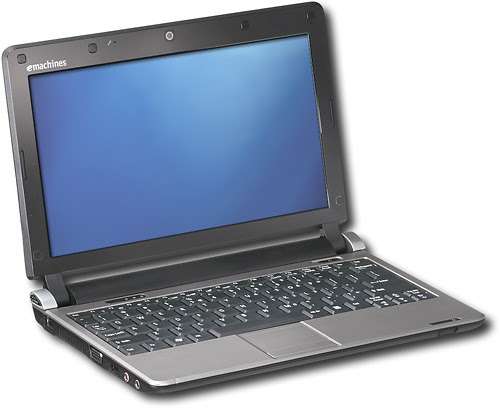
Ultimate Guide to eMachines EM350 Series Memory Upgrade: Boost Your Performance Today
If you own an eMachines EM350 series netbook, you might have noticed it slowing down over time. With technology constantly advancing, even reliable machines like eMachines can start to lag behind. But don’t worry—there’s a simple solution: upgrading your memory. In this guide, we’ll walk you through how to perform a memory upgrade on your eMachines EM350 series, boosting performance and extending the life of your device.
Table of Contents
Why Upgrade Your eMachines Memory?
When it comes to netbooks like the eMachines EM350 series, the built-in memory might not be enough to keep up with modern demands. Over time, software and applications become more memory-intensive, causing your device to slow down or even freeze. By upgrading your eMachines memory, you can:
Improve multitasking: Run more programs at the same time without a slowdown.
Boost performance: Enjoy faster load times and smoother operation.
Extend the life of your device: Keep your eMachines running efficiently for years to come.
Step-by-Step Guide: How to Upgrade Memory on eMachines EM350 Series
Upgrading the memory on your eMachines is a straightforward process that even a novice can handle. Follow these steps to get the best results.
Step 1: Choose the Right Memory
The first step is making sure you buy the correct memory for your eMachines EM350 series. This netbook typically supports up to 2GB of DDR2 RAM. Check the specifications of your device to confirm before purchasing the upgrade.
Pro Tip: Websites like Crucial offer memory upgrade tools that help you identify compatible RAM for your device.
Step 2: Power Off and Unplug Your eMachines
Before starting any hardware upgrade, ensure your eMachines is completely powered off and unplugged from any power source. This will protect both you and your device from potential damage.
Step 3: Access the Memory Slot
On the eMachines EM350, the memory slot is typically located underneath the netbook. Here’s how to access it:
Turn the netbook upside down.
Locate the small compartment cover, usually secured by screws.
Use a screwdriver to remove the screws and gently lift the cover.
Step 4: Install the New Memory
Once you’ve accessed the memory slot, carefully remove the old memory module. Align the new RAM module with the slot, ensuring the notches line up correctly. Push down gently until the memory clicks into place.
Step 5: Close the Compartment and Reboot
After the memory is installed, replace the compartment cover and secure the screws. Power on your eMachines to check if the memory upgrade was successful. Your system should now recognize the additional RAM and operate faster.
Benefits of Upgrading the eMachines EM350 Series
So, what can you expect after upgrading the memory in your eMachines EM350? The benefits are immediate and noticeable, including:
Faster Boot Times: The eMachines EM350 will start up quicker with more memory.
Enhanced Application Performance: Programs will load faster, and switching between tasks will be smoother.
Reduced Lag: Memory-intensive applications, like web browsers with multiple tabs, will perform better with more RAM.
Is It Worth Upgrading eMachines in 2024?
Some may wonder if upgrading an older netbook like the eMachines EM350 is worth it in today’s tech world. The answer depends on your needs. If you’re looking for a budget-friendly solution to enhance an existing device rather than purchasing a new one, then yes—upgrading your eMachines is an excellent option.
Reasons to Upgrade:
Cost-effective: Memory upgrades are far cheaper than buying a new device.
Sustainable: Extending the life of your eMachines is eco-friendly and reduces e-waste.
Usability: If you primarily use your netbook for light tasks like web browsing, document editing, and streaming, a memory upgrade can dramatically improve performance.
Alternatives to Upgrading eMachines EM350
If upgrading your eMachines doesn’t seem like the right choice, consider other options:
Upgrade Your Hard Drive
Upgrading to an SSD (Solid-State Drive) can significantly improve the speed of your eMachines EM350. SSDs are faster and more reliable than traditional HDDs, and combined with a memory upgrade, they can breathe new life into your device.
Upgrade to a New Device
If you find your eMachines is still struggling even after the memory upgrade, it might be time to invest in a new device. Many affordable laptops offer more modern features and improved performance, especially when compared to older netbooks like the eMachines.
Frequently Asked Questions About eMachines Memory Upgrades
Q: Can I upgrade my eMachines EM350 series memory beyond 2GB?
No, the eMachines EM350 series only supports a maximum of 2GB of RAM.
Q: How much will it cost to upgrade the memory on my eMachines?
The cost of a DDR2 RAM module for the eMachines EM350 series is typically between £15 and £30, depending on where you purchase it.
Q: Will upgrading my eMachines memory improve its speed?
Yes, adding more RAM to your eMachines will result in faster performance, especially when multitasking or running memory-intensive programs.
Conclusion: Should You Upgrade Your eMachines Memory?
Upgrading the memory on your eMachines EM350 series is a simple and cost-effective way to significantly improve its performance. Whether you’re looking to speed up your system for work or personal use, boosting the RAM will give your eMachines new life. While it’s true that the eMachines EM350 is an older device, a memory upgrade can help it keep up with today’s basic computing needs.
Ready to give your eMachines a new lease on life? Follow the steps outlined above, and don’t hesitate to reach out to Kingfisher Computers for further assistance with your upgrade.
The Illusion of Stability in Modern Updates For most users, operating system updates are something that simply happen. They arrive quietly, often installing in the background, requiring little more than…
Macbook Neo, How Does It Compare To Air & Pro? Over the last few years the laptop market has experienced one of the most significant architectural changes in its history.…
Apple’s latest product announcements mark one of the most significant shifts in the Mac lineup in more than a decade. While Apple routinely updates its hardware with faster chips, incremental…
There is a particular kind of frustration that only a slow computer can produce. It is not dramatic. It is not urgent. It does not scream for attention. Instead, it…
In an era where nearly every aspect of personal computer maintenance and professional life is mediated through digital systems, your computer is no longer a luxury device — it is…
Phone says charging but battery not increasing is one of the most frustrating problems smartphone users face. You plug it in.The lightning bolt appears.It says “Charging.” But the battery percentage…
Apple’s rumour cycle always looks like a thousand disconnected leaks — until you line them up and notice the same themes repeating: AI-first silicon, camera and display differentiation, form-factor experiments (foldables / spatial…
Wi-Fi connected but no internet is one of the most frustrating messages you can see on a computer or laptop. The Wi-Fi icon shows full bars.It says “Connected.”But websites won’t…
Unfortunately, there was an error submitting your request.
Please try again later, or reach out to us directly. You can call us at +44 1429 280955 or email us at sales@kingfishercomputers.co.uk for assistance. We’re here to help you get your computer back up and running!
We’ve received your booking, Our team will get in touch with you shortly to confirm the details. You’re one step closer to having your computer fixed! If you have any urgent questions, feel free to contact us. Otherwise, sit back, and we’ll handle the rest.