How to Tell When It’s Time to Upgrade Your Computer
Adam Fornal
November 20th, 2024
How to Tell When It’s Time to Upgrade Your Computer
Is your computer no longer performing like it used to? Technology evolves quickly, and even the best devices eventually reach their limits. Knowing when it’s time to upgrade can save you frustration, improve your productivity, and even prevent costly breakdowns. At Kingfisher Computers, we’re experts in guiding you to decide if it’s the perfect moment to enhance your system..
In this blog, we’ll explore the key signs that your computer needs an upgrade, the benefits of upgrading, and how to make the process seamless.
Table of Contents
Why It’s Important to Recognize When It’s Time to Upgrade
Understanding the right time to upgrade your computer can save you money and ensure you get the most out of your device. A timely upgrade can prevent slow performance, keep your system compatible with modern software, and enhance your overall experience. Whether it’s upgrading hardware like RAM or transitioning to a newer system, knowing when the best time to upgrade is crucial.
Signs It’s Time to Enhance Your Computer’s Performance
1. Slow Performance
One of the most common indicators that it’s time to upgrade is when your computer starts to lag. If tasks like opening programs, browsing the web, or even starting up take longer than usual, your computer may need an upgrade.
Why It Happens: Older hardware struggles to keep up with modern software demands. Components like RAM or your hard drive may be outdated.
What to Do: Upgrading to an SSD or adding more RAM can drastically improve performance. If you’re unsure whether it’s time to upgrade, visit us at Kingfisher Computers for expert advice.
2. Outdated Operating System
If your computer no longer supports the latest operating system updates, it’s likely time to upgrade. An outdated OS not only limits your software options but also makes your system vulnerable to security risks.
Solution: Hardware upgrades can often resolve compatibility issues. If your computer is too old to support current OS updates, it may bebetter to get a newer model.
3. Incompatibility with Modern Software
Do you struggle to install or run the latest software? This is a clear sign that it’s time to upgrade. Modern programs often require more processing power, memory, and storage than older computers can provide.
Example: Creative software like Adobe Photoshop or gaming applications may run poorly or not at all.
What to Do: Upgrading your GPU, CPU, or RAM can bring your system back up to speed. At Kingfisher Computers, we can help you decide if it’s the right time to upgrade specific components.
How To Tell When It’s Time To Upgrade Your Computer 2
4. Frequent Hardware Failures
Hardware issues like overheating, random shutdowns, or failing hard drives are strong indicators that it’s time to upgrade. Continuing to use failing hardware can result in data loss or even permanent damage.
Solution: Replace individual components like your hard drive or power supply. However, if multiple parts are failing, it’s likely worth to upgrade to a new computer.
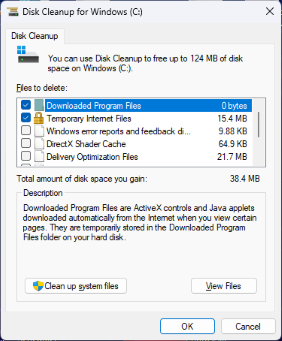
5. Running Out of Storage Space
If your hard drive is constantly full, it might be worth the upgrade. Constantly managing files to free up space is both inconvenient and time-consuming.
Solution: Upgrading to a larger SSD or adding an external drive can solve storage issues. If you’re not sure whether you have a SSD or HDD as your storage, let us evaluate your system.
6. Poor Gaming or Multimedia Performance
For gamers and creatives, lagging graphics or slow rendering speeds are key signs that it’s time to upgrade your hardware. Older GPUs and processors can’t keep up with today’s high-resolution demands.
What to Do: Upgrade your GPU or processor to improve performance. At Kingfisher Computers, we offer tailored upgrade solutions for gamers and professionals. Here is our recommended site which tells you exactly which GPU and CPU would go hand-in-hand with each other without a performance bottleneck.
Upgrade or Replace? How to Decide When It’s Time to Upgrade
Knowing whether it’s better to upgrade or replace your computer depends on several factors:
Upgrade:
Your computer is less than five years old.
Upgrading specific components will resolve your issues.
You want a cost-effective way to improve performance.
Replace:
Your computer is more than seven years old.
The cost of upgrades approaches the price of a new system.
Your system no longer supports modern hardware or software.
If you’re unsure whether it’s time to upgrade or replace, visit Kingfisher Computers for a free consultation.
Benefits of Upgrading Your Computer
Enhanced Performance: Upgrading can make your computer run faster and more efficiently.
Cost Savings: Addressing the issues is often cheaper than buying a new computer.
Extended Life: Upgrades can extend the lifespan of your device.
Eco-Friendly: Choosing to upgrade instead of replacing reduces electronic waste.
How Kingfisher Computers Can Help When It’s Time to Upgrade
At Kingfisher Computers, we specialize in helping you determine if it’s the right time to upgrade your system. Our services include:
Free Diagnostics: Unsure if it’stime? We’ll evaluate your computer at no cost.
Hardware Upgrades: From RAM to GPUs, we install top-quality components.
Custom Builds: Need a computer tailored to your needs? We’ll build it for you.
Data Migration: Worried about losing your files? We handle secure data transfers.
Preventive Tips to Delay the Time to Upgrade
Not ready to upgrade yet? Here are some tips to keep your computer running smoothly:
Keep it Clean: Regularly remove dust and debris to prevent overheating.
Update Software: Install updates for your operating system and applications.
Use Antivirus Software: Protect against malware that can slow down your system.
Back Up Regularly: Avoid losing data when issues arise.
These tips can help you delay your upgrade, but when the time comes, we’re here to help.
Is It Time to Upgrade? Contact Kingfisher Computers Today!
If you’re noticing signs that it’s time to upgrade, don’t wait for your computer’s performance to worsen. At Kingfisher Computers, we provide expert advice and services to make upgrading seamless.
📍 Visit us in-store for a free consultation. 🔗 Learn more on our website: Kingfishercomputer.co.uk. 📞 Contact us today: [Insert Phone Number].
Let us help you decide when it’s time to upgrade your computer and provide the solutions you need to keep your technology working at its best.
The Illusion of Stability in Modern Updates For most users, operating system updates are something that simply happen. They arrive quietly, often installing in the background, requiring little more than…
Macbook Neo, How Does It Compare To Air & Pro? Over the last few years the laptop market has experienced one of the most significant architectural changes in its history.…
Apple’s latest product announcements mark one of the most significant shifts in the Mac lineup in more than a decade. While Apple routinely updates its hardware with faster chips, incremental…
There is a particular kind of frustration that only a slow computer can produce. It is not dramatic. It is not urgent. It does not scream for attention. Instead, it…
In an era where nearly every aspect of personal computer maintenance and professional life is mediated through digital systems, your computer is no longer a luxury device — it is…
Phone says charging but battery not increasing is one of the most frustrating problems smartphone users face. You plug it in.The lightning bolt appears.It says “Charging.” But the battery percentage…
Apple’s rumour cycle always looks like a thousand disconnected leaks — until you line them up and notice the same themes repeating: AI-first silicon, camera and display differentiation, form-factor experiments (foldables / spatial…
Wi-Fi connected but no internet is one of the most frustrating messages you can see on a computer or laptop. The Wi-Fi icon shows full bars.It says “Connected.”But websites won’t…
Unfortunately, there was an error submitting your request.
Please try again later, or reach out to us directly. You can call us at +44 1429 280955 or email us at sales@kingfishercomputers.co.uk for assistance. We’re here to help you get your computer back up and running!
We’ve received your booking, Our team will get in touch with you shortly to confirm the details. You’re one step closer to having your computer fixed! If you have any urgent questions, feel free to contact us. Otherwise, sit back, and we’ll handle the rest.