Phone says charging but battery not increasing: 8 critical causes you must fix
Connor Boyle
February 17th, 2026
Phone says charging but battery not increasing is one of the most frustrating problems smartphone users face.
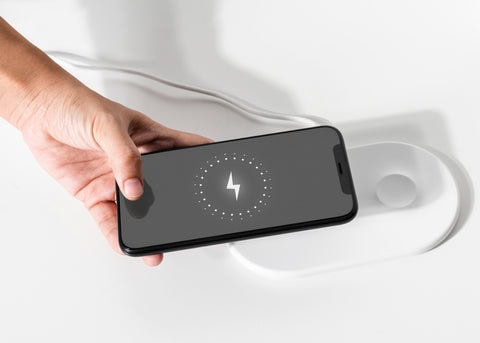
You plug it in. The lightning bolt appears. It says “Charging.”
But the battery percentage doesn’t move.
Or worse — it slowly goes down.
When a phone says charging but battery not increasing, it feels confusing because everything looks like it should be working.
This guide explains why this happens, what causes it, and which fixes actually solve the problem.
What it really means when a phone says charging but battery not increasing
When your phone shows the charging icon, it confirms that power is reaching the device through the cable and charging port. The system recognises that a connection has been made and that electricity is flowing into the phone.
However, that does not automatically mean everything inside is working as it should.
It does not always mean:
The battery is properly accepting and storing the charge
The charge rate is strong enough to increase the battery percentage
The internal charging circuit is functioning correctly
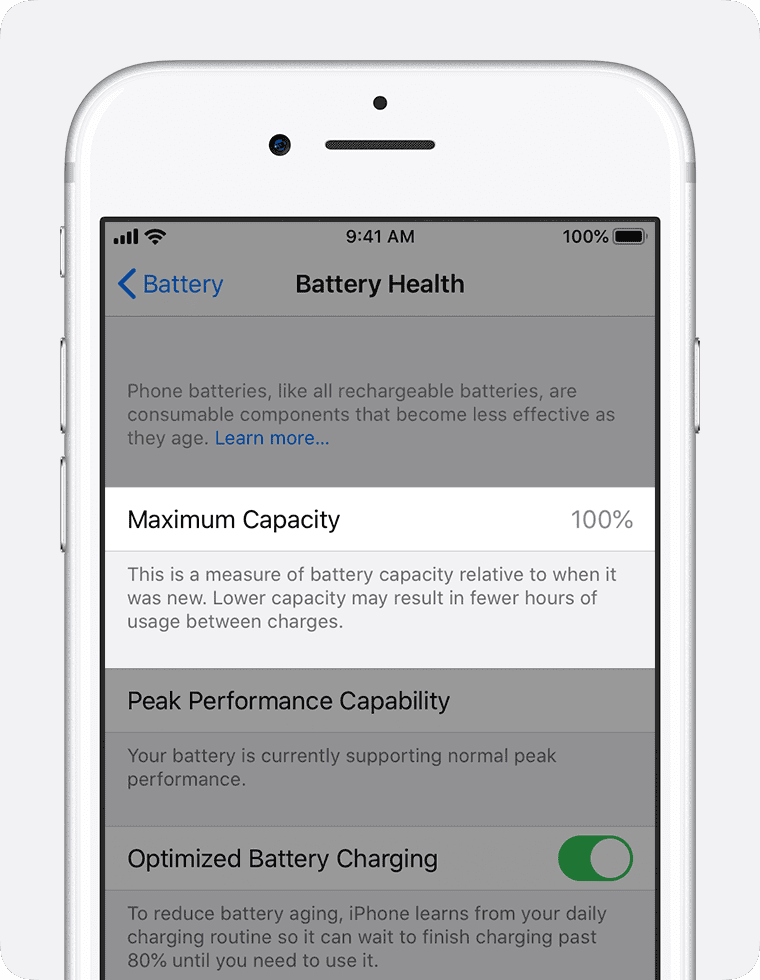
The battery health is good enough to hold incoming power
A phone can technically be “charging” while still failing to increase in percentage.
If your phone says charging but battery not increasing, one of two main situations is usually happening:
The phone is receiving too little power to meaningfully charge the battery
The phone is using more power than it’s receiving, cancelling out any gain
In both cases, the result looks identical on the surface. The charging symbol appears, the cable is connected, and everything seems normal — yet the battery percentage refuses to move.
That contradiction is what makes the issue so frustrating. The device appears to be doing the right thing, but behind the scenes, the charging process isn’t strong or stable enough to make progress.
Why this problem feels so confusing
Unlike a completely dead phone, this issue looks “half working.”
The charging symbol appears
The cable fits correctly
The phone turns on
But the battery percentage remains stuck.
That contradiction is what makes phone says charging but battery not increasing so frustrating.
The most common reasons phone says charging but battery not increasing
There isn’t just one cause behind this issue.
When a phone says charging but battery not increasing, the problem can be triggered by several different factors — some simple, some more technical.
Common causes include:
Faulty or damaged charging cables
Weak or low-quality chargers
Dirty or obstructed charging ports
Natural battery wear over time
Software glitches or background processes
Charging IC (power management) issues
Because multiple components are involved in charging, proper diagnosis matters. Replacing parts randomly can waste time and money if the real cause hasn’t been identified first.
Phone says charging but battery not increasing due to a weak charger
This is one of the most common causes we see in our repair shop.
Not all chargers are created equal — even if they physically fit your phone.
Modern smartphones are designed to charge at very specific power levels. If the charger:
Provides low wattage output
Is not original, certified, or high quality
Has internal damage from wear or overheating
Is being used through a low-power USB port
The phone may still detect that it’s plugged in, but the power being delivered isn’t enough to increase the battery percentage.
In some cases, the phone is technically charging — just extremely slowly. If the device is turned on and being used at the same time, the incoming power may barely keep up with what the phone is consuming.
Modern smartphones require precise voltage and amperage levels to charge efficiently. If those levels aren’t met, the battery percentage may stay frozen or even decrease slightly while plugged in.
Is this worth fixing?
✅ Yes
In many cases, replacing the charger or cable with a high-quality, properly rated version solves the problem instantly. It’s one of the simplest and most affordable fixes when a phone says charging but battery not increasing.
Phone says charging but battery not increasing because of a damaged cable
Charging cables bend constantly.
Over time:
Internal wires break
Resistance increases
Power delivery drops
The phone detects a connection — but not enough current flows to increase battery percentage.
This is especially common with:
Frayed cables
Very long cables
Cheap third-party cables
Phone says charging but battery not increasing due to a dirty charging port
Dust and lint build up slowly inside charging ports.
This can:
Prevent full cable insertion
Reduce electrical contact
Interrupt stable power delivery
Many phones that “won’t charge properly” are simply clogged with debris.
A proper port clean often restores full charging performance.
⚠️ Cleaning should be done carefully to avoid damage.
Phone says charging but battery not increasing because the battery is worn out
All batteries degrade over time.
As lithium batteries age:
Capacity drops
Internal resistance increases
Charging efficiency decreases
If your phone says charging but battery not increasing — especially on older devices — battery wear is a strong possibility.
Warning signs of battery wear
Battery drains quickly
Phone shuts off at 20–30%
Device gets warm while charging
Is this worth fixing?
✅ Often yes
Battery replacement is usually far cheaper than replacing the phone.
Phone says charging but battery not increasing due to background power usage
Sometimes the phone is charging — but it’s using power at the same time.
This happens when:
Brightness is high
Gaming while charging
Multiple apps running
Background updates downloading
If power usage equals charging speed, the percentage won’t move.
This is common with:
Fast-draining apps
Older batteries
Low-wattage chargers
Phone says charging but battery not increasing because of charging IC issues
The charging IC (integrated circuit) controls how power enters the battery.
If this chip fails:
The phone detects charging
But the battery doesn’t actually receive power
This is more serious and usually requires board-level repair.
Signs of charging IC failure
Phone only charges at certain angles
Charging is extremely slow
Percentage never rises
Is this worth fixing?
⚠️ Depends
On newer phones, yes. On very old phones, replacement may be smarter.
Why restarting sometimes fixes this issue
Software glitches can interrupt battery reporting.
If your phone says charging but battery not increasing, restarting may:
Reset battery calibration
Clear stuck processes
Restart charging services
It’s simple — but sometimes effective.
How we diagnose when a phone says charging but battery not increasing
At Kingfisher Computers, we don’t guess or replace parts blindly.
When a phone says charging but battery not increasing, we follow a structured diagnostic process to find the real cause rather than assuming it’s “just the battery.”
We carefully test:
Charger output, to confirm it is delivering the correct voltage and amperage
Cable integrity, checking for internal breaks or resistance issues
Port condition, ensuring the charging connection is clean, stable, and undamaged
Battery health, measuring capacity, wear level, and charge behaviour
Charging circuit behaviour, to verify that power is flowing correctly through the device
By testing each stage of the charging process step by step, we can identify exactly where the problem starts.
This tells us clearly whether the issue is:
A simple accessory fault
A moderate repair such as a battery replacement
Or a more complex board-level issue
Clear diagnosis means no unnecessary parts, no wasted money, and no guesswork.
What you can safely try at home when a phone says charging but battery not increasing
Before assuming the battery is dead, there are a few safe steps you can try yourself.
These checks won’t damage the device if done carefully.
Try a different charger and cable first
This is the simplest test — and one of the most effective.
If your phone says charging but battery not increasing, try:
A different charging cable
A different wall adapter
A different wall socket
Avoid charging from:
Laptop USB ports
Extension leads with low output
Cheap car chargers
If the battery percentage starts increasing with a different charger, the issue was likely power-related.
Inspect and clean the charging port carefully
Lint, dust, and pocket debris often build up slowly inside charging ports.
This can:
Prevent the cable from sitting fully inside
Cause unstable charging
Reduce power flow
If your phone says charging but battery not increasing, look closely into the port using a torch.
⚠️ Only clean gently using a wooden or plastic tool — never metal — to avoid short circuits.
If the cable clicks in more securely after cleaning and charging improves, debris was the cause.
Close background apps while charging
Sometimes the phone is charging — but using power just as fast.
To test this:
Close all apps
Reduce screen brightness
Turn off Wi-Fi and Bluetooth
Enable airplane mode
If the battery percentage begins to rise, the problem was excessive background power usage.
This is especially common on older devices with worn batteries.
What you should NOT do when a phone says charging but battery not increasing
Some actions can make the situation worse or damage the device.
Don’t keep unplugging and replugging aggressively
Repeated force when plugging in a charger can cause more harm than people realise.
If you constantly push, wiggle, or bend the cable to “make it charge,” it can:
Loosen the charging port over time
Damage delicate internal connectors
Worsen charging instability
Create intermittent power delivery
Charging ports are small and precisely aligned. They are not designed to handle pressure or sideways force. If your phone only charges at certain angles, that’s usually a sign of a hardware issue — not something that improves by pushing the cable harder.
In many cases, angle-dependent charging means:
The port is worn
The internal pins are damaged
The solder joints are weakened
Force rarely fixes this. It often makes the repair more expensive later.
Don’t use very cheap or unknown chargers
Not all chargers are built to the same standards.
Low-quality or uncertified chargers can:
Deliver unstable or inconsistent voltage
Provide insufficient current
Overheat during use
Stress the battery long-term
Even if your phone says charging but battery not increasing, the problem may not be the phone itself — it could be poor power delivery from the charger.
Modern smartphones rely on smart charging protocols. If the charger doesn’t communicate correctly, the device may limit charging speed or refuse to increase battery percentage properly.
Switching to a safe, certified charger from a reputable brand is always the first step before assuming there is a deeper fault.
Don’t ignore overheating
Heat is one of the biggest enemies of battery health.
If the phone becomes warm or hot while charging:
Charging speed may reduce automatically
The battery may pause charging entirely for safety
Performance may throttle
Long-term battery health may decline
Phones are designed to protect themselves. When temperatures rise too high, the charging system slows down to prevent damage.
This protective behaviour can make it look like the phone is not charging properly — when in reality, it’s deliberately limiting charge to stay safe.
If overheating happens regularly while charging, it’s important to investigate the cause rather than ignoring it. Over time, excessive heat can permanently reduce battery capacity.
When a phone says charging but battery not increasing becomes a battery replacement situation
If the phone is:
More than 2–3 years old
Losing charge quickly
Shutting down at random percentages
Battery wear becomes the most likely cause.
Lithium batteries naturally degrade over time. Even if the charging system works perfectly, a worn battery may not hold energy properly.
If all cables, chargers, and batteries test fine, the problem may be deeper.
A phone says charging but battery not increasing scenario can sometimes be caused by:
Faulty charging IC
Damaged power management chip
Liquid damage
Shorted components
Board-level repairs require specialist tools and diagnostics.
How we diagnose when a phone says charging but battery not increasing
When a device comes into our shop with this issue, we don’t rely on guesswork. We follow a clear, structured diagnostic process to identify exactly why the phone says charging but battery not increasing.
First, we test the charging voltage and current to confirm the correct amount of power is actually reaching the device. A phone may display the charging symbol even when the incoming power is unstable or insufficient.
Next, we check cable resistance and integrity. Cables can look perfectly fine on the outside while being damaged internally. Even slight resistance increases can significantly reduce charging speed.
We then assess battery health and cycle count. Every lithium battery has a limited lifespan, and excessive charge cycles or internal wear can prevent it from storing energy efficiently.
After that, we inspect the charging port for structural damage or debris. Loose connectors, worn pins, or hidden lint can interrupt stable power delivery without completely stopping the charging symbol from appearing.
Finally, we test board-level power delivery and the charging circuit itself. This tells us whether the charging IC and power management components are functioning correctly or if a deeper repair is required.
By following this process step-by-step, we can clearly determine whether the issue is:
A simple accessory fault, such as a cable or charger
A battery replacement case due to natural wear
Or a more complex repair involving the charging circuit or motherboard
Once we know the exact cause, we explain the findings in plain language and outline the available options before proceeding with any repair.
When repair makes sense
Repair is usually worthwhile when:
The phone is under 4–5 years old
The device is otherwise working well
The repair cost is reasonable compared to replacement
When replacement is the better option
Replacement may make more sense when:
The device is very old
Multiple components are failing
Repair cost approaches replacement value
We’ll always give honest advice.
Final thoughts: phone says charging but battery not increasing is usually fixable
Seeing your phone plugged in but not gaining charge feels incredibly frustrating — especially when the charging symbol is clearly visible on the screen. Everything looks like it should be working, yet the battery percentage refuses to move.
The good news is that when a phone says charging but battery not increasing, it’s often not a permanent fault.
In many cases, the cause is something simple:
The charger may be too weak to deliver enough power
The cable may be internally damaged or worn
The charging port may be clogged with dust or debris
The battery itself may be starting to wear out
These are all common issues we see regularly, and most of them are straightforward to fix.
What makes this problem stressful is not knowing which one is responsible. Guessing can lead to replacing the wrong part or spending money unnecessarily. The key is identifying the exact cause before taking action.
With proper testing, it’s usually clear whether the issue is a minor accessory fault, a battery that needs replacing, or something more technical.
Need help with a phone that says charging but battery not increasing?
If your phone shows it’s charging but the battery percentage won’t move, don’t ignore it and don’t keep forcing the cable in and out.
Bring it in and let us take a proper look.
We’ll run controlled tests, check the charging system safely, and explain exactly what’s happening inside your device. Then we’ll give you clear, honest advice on the best solution — whether that’s a simple cable replacement, a battery repair, or something more involved.
Most charging issues are fixable. The important thing is diagnosing them properly.
The Illusion of Stability in Modern Updates For most users, operating system updates are something that simply happen. They arrive quietly, often installing in the background, requiring little more than…
Macbook Neo, How Does It Compare To Air & Pro? Over the last few years the laptop market has experienced one of the most significant architectural changes in its history.…
Apple’s latest product announcements mark one of the most significant shifts in the Mac lineup in more than a decade. While Apple routinely updates its hardware with faster chips, incremental…
There is a particular kind of frustration that only a slow computer can produce. It is not dramatic. It is not urgent. It does not scream for attention. Instead, it…
In an era where nearly every aspect of personal computer maintenance and professional life is mediated through digital systems, your computer is no longer a luxury device — it is…
Phone says charging but battery not increasing is one of the most frustrating problems smartphone users face. You plug it in.The lightning bolt appears.It says “Charging.” But the battery percentage…
Apple’s rumour cycle always looks like a thousand disconnected leaks — until you line them up and notice the same themes repeating: AI-first silicon, camera and display differentiation, form-factor experiments (foldables / spatial…
Wi-Fi connected but no internet is one of the most frustrating messages you can see on a computer or laptop. The Wi-Fi icon shows full bars.It says “Connected.”But websites won’t…
Unfortunately, there was an error submitting your request.
Please try again later, or reach out to us directly. You can call us at +44 1429 280955 or email us at [email protected] for assistance. We’re here to help you get your computer back up and running!
We’ve received your booking, Our team will get in touch with you shortly to confirm the details. You’re one step closer to having your computer fixed! If you have any urgent questions, feel free to contact us. Otherwise, sit back, and we’ll handle the rest.