When your computer starts showing signs of age, the inevitable question arises: should you Upgrade Your CPU or GPU first? This decision affects not only your system’s immediate performance but also determines how well your computer handles future software demands. Understanding which component to prioritize requires careful analysis of your current system, usage patterns, and performance bottlenecks.
The choice to Upgrade Your CPU or GPU represents one of the most significant decisions in PC enhancement, directly impacting everything from gaming frame rates to productivity application responsiveness. Both components play crucial roles in modern computing, but they serve different functions and affect system performance in distinct ways. Making the right choice between these upgrades can mean the difference between a satisfying performance boost and a disappointing investment that fails to address your system’s primary limitations.
Understanding the Roles of CPU and GPU in Modern Computing
Before deciding whether to Upgrade Your CPU or GPU, it’s essential to understand how these components function within your system. The Central Processing Unit handles general computing tasks, system operations, and coordinates activities between all other components. Meanwhile, the Graphics Processing Unit specializes in rendering visual content, from simple desktop graphics to complex 3D environments and computational workloads that benefit from parallel processing.
How CPU Performance Affects Your System
The processor serves as your computer’s brain, executing instructions from software applications and managing system resources. When considering whether to Upgrade Your CPU or GPU, understanding processor limitations becomes crucial. Older or lower-powered processors can create bottlenecks that affect overall system responsiveness, multitasking capabilities, and application loading times. These limitations become particularly noticeable when running modern software designed for current-generation hardware.
CPU performance directly impacts tasks like web browsing with multiple tabs, document editing, video conferencing, and background system processes. A processor upgrade can dramatically improve system boot times, reduce application launch delays, and enhance multitasking performance. However, CPU upgrades often require motherboard compatibility considerations and may necessitate additional component upgrades like memory or cooling solutions.
Should You Upgrade Your Cpu Or Gpu First? 5
The Graphics Card’s Impact on Visual Performance
Graphics cards handle the demanding task of rendering visual content and increasingly serve as computational accelerators for various applications. When weighing whether to Upgrade Your CPU or GPU, consider that graphics performance affects not only gaming but also video editing, 3D modeling, streaming, and even some productivity applications that leverage GPU acceleration. Modern graphics cards can significantly impact your computer’s capability to handle high-resolution displays, multiple monitors, and visually demanding software.
The GPU’s influence extends beyond pure graphics rendering to include hardware-accelerated video encoding, machine learning workloads, and cryptocurrency mining capabilities. Many modern applications can offload certain computational tasks to the graphics card, potentially improving overall system performance even for non-gaming users. Understanding these broader applications helps inform the decision of whether to Upgrade Your CPU or GPU based on your specific usage requirements.
Should You Upgrade Your Cpu Or Gpu First? 6
Identifying Performance Bottlenecks in Your System
Determining whether to Upgrade Your CPU or GPU requires identifying which component currently limits your system’s performance. Bottlenecks occur when one component cannot keep pace with others, creating a performance ceiling that affects overall system capabilities. Recognizing these limitations helps prioritize upgrade decisions and ensures that your investment provides maximum performance improvement.
Diagnostic Tools and Performance Monitoring
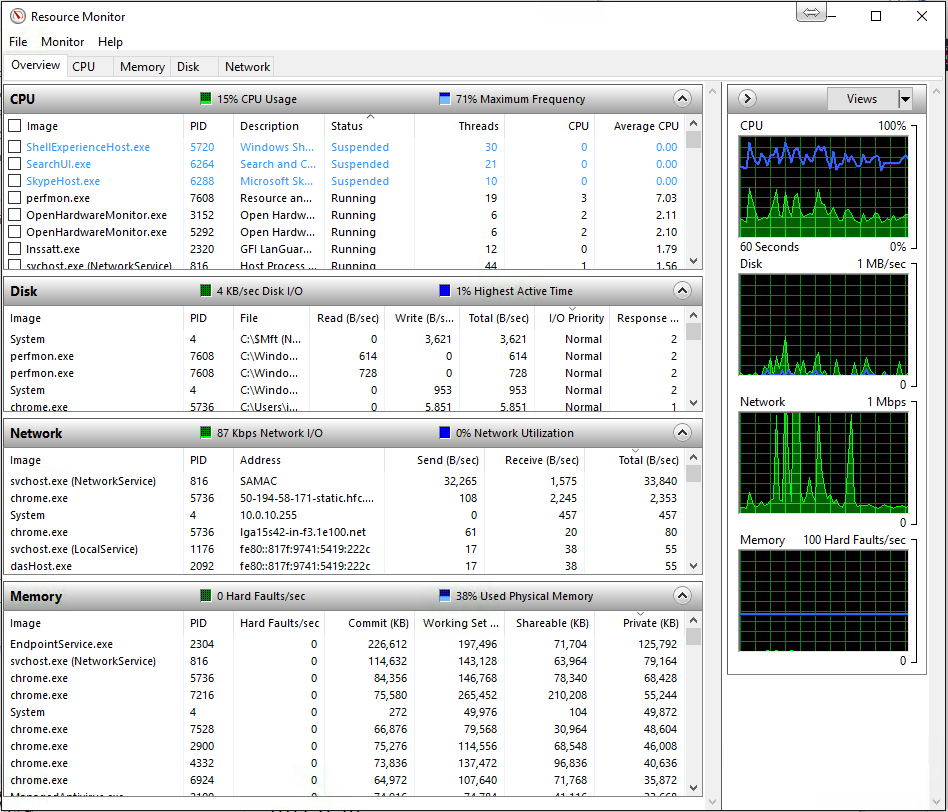
Several software tools can help determine whether you should Upgrade Your CPU or GPU by monitoring component utilization during typical usage scenarios. Task Manager in Windows provides basic monitoring capabilities, showing processor and memory usage alongside basic GPU utilization. More advanced tools like MSI Afterburner, HWiNFO64, and GPU-Z offer detailed performance metrics that reveal which components reach full utilization during demanding tasks.
Monitoring performance during your typical computing activities reveals usage patterns that inform upgrade decisions. If your processor consistently operates at high utilization while your graphics card remains underutilized, this suggests prioritizing a CPU upgrade. Conversely, maxed-out GPU usage with moderate processor utilization indicates that graphics card replacement would provide more significant performance improvements.
Should You Upgrade Your Cpu Or Gpu First? 7
Gaming Performance Analysis
For gaming enthusiasts wondering whether to Upgrade Your CPU or GPU, frame rate analysis provides clear guidance about system limitations. Enable frame rate counters and monitor both average and minimum frame rates during gameplay. If frame rates remain consistently low regardless of graphics settings adjustments, your graphics card likely represents the primary bottleneck. However, if reducing graphics quality fails to improve performance significantly, processor limitations may be constraining your system.
Gaming performance analysis should include testing various graphics settings to understand how different components affect frame rates. Lowering resolution and graphics quality primarily reduces GPU workload, while adjusting settings like view distance, physics calculations, and AI complexity affects processor performance. This testing methodology helps determine whether to Upgrade Your CPU or GPU based on which component provides the greatest performance improvement potential.
System Age and Compatibility Considerations
The age of your current system significantly influences whether you should Upgrade Your CPU or GPU first. Older systems may have compatibility limitations that affect upgrade options, while newer systems might benefit more from targeted component improvements. Understanding these constraints helps prioritize upgrades that provide maximum benefit within your system’s capabilities.
Motherboard compatibility represents a crucial factor when considering processor upgrades. Older motherboards may not support current-generation processors, potentially requiring additional upgrades that increase overall cost. Graphics card upgrades typically face fewer compatibility constraints, though power supply capacity and physical case dimensions may limit options. These considerations affect the practical aspects of deciding whether to Upgrade Your CPU or GPU.
Power Supply and Thermal Considerations
Both processor and graphics card upgrades can significantly impact system power consumption and heat generation. When deciding whether to Upgrade Your CPU or GPU, evaluate your current power supply’s capacity and efficiency rating. High-performance graphics cards often require substantial power delivery and may necessitate power supply upgrades. Similarly, more powerful processors might exceed your current cooling solution’s capabilities, requiring additional thermal management improvements.
Modern components generally offer better performance per watt compared to older hardware, but absolute power consumption often increases with performance capabilities. Calculate total system power requirements for potential upgrades and ensure adequate headroom for stable operation. This analysis helps determine the true cost of deciding whether to Upgrade Your CPU or GPU, including necessary supporting component improvements.
Gaming vs. Productivity: Different Upgrade Priorities
The decision of whether to Upgrade Your CPU or GPU heavily depends on your primary computer usage patterns. Gaming applications typically benefit more from graphics card improvements, while productivity software often sees greater improvements from processor upgrades. Understanding these usage-specific benefits helps prioritize component upgrades for maximum performance improvement in your most important applications.
Gaming Performance Optimization
Gaming represents the most graphics-intensive common computer usage scenario, making GPU upgrades particularly impactful for gaming enthusiasts. When considering whether to Upgrade Your CPU or GPU for gaming, graphics card improvements typically provide more noticeable performance gains. Modern games stress graphics hardware far more than processors, especially at higher resolutions and quality settings.
However, certain gaming scenarios benefit significantly from processor improvements. Competitive multiplayer games, strategy titles with complex AI systems, and simulation games often rely heavily on CPU performance. Additionally, gaming while streaming or recording gameplay creates additional processor demands that might justify prioritizing CPU upgrades. Understanding your specific gaming preferences helps determine whether to Upgrade Your CPU or GPU for optimal gaming performance.
Resolution and Refresh Rate Considerations
Your monitor’s specifications significantly influence whether you should Upgrade Your CPU or GPU for gaming improvements. Higher resolutions like 1440p and 4K place tremendous demands on graphics hardware, making GPU upgrades essential for smooth gameplay. Conversely, high refresh rate gaming at lower resolutions may benefit more from processor improvements that can deliver higher frame rates to fast displays.
The relationship between resolution, refresh rate, and hardware requirements creates complex upgrade scenarios. Gaming at 1080p with high refresh rates might benefit from Upgrade Your CPU or GPU decisions that prioritize processor performance for consistent high frame rates. Meanwhile, 4K gaming almost always benefits more from graphics card upgrades due to the massive increase in pixel rendering demands.
Professional applications present different hardware priorities compared to gaming, often benefiting more from processor improvements than graphics upgrades. When deciding whether to Upgrade Your CPU or GPU for productivity work, consider that most office applications, development environments, and data analysis tools rely primarily on processor performance. These applications benefit from faster single-threaded performance, additional processor cores, and improved memory bandwidth.
Creative applications like video editing, 3D modeling, and graphic design present mixed scenarios where both components contribute significantly to performance. Modern creative software increasingly leverages GPU acceleration for rendering, effects processing, and preview generation. However, timeline scrubbing, project management, and complex calculations still depend heavily on processor capabilities. Understanding your specific creative workflow helps determine whether to Upgrade Your CPU or GPU for optimal productivity improvements.
Multi-Monitor and Display Considerations
Professional workflows often involve multiple displays, which can influence the decision of whether to Upgrade Your CPU or GPU. Driving multiple high-resolution monitors places demands on graphics hardware, particularly when displaying different content simultaneously. Modern integrated graphics solutions handle basic multi-monitor setups adequately, but complex configurations with high-resolution displays benefit from dedicated graphics cards.
The type of content displayed across multiple monitors affects hardware requirements differently. Static productivity applications like spreadsheets and text editors place minimal demands on graphics hardware, while video playback, design applications, and interactive content require more substantial graphics capabilities. These usage patterns help inform whether to Upgrade Your CPU or GPU based on your specific multi-monitor requirements.
Budget Considerations and Cost-Effectiveness
Financial constraints often determine whether to Upgrade Your CPU or GPU, as both upgrades represent significant investments with different cost-benefit ratios. Understanding the price-performance relationship for each component type helps maximize the impact of your upgrade budget. Additionally, considering the total cost of ownership, including necessary supporting upgrades, provides a more accurate picture of upgrade expenses.
Performance Per Dollar Analysis
Evaluating whether to Upgrade Your CPU or GPU requires analyzing performance improvements relative to cost. Graphics card upgrades often provide more dramatic performance improvements for gaming applications, potentially offering better value for gaming-focused users. However, processor upgrades can provide broader system improvements that benefit all applications, potentially justifying higher costs through improved overall user experience.
The performance per dollar calculation becomes complex when considering different price segments and performance tiers. Entry-level upgrades in either category might provide modest improvements at lower costs, while high-end components deliver substantial performance gains at premium prices. Understanding your performance requirements and budget constraints helps determine whether to Upgrade Your CPU or GPU for optimal value.
Secondary Upgrade Requirements
The true cost of deciding whether to Upgrade Your CPU or GPU includes potential secondary upgrades required for optimal performance. Processor upgrades often necessitate motherboard replacements for compatibility, potentially requiring new memory and cooling solutions. Graphics card upgrades might require power supply improvements and case modifications for adequate cooling and clearance.
These secondary costs can significantly affect the overall investment required for each upgrade path. A seemingly affordable graphics card might require expensive power supply and cooling upgrades, while a processor improvement could necessitate a complete platform overhaul. Calculating total upgrade costs helps make informed decisions about whether to Upgrade Your CPU or GPU within your available budget.
Long-Term Value and Future-Proofing
Upgrade decisions should consider long-term value and system longevity beyond immediate performance improvements. When weighing whether to Upgrade Your CPU or GPU, consider how each component will handle future software demands and gaming requirements. Processors typically maintain relevance longer than graphics cards, as CPU requirements for software increase more gradually than graphics demands for gaming.
However, the rapid advancement of graphics technology means that current high-end graphics cards may provide adequate performance for several years of gaming at stable settings. The decision of whether to Upgrade Your CPU or GPU should balance immediate performance needs with expected component longevity and future upgrade flexibility.
Resale Value and Upgrade Paths
Consider the resale value of components when deciding whether to Upgrade Your CPU or GPU. Graphics cards typically maintain higher resale values due to consistent demand from gaming and cryptocurrency mining communities. Processors may have lower resale values but often provide longer useful lifespans before requiring replacement.
Planning upgrade paths helps optimize long-term system development and cost management. Understanding whether your next logical upgrade should prioritize CPU or GPU improvements helps create a strategic approach to system enhancement. This planning ensures that current upgrade decisions support future improvement options rather than creating compatibility limitations or bottlenecks.
Making the Final Decision: Upgrade Your CPU or GPU
The ultimate choice of whether to Upgrade Your CPU or GPU depends on synthesizing all the factors discussed throughout this analysis. Your specific usage patterns, current system limitations, budget constraints, and performance goals all contribute to the optimal upgrade decision. Creating a systematic approach to this decision ensures that your investment provides maximum benefit for your computing needs.
Decision Matrix and Prioritization Framework
Developing a structured approach to determine whether to Upgrade Your CPU or GPU involves weighing multiple factors against your specific requirements. Create a simple scoring system that evaluates current performance limitations, usage patterns, budget constraints, and future needs for both upgrade options. This systematic approach removes emotion and marketing influence from the decision-making process.
Consider immediate performance gains alongside long-term system development when evaluating whether to Upgrade Your CPU or GPU. An upgrade that provides modest immediate improvements but enables significant future enhancements might represent better long-term value than a component that delivers dramatic short-term gains but limits future development options.
Testing and Validation Methods
Before finalizing the decision of whether to Upgrade Your CPU or GPU, consider testing methodologies that validate your analysis. Benchmark your current system in various scenarios that represent your typical usage patterns. Document current performance levels and identify specific scenarios where performance improvements would provide the most significant user experience enhancements.
If possible, test systems with your preferred upgrade components to validate expected performance improvements. Many computer stores and technical communities offer opportunities to experience upgraded systems before making purchase decisions. This hands-on validation helps confirm theoretical analysis and ensures that your decision to Upgrade Your CPU or GPU aligns with practical performance expectations.
Implementation Strategy and Timing
Once you’ve decided whether to Upgrade Your CPU or GPU, developing an implementation strategy ensures optimal results from your investment. Consider timing factors like component availability, pricing trends, and personal schedule flexibility for installation and system configuration. Planning implementation details helps avoid common pitfalls and maximizes the benefits of your chosen upgrade path.
The timing of when to Upgrade Your CPU or GPU can significantly affect cost and component selection options. Hardware pricing fluctuates based on market conditions, new product releases, and seasonal demand patterns. Understanding these trends helps optimize purchase timing for better value and component selection.
Installation and Configuration Considerations
Successful implementation of your decision to Upgrade Your CPU or GPU requires careful attention to installation procedures and system configuration. Graphics card installations typically involve simpler procedures but may require driver updates and settings optimization. Processor upgrades often involve more complex installation procedures and may require operating system reinstallation or activation.
Prepare for potential complications and compatibility issues that might arise during upgrade implementation. Research common installation challenges for your specific components and system configuration. Having backup plans and troubleshooting resources available ensures that your decision to Upgrade Your CPU or GPU results in improved system performance rather than technical difficulties.
Optimizing Your Upgrade Strategy
The decision of whether to Upgrade Your CPU or GPU represents a critical choice that affects your computing experience for years to come. By systematically analyzing your current system limitations, usage patterns, budget constraints, and performance goals, you can make an informed decision that maximizes the value of your investment. Remember that there’s no universally correct answer—the optimal choice depends entirely on your specific circumstances and requirements.
Key Takeaways for Upgrade Success
Successful upgrade decisions require honest assessment of current system performance and realistic evaluation of expected improvements. Whether you choose to Upgrade Your CPU or GPU, focus on addressing your system’s primary performance bottlenecks rather than pursuing impressive specifications that don’t align with your usage patterns. This targeted approach ensures that your upgrade investment provides meaningful performance improvements in your most important applications.
Consider the broader system ecosystem when implementing your upgrade decision. Supporting components like power supplies, cooling solutions, and memory can significantly affect the performance gains realized from your primary component upgrade. Planning for these secondary requirements ensures that your decision to Upgrade Your CPU or GPU delivers optimal results without unexpected complications or additional expenses.
Future Upgrade Planning and System Evolution
Your current upgrade decision should align with long-term system development plans and future performance requirements. Understanding how your choice to Upgrade Your CPU or GPU affects future upgrade options helps create a coherent system development strategy. This strategic approach maximizes the lifespan and performance potential of your computing investment while minimizing total cost of ownership over time.
The rapid pace of hardware development means that today’s upgrade decisions will eventually require reevaluation as software demands evolve and new technologies emerge. Building flexibility into your upgrade strategy ensures that your system can adapt to changing requirements without requiring complete replacement. Whether you ultimately decide to Upgrade Your CPU or GPU first, maintaining awareness of technological trends and system development options positions you for continued computing success.
By carefully analyzing your specific needs and following the guidance provided in this comprehensive analysis, you can confidently determine whether to Upgrade Your CPU or GPU for optimal system performance. Remember that the best upgrade decision is the one that addresses your current limitations while supporting your future computing goals within your available budget. Take time to thoroughly evaluate your options, and your chosen upgrade path will provide years of improved computing performance and user satisfaction.
The Illusion of Stability in Modern Updates For most users, operating system updates are something that simply happen. They arrive quietly, often installing in the background, requiring little more than…
Macbook Neo, How Does It Compare To Air & Pro? Over the last few years the laptop market has experienced one of the most significant architectural changes in its history.…
Apple’s latest product announcements mark one of the most significant shifts in the Mac lineup in more than a decade. While Apple routinely updates its hardware with faster chips, incremental…
There is a particular kind of frustration that only a slow computer can produce. It is not dramatic. It is not urgent. It does not scream for attention. Instead, it…
In an era where nearly every aspect of personal computer maintenance and professional life is mediated through digital systems, your computer is no longer a luxury device — it is…
Phone says charging but battery not increasing is one of the most frustrating problems smartphone users face. You plug it in.The lightning bolt appears.It says “Charging.” But the battery percentage…
Apple’s rumour cycle always looks like a thousand disconnected leaks — until you line them up and notice the same themes repeating: AI-first silicon, camera and display differentiation, form-factor experiments (foldables / spatial…
Wi-Fi connected but no internet is one of the most frustrating messages you can see on a computer or laptop. The Wi-Fi icon shows full bars.It says “Connected.”But websites won’t…
Unfortunately, there was an error submitting your request.
Please try again later, or reach out to us directly. You can call us at +44 1429 280955 or email us at [email protected] for assistance. We’re here to help you get your computer back up and running!
We’ve received your booking, Our team will get in touch with you shortly to confirm the details. You’re one step closer to having your computer fixed! If you have any urgent questions, feel free to contact us. Otherwise, sit back, and we’ll handle the rest.