How to Pick the Right Power Supply (Wattage & Efficiency)
Adam Fornal
May 13th, 2025
Table of Contents
The Most Overlooked PC Component
When building or upgrading a computer, people often focus on flashy parts like the GPU or CPU. But one of the most important decisions you’ll make is choosing the right power supply. It may not be the most exciting component, but it’s essential to the health, performance, and longevity of your entire system.
In this in-depth guide, you’ll learn how to pick the right power supply — with a focus on wattage, efficiency, and reliability. We’ll explain everything in simple terms so you can make a confident, informed decision and avoid costly mistakes.
Why the Right Power Supply Matters
A good power supply does more than just power your PC. It ensures stable voltages, protects your hardware from power surges, and helps your system run efficiently. Choosing the right power supply affects everything from system stability to upgradability. Without it, you risk crashes, overheating, damaged components, and even full system failure.
The power supply is the heart of your system — and just like with your heart, when it fails, everything else is at risk. That’s why this component should never be an afterthought.
Understanding Wattage: How Much Power Do You Really Need?
What Wattage Really Means
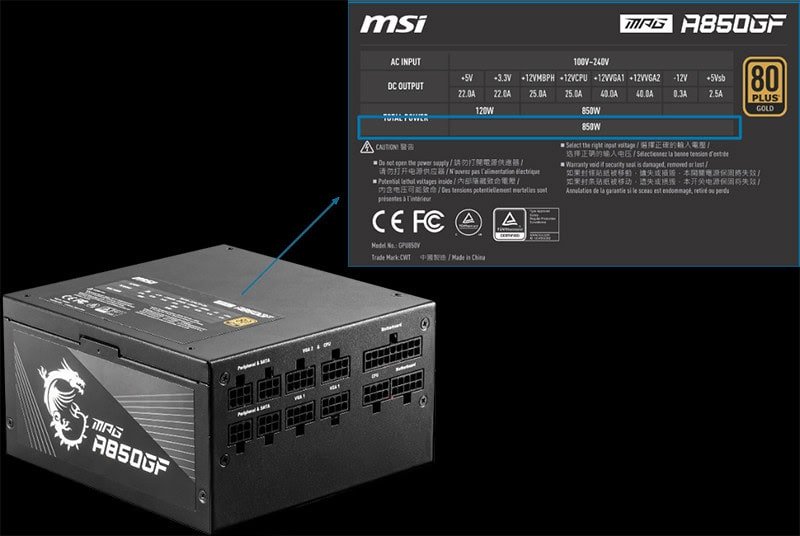
Wattage refers to the maximum amount of power your PSU can supply to your components. It’s not about running your system at full wattage all the time — it’s about ensuring there’s enough headroom. Picking the right power supply means understanding your system’s power requirements.
How to Calculate Your PC’s Power Needs
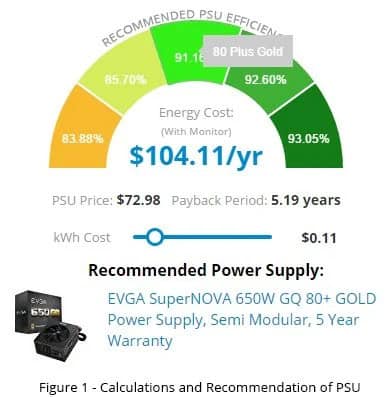
Use a PSU calculator (like OuterVision) to get an estimate. Add up the power draw from your CPU, GPU, drives, RAM, and cooling system. Then add 20–30% headroom to avoid overloading your power supply. You can also review manufacturer specs for each part’s typical and peak wattage consumption.
A common mistake is underestimating power draw, especially with modern GPUs that have high transient spikes — short bursts of extra power demand. A 650W PSU might not be enough for a GPU that spikes to 400W during gameplay.
Common Wattage Recommendations
Basic office PC: 300–450W
Mid-range gaming PC: 500–650W
High-end gaming/editing rig: 750–1000W
Enthusiast/multi-GPU builds: 1000W and up
Always consider future upgrades. The right power supply is not just about meeting today’s requirements, but also tomorrow’s.
How To Pick The Right Power Supply (Wattage & Efficiency) 5
Overkill vs. Underkill
Going overboard with wattage can waste money and reduce efficiency. A 1200W PSU on a 400W build will operate below its optimal efficiency curve. On the flip side, a PSU running at 100% constantly can degrade faster. The right power supply balances headroom with actual usage.
Efficiency Ratings: What Do 80 PLUS Ratings Mean?
The Basics of Efficiency
Efficiency is how well your PSU converts AC (wall power) into DC (usable power). If it’s 80% efficient, that means 20% of the power is lost as heat. This matters because higher efficiency means:
Less heat
Lower electricity bills
Less fan noise (since cooling is easier)
The right power supply should operate efficiently at your typical load — usually 40–60% of its rated wattage.
Understanding 80 PLUS Ratings
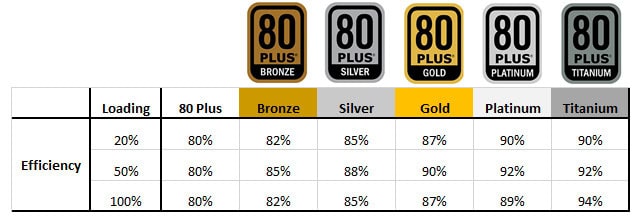
80 PLUS certification is a standard that rates power supplies on their efficiency. From lowest to highest:
80 PLUS (White): 80% efficient at 20/50/100% load
80 PLUS Bronze: 82–85% efficient
80 PLUS Silver: 85–88% efficient
80 PLUS Gold: 87–90% efficient
80 PLUS Platinum: 89–92% efficient
80 PLUS Titanium: 90–94% efficient
For most users, Gold offers the best value. If you’re building a workstation or a 24/7 system, go for Platinum or Titanium. The right power supply combines value with performance.
How To Pick The Right Power Supply (Wattage & Efficiency) 6
Why Efficiency Matters Long-Term
Efficient PSUs generate less heat, which reduces fan wear and internal strain on components. They also draw less power from the wall. Over years of use, a high-efficiency PSU could save enough in energy costs to justify the higher upfront cost.
Eco-Friendly Computing
If you care about sustainability, the right power supply is one that minimizes waste. Reducing heat and power usage lowers your carbon footprint — especially important in always-on systems.
Quality, Reliability, and Features to Look For
Brands That Are Worth Your Money
Don’t be tempted by cheap, no-name brands. Poor-quality PSUs are often the first to fail — and they can take your expensive components with them. Trusted brands include:
Seasonic (often OEM for others)
Corsair (especially RMx and HX series)
EVGA (G+ and P2 series)
Be Quiet!
Cooler Master
A good rule of thumb: if a PSU seems too cheap for its wattage and rating, it probably cuts corners.
Modular vs. Non-Modular
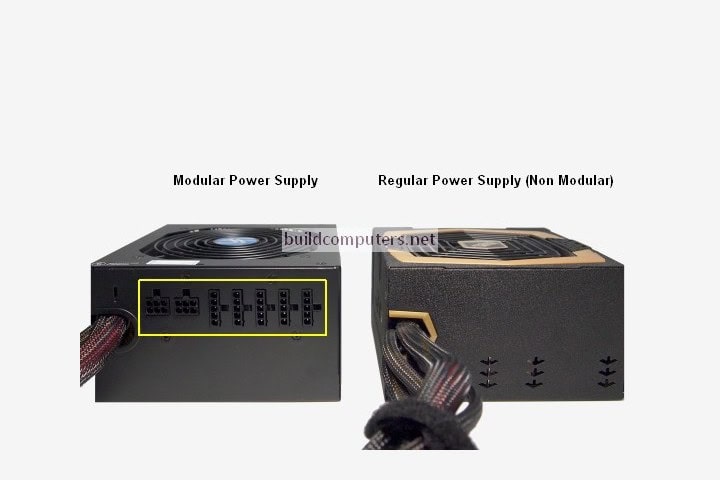
Fully Modular: Detachable cables = better airflow and cleaner builds
If airflow and aesthetics matter, the right power supply is likely modular. Non-modular units are fine for budget builds but can be messy.
How To Pick The Right Power Supply (Wattage & Efficiency) 7
Protections to Check For
Every quality PSU should include:
Over Voltage Protection (OVP)
Under Voltage Protection (UVP)
Over Current Protection (OCP)
Over Power Protection (OPP)
Short Circuit Protection (SCP)
Over Temperature Protection (OTP)
These ensure your system stays safe in case of power surges or hardware failure. The right power supply keeps your investment protected.
Warranty and Customer Support
Good PSUs come with 5–10 year warranties, reflecting manufacturer confidence. Brands like Seasonic and EVGA offer long warranties and great customer service — another sign you’re getting the right power supply.
How To Pick The Right Power Supply (Wattage & Efficiency) 8
Advanced Considerations for Enthusiasts
Ripple Suppression and Voltage Regulation
Advanced users may care about ripple — small fluctuations in voltage that can harm sensitive components. Top-tier PSUs maintain tight voltage control and low ripple, especially important for overclocked systems. The right power supply offers stable power even under heavy load.
Transient Load Handling
New GPUs, like NVIDIA’s 40-series, are known for high transient spikes (sudden short bursts of power). The right power supply must handle these without shutting down or spiking voltages. Look for reviews that include transient testing.
PSU Size and Case Compatibility
Higher wattage PSUs are often physically larger. Always check dimensions before buying. The right power supply fits comfortably in your case without blocking airflow or interfering with cable routing.
Connectors and Cable Count
Does your PSU come with enough cables for your build? For example:
Dual 8-pin EPS for high-end motherboards
3x 8-pin PCIe for modern GPUs
SATA/Molex for drives, fans, RGB
Make sure the right power supply includes the right connectors — or else you’ll be hunting for adapters.
Tips for Picking the Right Power Supply for Specific Builds
For Gaming PCs
Prioritize GPU headroom
80 PLUS Gold
Modular if possible
650W–850W depending on GPU tier
For Streaming or Content Creation
Consider higher wattage for multitasking
32GB+ RAM and storage demand higher efficiency
Aim for Platinum if the system is always on
For Workstations or AI Rigs
Wattage headroom is critical
EPS and PCIe connectors must be adequate
Platinum or Titanium for 24/7 reliability
For Budget Builds
Don’t sacrifice brand quality
Bronze is acceptable
450W–550W typically enough
Invest in Peace of Mind
Choosing the right power supply isn’t just about wattage — it’s about ensuring your system runs safely, efficiently, and quietly for years. Whether you’re gaming, creating, or just using your PC every day, a reliable PSU protects every other investment you’ve made.
Use tools to calculate real wattage needs, check for efficiency certifications, look for robust protections, and stick with reputable brands. Future-proof your setup by leaving room for upgrades, and always verify connector types and case compatibility.
If you’re building or upgrading your PC, don’t skimp here. The right power supply is an investment in your entire system’s stability.
Your PSU is the unsung hero of your rig — treat it like one. Choose the right power supply, and your system will thank you with years of trouble-free performance.
The Illusion of Stability in Modern Updates For most users, operating system updates are something that simply happen. They arrive quietly, often installing in the background, requiring little more than…
Macbook Neo, How Does It Compare To Air & Pro? Over the last few years the laptop market has experienced one of the most significant architectural changes in its history.…
Apple’s latest product announcements mark one of the most significant shifts in the Mac lineup in more than a decade. While Apple routinely updates its hardware with faster chips, incremental…
There is a particular kind of frustration that only a slow computer can produce. It is not dramatic. It is not urgent. It does not scream for attention. Instead, it…
In an era where nearly every aspect of personal computer maintenance and professional life is mediated through digital systems, your computer is no longer a luxury device — it is…
Phone says charging but battery not increasing is one of the most frustrating problems smartphone users face. You plug it in.The lightning bolt appears.It says “Charging.” But the battery percentage…
Apple’s rumour cycle always looks like a thousand disconnected leaks — until you line them up and notice the same themes repeating: AI-first silicon, camera and display differentiation, form-factor experiments (foldables / spatial…
Wi-Fi connected but no internet is one of the most frustrating messages you can see on a computer or laptop. The Wi-Fi icon shows full bars.It says “Connected.”But websites won’t…
Unfortunately, there was an error submitting your request.
Please try again later, or reach out to us directly. You can call us at +44 1429 280955 or email us at sales@kingfishercomputers.co.uk for assistance. We’re here to help you get your computer back up and running!
We’ve received your booking, Our team will get in touch with you shortly to confirm the details. You’re one step closer to having your computer fixed! If you have any urgent questions, feel free to contact us. Otherwise, sit back, and we’ll handle the rest.