Ultimate Guide: How to Free Space and Clean Up Your Computer for Maximum Performance
Is your computer running slower than usual? If so, it might be because you’re running out of free space. Whether you’re using a Windows PC or a Mac, having enough free space on your hard drive is crucial for maintaining optimal performance. Over time, as you install new applications, download files, and store photos or videos, your hard drive can fill up quickly, leaving little room for system processes to run smoothly.
In this guide, we’ll show you how to free space on your computer, clean up unnecessary files, and boost your system’s performance. By the end, you’ll have the tools and knowledge to keep your computer running at its best.
Table of Contents
Why Is Free Space Important?
Your computer’s operating system (whether macOS or Windows) relies on sufficient free space to manage processes and store temporary files. Without enough free space, your computer may start to slow down, freeze, or even crash. Here’s why keeping enough free space is essential:
Smooth System Operation: With enough free space, your computer can run background processes and applications without lag.
Faster Boot Times: A fuller hard drive slows down your system’s startup time.
Efficient Updates: Operating system updates require free space for installation; without it, updates may fail or take much longer.
Improved File Management: Freeing up space makes it easier to organize and find files.
Maintaining adequate free space is essential for the overall health and longevity of your computer.
How to Check Free Space on Your Computer
Before you start clearing out files, you need to know how much free space is left on your hard drive. Both Windows and macOS make it easy to check your available storage.
For Windows Users:
Click on the Start Menu and go to Settings.
Select System, then click Storage.
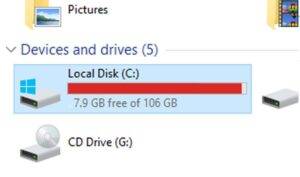
Here, you can see how much space is used and how much space is left on your hard drive.
For macOS Users:
Click the Apple Menu in the top-left corner of your screen.
Select About This Mac, then click the Storage tab.
You’ll see a breakdown of what’s taking up space and how much space you have left.
Windows 10 Disk SpaceMacos Disk Space
Top Ways to Free Space on Your Computer
If your hard drive is running low on free space, it’s time to take action. Here are the most effective ways to clean up your computer and regain precious storage.
1. Delete Unnecessary Files
The simplest way for cleaning your storage is by deleting files you no longer need. Go through your Downloads folder, Desktop, and other directories where you may have stored files you’ve already used.
Documents: Sort through old documents and delete those that are no longer relevant.
Images: Remove duplicate or outdated images taking up valuable space.
Videos: Videos take up a lot of storage—delete any that are no longer needed.
2. Uninstall Unused Programs
Unused programs and applications can take up a significant amount of space on your hard drive. To free space, uninstall any software you no longer use.
For Windows:
Go to Settings > Apps > Apps & Features.
Scroll through the list and uninstall programs you no longer need.
For macOS:
Open Finder and navigate to the Applications folder.
Drag unused applications to the Trash and empty it to completely remove them.
3. Use Disk Cleanup or macOS Storage Management
Both Windows and macOS offer built-in tools to help you quickly and efficiently free space on your hard drive.
For Windows Users:
Open Disk Cleanup by typing it into the search bar.
Select the drive you want to clean (usually C:), then choose the file types you want to delete (e.g., Temporary Files, Recycle Bin, etc.).
Click OK to delete the selected files and reclaim free space.
For macOS Users:
Go to Apple Menu > About This Mac > Storage.
Click Manage to see recommendations for clearing up space, including Empty Trash Automatically, Reduce Clutter, and more.
4. Clear Cache Files
Cache files are temporary files created by your operating system and applications. Over time, these files can accumulate and take up valuable free space. Clearing your cache regularly is a great way to reclaim storage.
For Windows:
Open Settings, then go to System > Storage > Temporary Files.
Check the box next to Temporary Files and click Remove files to free up space.
For macOS:
Open Finder, then press Shift + Command + G to open the “Go to Folder” window.
Type ~/Library/Caches/ and press Go.
Delete the contents of the folder to clear your cache and gain free space.
5. Move Files to External Storage or Cloud Storage
If you have large files like videos or project archives, consider moving them to an external hard drive or cloud storage to free space on your computer’s internal drive.
Best Cloud Storage Options:
Google Drive: Offers 15 GB of free storage and integrates seamlessly with macOS and Windows.
OneDrive: Microsoft’s cloud storage solution with automatic backups and 5 GB of free storage.
Dropbox: Provides 2 GB of free storage and an intuitive user interface.
Why Regularly Freeing Space is Essential
Keeping an eye on your Storage and managing it regularly helps ensure that your computer runs efficiently. Regularly cleaning up your hard drive prevents system slowdowns and allows you to install necessary updates without worrying about storage limitations. By following these tips, you’ll always have enough free space for your essential files and programs.
Conclusion: Boost Your Computer’s Performance by Freeing Space
Managing your computer’s Storage is an essential part of maintaining its performance. By deleting unnecessary files, uninstalling unused programs, and utilizing tools like Disk Cleanup or macOS Storage Management, you can free up valuable space and keep your system running smoothly. Whether you’re a Windows or macOS user, these strategies will help you optimize your storage and enjoy faster performance.
Need help with managing your computer’s free space? Contact Kingfisher Computers for expert support and personalized solutions!
The Illusion of Stability in Modern Updates For most users, operating system updates are something that simply happen. They arrive quietly, often installing in the background, requiring little more than…
Macbook Neo, How Does It Compare To Air & Pro? Over the last few years the laptop market has experienced one of the most significant architectural changes in its history.…
Apple’s latest product announcements mark one of the most significant shifts in the Mac lineup in more than a decade. While Apple routinely updates its hardware with faster chips, incremental…
There is a particular kind of frustration that only a slow computer can produce. It is not dramatic. It is not urgent. It does not scream for attention. Instead, it…
In an era where nearly every aspect of personal computer maintenance and professional life is mediated through digital systems, your computer is no longer a luxury device — it is…
Phone says charging but battery not increasing is one of the most frustrating problems smartphone users face. You plug it in.The lightning bolt appears.It says “Charging.” But the battery percentage…
Apple’s rumour cycle always looks like a thousand disconnected leaks — until you line them up and notice the same themes repeating: AI-first silicon, camera and display differentiation, form-factor experiments (foldables / spatial…
Wi-Fi connected but no internet is one of the most frustrating messages you can see on a computer or laptop. The Wi-Fi icon shows full bars.It says “Connected.”But websites won’t…
Unfortunately, there was an error submitting your request.
Please try again later, or reach out to us directly. You can call us at +44 1429 280955 or email us at sales@kingfishercomputers.co.uk for assistance. We’re here to help you get your computer back up and running!
We’ve received your booking, Our team will get in touch with you shortly to confirm the details. You’re one step closer to having your computer fixed! If you have any urgent questions, feel free to contact us. Otherwise, sit back, and we’ll handle the rest.