Keeping track of your macOS free space is essential for maintaining the performance of your MacBook or iMac. Running out of free space can slow down your system, cause apps to crash, and prevent updates from installing properly. In this guide, we’ll show you how to easily check your Mac’s free disk space in just a few steps.
Table of Contents
Have You Read Our Article on Free Disk Space?
If you’ve read our article on free disk space and want to know exactly how to check the available macOS free space on your MacBook or iMac, you’ve come to the right place. We’ve simplified the process into three easy steps so you can quickly check how much free disk space is available on your Apple device.
How to Check macOS Free Space on Your Hard Disk
If you’re wondering how to check your free space on macOS, follow these simple steps:
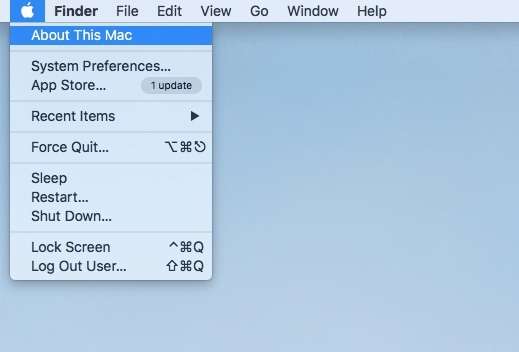
Click the Apple icon located in the top-left corner of your screen.
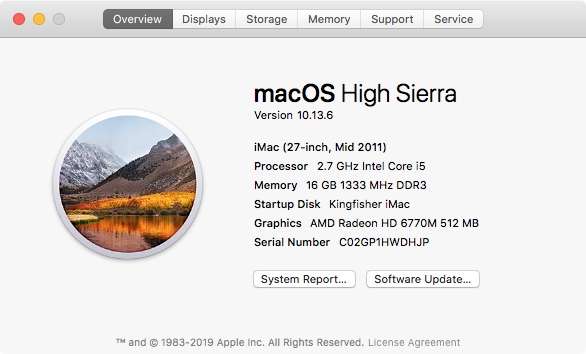
From the drop-down menu, select “About This Mac”.
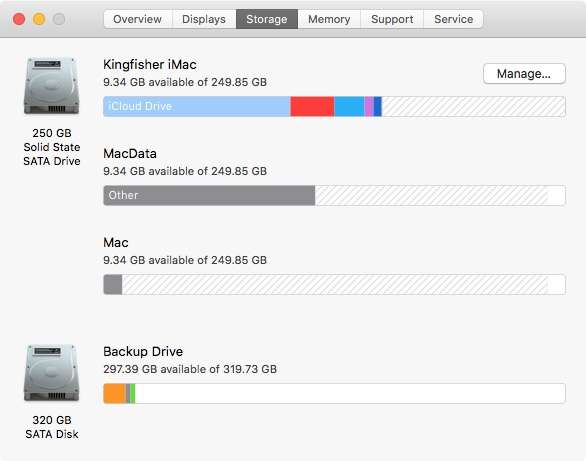
A window will appear—click on Storage.
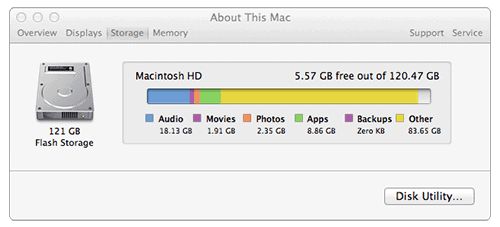
You will now see a detailed breakdown of your hard disk usage, including how much free space you have available.
It’s that simple! Now you know how much space you have left on your macOS hard disk and what categories are consuming your storage.
Visual Guide: Check macOS Free Space
If you prefer visual instructions, watch our video tutorial on how to check macOS free space:
What to Do If Your macOS Free Space Is Low
If you’ve checked your macOS free space and found that your hard disk is nearly full, it’s time to take action to avoid performance issues. A full hard drive can slow down your system, and you may run into errors when saving files or installing new applications.
Here’s what you can do to free up space on your macOS device:
Delete unnecessary files and apps: Remove large files you no longer need, such as old downloads, videos, or unused applications.
Empty the Trash: Files you delete are stored in the Trash until it’s emptied. Make sure to clear it out.
Use cloud storage: Move files to cloud storage solutions like iCloud, Google Drive, or Dropbox to free up local space on your hard disk.
For a more detailed guide on how to free up space on your Mac, check out our full step-by-step guide:
Having enough macOS free space is crucial for the smooth functioning of your computer. If you’re wondering why it’s important to manage your disk space, here are a few reasons:
Improved performance: A full disk can slow down your Mac, making tasks like file transfers and app loading slower.
System stability: Low disk space can cause system crashes and app freezes, especially when running resource-intensive applications.
Operating system updates: Apple’s macOS updates require a certain amount of free space to install. Without enough room, updates may fail, leaving your system vulnerable to security issues.
To learn more about managing your macOS storage, visit Apple’s official guide for further tips.
If you were looking for a guide on how to check your free space on a Windows PC instead of macOS, no worries! Click the link below to access our guide for checking Windows hard disk space:
We hope this guide has helped you learn how to check your macOS free space and understand the importance of keeping enough disk space available on your MacBook or iMac. If your disk is nearly full, follow our guide on freeing up space to keep your system running smoothly. Regularly checking your storage ensures optimal performance and system stability.
The Illusion of Stability in Modern Updates For most users, operating system updates are something that simply happen. They arrive quietly, often installing in the background, requiring little more than…
Macbook Neo, How Does It Compare To Air & Pro? Over the last few years the laptop market has experienced one of the most significant architectural changes in its history.…
Apple’s latest product announcements mark one of the most significant shifts in the Mac lineup in more than a decade. While Apple routinely updates its hardware with faster chips, incremental…
There is a particular kind of frustration that only a slow computer can produce. It is not dramatic. It is not urgent. It does not scream for attention. Instead, it…
In an era where nearly every aspect of personal computer maintenance and professional life is mediated through digital systems, your computer is no longer a luxury device — it is…
Phone says charging but battery not increasing is one of the most frustrating problems smartphone users face. You plug it in.The lightning bolt appears.It says “Charging.” But the battery percentage…
Apple’s rumour cycle always looks like a thousand disconnected leaks — until you line them up and notice the same themes repeating: AI-first silicon, camera and display differentiation, form-factor experiments (foldables / spatial…
Wi-Fi connected but no internet is one of the most frustrating messages you can see on a computer or laptop. The Wi-Fi icon shows full bars.It says “Connected.”But websites won’t…
Unfortunately, there was an error submitting your request.
Please try again later, or reach out to us directly. You can call us at +44 1429 280955 or email us at sales@kingfishercomputers.co.uk for assistance. We’re here to help you get your computer back up and running!
We’ve received your booking, Our team will get in touch with you shortly to confirm the details. You’re one step closer to having your computer fixed! If you have any urgent questions, feel free to contact us. Otherwise, sit back, and we’ll handle the rest.