PC Bottlenecks Explained: What’s Slowing You Down?
Adam Fornal
May 15th, 2025
Table of Contents
In today’s digital era, computer performance is essential for everything from professional tasks to gaming and creative pursuits. Yet many users experience frustrating slowdowns without understanding the root causes. This comprehensive guide to PC Bottlenecks Explained will help you identify and resolve the performance limitations holding your system back. By understanding how bottlenecks occur and learning to diagnose them effectively, you’ll be equipped to make targeted upgrades that deliver meaningful improvements rather than wasting money on components that won’t address your specific performance issues.
Understanding the Concept of Bottlenecks in Computing
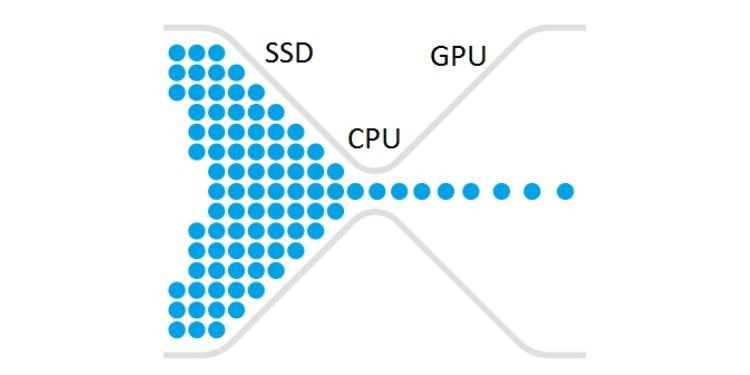
Before diving into specific components, it’s crucial to understand what bottlenecks actually are in the context of computing. When we discuss PC Bottlenecks Explained in simple terms, we’re referring to any component in your system that limits overall performance. Think of your computer as a factory assembly line – the entire production can only move as fast as its slowest station. Similarly, your computer’s performance is limited by its weakest link. The concept of PC Bottlenecks Explained revolves around identifying these weak links and addressing them strategically.
How Bottlenecks Affect System Performance
When examining PC Bottlenecks Explained in real-world scenarios, we observe that they manifest in various ways depending on your activities. During gaming, a bottleneck might appear as stuttering frame rates or texture pop-in. For productivity tasks, you might experience delays when opening applications or processing large files. The key to understanding PC Bottlenecks Explained is recognizing that performance limitations aren’t universal – a system perfectly capable of office work might struggle significantly with video editing or modern gaming.
The Dynamic Nature of Performance Limitations
An essential aspect of PC Bottlenecks Explained is understanding that bottlenecks aren’t static – they shift depending on the task at hand. For instance, web browsing and document editing might be limited by your storage speed, while gaming could be constrained by your graphics card. This dynamic nature of performance limitations is why a one-size-fits-all approach to upgrades often disappoints. The concept of PC Bottlenecks Explained emphasizes targeted improvements based on your specific usage patterns.
Major Hardware Bottlenecks and Their Impact
When discussing PC Bottlenecks Explained, hardware limitations are often the most straightforward to identify and address. Let’s examine the primary hardware components that frequently become bottlenecks and learn how to recognize when they’re limiting your system’s performance.
CPU Bottlenecks: The Brain of Your System
The processor serves as your computer’s brain, handling calculations and instructions for every operation. When exploring PC Bottlenecks Explained, CPU limitations are among the most common issues users encounter. A processor bottleneck occurs when your CPU cannot process data quickly enough to keep up with other components, resulting in underutilization of your graphics card or other high-performance parts.
Signs of a CPU Bottleneck
Understanding PC Bottlenecks Explained requires recognizing the symptoms of processor limitations. Key indicators include high CPU usage (consistently near 100%) while other components show lower utilization, stuttering frame rates despite a powerful graphics card, and poor multitasking performance. Modern monitoring tools can help visualize these patterns, making PC Bottlenecks Explained more accessible for average users. When your CPU usage remains maxed out while your GPU hovers at lower utilization percentages during gaming, you’re likely experiencing a processor bottleneck.
CPU Specifications That Matter
When addressing PC Bottlenecks Explained in the context of processors, several specifications deserve attention. Core count impacts multitasking and modern applications designed for parallel processing, while clock speed affects per-core performance for tasks that don’t utilize multiple cores efficiently. Cache size, instruction set support, and architectural improvements also influence performance. Understanding PC Bottlenecks Explained means recognizing that CPU requirements vary dramatically between usage scenarios – gaming benefits from fewer faster cores, while content creation leverages more cores for parallel workloads.
Pc Bottlenecks Explained: What's Slowing You Down? 4
GPU Bottlenecks: Visual Processing Limitations
For gamers and creative professionals, graphics processing constraints frequently top the list when discussing PC Bottlenecks Explained. Your graphics card handles rendering images, videos, and 3D graphics, making it critical for visually demanding tasks. A GPU bottleneck occurs when your graphics card cannot render frames quickly enough to match your processor’s capability to send rendering instructions.
Identifying Graphics Processing Constraints
When covering PC Bottlenecks Explained for visual workloads, several symptoms point to GPU limitations. These include low frame rates despite a powerful CPU, graphics settings having dramatic performance impacts, and GPU usage consistently at or near 100% while CPU usage remains moderate. The topic of PC Bottlenecks Explained becomes particularly relevant in gaming, where GPU limitations often determine whether you can run games at your desired resolution and detail level.
Critical GPU Specifications
A thorough PC Bottlenecks Explained guide must address the graphics card specifications that impact different workloads. VRAM capacity affects texture quality and resolution capabilities, particularly for modern games and video editing. Core count and clock speeds influence raw rendering power, while specialized hardware (like ray tracing cores) affects performance in specific applications. Understanding PC Bottlenecks Explained means recognizing that GPU requirements scale dramatically with resolution – a card adequate for 1080p gaming might struggle severely at 4K resolutions.
Pc Bottlenecks Explained: What's Slowing You Down? 5
Memory and Storage Bottlenecks: Data Access Limitations
While processors and graphics cards often receive the most attention, memory and storage constraints are equally important in PC Bottlenecks Explained. These components determine how quickly your system can access and manipulate data, creating potential bottlenecks even when CPU and GPU resources appear adequate.
RAM Bottlenecks and Their Symptoms
When discussing PC Bottlenecks Explained regarding system memory, insufficient RAM creates performance problems through excessive paging – the process of moving data between RAM and slower storage. Signs of memory constraints include high disk activity, system-wide slowdowns when switching between applications, and performance degradation over time as you open more programs. The principle of PC Bottlenecks Explained applies here as capacity limitations force your system to rely on significantly slower storage for data that should ideally remain in RAM.
Storage Speed Limitations
No PC Bottlenecks Explained guide would be complete without addressing storage constraints. Traditional hard drives, with their mechanical components, create noticeable bottlenecks in modern systems through slower data access times. Symptoms include long boot and application loading times, hitching during large file operations, and system responsiveness that doesn’t match your hardware’s theoretical capabilities. The concept of PC Bottlenecks Explained extends to storage configurations – even high-end SSDs can become bottlenecks when dealing with extremely large files or specialized workloads.
Motherboard and Connection Bottlenecks: Often Overlooked Limitations
When examining PC Bottlenecks Explained comprehensively, we must address the less obvious constraints imposed by motherboards and connection interfaces. These components determine how effectively your primary parts communicate, potentially limiting performance even with premium CPU, GPU, and storage hardware.
Interface and Bus Limitations
A complete understanding of PC Bottlenecks Explained requires examining how data moves between components. PCIe generation and lane allocation affect graphics card performance and storage speeds for NVMe drives. RAM channels and speeds impact memory bandwidth available to the processor. USB generations limit external device performance. The topic of PC Bottlenecks Explained becomes particularly relevant when upgrading individual components – an older motherboard might prevent a new graphics card or SSD from performing at its full potential.
Chipset and VRM Constraints
When discussing PC Bottlenecks Explained for system builders, motherboard quality matters beyond mere connections. Voltage regulation modules (VRMs) determine stable power delivery for overclocking and sustained performance under load. Chipset limitations affect expandability and feature support. The concept of PC Bottlenecks Explained extends to these often-overlooked aspects – an inadequate motherboard can prevent high-end components from maintaining their optimal performance, especially under extended load.
Pc Bottlenecks Explained: What's Slowing You Down? 6
Software and Configuration Bottlenecks
While hardware limitations often dominate discussions of PC Bottlenecks Explained, software and configuration issues can create equally significant performance constraints. Understanding these non-hardware bottlenecks is essential for maximizing system performance without unnecessary component upgrades.
Operating System and Driver Bottlenecks
The foundation of PC Bottlenecks Explained in the software realm begins with your operating system and drivers. These fundamental software layers create the environment in which all your applications run, making their optimization critical for system performance.
Operating System Optimization Techniques
When exploring PC Bottlenecks Explained beyond hardware, several operating system factors deserve attention. Background processes consume resources silently, while outdated OS versions may lack optimizations for modern hardware. Fragmentation affects traditional storage performance, and improper power settings might throttle component capabilities. Understanding PC Bottlenecks Explained from the OS perspective means recognizing that software inefficiencies can nullify hardware advantages – even powerful systems suffer when running poorly optimized operating systems.
Driver Management for Optimal Performance
No discussion of PC Bottlenecks Explained would be complete without addressing drivers – the software interfaces between your hardware and operating system. Outdated drivers lack performance optimizations and bug fixes, while incorrect drivers can cause stability issues and performance degradation. The principle of PC Bottlenecks Explained applies here as driver quality directly impacts how effectively your hardware communicates with the operating system and applications.
Beyond system-level software, PC Bottlenecks Explained must address how specific applications interact with your hardware. Different programs utilize system resources in vastly different ways, creating unique bottleneck patterns depending on your typical workloads.
Understanding Application Resource Requirements
A thorough PC Bottlenecks Explained guide recognizes that applications have distinct hardware preferences. Video editing leverages multiple CPU cores and benefits from high RAM capacity, while many games prioritize single-thread CPU performance and GPU capabilities. Virtualization demands significant memory, and 3D rendering benefits from specialized hardware acceleration. The concept of PC Bottlenecks Explained becomes particularly relevant when selecting hardware for specific purposes – understanding application demands helps prioritize upgrades that directly benefit your particular usage.
Optimization Techniques for Common Applications
When discussing PC Bottlenecks Explained for everyday software, numerous optimization opportunities exist. Application-specific settings like render distance in games or cache sizes in creative software significantly impact performance. Hardware acceleration toggles determine which components handle specific tasks. The principle of PC Bottlenecks Explained extends to these configuration details – properly optimized applications make more efficient use of available hardware resources, potentially eliminating bottlenecks without hardware upgrades.
Network and Internet Bottlenecks
While often overlooked in discussions of PC Bottlenecks Explained, network limitations significantly impact the performance of online activities. From gaming to cloud computing and streaming, network constraints can create performance issues unrelated to your computer’s processing capabilities.
Identifying Network Performance Issues
When covering PC Bottlenecks Explained for online activities, several factors indicate network limitations. High ping times affect real-time applications like gaming and video conferencing, while insufficient bandwidth constrains streaming quality and download speeds. Packet loss creates unpredictable performance even with adequate speed. The topic of PC Bottlenecks Explained becomes particularly relevant for competitive gamers and remote workers, where network performance directly impacts productivity and experience.
Hardware and Configuration Solutions for Network Bottlenecks
A comprehensive PC Bottlenecks Explained guide must address network optimization techniques. Router quality and placement affect signal strength and consistency, while Ethernet connections eliminate wireless interference issues. QoS settings prioritize critical traffic, and DNS configuration impacts web browsing responsiveness. Understanding PC Bottlenecks Explained for networking means recognizing that internet performance depends on numerous factors beyond raw speed – proper configuration often delivers better results than simply paying for higher bandwidth.
Diagnosing and Resolving PC Bottlenecks
With a foundation in the various types of bottlenecks, let’s explore the practical side of PC Bottlenecks Explained – how to identify your specific limitations and address them effectively without wasting resources on unnecessary upgrades.
Diagnostic Tools and Techniques
The practical application of PC Bottlenecks Explained begins with proper diagnosis. Various tools help identify which components limit your system’s performance in different scenarios.
System Monitoring Tools
When implementing PC Bottlenecks Explained methodologies, several monitoring applications prove invaluable. Task Manager provides basic utilization data, while specialized tools like HWiNFO and MSI Afterburner offer detailed hardware metrics including temperatures and clock speeds. Benchmark applications establish performance baselines and comparative data. The principle of PC Bottlenecks Explained becomes actionable through these tools – by observing which components reach maximum utilization during slowdowns, you can identify specific bottlenecks in your system.
Benchmark Analysis and Interpretation
No guide to PC Bottlenecks Explained would be complete without discussing benchmark interpretation. Synthetic benchmarks provide standardized performance metrics, while real-world testing in actual applications offers practical performance data. Comparative analysis against similar systems helps identify underperforming components. Understanding PC Bottlenecks Explained through benchmarking requires recognizing that numbers alone don’t tell the complete story – performance should be evaluated in the context of your specific usage requirements and expectations.
Strategic Upgrade Planning
The ultimate goal of PC Bottlenecks Explained is enabling informed upgrade decisions. Rather than blindly purchasing the latest components, understanding your specific bottlenecks allows targeted improvements that deliver meaningful performance gains.
Prioritizing Upgrades for Maximum Impact
When applying PC Bottlenecks Explained principles to upgrade planning, focus on the components creating the most significant limitations for your typical tasks. For gaming-focused systems, graphics card upgrades often deliver the most noticeable improvements, while productivity systems might benefit more from processor or memory enhancements. The concept of PC Bottlenecks Explained emphasizes value optimization – directing your budget toward changes that address your specific performance constraints rather than generic “best component” recommendations.
Balanced System Building Philosophy
A thorough understanding of PC Bottlenecks Explained leads to a balanced system building approach. While perfect component matching isn’t practical or necessary, extreme mismatches waste resources. High-end graphics cards paired with entry-level processors create severe bottlenecks, as do powerful CPUs with insufficient RAM. The principle of PC Bottlenecks Explained applies particularly to system building – allocating your budget proportionally across components based on your usage patterns delivers optimal performance per dollar spent.
Optimization Without Hardware Upgrades
Before concluding our discussion of PC Bottlenecks Explained, we must emphasize that many performance issues can be resolved without purchasing new hardware. Software optimization often delivers significant improvements for free or minimal cost.
Software and OS Optimization Techniques
When implementing PC Bottlenecks Explained methodologies without hardware changes, several approaches yield results. Disabling unnecessary startup programs and services reduces resource consumption, while regular maintenance prevents performance degradation over time. Power plan adjustments ensure components operate at appropriate performance levels, and storage cleanup prevents slowdowns from limited free space. The concept of PC Bottlenecks Explained extends to these software interventions – resolving artificial limitations often delivers more immediate benefits than hardware upgrades.
Overclocking and Advanced Tuning
For technically inclined users, PC Bottlenecks Explained includes performance tuning beyond standard settings. Processor and memory overclocking extract additional performance from existing hardware, while GPU undervolting can improve thermal behavior without sacrificing performance. Custom fan curves balance acoustics with cooling efficiency. Understanding PC Bottlenecks Explained in the context of hardware tuning means recognizing that factory settings prioritize stability and compatibility over maximum performance – careful adjustments can unlock additional capabilities from your current components.
Specialized Bottlenecks in Different Computing Scenarios
To complete our exploration of PC Bottlenecks Explained, let’s examine how bottlenecks manifest differently across various computing categories. Different usage scenarios create unique performance limitations that require specialized knowledge to address effectively.
Gaming PC Bottlenecks
Gaming represents one of the most demanding consumer computing applications, making PC Bottlenecks Explained particularly relevant for players seeking smooth experiences at high detail levels and resolutions.
Resolution and Frame Rate Considerations
When discussing PC Bottlenecks Explained for gaming, resolution dramatically impacts which components become limiting factors. At 1080p, processors often become bottlenecks as they struggle to feed instructions to capable graphics cards. At 4K resolution, even powerful GPUs become the primary constraint. The principle of PC Bottlenecks Explained applies differently across game genres – competitive titles benefit from higher frame rates and lower latency, while visually rich single-player experiences prioritize image quality and consistency.
Game Engine Optimization Differences
A thorough understanding of PC Bottlenecks Explained for gaming recognizes that different game engines utilize hardware resources distinctly. Some titles distribute workloads effectively across multiple CPU cores, while others rely heavily on single-thread performance. Certain engines benefit significantly from fast memory, while others consume excessive VRAM at higher settings. The concept of PC Bottlenecks Explained becomes game-specific – performance optimization requires understanding how each title interacts with your particular hardware configuration.
Workstation and Content Creation Bottlenecks
Professional workloads create unique performance limitations that differ from gaming or general computing, making PC Bottlenecks Explained particularly valuable for content creators and professionals.
Video Editing and Rendering Bottlenecks
When exploring PC Bottlenecks Explained for media production, several specialized constraints emerge. Timeline scrubbing performance depends on both storage speed and decode capabilities, while export times leverage multi-core processors and, increasingly, GPU acceleration. Preview resolution affects real-time performance, and codec complexity impacts hardware requirements significantly. Understanding PC Bottlenecks Explained for video workflows means recognizing that different stages of production create different bottlenecks – importing might be storage-limited while color grading might be GPU-constrained.
3D Modeling and CAD Performance Constraints
The application of PC Bottlenecks Explained to 3D workflows reveals unique performance considerations. Scene complexity affects viewport performance regardless of hardware power, while simulation calculations benefit from specific processor architectures. Scene loading times depend on storage and memory capacity, and specialized GPU features accelerate certain workflows substantially. The principle of PC Bottlenecks Explained extends to software selection – some applications leverage GPU acceleration more effectively than others, creating different bottleneck patterns even in similar workflows.
Server and Multi-User Environment Bottlenecks
While consumer computing focuses on single-user experience, PC Bottlenecks Explained applies differently to server environments where multiple users or processes compete for resources simultaneously.
Virtualization and Resource Allocation
When discussing PC Bottlenecks Explained for virtualized environments, resource allocation becomes paramount. Memory constraints often limit the number and performance of virtual machines, while storage I/O affects application responsiveness across all instances. Network bandwidth determines remote access performance, and processor allocation affects compute-intensive workloads. The concept of PC Bottlenecks Explained becomes particularly relevant for home lab environments – understanding resource requirements helps maximize the capabilities of available hardware without creating performance bottlenecks.
Scalability and Throughput Considerations
A comprehensive view of PC Bottlenecks Explained for server workloads must address scalability. Linear performance scaling rarely occurs as users or processes increase, with various bottlenecks emerging at different utilization levels. Queue depths affect storage performance under heavy concurrent access, while memory bandwidth constraints become apparent in data-intensive operations. Understanding PC Bottlenecks Explained in multi-user contexts means recognizing that peak performance differs from sustained capability – systems must be designed for consistent experience rather than theoretical maximum throughput.
Implementing Your Knowledge of PC Bottlenecks
Our exploration of PC Bottlenecks Explained has covered the major hardware and software factors that limit computer performance across different usage scenarios. By understanding these principles, you can make informed decisions about system optimization and upgrades rather than following generic recommendations that might not address your specific limitations.
Creating a Personalized Optimization Strategy
The practical application of PC Bottlenecks Explained culminates in developing a personalized optimization approach. Begin by identifying your primary activities and their specific resource requirements. Use monitoring tools to determine which components reach maximum utilization during those tasks. Develop an upgrade path that prioritizes resolving these specific bottlenecks rather than pursuing arbitrary component improvements. The concept of PC Bottlenecks Explained emphasizes this tailored approach – the most effective optimization strategy addresses your particular usage patterns and performance limitations.
Future-Proofing Considerations
As we conclude our discussion of PC Bottlenecks Explained, consider how today’s decisions affect tomorrow’s performance. Technology evolves rapidly, with software requirements increasing alongside hardware capabilities. Emerging technologies like ray tracing, AI acceleration, and ever-increasing resolution standards create new potential bottlenecks. The principle of PC Bottlenecks Explained extends to future planning – understanding trend directions helps make upgrade decisions that maintain relevance longer, providing better value over time.
By mastering the concepts covered in this PC Bottlenecks Explained guide, you’re equipped to maximize your system’s performance through informed decisions rather than trial and error. Remember that the most expensive component isn’t always the solution to your specific bottleneck – targeted improvements based on actual usage deliver the best experience per dollar spent. Whether building a new system or optimizing an existing one, the knowledge of how bottlenecks form and how to identify them ensures you’ll achieve the performance you need without unnecessary expense.
The Illusion of Stability in Modern Updates For most users, operating system updates are something that simply happen. They arrive quietly, often installing in the background, requiring little more than…
Macbook Neo, How Does It Compare To Air & Pro? Over the last few years the laptop market has experienced one of the most significant architectural changes in its history.…
Apple’s latest product announcements mark one of the most significant shifts in the Mac lineup in more than a decade. While Apple routinely updates its hardware with faster chips, incremental…
There is a particular kind of frustration that only a slow computer can produce. It is not dramatic. It is not urgent. It does not scream for attention. Instead, it…
In an era where nearly every aspect of personal computer maintenance and professional life is mediated through digital systems, your computer is no longer a luxury device — it is…
Phone says charging but battery not increasing is one of the most frustrating problems smartphone users face. You plug it in.The lightning bolt appears.It says “Charging.” But the battery percentage…
Apple’s rumour cycle always looks like a thousand disconnected leaks — until you line them up and notice the same themes repeating: AI-first silicon, camera and display differentiation, form-factor experiments (foldables / spatial…
Wi-Fi connected but no internet is one of the most frustrating messages you can see on a computer or laptop. The Wi-Fi icon shows full bars.It says “Connected.”But websites won’t…
Unfortunately, there was an error submitting your request.
Please try again later, or reach out to us directly. You can call us at +44 1429 280955 or email us at sales@kingfishercomputers.co.uk for assistance. We’re here to help you get your computer back up and running!
We’ve received your booking, Our team will get in touch with you shortly to confirm the details. You’re one step closer to having your computer fixed! If you have any urgent questions, feel free to contact us. Otherwise, sit back, and we’ll handle the rest.