How to Choose the Right Motherboard for Your Build
Adam Fornal
May 19th, 2025
Table of Contents
When building a custom PC, selecting the right motherboard is perhaps the most critical decision you’ll make. This central component determines compatibility with other hardware, available features, and future upgrade potential. Many builders focus primarily on flashy components like graphics cards and processors, overlooking how crucial this foundation piece is to the entire system’s functionality and longevity. This comprehensive guide will walk you through everything you need to know to select the right motherboard for your specific needs, budget, and future plans.
Understanding the Right Motherboard Fundamentals
Before diving into specific selection criteria, it’s essential to understand what a motherboard actually does. It serves as the communication hub for all your computer components, connecting everything from your CPU and RAM to storage drives and peripherals. It contains circuitry and connectors that allow these various components to work together seamlessly. When searching for the right motherboard, you’re essentially looking for the foundation upon which your entire system will be built.
The Right Motherboard Anatomy and Components
Understanding the key parts of a motherboard helps you recognize what makes a suitable choice for your particular needs. The CPU socket is perhaps the most important element, as it must be compatible with your chosen processor. Memory slots accommodate your RAM modules, while expansion slots like PCIe allow for graphics cards and other add-in components. A quality board will also include storage connectors for your drives, rear I/O ports for external peripherals, and power delivery components that ensure stable operation under load.
Chipsets and Their Significance
The chipset is the right motherboard’s primary controller hub, and choosing an appropriate option means selecting a chipset that matches your needs. A chipset determines what features your motherboard supports, from USB ports and storage options to overclocking capabilities. Intel and AMD each offer several chipset tiers, ranging from budget-friendly options with limited features to high-end choices with extensive connectivity and performance enhancements. Understanding chipset hierarchies is crucial to selecting a board that balances your requirements and budget.
Form Factors and Case Compatibility
The right Motherboards come in different sizes, or form factors, and selecting the right motherboard includes ensuring it fits your chosen case. The most common form factors include ATX (standard full-size), Micro-ATX (somewhat smaller), and Mini-ITX (compact). Each offers different advantages and trade-offs in terms of expansion capabilities, component spacing, and cooling potential. Ensuring compatibility between your case and motherboard prevents frustrating surprises during the build process.
CPU Compatibility: The Starting Point for the Right Motherboard
The processor you choose—or plan to choose—dictates which motherboards will work with your system. Your selected board must have a compatible socket and chipset for your CPU. This compatibility is non-negotiable; mismatched components simply won’t work together.
AMD vs. Intel Considerations for the Right motherboard
The AMD versus Intel decision significantly impacts what constitutes a suitable choice for your build. These manufacturers use different socket types and chipsets, and the right motherboard designed for one will not work with processors from the other. AMD has maintained better socket longevity with their AM4 platform (though they’ve now moved to AM5 for newer processors), while Intel has historically changed sockets more frequently. When planning a build, determining your processor first helps narrow down what represents the ideal foundation for your system.
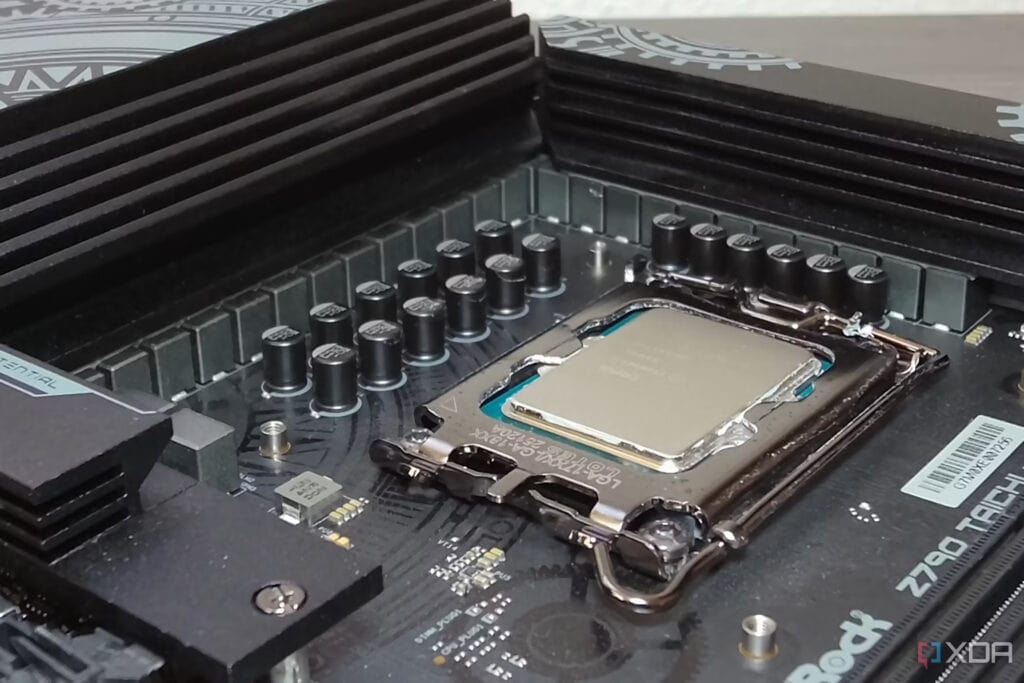
Each processor generation typically works with specific socket types. For Intel, recent generations have used LGA 1700, LGA 1200, and LGA 1151 sockets. AMD’s mainstream processors have used the AM4 socket for several generations, with AM5 supporting their newest offerings. Selecting the right motherboard means ensuring its socket matches your CPU. Additionally, while physical compatibility is essential, you must also verify that your board has a chipset that fully supports your specific processor model and generation.
How To Choose The Right Motherboard For Your Build 6
BIOS Compatibility and Updates
Even with the correct socket, some motherboard and CPU combinations require BIOS updates for compatibility, especially when using newer processors with older motherboard models. A good motherboard either has out-of-the-box support for your CPU or provides features like BIOS flashback that allow updates without requiring an older, compatible CPU. When purchasing components, verify whether your selected board will work with your processor immediately or might need updates before first use.
Memory Support and Optimization for the Right Motherboard
RAM compatibility and performance are significant considerations when selecting the right motherboard for your build. Different models support varying memory technologies, speeds, capacities, and configurations.
DDR4 vs. DDR5: Making the Right Choice
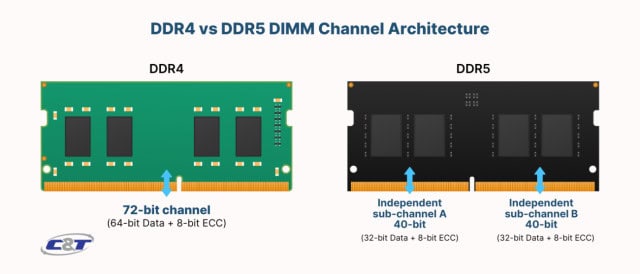
As of 2025, the PC building community is amid a transition from DDR4 to DDR5 memory. The right motherboard should support the memory generation that best suits your needs and budget. DDR5 offers higher bandwidth and future-proofing but comes at a premium price. DDR4 remains more affordable while still providing excellent performance for most applications. Your processor choice partially dictates this decision, as newer CPU generations may require specific memory types. Ensure your selected board aligns with both your processor and memory preferences.
Memory Speed, Channels, and Capacity
A quality motherboard supports your desired memory configuration. Consider maximum supported speeds (measured in MHz), the number of memory channels (dual-channel being most common), and maximum capacity. Some applications benefit significantly from faster memory, while others gain more from increased capacity. Verify that the right motherboard can accommodate your current needs and potential future upgrades, both in terms of memory slots and supported technologies.
QVL and Memory Compatibility
Motherboard manufacturers maintain Qualified Vendor Lists (QVLs) that identify specific memory kits tested for compatibility. While unlisted memory often works, choosing modules from your board’s QVL minimizes the risk of compatibility issues. This consideration becomes especially important when planning high-speed memory overclocking or when building systems that absolutely cannot tolerate stability problems. For mission-critical builds, the right motherboard and memory combination should come from verified compatible components.
How To Choose The Right Motherboard For Your Build 7
Expansion and Connectivity Options for the Right Motherboard
Modern computers connect to a vast array of peripherals and storage devices. The right motherboard provides the connections you need today while accommodating your likely future requirements. Beyond basic compatibility, the quality and configuration of these connections significantly impact your system’s performance and versatility.
PCIe Slots and Expansion Capabilities
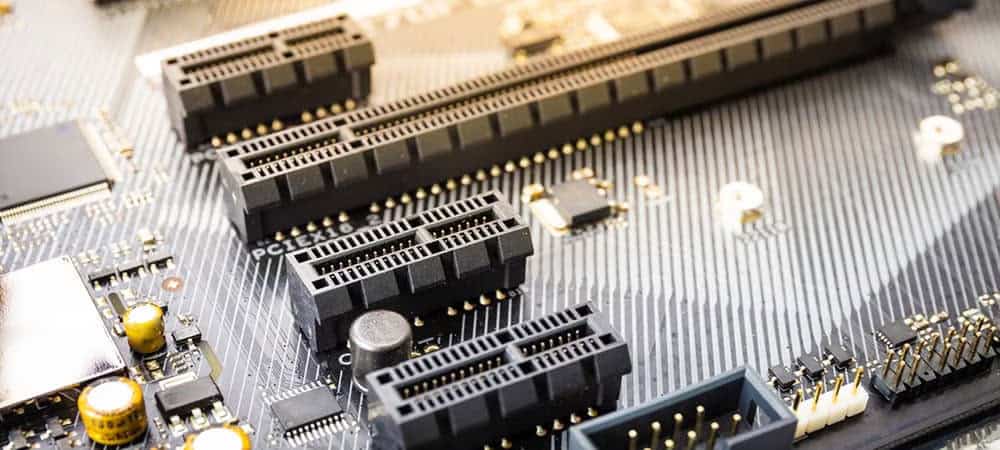
Peripheral Component Interconnect Express (PCIe) slots are among the most important expansion options on a motherboard. Your chosen board should offer appropriate PCIe slots for your graphics card(s), expansion cards, and other add-in components.
Understanding PCIe Generations and Lanes
PCIe technology has evolved through several generations (currently at PCIe 5.0), with each doubling the bandwidth of the previous version. Your motherboard should provide the PCIe generation appropriate for your components, especially for high-bandwidth devices like graphics cards and NVMe storage. Additionally, the number and configuration of PCIe lanes matter—the right motherboard allocates sufficient lanes to prevent bottlenecks when multiple devices operate simultaneously. For example, if you plan to use multiple PCIe 4.0 NVMe drives and a high-end graphics card, your motherboard would need adequate lane distribution.
Multi-GPU Support and Considerations
While less common than in years past, some users still require multi-GPU configurations for specific workloads. If this applies to your build, your motherboard must provide multiple full-length PCIe slots with appropriate spacing and electrical configurations (typically x16/x16 or x16/x8). Not all motherboards that physically accommodate multiple graphics cards provide full bandwidth to each slot. For multi-GPU setups, look for proper lane allocation and, if desired, SLI or CrossFire certification.
Specialized Expansion Cards and Future-Proofing
Beyond graphics cards, you might need slots for sound cards, network adapters, capture cards, or other specialized components. A well-chosen motherboard accommodates both your current expansion needs and potential future additions. Some boards now include specialized slots for additional devices like M.2 WiFi cards or Thunderbolt add-in cards. When evaluating options for long-term use, consider whether the expansion capabilities align with emerging technologies likely to become important during your ownership period.
How To Choose The Right Motherboard For Your Build 8
Storage Options and Configuration for the Right Motherboard
Storage technology has evolved rapidly, with multiple connection standards offering different performance levels. The right motherboard provides appropriate storage options for your performance requirements and capacity needs.
NVMe and M.2 Technology
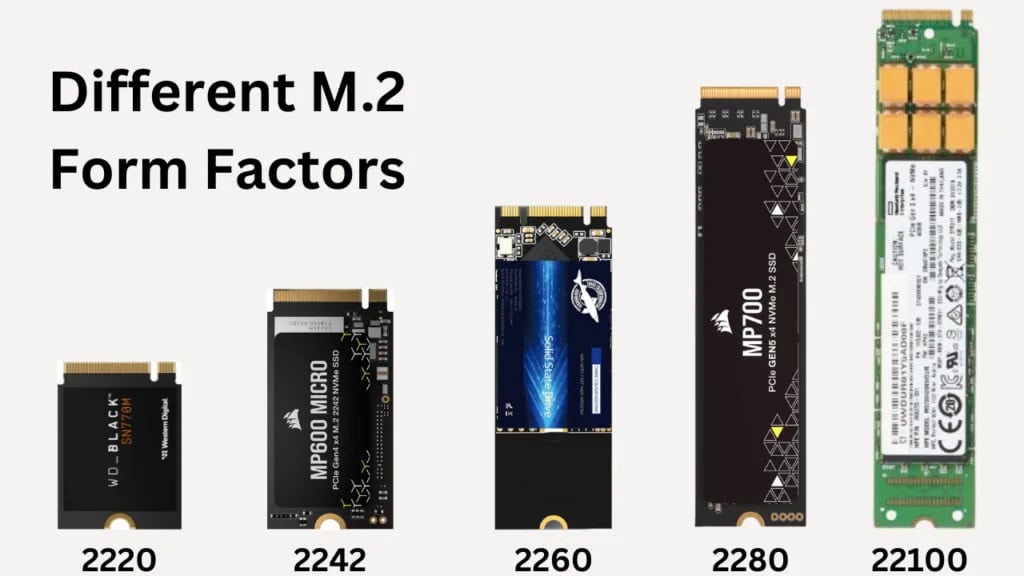
Modern storage often utilizes M.2 slots, particularly for NVMe solid-state drives that offer significantly faster performance than traditional SATA connections. A suitable motherboard includes an appropriate number of M.2 slots for your storage plans. Pay attention to whether your board’s M.2 slots support both NVMe and SATA protocols (if you plan to use both types) and note the maximum supported size, as some older slots may not accommodate longer 110mm drives. Also verify the PCIe generation supported by each slot, as the right motherboard provide appropriate bandwidth for your drives.
SATA Ports and Legacy Support
Despite the rise of M.2 storage, SATA connections remain valuable for high-capacity hard drives, some SSDs, and optical drives. Your motherboard should include sufficient SATA ports for your storage array. Note that on some motherboards, using certain M.2 slots disables specific SATA ports due to lane sharing. When planning a system with multiple storage devices, ensure your selected board allows all your drives to operate simultaneously without unexpected limitations.
How To Choose The Right Motherboard For Your Build 9
RAID Support and Storage Flexibility
For data redundancy or performance enhancement, some users implement RAID (Redundant Array of Independent Disks) configurations. If this interests you, your board should support your desired RAID levels through either the chipset or additional controllers. More advanced storage configurations might benefit from motherboards with enhanced features like superior caching technologies or dedicated hardware RAID solutions. For complex storage setups, choose a board that balances performance, reliability, and flexibility according to your specific requirements.
The connections available on your motherboard directly impact how you interact with your computer. A good selection provides appropriate ports for all your peripherals and external devices.
USB Configurations and Generations
USB ports connect most external devices to your PC, and the right motherboard offers an appropriate mix of USB standards and quantities. Modern motherboards typically include USB 3.2 Gen 1 and Gen 2 ports, with newer models adding USB 3.2 Gen 2×2 (20Gbps) or USB4/Thunderbolt support. Consider both rear panel ports and internal headers when evaluating whether a board meets your connectivity needs. For virtual reality setups, external storage, or high-bandwidth peripherals, having sufficient high-speed USB connections significantly improves the user experience.
Audio Solutions and Quality
Built-in audio quality varies substantially between motherboards. Your ideal board provides audio capabilities suited to your usage. For casual users, basic integrated audio suffices, while content creators and audiophiles benefit from motherboards with premium audio components, better shielding, and higher-quality DACs (digital-to-analog converters). Some high-end motherboards feature dedicated amplification for headphones of different impedance levels. When audio matters to your setup, choose a board with appropriate sound processing hardware rather than requiring a separate sound card.
Networking Features: Ethernet and WiFi
Network connectivity options are increasingly important in our connected world. The right motherboard includes networking features appropriate for your usage pattern and environment. Consider Ethernet speed (2.5Gb or faster connections benefit heavy network users or those with high-speed internet), WiFi capabilities (WiFi 6/6E or newer for wireless setups), and Bluetooth support for wireless peripherals. For some users, your board might need to include multiple network interfaces for complex networking scenarios or redundancy.
Performance and Specialization Features for the Right Motherboard
Different users have vastly different performance needs from their systems. A well-chosen motherboard provides features that enable your specific performance targets without unnecessary expense on capabilities you won’t utilize.
Power Delivery and Overclocking
The right motherboard’s power delivery system directly affects system stability, especially under heavy loads or when overclocking. Your selection should provide appropriate power for your processor and use case.
VRM Quality and CPU Power Delivery
The Voltage Regulator Module (VRM) supplies power to your CPU, and its quality significantly impacts system stability. A quality motherboard includes a VRM configuration appropriate for your processor’s power demands. Higher-end processors with more cores require robust power delivery systems, particularly when overclocked. Look for quality components in the VRM, including sufficient power stages, quality MOSFETs, chokes, and capacitors, along with adequate cooling for these components to prevent thermal throttling under sustained loads.
Overclocking Features and Capabilities
If you plan to overclock your system, your motherboard must support this activity through both hardware and firmware features. Look for boards with robust power delivery, enhanced cooling options for VRMs, debug features like POST code displays, and extensive BIOS settings for fine-tuning performance. Not all chipsets support overclocking, so verify that your chosen board allows this functionality if desired. For serious overclockers, consider features like LN2 modes, voltage measurement points, or direct CPU voltage control.
Cooling and Thermal Design
Effective cooling becomes increasingly important as component power increases. A suitable motherboard includes appropriate cooling for its chipset and VRMs, along with sufficient fan headers to manage your case airflow. Some motherboards feature integrated water cooling options for the VRMs or chipset, temperature sensors at various locations, and sophisticated fan control capabilities. For high-performance systems, your board should contribute to, rather than hinder, your overall thermal management strategy.
How To Choose The Right Motherboard For Your Build 10
Special Use Cases and Features
Some builds target specific use cases that benefit from specialized motherboard features. Identifying your primary use case helps determine what represents the right motherboard for your particular build.
Gaming-Specific Features
For gaming-focused builds, your ideal board may include features like optimized network controllers with traffic prioritization, enhanced audio for positional awareness, or RGB lighting integration. Some gaming motherboards offer features like additional USB ports positioned for VR headsets or front-panel connections. While marketing sometimes overstates the impact of gaming-specific features, a well-chosen gaming motherboard often includes quality-of-life improvements that enhance the gaming experience.
Workstation and Professional Features
Professional workloads often require specialized capabilities. For workstation use, consider boards with ECC (Error-Correcting Code) memory support, more robust driver certification, additional PCIe lanes for multiple expansion cards, or enhanced remote management capabilities. Content creation workstations benefit from optimized storage configurations for large file transfers, while software development environments might prioritize stability and verification. For professional use, look at manufacturer lines specifically designed for workstation applications.
Small Form Factor and Specialized Builds
Compact builds face unique constraints and require carefully selected motherboards with appropriate dimensions and feature density. Mini-ITX and Micro-ATX motherboards pack essential features into smaller footprints, but typically offer fewer expansion slots and may have more tightly spaced components. For small form factor builds, balance necessary functionality against size limitations, often requiring careful consideration of component placement and cooling solutions. Some specialty motherboards target extremely compact builds, home theater PCs, or other specific use cases where certain interfaces or form factors take priority over raw performance.
Budget Considerations and Value Analysis for the Right Motherboard
While it’s tempting to focus solely on features, budget reality often constrains choices. Finding the ideal motherboard involves balancing capabilities against cost.
Price-to-Performance Ratio
Motherboard pricing often correlates with features and build quality, but the relationship isn’t always linear. A good value board provides features you’ll actually use without unnecessary extras. The most expensive motherboard isn’t automatically the best choice for every build. Analyze which features matter for your specific use case, and prioritize those when allocating your budget. Sometimes a mid-range motherboard represents the optimal choice even for high-end builds if the premium options include features you won’t utilize.
Feature Prioritization and Trade-offs
Most buyers face trade-offs when selecting a motherboard within budget constraints. Create a hierarchy of must-have features, nice-to-have capabilities, and unnecessary extras for your specific situation. Perhaps you need excellent VRMs for overclocking but can forgo built-in WiFi. Or maybe storage flexibility matters more than extreme RAM overclocking potential. Understanding your priorities helps identify a board that allocates its cost to the areas most important to you.
Long-term Value and Future-Proofing
Consider how long you expect to use the system when determining the right motherboard. If you upgrade frequently, you might prioritize current performance over longevity. For longer-term builds, consider boards that include newer standards and technologies even if you can’t immediately use them. Some features like USB4, PCIe 5.0, or DDR5 support might add cost today but provide extended relevance as these technologies become mainstream. Ultimately, the right motherboard balances immediate needs against reasonable future-proofing without excessive spending on speculative future capabilities.
Compatibility and Integration Considerations for the Right Motherboard
Beyond basic component compatibility, several additional factors determine whether a motherboard truly represents the best choice for your specific situation.
Aesthetics and System Integration
For many builders, visual appeal matters alongside technical specifications. Your motherboard should complement your overall design vision.
Visual Design and RGB Integration
Modern PC building often incorporates aesthetic elements like color schemes and lighting. Your ideal board fits your visual preferences with appropriate styling, colors, and lighting options. Many motherboards include RGB lighting systems that integrate with other components through software ecosystems. If visual cohesion matters to you, select a board that participates in the same RGB ecosystem as your other components (like Asus Aura Sync, MSI Mystic Light, or Gigabyte RGB Fusion) to enable synchronized lighting effects.
Physical Layout and Component Clearance
A well-chosen motherboard physically accommodates your other components without clearance issues. Consider how the placement of CPU sockets, RAM slots, and M.2 mounts interacts with large CPU coolers, graphics cards, or RAM modules with tall heat spreaders. Some motherboard layouts work better with certain case designs or cooling solutions. For complex builds with multiple components, look for appropriate spacing and positioning to avoid physical conflicts during assembly and operation.
Cable Management and Connector Placement
Thoughtful connector placement contributes significantly to clean builds. A quality board positions headers and connectors logically for your case and component arrangement. Edge-mounted SATA connectors prevent conflicts with long graphics cards, while strategically placed fan and RGB headers simplify cable routing. Some motherboards rotate certain connectors to reduce cable strain or improve aesthetics. For builders who value clean internal appearance, choose a design that facilitates rather than hinders effective cable management.
Software Ecosystem and Support
Hardware quality matters, but software support increasingly differentiates motherboard options. Your selection should include useful software utilities and reliable support.
BIOS/UEFI Features and User Interface
The BIOS (Basic Input/Output System) or UEFI (Unified Extensible Firmware Interface) represents your primary interface for low-level system configuration. An ideal motherboard includes an intuitive, feature-rich firmware interface appropriate for your technical comfort level. Consider whether you prefer simplified interfaces with basic options or comprehensive controls for detailed tuning. Features like BIOS flashback, dual BIOS chips, or easy-to-navigate layouts can make a board significantly more user-friendly during setup and troubleshooting.
Manufacturer Software Utilities
Most motherboard manufacturers provide software utilities for monitoring, overclocking, and feature control within the operating system. A good motherboard includes useful software that enhances functionality without excessive bloatware. Utilities that calibrate fan curves, monitor temperatures, control lighting, update drivers, or enable one-click optimization can add significant value when implemented well. For some users, consider manufacturers whose software ecosystem particularly excels in areas important to their usage pattern.
Driver Support and Update Frequency
Long-term reliability depends partly on continued software support from the manufacturer. Select a board from a company with a good track record of driver updates, BIOS improvements, and security patches. Research how quickly manufacturers address issues with previous models and how long they typically support products after release. For system stability, especially in professional environments, prioritize manufacturers known for thorough testing and timely updates rather than releasing frequent but problematic software revisions.
Reliability and Build Quality
While flashy features attract attention, underlying build quality ultimately determines satisfaction with your purchase. The right motherboard demonstrates quality construction and reliability.
Component Quality and Durability
Physical construction quality varies significantly between motherboards, even at similar price points. Look for quality components like Japanese capacitors, reinforced PCIe and memory slots, and solid chokes. Boards targeting durability often feature thicker PCBs, additional copper layers for better heat dissipation, or reinforced mounting holes to prevent warping. For systems that will see heavy use or remain in service for many years, prioritize build quality over marginal feature additions.
Warranty and Support Services
Even quality products occasionally fail, making manufacturer support important. Choose a motherboard with appropriate warranty coverage and accessible support options. Some manufacturers offer longer warranties for premium models or provide services like cross-shipping for replacements. Research both official warranty terms and real-world experiences with support departments based on your tolerance for potential downtime and support needs.
User Reviews and Reliability History
Community feedback provides valuable insight into real-world reliability. Research user experiences with models you’re considering to make an informed choice. Look for patterns in reviews rather than isolated incidents, and consider the manufacturer’s general reputation for quality control. Some motherboard series develop strong reputations for reliability, while others become known for specific issues. This collective experience can help you determine the most reliable option for your requirements.
Making Your Final Decision for the Right Motherboard
With so many factors to consider, selecting the right motherboard can feel overwhelming. This final section provides a framework for making your decision with confidence.
Research and Comparison Methodology
Systematic research helps identify the ideal board among many options with similar specifications.
Trusted Review Sources and Benchmarks
Professional reviews provide standardized testing and expert analysis to help identify the right motherboard for different use cases. Look for reviews that test VRM temperatures under load, measure actual performance with various components, and evaluate real-world usability rather than simply listing specifications. Cross-reference multiple sources to get a complete picture of each model’s strengths and weaknesses. This research helps determine whether a specific motherboard truly represents the best option for your individual needs.
Comparative Analysis Techniques
Create a structured comparison when evaluating multiple options for your build. Develop a weighted scoring system based on your priorities, assigning more points to features crucial for your use case. This approach prevents being swayed by flashy but unnecessary features and helps identify which model objectively represents the optimal choice for your specific requirements. Consider creating a spreadsheet that tracks key specifications and your priority weighting to calculate which option best aligns with your needs.
Community Feedback and Expert Opinions
Enthusiast forums, subreddits, and Discord communities often provide valuable perspective on what constitutes the right motherboard for different scenarios. These sources can highlight compatibility issues, undocumented features, or real-world performance that formal reviews might miss. When multiple experts consistently recommend certain models or warn against others, these patterns provide valuable guidance. Community resources often identify quality options at various price points based on collective experience.
Common Pitfalls and Mistakes
Even experienced builders sometimes make motherboard selection errors. Awareness of these pitfalls helps ensure you choose wisely the first time.
Overspending on Unnecessary Features
Many builders allocate too much budget to their motherboard, purchasing features they’ll never use. Your ideal board includes capabilities you’ll actually utilize without unnecessary premium features. For example, extreme overclocking features add significant cost but provide no benefit for users who run stock settings. Similarly, paying for integrated WiFi 6E if you’ll always use Ethernet represents wasted budget. Honestly assess which features you’ll actually use to avoid expensive extras.
Overlooking Critical Compatibility Issues
In the excitement of component selection, subtle compatibility problems are easily missed. The right motherboard must work seamlessly with every other component in your system. Double-check CPU socket compatibility, memory speed support, physical dimensions, and power requirements before purchasing. Consider less obvious issues like CPU cooler clearance with tall VRM heatsinks or RAM slot access with large graphics cards. Thorough compatibility verification ensures your selection actually works in your planned configuration.
Ignoring Future Needs and Upgrades
Your computing needs will likely evolve over time, and the right motherboard should accommodate reasonable future changes. Consider whether you might add more storage, upgrade your processor within the same generation, or need additional connectivity in the coming years. While you shouldn’t pay large premiums for speculative future compatibility, look for some flexibility for likely upgrades during your ownership period rather than creating immediate limitations.
Making the Purchase
After thorough research, it’s time to acquire the right motherboard for your build.
Retailer Selection and Return Policies
Purchase from retailers with customer-friendly policies regarding DOA (dead on arrival) components and returns. Computer components occasionally arrive non-functional, and a good return policy provides peace of mind. Some retailers offer extended return windows, cross-shipping for replacements, or additional warranty coverage. These policies add value when purchasing, potentially justifying slightly higher prices compared to retailers with restrictive policies.
New vs. Open Box and Used Options
Budget constraints sometimes make open-box or used motherboards tempting. While these can represent good value, additional caution is warranted. If considering such options, verify remaining warranty coverage and return eligibility. Used motherboards might have hidden damage from previous overclocking or inappropriate handling. For critical systems, new retail packages typically represent safer choices, while experienced builders might accept the additional risk of used or open-box items in exchange for savings.
Timing Purchases and Market Awareness
Market timing can significantly impact the available options and pricing for the right motherboards. Prices fluctuate with new product releases, supply chain issues, and promotional events. Researching typical pricing patterns helps identify whether current prices represent good value. Sometimes waiting for sales events or imminent product launches results in better options within your budget. However, if you need a system immediately, waiting indefinitely for perfect timing often costs more in productivity than the potential savings.
Conclusion for the Right Motherboard
Selecting the right motherboard requires balancing numerous factors including compatibility, features, quality, and cost. By systematically evaluating these considerations against your specific needs, you can confidently choose a motherboard that serves as the foundation for a reliable, capable system.
Final Checklist Before Purchase
Before clicking the purchase button, conduct a final verification to ensure you’ve truly identified the ideal board for your build. Confirm CPU and RAM compatibility, verify that the form factor matches your case, ensure sufficient connectivity for all your devices, and check that the features align with your usage plans. Review your budget allocation once more to confirm that your selection represents appropriate value within your overall build. This final check prevents expensive mistakes and confirms that you’ve made a choice based on careful consideration rather than marketing hype.
Installation and Setup Best Practices
Once you receive the right motherboard, proper installation maximizes performance and reliability. Follow manufacturer guidelines for mounting in your case, apply appropriate force when seating components, and connect power in the recommended sequence. After assembly, update to the latest stable BIOS version, install the most recent drivers, and verify all features function as expected. These steps ensure that your motherboard operates optimally from day one, providing the foundation for a positive building experience and reliable system operation.
By following this comprehensive guide, you’ve positioned yourself to select the right motherboard that aligns with your technical requirements, aesthetic preferences, and budget constraints. While the process requires careful consideration of numerous factors, the reward is a well-balanced system built on a solid foundation that will serve your computing needs reliably for years to come.
The Illusion of Stability in Modern Updates For most users, operating system updates are something that simply happen. They arrive quietly, often installing in the background, requiring little more than…
Macbook Neo, How Does It Compare To Air & Pro? Over the last few years the laptop market has experienced one of the most significant architectural changes in its history.…
Apple’s latest product announcements mark one of the most significant shifts in the Mac lineup in more than a decade. While Apple routinely updates its hardware with faster chips, incremental…
There is a particular kind of frustration that only a slow computer can produce. It is not dramatic. It is not urgent. It does not scream for attention. Instead, it…
In an era where nearly every aspect of personal computer maintenance and professional life is mediated through digital systems, your computer is no longer a luxury device — it is…
Phone says charging but battery not increasing is one of the most frustrating problems smartphone users face. You plug it in.The lightning bolt appears.It says “Charging.” But the battery percentage…
Apple’s rumour cycle always looks like a thousand disconnected leaks — until you line them up and notice the same themes repeating: AI-first silicon, camera and display differentiation, form-factor experiments (foldables / spatial…
Wi-Fi connected but no internet is one of the most frustrating messages you can see on a computer or laptop. The Wi-Fi icon shows full bars.It says “Connected.”But websites won’t…
Unfortunately, there was an error submitting your request.
Please try again later, or reach out to us directly. You can call us at +44 1429 280955 or email us at sales@kingfishercomputers.co.uk for assistance. We’re here to help you get your computer back up and running!
We’ve received your booking, Our team will get in touch with you shortly to confirm the details. You’re one step closer to having your computer fixed! If you have any urgent questions, feel free to contact us. Otherwise, sit back, and we’ll handle the rest.