Your computer works tirelessly every day, processing thousands of operations and maintaining countless connections. Yet most users remain unaware of the hidden threats steadily destroying their investment from within. These Silent Killers That Shorten Your PC’s Lifespan operate quietly in the background, gradually degrading performance and reliability until sudden failure strikes without warning. Understanding these threats is the first step toward protecting your valuable computing equipment and maximizing its useful life.
The devastating impact of these Silent Killers That Shorten Your PC’s Lifespan extends far beyond simple inconvenience. When computers fail prematurely, users face expensive replacement costs, potential data loss, and significant productivity disruption. More troubling is that most of these issues develop slowly over months or years, making them difficult to detect until irreversible damage occurs. By learning to identify and combat these threats early, you can dramatically extend your computer’s operational lifespan while maintaining peak performance throughout its service life.
The Hidden Nature of PC Degradation
Computer deterioration rarely announces itself with obvious symptoms until critical damage has already occurred. Unlike mechanical devices that produce warning sounds or visible wear patterns, Silent Killers That Shorten Your PC’s Lifespan work invisibly within your system’s electronic components. Heat stress gradually weakens solder joints, dust accumulation slowly restricts airflow, and electrical fluctuations progressively damage sensitive circuits. By the time users notice performance problems or system instability, these destructive processes have often progressed beyond the point of simple remediation.
Modern computers incorporate sophisticated monitoring systems designed to track component health and system performance. However, these systems often fail to detect the subtle signs of Silent Killers That Shorten Your PC’s Lifespan until damage reaches advanced stages. Temperature sensors may miss localized hot spots, fan monitoring cannot detect gradual bearing wear, and power supply diagnostics rarely identify intermittent voltage irregularities. This limitation means that proactive maintenance and awareness become essential for protecting your investment against premature failure.
Understanding Component Vulnerability
Different computer components exhibit varying susceptibility to the Silent Killers That Shorten Your PC’s Lifespan. Moving parts like hard drives and cooling fans face mechanical wear that accelerates under adverse conditions. Electronic components such as capacitors and processors suffer from thermal stress and electrical degradation. Memory modules can develop bit errors from electromagnetic interference, while power supplies deteriorate from continuous operation and fluctuating loads. Recognizing these vulnerabilities helps prioritize protective measures and maintenance schedules.
The interconnected nature of computer systems means that failure in one component often cascades to affect others. When Silent Killers That Shorten Your PC’s Lifespan compromise cooling efficiency, increased temperatures stress all system components simultaneously. Power supply degradation can introduce voltage fluctuations that damage sensitive electronics throughout the system. This amplification effect explains why seemingly minor issues can ultimately lead to complete system failure, making early intervention crucial for long-term reliability.
The Five Most Dangerous Threats to Your Computer
After analyzing thousands of computer failures and consulting with hardware engineers, five primary Silent Killers That Shorten Your PC’s Lifespan emerge as the most destructive forces affecting modern computers. These threats operate through different mechanisms but share common characteristics: they develop gradually, remain largely invisible to users, and cause progressive damage that compounds over time. Understanding each threat’s specific characteristics enables targeted prevention strategies that can add years to your computer’s useful life.
1. Heat: The Primary Silent Killer That Shortens Your PC’s Lifespan
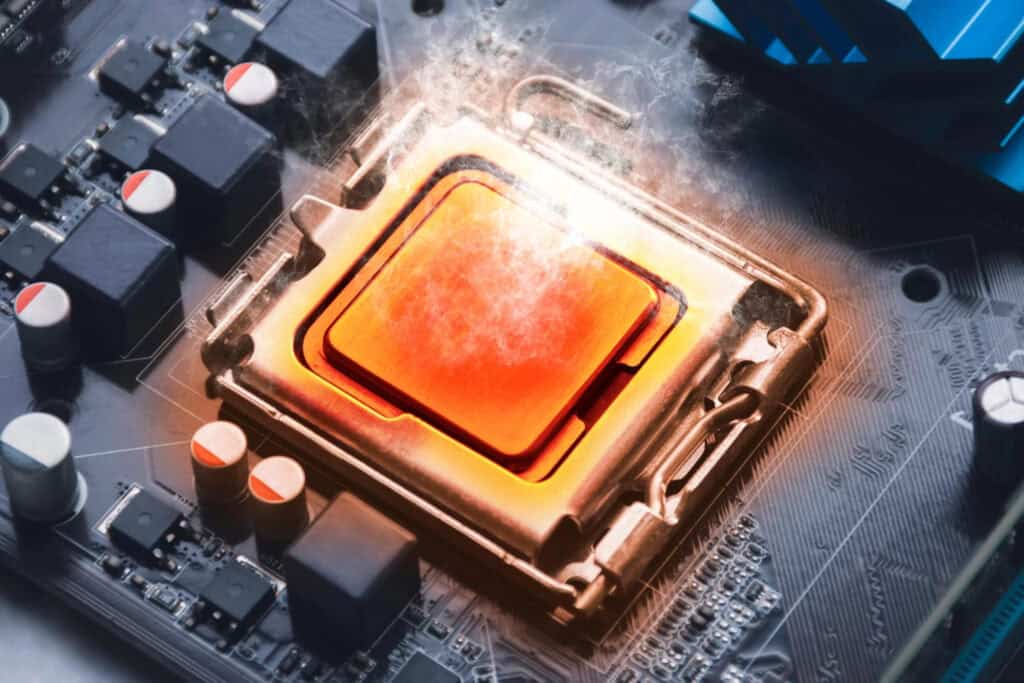
Excessive heat stands as the most pervasive and destructive of all Silent Killers That Shorten Your PC’s Lifespan. Every electronic component in your computer generates heat during normal operation, and this thermal energy must be effectively managed to prevent damage. When cooling systems fail to maintain optimal temperatures, a cascade of destructive processes begins that can permanently damage expensive components within hours or days.
The mechanisms by which heat destroys computer components are well-documented in engineering literature. Elevated temperatures cause metal expansion that stresses solder joints and circuit board traces. Semiconductors experience increased electron mobility that can lead to junction failures and reduced operational lifespan. Capacitors lose electrolytic fluid through evaporation, while magnetic storage media can suffer data corruption from thermal expansion. These processes make heat management one of the most critical factors in combating Silent Killers That Shorten Your PC’s Lifespan.
5 Silent Killers That Shorten Your Pc's Lifespan 6
Identifying Heat-Related Problems
Heat damage often manifests through subtle symptoms that users frequently attribute to other causes. System crashes during intensive tasks, random application freezes, and gradual performance degradation all commonly result from thermal stress. Graphics artifacts during gaming or video playback often indicate GPU overheating, while sudden system shutdowns typically trigger when CPU temperatures exceed safe thresholds. Recognizing these warning signs enables intervention before heat becomes one of the Silent Killers That Shorten Your PC’s Lifespan.
Monitoring software provides valuable insights into system temperatures, but interpretation requires understanding normal operating ranges for different components. Modern processors typically operate safely up to 80-85°C, while graphics cards may tolerate slightly higher temperatures. However, sustained operation near these limits accelerates component aging and increases failure probability. Maintaining temperatures well below maximum specifications significantly extends component lifespan and system reliability.
Effective Heat Management Strategies
Preventing heat from becoming one of the Silent Killers That Shorten Your PC’s Lifespan requires comprehensive thermal management strategies. Regular cleaning removes dust accumulation that insulates components and blocks airflow. Proper case ventilation ensures adequate air circulation, while quality thermal compounds maintain efficient heat transfer from processors to cooling systems. Upgrading stock cooling solutions can provide additional thermal headroom for demanding applications or aging systems.
Environmental factors significantly impact system temperatures and should be considered when positioning computers. Direct sunlight, proximity to heat sources, and restricted airflow around cases all contribute to elevated operating temperatures. Creating an optimal operating environment helps cooling systems function efficiently and reduces the likelihood that heat will join the Silent Killers That Shorten Your PC’s Lifespan affecting your system.
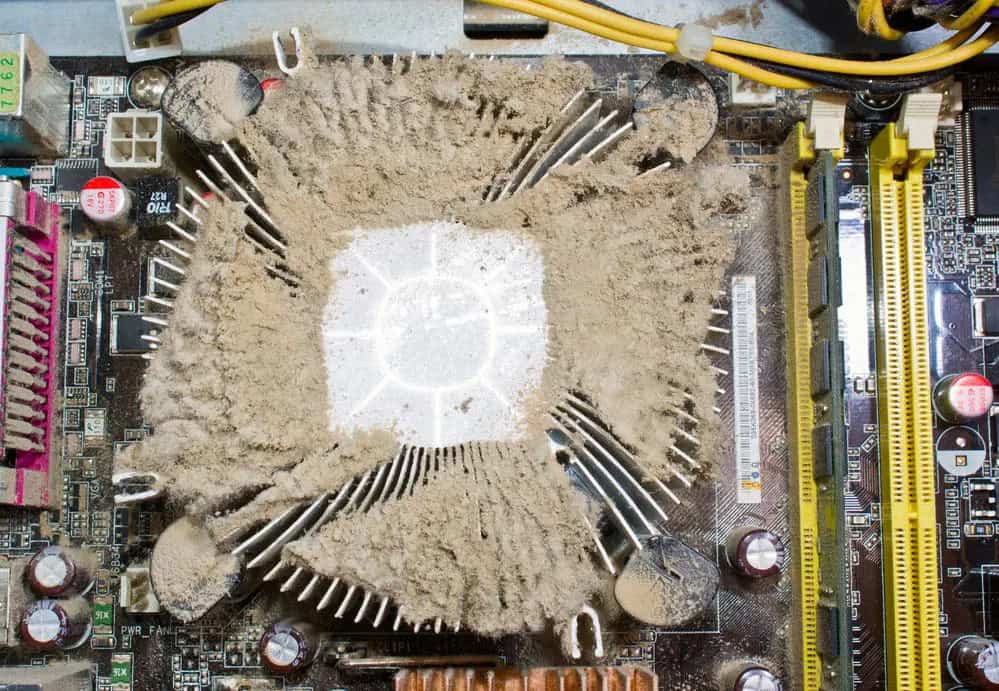
Dust represents one of the most underestimated Silent Killers That Shorten Your PC’s Lifespan, yet its impact on system reliability and component longevity is profound. This seemingly harmless household byproduct acts as an insulator, trapping heat around sensitive components while simultaneously providing conductive pathways that can cause electrical shorts. Over time, dust accumulation transforms from a minor maintenance issue into a serious threat to system stability and component survival.
The composition of household dust creates multiple pathways for component damage. Dead skin cells, textile fibers, and atmospheric particles combine with moisture to form conductive films on circuit boards. Metal particles from environmental sources can create short circuits between traces, while organic matter provides nutrients for microbial growth that can corrode connections. Understanding how dust becomes one of the Silent Killers That Shorten Your PC’s Lifespan emphasizes the importance of regular cleaning and preventive measures.
5 Silent Killers That Shorten Your Pc's Lifespan 7
The Progressive Nature of Dust Damage
Dust accumulation follows predictable patterns within computer systems, beginning with intake fans and progressing through airflow paths to settle on components throughout the case. Initial accumulation may have minimal impact on system operation, leading users to postpone cleaning until visible buildup occurs. However, this gradual progression masks the insidious nature of dust as one of the Silent Killers That Shorten Your PC’s Lifespan. By the time dust becomes visible, significant thermal impact has already begun.
The relationship between dust accumulation and system temperatures demonstrates the progressive nature of this threat. Clean systems maintain optimal airflow patterns and efficient heat dissipation. As dust builds up, airflow restriction forces cooling systems to work harder while simultaneously reducing their effectiveness. This combination creates a feedback loop where increasing temperatures accelerate component aging, making dust one of the most persistent Silent Killers That Shorten Your PC’s Lifespan.
Comprehensive Dust Management
Effective dust control requires both reactive cleaning and proactive prevention strategies. Regular internal cleaning using compressed air removes accumulated particles, while positive air pressure within cases helps prevent external dust infiltration. Quality air filters at intake points capture particles before they enter systems, though these filters require periodic replacement to maintain effectiveness. These measures help prevent dust from joining the Silent Killers That Shorten Your PC’s Lifespan affecting your equipment.
Environmental modifications can significantly reduce dust exposure and extend cleaning intervals. Positioning computers away from high-traffic areas reduces particle exposure, while maintaining appropriate humidity levels prevents static buildup that attracts dust. Regular room cleaning and air filtration systems create cleaner operating environments that reduce the particle load on computer cooling systems, helping combat one of the most common Silent Killers That Shorten Your PC’s Lifespan.
3. Power Supply Degradation: The Foundation Failure
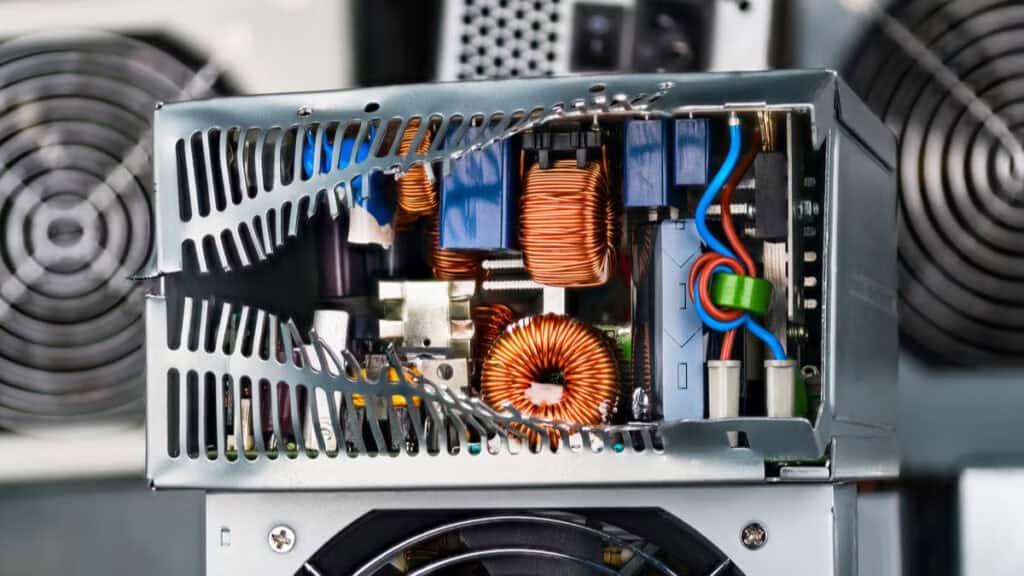
Power supply units represent critical system components whose failure can instantly destroy every connected device. As Silent Killers That Shorten Your PC’s Lifespan, degrading power supplies pose unique risks because their failure modes often involve catastrophic overvoltage or undervoltage conditions that damage downstream components. Unlike other system failures that might cause data loss or inconvenience, power supply failures frequently result in complete system destruction requiring expensive component replacement.
The gradual degradation of power supply components creates an insidious threat that develops over years of operation. Electrolytic capacitors slowly lose capacitance, increasing voltage ripple that stresses connected components. Switching transistors develop higher resistance, generating excess heat and reducing efficiency. Voltage regulation circuits drift from specification, creating potentially damaging conditions that make power supplies among the most dangerous Silent Killers That Shorten Your PC’s Lifespan.
5 Silent Killers That Shorten Your Pc's Lifespan 8
Recognizing Power Supply Warning Signs
Power supply degradation manifests through various symptoms that users often misattribute to other system components. Random crashes during high-load operations may indicate voltage instability, while coil whine or unusual noises suggest component stress. Graphics artifacts or system instability can result from insufficient power delivery to hungry components. Understanding these symptoms helps identify when power supplies join the Silent Killers That Shorten Your PC’s Lifespan threatening your system.
System monitoring tools can provide valuable insights into power supply health, though interpretation requires understanding normal voltage ranges and stability requirements. Modern systems typically operate on multiple voltage rails that must maintain tight tolerances for proper operation. Voltage measurements outside specification ranges indicate developing problems that could escalate into one of the most destructive Silent Killers That Shorten Your PC’s Lifespan.
Power Supply Protection Strategies
Preventing power supply degradation requires both quality component selection and proper operating conditions. Investing in high-quality units with robust designs and appropriate capacity ratings provides better long-term reliability. Operating power supplies well below their maximum ratings reduces stress and extends operational lifespan, helping prevent them from becoming Silent Killers That Shorten Your PC’s Lifespan.
External power conditioning can significantly improve power supply longevity by providing stable input conditions. Uninterruptible power supplies protect against voltage fluctuations and power outages, while surge protectors guard against transient overvoltage events. These protective measures create optimal operating conditions that reduce the likelihood of power supplies joining the Silent Killers That Shorten Your PC’s Lifespan affecting your system.
Lesser-Known Threats and Environmental Factors
Beyond the primary mechanical and thermal threats, several environmental and usage-related factors contribute to the Silent Killers That Shorten Your PC’s Lifespan. These factors often interact synergistically with primary threats, accelerating component degradation and reducing system reliability. Understanding these secondary threats enables comprehensive protection strategies that address all potential failure modes.
4. Electromagnetic Interference: The Invisible Disruptor
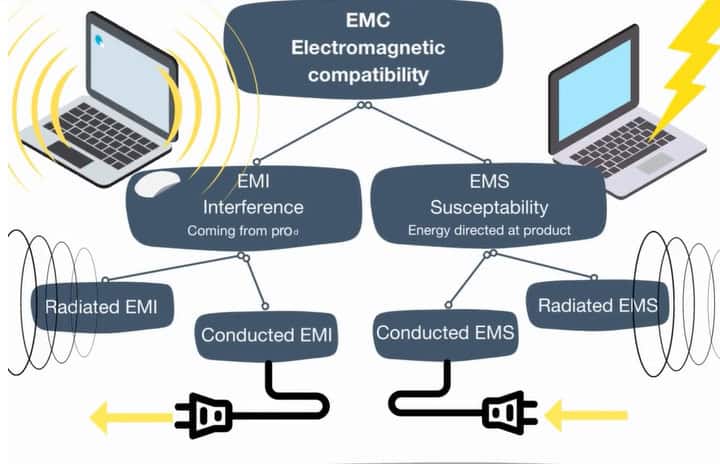
Electromagnetic interference represents one of the most overlooked Silent Killers That Shorten Your PC’s Lifespan, yet its impact on system stability and component longevity can be significant. Modern computers operate with increasingly sensitive electronics that can be disrupted by electromagnetic fields from nearby devices. Cell phones, wireless routers, fluorescent lights, and even household appliances generate electromagnetic energy that can interfere with computer operation and gradually degrade component performance.
The mechanisms by which electromagnetic interference affects computer systems are complex and varied. High-frequency signals can induce currents in circuit traces, causing data corruption and component stress. Magnetic fields can affect the operation of traditional hard drives and induce currents in power cables. Radio frequency interference can disrupt wireless communications and cause system instability. These diverse effects make electromagnetic interference one of the more subtle Silent Killers That Shorten Your PC’s Lifespan.
5 Silent Killers That Shorten Your Pc's Lifespan 9
Sources of Electromagnetic Interference
Common household and office devices contribute to the electromagnetic environment surrounding computers. Microwave ovens generate significant radio frequency energy during operation, while fluorescent and LED lighting can produce electrical noise across wide frequency ranges. Wireless devices including phones, tablets, and networking equipment constantly transmit signals that can interfere with sensitive computer circuits. Identifying and managing these sources helps reduce their contribution to Silent Killers That Shorten Your PC’s Lifespan.
Industrial and commercial environments often present more severe electromagnetic challenges. Electric motors, welding equipment, and high-power transmission lines generate strong electromagnetic fields that can affect computer operation at considerable distances. Even seemingly benign devices like copy machines and printers can produce electromagnetic interference that contributes to system instability and component degradation over time.
Mitigating Electromagnetic Threats
Protecting computers from electromagnetic interference requires both shielding and positioning strategies. Quality computer cases provide some electromagnetic shielding, though gaps around connections and ventilation can compromise protection. Positioning computers away from strong electromagnetic sources reduces exposure intensity, while proper cable management can minimize interference pickup. These measures help prevent electromagnetic effects from joining the Silent Killers That Shorten Your PC’s Lifespan.
Specialized shielding products can provide additional protection in challenging electromagnetic environments. Ferrite cores on power and data cables reduce high-frequency interference, while conductive gaskets improve case shielding effectiveness. For critical applications, dedicated electromagnetic compatibility measures may be necessary to ensure reliable operation and prevent electromagnetic interference from becoming one of the Silent Killers That Shorten Your PC’s Lifespan.
5. Voltage Fluctuations: The Grid-Based Menace
Electrical power quality issues represent some of the most destructive Silent Killers That Shorten Your PC’s Lifespan, yet many users remain unaware of their electrical environment’s impact on computer reliability. Modern electronics require clean, stable power to operate reliably, but electrical grids worldwide deliver power with varying quality levels. Voltage fluctuations, frequency variations, and harmonic distortion all contribute to component stress and premature failure.
The sensitivity of modern computer components to power quality issues has increased as transistor sizes shrink and operating voltages decrease. Small voltage variations that would have minimal impact on older equipment can cause significant stress in contemporary systems. Power supply units work harder to maintain stable output voltages when input power quality is poor, leading to increased component temperatures and reduced lifespan. These factors make power quality one of the most pervasive Silent Killers That Shorten Your PC’s Lifespan.
5 Silent Killers That Shorten Your Pc's Lifespan 10
Understanding Power Quality Problems
Power quality issues manifest in various forms that can damage computer equipment through different mechanisms. Voltage sags occur when electrical demand exceeds supply capacity, forcing components to operate outside design parameters. Voltage spikes result from switching operations or lightning strikes, potentially causing immediate component failure. Harmonic distortion from nonlinear loads creates heating in transformers and conductors throughout electrical systems.
The cumulative effect of poor power quality accelerates component aging even when individual events don’t cause immediate failure. Repeated exposure to voltage variations stresses power supply components, while frequency fluctuations can affect motor-driven devices like cooling fans and hard drives. Understanding these mechanisms helps identify when power quality joins the Silent Killers That Shorten Your PC’s Lifespan affecting your equipment.
Protecting computers from power quality issues requires understanding local electrical conditions and implementing appropriate mitigation strategies. Power quality monitoring can identify specific problems affecting your electrical environment, enabling targeted solutions. Voltage regulators provide stable output voltage despite input fluctuations, while isolation transformers reduce harmonic distortion and provide some surge protection.
Uninterruptible power supplies represent comprehensive solutions for power quality problems, providing battery backup during outages while conditioning power during normal operation. Quality UPS systems include voltage regulation, frequency stabilization, and harmonic filtering that address multiple power quality issues simultaneously. These investments help prevent power problems from joining the Silent Killers That Shorten Your PC’s Lifespan threatening your valuable equipment.
The Synergistic Effect of Combined Threats
Understanding how multiple Silent Killers That Shorten Your PC’s Lifespan interact creates opportunities for more effective protection strategies. Heat and dust work together to create particularly destructive conditions, while power quality problems can accelerate the effects of other threats. Electromagnetic interference can make systems more sensitive to power fluctuations, while degraded cooling systems become less effective at managing heat generated by struggling power supplies.
Comprehensive protection strategies must address all potential threats rather than focusing on individual issues. Systems exposed to multiple Silent Killers That Shorten Your PC’s Lifespan experience accelerated degradation that cannot be prevented by addressing threats individually. This synergistic effect explains why some computers fail much earlier than expected while others in similar environments continue operating reliably for many years.
Long-Term Protection and Maintenance Strategies
Developing effective defenses against the Silent Killers That Shorten Your PC’s Lifespan requires systematic approaches that address both immediate threats and long-term sustainability. Successful protection strategies combine proactive maintenance, environmental optimization, and quality component selection to create comprehensive defense systems. These integrated approaches can dramatically extend computer lifespan while maintaining optimal performance throughout the operational period.
Creating a Comprehensive Protection Plan
Effective protection against Silent Killers That Shorten Your PC’s Lifespan begins with understanding your specific environment and usage patterns. Computers in dusty workshops face different threats than systems in clean office environments. Gaming systems with high thermal loads require different cooling strategies than basic productivity computers. Developing protection plans tailored to specific situations ensures resources focus on the most relevant threats.
Regular assessment and plan updates help maintain protection effectiveness as conditions change. New equipment installations can introduce electromagnetic interference, while seasonal changes affect dust levels and ambient temperatures. Monitoring system health and adjusting protection strategies accordingly helps prevent emerging threats from joining the Silent Killers That Shorten Your PC’s Lifespan affecting your equipment.
Maintenance Scheduling and Documentation
Systematic maintenance scheduling prevents the accumulation of problems that contribute to premature system failure. Monthly cleaning prevents dust from reaching damaging levels, while quarterly thermal assessments identify developing cooling problems. Annual power supply testing can detect degradation before catastrophic failure occurs, helping prevent power problems from becoming Silent Killers That Shorten Your PC’s Lifespan.
Documentation of maintenance activities and system observations provides valuable data for optimizing protection strategies. Temperature logs can reveal seasonal patterns or developing problems, while cleaning records help establish appropriate intervals for different environments. This documentation enables data-driven decisions about component replacement and system upgrades that maximize protection against Silent Killers That Shorten Your PC’s Lifespan.
Investment in Quality and Longevity
Preventing Silent Killers That Shorten Your PC’s Lifespan often requires upfront investments in quality components and protection systems. Premium power supplies with better voltage regulation and higher efficiency ratings provide more reliable operation and longer service life. Quality cooling systems maintain lower operating temperatures that extend component lifespan throughout the system. These investments pay dividends through extended system life and reduced failure rates.
Environmental improvements can provide system-wide benefits that justify their cost through extended equipment life. Air filtration systems reduce dust exposure for all equipment in treated areas, while power conditioning protects every connected device. Climate control systems maintain optimal temperature and humidity levels that minimize multiple threat categories simultaneously. These comprehensive approaches address multiple Silent Killers That Shorten Your PC’s Lifespan through single investments.
The Economics of Prevention
Cost-benefit analysis strongly favors proactive measures over reactive repairs when combating Silent Killers That Shorten Your PC’s Lifespan. The cost of regular cleaning, quality components, and environmental improvements pales compared to premature system replacement or catastrophic component failure. Data loss and productivity impacts add significant hidden costs to system failures that make prevention even more attractive economically.
Long-term total cost of ownership calculations demonstrate the value of comprehensive protection strategies. Systems protected against Silent Killers That Shorten Your PC’s Lifespan operate reliably for many years beyond the lifespan of unprotected equipment. This extended operational life dramatically reduces the annualized cost of computing while providing better performance and reliability throughout the service period.
Taking Control of Your PC’s Destiny
The Silent Killers That Shorten Your PC’s Lifespan operate continuously, gradually degrading your valuable computing equipment through mechanisms that remain largely invisible until catastrophic failure occurs. Heat stress weakens solder joints and accelerates component aging, while dust accumulation creates thermal barriers and conductive pathways that threaten system stability. Power supply degradation introduces voltage instabilities that can destroy connected components, while electromagnetic interference and power quality issues create additional stress that compounds other threats.
Understanding these destructive forces empowers users to implement effective countermeasures that can dramatically extend computer lifespan and reliability. Regular cleaning prevents dust accumulation, quality cooling systems manage thermal stress, and power conditioning protects against electrical threats. Environmental improvements reduce exposure to multiple threat categories, while systematic maintenance ensures protection systems continue operating effectively over time.
The Path Forward
Implementing comprehensive protection against Silent Killers That Shorten Your PC’s Lifespan requires commitment to ongoing maintenance and appropriate investment in quality components and protection systems. The economic benefits of these investments become apparent through extended equipment life, reduced failure rates, and improved performance consistency. Most importantly, proactive protection provides peace of mind and productivity benefits that justify the effort required for implementation.
The technology landscape continues evolving, but the fundamental principles of protecting against Silent Killers That Shorten Your PC’s Lifespan remain constant. Clean operating environments, stable power, effective cooling, and quality components form the foundation of long-term computer reliability. Users who implement these protection strategies will enjoy many additional years of reliable service from their computing investments while avoiding the frustration and expense of premature system failure.
Taking action against these threats today ensures your computer will continue delivering reliable performance for years to come. The Silent Killers That Shorten Your PC’s Lifespan won’t wait for convenient timing to strike—their destructive work continues every moment your system operates. By implementing comprehensive protection strategies now, you take control of your computer’s destiny and maximize the return on your technology investment.
The Illusion of Stability in Modern Updates For most users, operating system updates are something that simply happen. They arrive quietly, often installing in the background, requiring little more than…
Macbook Neo, How Does It Compare To Air & Pro? Over the last few years the laptop market has experienced one of the most significant architectural changes in its history.…
Apple’s latest product announcements mark one of the most significant shifts in the Mac lineup in more than a decade. While Apple routinely updates its hardware with faster chips, incremental…
There is a particular kind of frustration that only a slow computer can produce. It is not dramatic. It is not urgent. It does not scream for attention. Instead, it…
In an era where nearly every aspect of personal computer maintenance and professional life is mediated through digital systems, your computer is no longer a luxury device — it is…
Phone says charging but battery not increasing is one of the most frustrating problems smartphone users face. You plug it in.The lightning bolt appears.It says “Charging.” But the battery percentage…
Apple’s rumour cycle always looks like a thousand disconnected leaks — until you line them up and notice the same themes repeating: AI-first silicon, camera and display differentiation, form-factor experiments (foldables / spatial…
Wi-Fi connected but no internet is one of the most frustrating messages you can see on a computer or laptop. The Wi-Fi icon shows full bars.It says “Connected.”But websites won’t…
Unfortunately, there was an error submitting your request.
Please try again later, or reach out to us directly. You can call us at +44 1429 280955 or email us at [email protected] for assistance. We’re here to help you get your computer back up and running!
We’ve received your booking, Our team will get in touch with you shortly to confirm the details. You’re one step closer to having your computer fixed! If you have any urgent questions, feel free to contact us. Otherwise, sit back, and we’ll handle the rest.