Most people replace their computers every 3-5 years, convinced that technology moves too fast for older machines to remain useful. However, with proper care and strategic upgrades, you can absolutely Make Your PC Last 10 Years while maintaining excellent performance throughout its extended lifespan. This comprehensive guide reveals the secrets to computer longevity, covering everything from hardware protection to software optimization strategies that will keep your system running smoothly for a full decade.
The key to successfully Make Your PC Last 10 Years lies in understanding that computers don’t automatically become obsolete—they become neglected. By implementing the right maintenance practices, upgrade strategies, and usage habits from day one, your computer can serve you reliably for far longer than most users imagine possible. The financial benefits alone make this approach worthwhile, as a well-maintained decade-old computer can outperform a poorly maintained three-year-old machine.
The Economics of Computer Longevity
When you Make Your PC Last 10 Years, the financial advantages become immediately apparent. Consider that a $1,500 computer used for ten years costs just $150 per year, compared to $500 annually if replaced every three years. This dramatic cost reduction allows you to invest in higher-quality components initially, creating a positive cycle where better parts support longer lifespans. Additionally, the environmental impact of extending computer life significantly reduces electronic waste and the carbon footprint associated with manufacturing new devices.
The secondary benefits of learning to Make Your PC Last 10 Years extend beyond simple cost savings. You’ll develop valuable technical skills, gain deeper understanding of computer systems, and build confidence in maintaining technology. This knowledge transfers to other devices and situations, making you more self-reliant and capable of helping others with their technology needs. Furthermore, a computer that lasts a decade typically maintains better resale value than frequently replaced machines, as its condition reflects careful ownership.
Understanding the Decade Timeline
To successfully Make Your PC Last 10 Years, it’s crucial to understand how computer needs evolve over time. The first three years typically require minimal intervention beyond basic maintenance. Years four through six often demand strategic upgrades to maintain performance with evolving software requirements. The final four years focus on careful management and targeted improvements to extend functionality. This timeline helps you plan investments and maintenance schedules that align with your computer’s changing needs.
Foundation Strategies to Make Your PC Last 10 Years
Creating a computer that will serve you for a full decade begins with establishing solid foundations from the moment you acquire your system. These fundamental strategies form the backbone of any successful long-term computer ownership plan.
Quality Components: The Foundation of Longevity
The most critical factor in your ability to Make Your PC Last 10 Years is starting with quality components. While budget builds can certainly last, investing in reputable brands and higher-grade components provides the reliability foundation necessary for extended service. Focus particularly on the power supply, motherboard, and cooling systems, as these components directly impact the lifespan of every other part in your system.
Power Supply: The Heart of Longevity
A quality power supply unit (PSU) is absolutely essential if you want to Make Your PC Last 10 Years. Cheap power supplies not only fail more frequently but can damage other components when they fail. Look for units with 80 Plus certification, which indicates energy efficiency and typically correlates with better build quality. Modular cables reduce clutter and improve airflow, while adequate wattage headroom (about 20% above your system’s requirements) reduces stress on the PSU and allows for future upgrades.
The relationship between power supply quality and system longevity cannot be overstated. To Make Your PC Last 10 Years, invest in a PSU from established manufacturers like Seasonic, Corsair, or EVGA. These companies typically offer warranties that reflect their confidence in product longevity. A quality PSU also provides cleaner power to sensitive components, reducing the electrical stress that can cause premature failure in processors, memory, and storage devices.
Motherboard Selection for the Long Term
Your motherboard choice significantly impacts your ability to Make Your PC Last 10 Years by determining upgrade possibilities and feature longevity. Select boards with recent chipsets that support current and upcoming standards. Look for multiple RAM slots, extra expansion slots, and current connectivity options like USB 3.2 and fast networking. A motherboard with good VRM (voltage regulator module) design will better support processor upgrades and provide more stable power delivery throughout the system’s life.
When evaluating motherboards to Make Your PC Last 10 Years, consider the manufacturer’s track record for BIOS updates and long-term support. Companies like ASUS, MSI, and Gigabyte typically provide BIOS updates for several years, adding compatibility with newer processors and fixing issues that arise. This ongoing support can significantly extend your system’s compatibility with new hardware and software.
Cooling Systems: Protecting Your Investment
Effective cooling is absolutely crucial when you want to Make Your PC Last 10 Years. Heat is the enemy of electronics, causing components to degrade faster and fail sooner. A well-designed cooling system not only prevents immediate damage but also slows the long-term aging process that affects all electronic components.
CPU Cooling for Longevity
To Make Your PC Last 10 Years, invest in cooling that exceeds your processor’s minimum requirements. A cooler that easily handles your CPU’s heat output will run its fans at lower speeds, reducing noise and fan wear while maintaining lower temperatures. Lower temperatures directly correlate with longer component life, as chemical processes that cause semiconductor degradation slow significantly at cooler operating temperatures.
Quality air coolers from manufacturers like Noctua, be quiet!, or Cooler Master can Make Your PC Last 10 Years by providing excellent cooling performance with minimal maintenance requirements. For enthusiasts, liquid cooling systems offer superior heat dissipation but require more maintenance and have additional failure points. Whichever cooling solution you choose, ensure it’s appropriately sized for your processor and case, with adequate clearance for memory modules and other components.
Case Airflow and System Cooling
Proper case airflow is essential to Make Your PC Last 10 Years by maintaining reasonable temperatures for all components, not just the CPU. Plan your case fan configuration to create positive pressure (more intake than exhaust), which helps prevent dust accumulation while ensuring adequate air circulation. Position intake fans at the front or bottom of the case, with exhaust fans at the rear and top.
The relationship between case cooling and component longevity makes airflow planning crucial when you want to Make Your PC Last 10 Years. Graphics cards, memory modules, storage drives, and power supplies all generate heat and benefit from good airflow. Monitor system temperatures regularly and adjust fan curves to balance cooling performance with noise levels. Quality case fans from companies like Noctua or be quiet! may cost more initially but provide years of reliable, quiet operation.
Storage Strategy for the Long Haul
Your storage configuration plays a vital role in your ability to Make Your PC Last 10 Years. Modern storage technologies offer different advantages for long-term use, and understanding these differences helps you make informed decisions about your system’s storage architecture.
SSD Selection and Management
Solid-state drives (SSDs) have revolutionized computer storage and are essential components when you want to Make Your PC Last 10 Years. Unlike traditional hard drives, SSDs have no moving parts, making them more resistant to physical damage and generally more reliable over time. However, SSDs do have finite write cycles, making proper selection and management important for longevity.
To Make Your PC Last 10 Years with SSD storage, choose drives with higher TBW (total bytes written) ratings and consider over-provisioning to extend drive life. Modern SSDs from Samsung, Crucial, and Western Digital offer excellent longevity when properly managed. Enable TRIM in your operating system to maintain performance over time, and avoid filling SSDs to capacity, as this can reduce both performance and lifespan.
Backup Storage Solutions
Even with the most reliable primary storage, backup solutions are essential to Make Your PC Last 10 Years without data loss. Implement a comprehensive backup strategy that includes both local and cloud storage options. External hard drives provide cost-effective local backup for large amounts of data, while cloud services offer protection against physical disasters and theft.
The 3-2-1 backup rule becomes particularly important when you Make Your PC Last 10 Years: maintain three copies of important data, store them on at least two different media types, and keep one copy offsite. This strategy protects against various failure modes and ensures your data remains safe throughout your computer’s extended lifespan. Automated backup solutions reduce the maintenance burden and increase the likelihood of consistent data protection.
Maintenance Protocols to Make Your PC Last 10 Years
Establishing and following consistent maintenance protocols is absolutely crucial for anyone seeking to Make Your PC Last 10 Years. These protocols address both hardware and software aspects of computer care, preventing small issues from becoming major problems.
Physical Maintenance and Cleaning
Regular physical maintenance forms the foundation of any successful plan to Make Your PC Last 10 Years. Dust, the silent killer of computer components, accumulates gradually but causes significant problems when left unchecked. Establishing a regular cleaning schedule prevents dust-related overheating and component failure.
Dust Management and Cleaning Schedules
To Make Your PC Last 10 Years, implement a quarterly cleaning schedule that addresses all dust accumulation points. Desktop computers require more frequent attention than laptops due to their larger air volumes and multiple intake points. Use compressed air to blow dust from heat sinks, fans, and filters, working from inside the case outward to avoid pushing dust deeper into components.
The relationship between dust control and component longevity makes regular cleaning essential when you want to Make Your PC Last 10 Years. Dust acts as an insulator, preventing heat dissipation and forcing cooling systems to work harder. This increased workload reduces fan lifespan and causes components to operate at higher temperatures, accelerating the aging process. A clean computer runs cooler, quieter, and more efficiently throughout its extended lifespan.
Component Inspection and Maintenance
Beyond cleaning, regular component inspection helps Make Your PC Last 10 Years by identifying potential issues before they cause failures. Check cable connections for looseness or damage, examine capacitors for bulging or leaking, and verify that all fans spin freely without excessive noise. Replace thermal paste between the CPU and cooler every 3-4 years to maintain optimal heat transfer.
Visual inspection during cleaning sessions allows you to Make Your PC Last 10 Years by catching problems early. Look for signs of wear on moving parts, corrosion on connections, or discoloration that might indicate overheating. Document any changes or concerns, as patterns over time can help predict and prevent failures. This proactive approach transforms you from a reactive user into a preventive maintenance expert.
Software Maintenance and Optimization
Software maintenance is equally important as hardware care when you want to Make Your PC Last 10 Years. Operating systems and applications accumulate digital clutter over time, reducing performance and stability. Regular software maintenance prevents these issues and keeps your system running smoothly.
Operating System Management
To Make Your PC Last 10 Years, maintain your operating system through regular updates, cleanup, and optimization. Install security updates promptly to protect against vulnerabilities, but consider deferring major feature updates until they’ve been available for several months. This approach balances security with stability, reducing the risk of compatibility issues with your existing software and hardware.
Registry maintenance, disk cleanup, and startup program management all contribute to your ability to Make Your PC Last 10 Years. Use built-in tools like Disk Cleanup and System File Checker to remove unnecessary files and repair system corruption. Regularly review startup programs and disable those you don’t need, as fewer startup items mean faster boot times and lower resource usage throughout your computer’s extended lifespan.
Application Lifecycle Management
Managing installed applications becomes increasingly important as you Make Your PC Last 10 Years. Regularly audit your software installations, removing programs you no longer use and updating those you keep. Each installed application represents a potential security risk and performance drain, so maintaining a lean software environment supports both security and performance over time.
The key to successful application management while seeking to Make Your PC Last 10 Years lies in choosing software with strong long-term support records. Prefer applications from established developers who regularly update their products and provide backward compatibility. Avoid software that requires frequent reinstallation or shows signs of abandonment, as these can become security risks or compatibility problems over time.
Hardware Monitoring and Preventive Care
Continuous hardware monitoring enables you to Make Your PC Last 10 Years by detecting problems before they cause failures. Modern computers include numerous sensors that provide valuable information about system health, and learning to interpret this data helps you maintain optimal performance.
Temperature Monitoring and Management
Temperature monitoring is crucial when you want to Make Your PC Last 10 Years because heat directly impacts component lifespan. Use software like HWiNFO64, Core Temp, or MSI Afterburner to track temperatures during various usage scenarios. Establish baseline temperatures for your components and monitor for increases that might indicate cooling problems or dust accumulation.
The relationship between temperature and component longevity makes monitoring essential to Make Your PC Last 10 Years. Create temperature logs during different activities to understand your system’s thermal behavior. If temperatures consistently exceed manufacturer recommendations, investigate cooling improvements or workload adjustments. This proactive approach prevents thermal damage and extends component life significantly.
Performance Benchmarking and Tracking
Regular performance benchmarking helps Make Your PC Last 10 Years by establishing baselines and tracking degradation over time. Run standardized tests quarterly to measure CPU, GPU, memory, and storage performance. Significant performance decreases often indicate developing problems that can be addressed before they cause failures.
Maintaining performance records throughout your computer’s life enables you to Make Your PC Last 10 Years by identifying trends and planning upgrades strategically. Compare current performance to historical data to understand whether changes result from software bloat, hardware degradation, or configuration issues. This data-driven approach to system management helps you make informed decisions about maintenance and upgrades.
Strategic Upgrades to Make Your PC Last 10 Years
The ability to Make Your PC Last 10 Years depends heavily on strategic upgrades that keep your system relevant as technology advances. Rather than replacing entire systems, targeted upgrades can provide significant performance improvements at a fraction of the cost.
Memory and Storage Upgrades
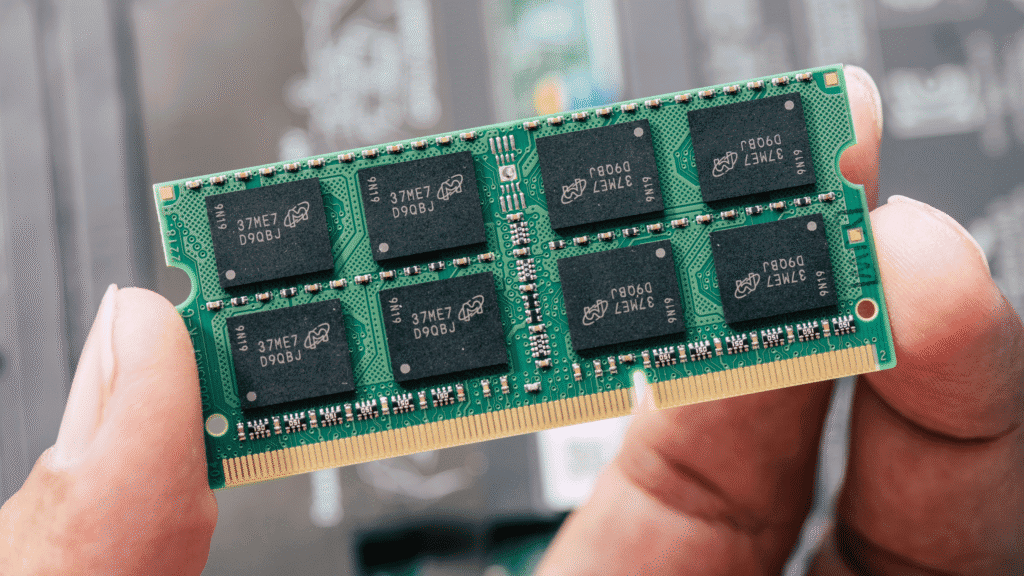
RAM and storage upgrades often provide the most noticeable improvements when you want to Make Your PC Last 10 Years. These components directly impact system responsiveness and multitasking capability, making them excellent candidates for strategic enhancement.
RAM Expansion Strategy
To Make Your PC Last 10 Years, plan RAM upgrades that align with evolving software requirements. Start with a moderate amount of high-quality RAM, leaving room for future expansion. As applications become more memory-intensive, additional RAM prevents performance degradation and extends your system’s useful life. Choose RAM with good overclocking potential, as this provides additional headroom for future needs.
Memory timing and compatibility become important considerations when you Make Your PC Last 10 Years. Select RAM that matches your motherboard’s specifications and consider future upgrade paths. If your motherboard supports higher-speed RAM than your current modules, you can upgrade to faster memory later while maintaining compatibility with your existing setup.
How To Make Your Pc Last 10 Years (Yes, Really) 6
Storage Evolution and Expansion
Storage technology continues advancing rapidly, making storage upgrades valuable for anyone seeking to Make Your PC Last 10 Years. Start with a moderate-capacity SSD for the operating system and applications, then add storage as needed. This approach allows you to benefit from improving SSD technology and decreasing prices over time.
The strategic approach to storage expansion when you Make Your PC Last 10 Years involves understanding different storage tiers. Use fast SSDs for frequently accessed files and applications, while larger, slower storage handles archives and media files. This tiered approach maximizes performance while controlling costs, and it can evolve as your needs change throughout your computer’s decade-long lifespan.
Graphics and Processing Power
Graphics and processing upgrades can significantly extend your ability to Make Your PC Last 10 Years by keeping pace with demanding applications and games. These upgrades often provide the most dramatic performance improvements, though they require careful consideration of power and cooling requirements.
Graphics Card Upgrade Timeline
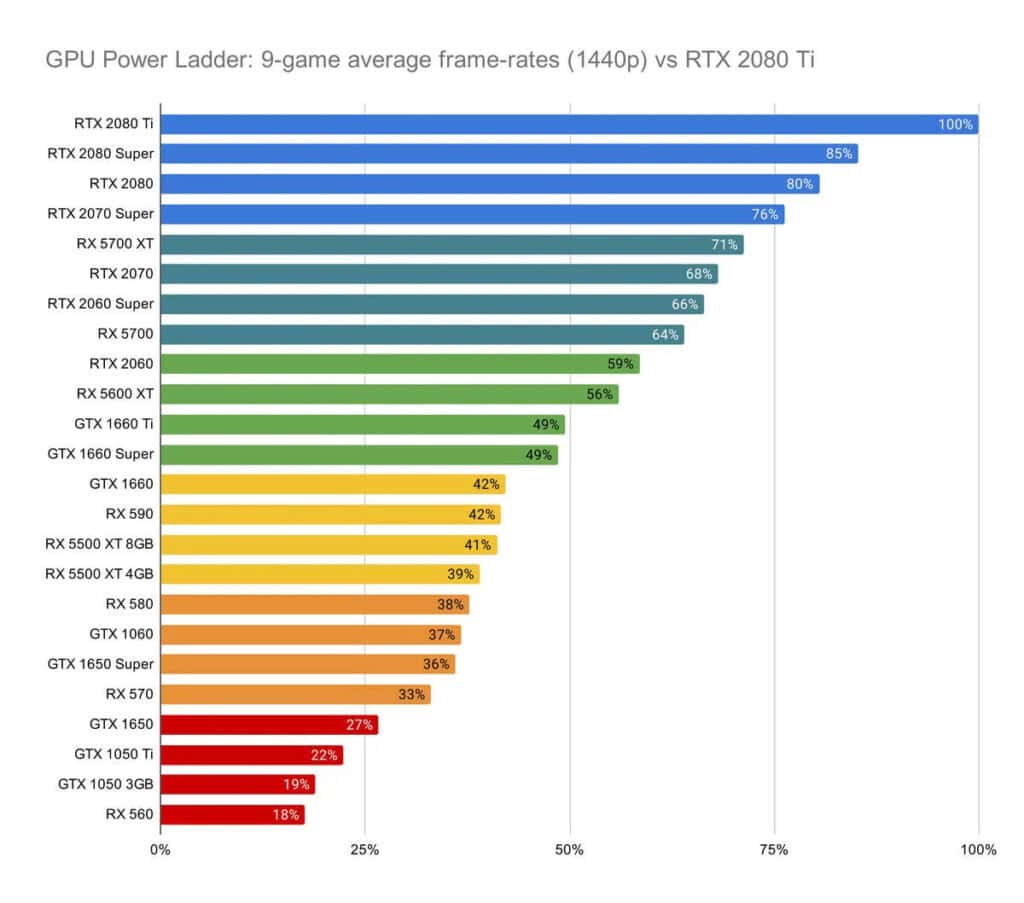
To Make Your PC Last 10 Years, plan graphics card upgrades every 4-6 years, depending on your usage requirements. Graphics technology advances rapidly, and newer cards often provide substantial improvements in performance per watt. When upgrading, ensure your power supply can handle the new card’s requirements and that your case provides adequate cooling.
The timing of graphics upgrades when you Make Your PC Last 10 Years depends on your specific needs and budget. Gamers may need more frequent upgrades to maintain high settings, while general users might find that mid-range cards serve them well for many years. Consider buying slightly more powerful graphics cards than your current needs require, as this provides headroom for future software requirements.
How To Make Your Pc Last 10 Years (Yes, Really) 7
Processor Considerations
Processor upgrades can help Make Your PC Last 10 Years, but they’re often more complex than other component upgrades. Modern processors tend to have longer useful lives than in previous generations, making CPU upgrades less critical for most users. However, if your motherboard supports newer processors, a CPU upgrade can provide significant performance improvements.
When considering processor upgrades to Make Your PC Last 10 Years, evaluate whether your current CPU creates bottlenecks in your typical usage scenarios. If your processor handles your workload comfortably, focus upgrade investments on other components. However, if you’re experiencing CPU-limited performance, a processor upgrade can breathe new life into your system.
Peripheral and Connectivity Upgrades
Peripheral and connectivity upgrades often get overlooked but can significantly impact your ability to Make Your PC Last 10 Years. These upgrades keep your system compatible with evolving standards and improve your overall computing experience.
USB and Connectivity Expansion
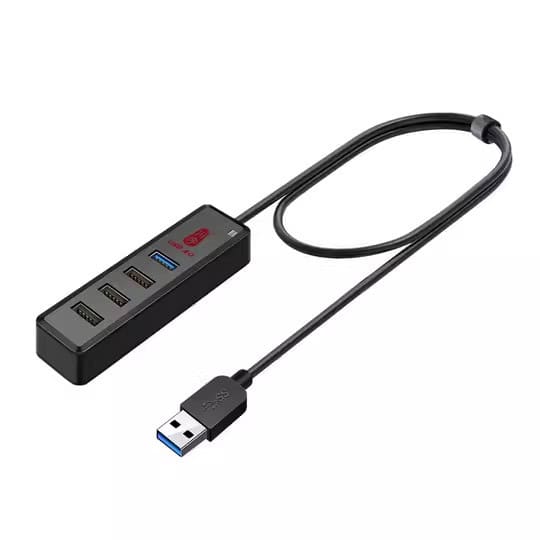
To Make Your PC Last 10 Years, ensure your system maintains compatibility with evolving connectivity standards. USB-C and Thunderbolt adoption continues growing, and adding these connections through expansion cards or hubs keeps your system current. Network adapter upgrades can also provide significant improvements as internet speeds increase and new networking standards emerge.
The importance of connectivity upgrades when you Make Your PC Last 10 Years extends beyond simple convenience. Faster storage connections enable better external backup solutions, while improved networking supports cloud services and remote work requirements. Plan connectivity upgrades that align with your evolving usage patterns and the peripheral devices you expect to use.
How To Make Your Pc Last 10 Years (Yes, Really) 8
Audio and Display Enhancements
Audio and display upgrades can enhance your ability to Make Your PC Last 10 Years by improving your daily computing experience. Sound cards or external DACs provide better audio quality, while display upgrades can reduce eye strain during long computing sessions. These upgrades often provide quality-of-life improvements that make using an older computer more enjoyable.
Consider how audio and display upgrades contribute to your goal to Make Your PC Last 10 Years by improving ergonomics and reducing fatigue. Better displays with appropriate brightness and color accuracy reduce eye strain, while quality audio equipment makes multimedia consumption more enjoyable. These improvements help maintain your satisfaction with an aging system, reducing the temptation to replace it prematurely.
Advanced Techniques to Make Your PC Last 10 Years
Advanced users can employ sophisticated techniques to Make Your PC Last 10 Years through careful optimization and proactive management strategies. These approaches require more technical knowledge but can significantly extend system lifespan and performance.
Power Management and Efficiency
Effective power management plays a crucial role in your ability to Make Your PC Last 10 Years by reducing component stress and heat generation. Modern computers include sophisticated power management features that can extend component life when properly configured.
Advanced Power Settings
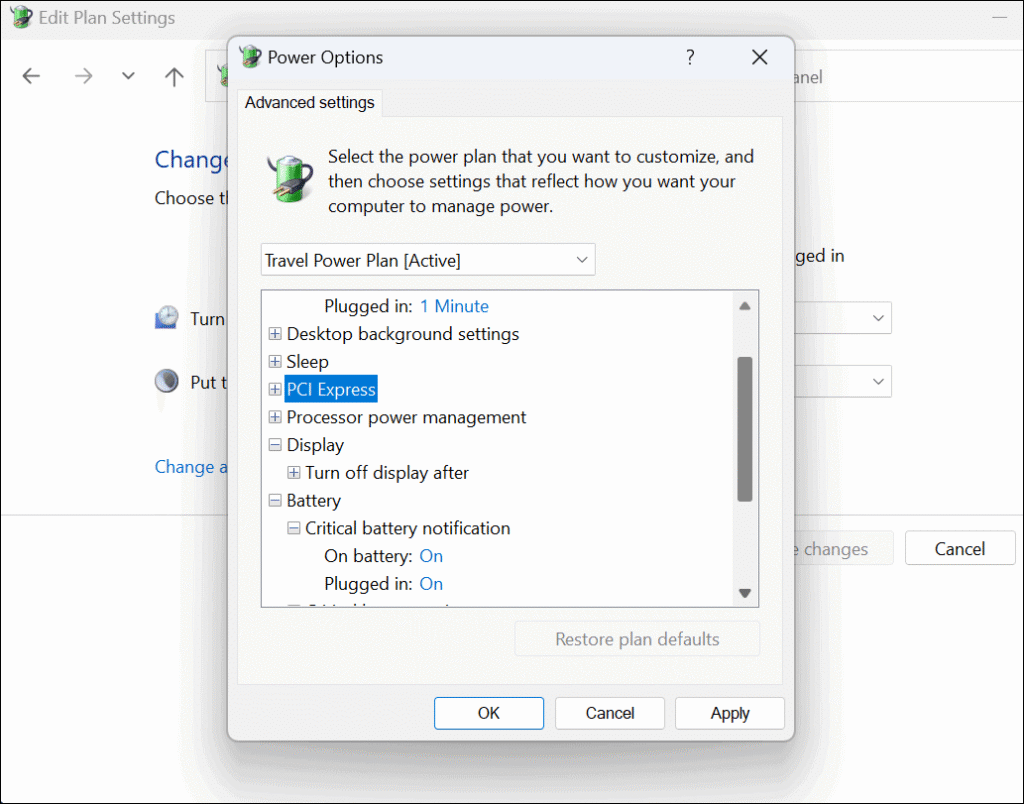
To Make Your PC Last 10 Years, configure advanced power settings that balance performance with component longevity. Use power plans that reduce processor speed and voltage when full performance isn’t needed, as this decreases heat generation and extends component life. Configure hard drive spin-down times and display sleep settings to reduce wear on mechanical components.
The relationship between power management and component longevity makes advanced configuration essential when you want to Make Your PC Last 10 Years. Modern processors can dynamically adjust their speed and voltage based on workload, significantly reducing power consumption and heat generation during light usage. Learning to optimize these settings for your specific usage patterns can substantially extend your system’s lifespan.
How To Make Your Pc Last 10 Years (Yes, Really) 9
Thermal Management Strategies
Advanced thermal management techniques can help Make Your PC Last 10 Years by maintaining optimal operating temperatures under all conditions. Custom fan curves that respond to component temperatures provide better cooling efficiency than default settings. Undervolting processors and graphics cards can reduce heat generation while maintaining performance levels.
The key to effective thermal management when you Make Your PC Last 10 Years lies in understanding the relationship between temperature, performance, and longevity. Create thermal profiles for different usage scenarios, using aggressive cooling during demanding tasks and quieter operation during light usage. This approach maximizes component life while maintaining appropriate performance levels.
System Optimization and Tuning
System optimization becomes increasingly important as you Make Your PC Last 10 Years and software requirements evolve. Advanced tuning techniques can extract additional performance from aging hardware while maintaining system stability.
Registry and File System Optimization
To Make Your PC Last 10 Years, implement advanced registry and file system optimization techniques that maintain system responsiveness. Regular registry cleaning removes orphaned entries that can slow system startup and operation. File system optimization, including defragmentation scheduling and SSD optimization, maintains storage performance throughout your computer’s extended lifespan.
The importance of system optimization when you Make Your PC Last 10 Years cannot be understated. Operating systems accumulate digital clutter over time, and this clutter can significantly impact performance on older hardware. Implementing systematic optimization procedures helps maintain the snappy performance that makes using an older computer enjoyable rather than frustrating.
How To Make Your Pc Last 10 Years (Yes, Really) 10
Service and Process Management
Advanced service and process management techniques help Make Your PC Last 10 Years by reducing resource usage and eliminating unnecessary background activities. Disable services you don’t need, optimize startup programs, and manage automatic updates to reduce system load. This approach becomes particularly important as hardware ages and has less performance headroom.
Learning to manage system processes effectively when you Make Your PC Last 10 Years requires understanding what different services do and how they impact system performance. Use tools like Process Explorer and Services.msc to identify resource-intensive processes and determine whether they’re necessary for your usage patterns. This knowledge helps you maintain a lean, efficient system throughout its extended lifespan.
Virtualization and Environment Management
Virtualization technologies can paradoxically help Make Your PC Last 10 Years by isolating potentially problematic software and maintaining clean system environments. Advanced users can leverage these tools to extend system life and maintain optimal performance.
Virtual Machine Strategies
To Make Your PC Last 10 Years, consider using virtual machines for risky or resource-intensive applications. This approach isolates potentially problematic software from your main system while allowing you to run legacy applications that might otherwise require keeping older hardware. Virtual machines also provide excellent testing environments for software updates and system changes.
The strategic use of virtualization when you Make Your PC Last 10 Years extends beyond simple isolation. Virtual machines can help you maintain clean system environments by containing software installations and preventing registry bloat. This approach requires adequate RAM and processing power but can significantly extend your system’s useful life by maintaining optimal performance characteristics.
Container and Sandbox Technologies
Container technologies and sandboxing can help Make Your PC Last 10 Years by providing isolated environments for different applications and use cases. These technologies prevent application conflicts and reduce the risk of system contamination from poorly behaved software. While more complex than traditional installation methods, containerization can maintain system cleanliness throughout your computer’s extended lifespan.
Understanding how containers and sandboxes contribute to your ability to Make Your PC Last 10 Years requires recognizing their role in system maintenance. These technologies prevent the accumulation of software artifacts that can slow system performance over time. While they require more sophisticated management, the payoff in system longevity and performance can be substantial for advanced users.
Your Path to Make Your PC Last 10 Years
Successfully implementing a strategy to Make Your PC Last 10 Years requires commitment, planning, and consistent execution. The techniques and strategies outlined in this guide provide a comprehensive roadmap for extending your computer’s useful life far beyond typical expectations. The key lies in understanding that computer longevity results from deliberate actions rather than chance.
Building Your Longevity Plan
To Make Your PC Last 10 Years, create a personalized plan that addresses your specific usage patterns, technical comfort level, and budget constraints. Start with the fundamental strategies of quality components and proper cooling, then layer on maintenance protocols and strategic upgrades. This systematic approach ensures that every aspect of your system receives appropriate attention throughout its extended lifespan.
The financial and environmental benefits of successfully implementing a plan to Make Your PC Last 10 Years justify the effort required. Beyond the obvious cost savings, you’ll develop valuable technical skills and gain confidence in managing technology. This knowledge serves you well throughout your computing life and often proves valuable in professional contexts.
Sustaining Long-term Success
The ultimate success of your efforts to Make Your PC Last 10 Years depends on maintaining consistent habits and staying adaptable as technology evolves. Regular maintenance, strategic upgrades, and proactive problem-solving form the foundation of computer longevity. Remember that the goal isn’t just to keep your computer running for ten years, but to keep it running well enough to meet your needs throughout that period.
Your commitment to Make Your PC Last 10 Years represents more than simple cost savings—it demonstrates environmental responsibility and technical competence. As you implement these strategies, you’ll find that the satisfaction of maintaining a high-performing system for an extended period provides rewards beyond the purely financial. The knowledge and skills you develop will serve you well in all your future technology decisions, making this investment in learning doubly valuable.
By following the comprehensive strategies outlined in this guide, you now have the tools and knowledge necessary to Make Your PC Last 10 Years while maintaining excellent performance throughout its extended lifespan. The journey requires dedication, but the rewards—financial, environmental, and personal—make it an endeavor worth pursuing.
The Illusion of Stability in Modern Updates For most users, operating system updates are something that simply happen. They arrive quietly, often installing in the background, requiring little more than…
Macbook Neo, How Does It Compare To Air & Pro? Over the last few years the laptop market has experienced one of the most significant architectural changes in its history.…
Apple’s latest product announcements mark one of the most significant shifts in the Mac lineup in more than a decade. While Apple routinely updates its hardware with faster chips, incremental…
There is a particular kind of frustration that only a slow computer can produce. It is not dramatic. It is not urgent. It does not scream for attention. Instead, it…
In an era where nearly every aspect of personal computer maintenance and professional life is mediated through digital systems, your computer is no longer a luxury device — it is…
Phone says charging but battery not increasing is one of the most frustrating problems smartphone users face. You plug it in.The lightning bolt appears.It says “Charging.” But the battery percentage…
Apple’s rumour cycle always looks like a thousand disconnected leaks — until you line them up and notice the same themes repeating: AI-first silicon, camera and display differentiation, form-factor experiments (foldables / spatial…
Wi-Fi connected but no internet is one of the most frustrating messages you can see on a computer or laptop. The Wi-Fi icon shows full bars.It says “Connected.”But websites won’t…
Unfortunately, there was an error submitting your request.
Please try again later, or reach out to us directly. You can call us at +44 1429 280955 or email us at sales@kingfishercomputers.co.uk for assistance. We’re here to help you get your computer back up and running!
We’ve received your booking, Our team will get in touch with you shortly to confirm the details. You’re one step closer to having your computer fixed! If you have any urgent questions, feel free to contact us. Otherwise, sit back, and we’ll handle the rest.