8 Common PC Building Myths (And the Truth Behind Them)
Adam Fornal
July 5th, 2025
Table of Contents
Building your own computer has become increasingly popular as more people recognize the benefits of custom systems. However, numerous misconceptions persist about the PC building process, deterring many potential builders from taking the plunge. These Common PC Building Myths range from concerns about difficulty and cost to worries about compatibility and performance. Understanding the truth behind these myths empowers you to make informed decisions about whether building your own PC is right for you.
The prevalence of Common PC Building Myths stems from outdated information, marketing tactics, and well-meaning but misguided advice from friends or online forums. Many of these myths originated during the early days of personal computing when building PCs required extensive technical knowledge and involved significant risks. Today’s reality is far different, with standardized components, improved manufacturing quality, and abundant resources making PC building more accessible than ever before.
Why These Myths Persist in the Modern Era
Despite technological advances, Common PC Building Myths continue to circulate because they tap into genuine concerns that many people have about working with expensive electronics. Fear of damaging components, uncertainty about compatibility, and concerns about warranty coverage are legitimate worries that these myths exploit. Additionally, some retailers and manufacturers benefit from perpetuating certain myths that discourage DIY building in favor of pre-built systems.
Understanding why Common PC Building Myths persist helps us address them more effectively. Social media and online forums can amplify misinformation, especially when shared by well-intentioned individuals who experienced problems during their own builds. Without proper context or updated information, these isolated incidents become generalized warnings that discourage others from attempting their own builds. The rapid pace of technological change also means that advice from even a few years ago might no longer apply to current hardware.
The Cost of Believing These Myths
When you accept Common PC Building Myths as truth, you might miss out on significant benefits that custom building offers. Pre-built systems often include unnecessary software, underpowered components in certain areas, or proprietary parts that limit future upgrades. You might pay premium prices for brand names while receiving inferior performance compared to a thoughtfully assembled custom system. More importantly, you lose the educational value and satisfaction that comes from understanding how your computer works.
The financial implications of Common PC Building Myths extend beyond initial purchase prices. When you don’t understand your system’s components, you’re more likely to make poor upgrade decisions or pay for unnecessary repairs. Building your own PC teaches you valuable troubleshooting skills that can save money throughout your computer’s lifespan. You also gain the confidence to perform routine maintenance tasks that might otherwise require professional service.
Debunking the Most Persistent PC Building Myths
Let’s examine eight of the most pervasive Common PC Building Myths and reveal the truth behind each one. By understanding the reality of modern PC building, you can make decisions based on facts rather than fear or misinformation.
Myth 1: PC Building Is Too Complicated for Average Users
One of the most persistent Common PC Building Myths is that assembling a computer requires extensive technical expertise or engineering knowledge. This myth suggests that only IT professionals or dedicated hobbyists can successfully build PCs without damaging expensive components or creating unstable systems.
The Reality of Modern PC Building
Today’s PC building process is remarkably straightforward, comparable to assembling furniture with clear instructions. Modern components use standardized connectors that only fit in the correct locations, making it nearly impossible to connect things incorrectly. Motherboards include color-coded headers, CPUs have alignment markers, and power supplies feature keyed connectors that prevent improper installation. These design improvements have eliminated most of the guesswork that once made PC building challenging.
The abundance of resources available to modern builders further dispels this myth among Common PC Building Myths. Video tutorials, step-by-step guides, and community forums provide comprehensive support for builders of all experience levels. Manufacturers now include detailed installation manuals with clear diagrams and troubleshooting sections. Many components also feature tool-free installation mechanisms that simplify the building process even further.
Skills Required vs. Skills Assumed
When examining Common PC Building Myths about complexity, it’s important to distinguish between actual requirements and perceived barriers. PC building requires careful attention to detail, the ability to follow instructions, and basic manual dexterity—skills that most people already possess. You don’t need to understand electrical engineering principles or memorize technical specifications to successfully assemble a computer.
The tools required for PC building are minimal and inexpensive. A Phillips head screwdriver handles most installation tasks, while an anti-static wrist strap provides additional protection for sensitive components. Some builders prefer magnetic screwdrivers or additional tools for convenience, but these aren’t necessary for successful builds. This accessibility challenges the complexity-focused Common PC Building Myths that suggest extensive tool collections or specialized knowledge are prerequisites.
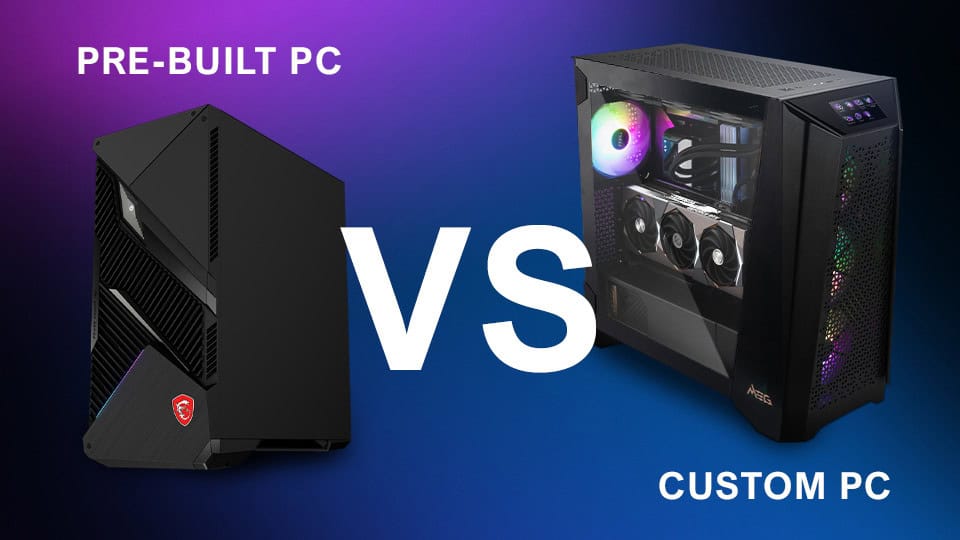
Myth 2: Pre-Built PCs Always Offer Better Value
Another prevalent entry among Common PC Building Myths claims that pre-built systems provide superior value through bulk purchasing power and manufacturer optimizations. This myth suggests that individual consumers cannot match the pricing or performance that large manufacturers achieve through economies of scale.
Understanding True Value in PC Systems
When evaluating Common PC Building Myths about value, it’s essential to consider the complete picture beyond initial purchase prices. Pre-built systems often include compromises that aren’t immediately apparent, such as generic power supplies, limited RAM configurations, or motherboards with minimal upgrade potential. These cost-cutting measures can significantly impact long-term value and system longevity.
Custom builds allow you to allocate your budget according to your specific needs and priorities. If you prioritize gaming performance, you can invest more in graphics cards and high-refresh displays while choosing adequate but not premium components elsewhere. For content creation, you might emphasize CPU performance and memory capacity over gaming-specific features. This flexibility challenges Common PC Building Myths that suggest pre-built systems offer optimal configurations for everyone.
Hidden Costs and Limitations
Pre-built systems often include hidden costs that aren’t immediately apparent, contradicting Common PC Building Myths about their value proposition. Bloatware and trial software can degrade performance and require time to remove. Proprietary components might necessitate expensive manufacturer-specific replacements during repairs or upgrades. Warranty terms might void coverage for user modifications, limiting your ability to customize or upgrade your system.
8 Common Pc Building Myths (And The Truth Behind Them) 5
The upgrade limitations in many pre-built systems represent a significant long-term cost that Common PC Building Myths often overlook. Manufacturers frequently use proprietary motherboards, power supplies, or cooling solutions that prevent standard component upgrades. When upgrade time arrives, you might need to replace multiple components simultaneously rather than upgrading individual parts as needed. This limitation can make pre-built systems more expensive over their useful lifespan.
Myth 3: You’ll Void All Warranties by Building Your Own PC
Fear of warranty loss represents one of the most concerning Common PC Building Myths for potential builders. This myth suggests that assembling your own PC automatically voids all component warranties, leaving you without recourse if parts fail during the warranty period.
Understanding Component Warranties
Modern component warranties typically cover manufacturing defects regardless of how the part is used, directly contradicting this entry among Common PC Building Myths. Graphics cards, processors, memory modules, and storage devices carry manufacturer warranties that remain valid whether installed in custom builds or pre-built systems. These warranties specifically protect against component failures rather than system-level issues.
The key to maintaining warranty coverage while building your own PC lies in proper handling and installation practices. Physical damage from mishandling, excessive force, or improper installation can void warranties, but normal assembly procedures don’t affect coverage. This reality challenges Common PC Building Myths that suggest building your own PC automatically eliminates warranty protection.
Warranty Advantages in Custom Builds
Custom builds often provide superior warranty coverage compared to pre-built systems, contrary to Common PC Building Myths about warranty disadvantages. When you purchase components individually, each part carries its own warranty terms, often ranging from two to five years depending on the component type. High-end components frequently include extended warranties or advanced replacement programs that surpass typical system warranties.
8 Common Pc Building Myths (And The Truth Behind Them) 6
Pre-built system warranties typically cover the entire system but might require shipping the complete computer for repairs, resulting in extended downtime. Custom builds allow you to replace individual failed components while continuing to use the rest of your system. This flexibility challenges Common PC Building Myths that portray custom building as warranty-unfriendly.
Myth 4: Compatibility Issues Are Too Complex to Navigate
Component compatibility concerns fuel many Common PC Building Myths that discourage potential builders. This myth suggests that ensuring all components work together requires extensive technical knowledge and that compatibility issues will inevitably arise in custom builds.
Modern Compatibility Standards
Today’s PC components adhere to well-established industry standards that virtually eliminate compatibility issues, contradicting this element of Common PC Building Myths. Socket types, memory specifications, and expansion card interfaces follow standardized designs that ensure proper function across different manufacturers. PCIe slots, SATA connections, and USB headers maintain consistent specifications that prevent compatibility problems.
Online compatibility checkers and PC building tools further simplify the process, challenging Common PC Building Myths about complexity. These tools automatically flag potential compatibility issues and suggest alternative components when problems arise. Popular PC building websites include compatibility filters that ensure all selected components work together properly. This automated assistance makes compatibility verification accessible to builders of all experience levels.
When Compatibility Issues Actually Occur
Real compatibility problems typically arise from specific scenarios that Common PC Building Myths often misrepresent. BIOS updates might be required for newer processors on existing motherboards, but this process has become increasingly user-friendly with automated update utilities. Memory compatibility issues primarily affect extreme overclocking scenarios that most builders never encounter.
Physical fitment represents the most common compatibility concern, but Common PC Building Myths often exaggerate its complexity. Large graphics cards might interfere with some motherboard components, but manufacturers provide detailed specifications that allow builders to verify clearances before purchasing. Case compatibility with motherboard form factors and cooling solutions follows standardized measurements that eliminate guesswork.
Myth 5: Building PCs Requires Expensive Tools and Equipment
Tool and equipment requirements represent another category of Common PC Building Myths that create unnecessary barriers for potential builders. This myth suggests that PC building requires specialized tools, testing equipment, or expensive workbenches that make the hobby financially impractical for casual builders.
Essential vs. Optional Tools
The minimal tool requirements for PC building challenge Common PC Building Myths about expensive equipment needs. A quality Phillips head screwdriver handles the majority of installation tasks, while an anti-static wrist strap provides additional component protection. These basic tools cost less than most individual PC components and can be used for multiple builds over many years.
Additional tools can enhance the building experience but aren’t necessary for success, contrary to Common PC Building Myths that suggest extensive tool collections are required. Magnetic screwdrivers, cable management tools, and thermal paste applicators provide convenience but don’t affect the fundamental building process. Many successful builders complete their first systems using only basic tools found in typical household toolboxes.
Workspace Requirements
Common PC Building Myths often exaggerate workspace requirements, suggesting that dedicated workshops or specialized workbenches are necessary for safe PC assembly. In reality, any clean, well-lit surface provides adequate workspace for building computers. Kitchen tables, desks, or even floor space can accommodate PC building activities with proper preparation.
Anti-static precautions represent a legitimate concern that Common PC Building Myths sometimes minimize or overcomplicate. Simple measures like touching grounded metal surfaces or wearing anti-static wrist straps provide adequate protection without requiring expensive equipment. Building on hard surfaces rather than carpeted areas and maintaining reasonable humidity levels further reduce static risks.
Advanced Myths About PC Building Performance and Longevity
Beyond basic building concerns, several Common PC Building Myths focus on performance and longevity aspects that can significantly impact building decisions. These myths often contain elements of truth but present incomplete or outdated information that leads to poor choices.
Myth 6: Custom Builds Are Less Reliable Than Pre-Built Systems
Reliability concerns represent some of the most persistent Common PC Building Myths that discourage potential builders. This myth suggests that professional assembly and testing procedures in pre-built systems result in superior reliability compared to custom builds assembled by individual users.
Quality Control in Modern Manufacturing
Component quality control standards have improved dramatically over the past decade, challenging Common PC Building Myths about reliability differences. Modern components undergo extensive testing before leaving the factory, ensuring that defective parts rarely reach consumers. When failures occur, they typically result from manufacturing defects rather than assembly errors, meaning that custom builds don’t inherently suffer from reliability disadvantages.
8 Common Pc Building Myths (And The Truth Behind Them) 7
The standardization of PC components further contradicts Common PC Building Myths about reliability concerns. Connectors, mounting systems, and interface standards ensure consistent performance regardless of who assembles the system. When properly installed, components function identically whether installed in custom builds or pre-built systems. This standardization eliminates most assembly-related reliability concerns.
Assembly Quality Factors
Personal attention to detail during custom builds often results in superior assembly quality compared to mass-produced systems, contrary to Common PC Building Myths about reliability. Custom builders typically take more time to ensure proper cable management, secure component mounting, and adequate cooling airflow. These factors can actually improve long-term reliability compared to pre-built systems that prioritize assembly speed over optimization.
The ability to select specific components for custom builds allows builders to prioritize reliability over cost considerations, challenging Common PC Building Myths that suggest pre-built systems offer superior reliability. Custom builders can choose components with proven track records, extended warranties, or enhanced cooling solutions that may not be available in pre-built systems at similar price points.
Myth 7: Overclocking Always Voids Warranties and Damages Hardware
Overclocking represents one of the most misunderstood aspects addressed by Common PC Building Myths. This myth suggests that any attempt to exceed stock component speeds automatically voids warranties and significantly increases the risk of hardware damage.
Modern Overclocking Safeguards
Today’s components include extensive built-in protections that prevent damage from moderate overclocking, contradicting Common PC Building Myths about inherent dangers. Processors, graphics cards, and memory modules feature thermal throttling, voltage limits, and automatic shutdown mechanisms that prevent damage from overclocking attempts. These safeguards make overclocking much safer than Common PC Building Myths suggest.
Manufacturer support for overclocking has evolved significantly, challenging Common PC Building Myths about warranty implications. Many processors and graphics cards include official overclocking utilities and preset profiles that remain within warranty coverage. Some manufacturers even provide overclocking warranties that specifically cover damage from approved overclocking activities.
Overclocking Risks and Rewards
While Common PC Building Myths often exaggerate overclocking dangers, real risks do exist when proper precautions aren’t followed. Excessive voltage increases, inadequate cooling, or unstable settings can cause component damage or system instability. However, these risks are manageable through conservative approaches and proper monitoring tools.
8 Common Pc Building Myths (And The Truth Behind Them) 8
The performance benefits of overclocking often exceed the risks when approached responsibly, contrary to Common PC Building Myths that suggest minimal gains. Modern overclocking can provide 10-30% performance improvements in many applications, representing significant value for the time invested. These gains are particularly valuable for gaming, content creation, and other demanding applications.
Myth 8: You Need the Latest and Greatest Components
The final category of Common PC Building Myths we’ll address involves component selection and the perceived need for cutting-edge hardware. This myth suggests that successful PC builds require the newest and most expensive components to achieve satisfactory performance.
Performance vs. Price Considerations
Value-oriented component selection often provides better real-world performance than flagship products, challenging Common PC Building Myths about expensive hardware requirements. Previous-generation components frequently offer 80-90% of current-generation performance at significantly reduced prices. For most users, these performance differences are barely noticeable in practical applications.
The concept of “good enough” performance directly contradicts Common PC Building Myths that emphasize maximum specifications. Most computing tasks, including gaming at 1080p resolution, can be handled comfortably by mid-range components that cost significantly less than flagship alternatives. Understanding your actual performance requirements helps avoid the expensive trap that these myths create.
Future-Proofing Strategies
Effective future-proofing involves strategic component selection rather than simply purchasing the most expensive options available, contrary to Common PC Building Myths about future-proofing requirements. Investing in quality power supplies, motherboards with adequate expansion capabilities, and sufficient memory capacity provides better long-term value than spending premium amounts on CPU or GPU specifications you may not utilize.
The rapid pace of technological advancement makes absolute future-proofing impossible, challenging Common PC Building Myths that suggest expensive components guarantee longevity. Today’s mid-range components often outperform last generation’s flagship products, meaning that reasonable current-generation hardware will remain competitive for several years regardless of initial cost.
Building for Your Actual Needs
Successful PC building involves matching system capabilities to your actual requirements rather than pursuing theoretical maximum performance, contrary to Common PC Building Myths about component selection. Gaming systems require different optimization than content creation workstations, and office productivity machines need different specifications than either specialized use case.
Understanding your priorities helps avoid the expensive mistakes that Common PC Building Myths often promote. If you primarily browse the web and handle basic productivity tasks, investing in expensive gaming hardware provides no practical benefit. Conversely, content creators who work with 4K video need more processing power and memory than typical gaming systems require.
Making Informed Decisions About PC Building
After examining these eight Common PC Building Myths, it’s clear that many widespread beliefs about PC building are either outdated or fundamentally incorrect. Modern PC building is more accessible, affordable, and reliable than these myths suggest. Understanding the reality behind these misconceptions empowers you to make informed decisions about whether building your own PC aligns with your needs and capabilities.
The Evolution of PC Building
The PC building landscape has changed dramatically over the past decade, making many Common PC Building Myths obsolete. Improved manufacturing standards, better component compatibility, and comprehensive online resources have eliminated most barriers that once made PC building challenging. Today’s builders benefit from standardized components, extensive community support, and automated tools that simplify the process.
Recognition of how Common PC Building Myths developed helps explain why they persist despite technological improvements. Many myths originated during earlier eras when PC building involved genuine complexity and significant risks. As the industry matured and standards improved, these myths failed to evolve with the technology, creating a disconnect between perception and reality.
Making the Right Choice for Your Situation
Whether PC building is right for you depends on your specific circumstances, goals, and preferences rather than the fears promoted by Common PC Building Myths. If you enjoy learning new skills, want maximum control over your system specifications, or need specialized configurations not available in pre-built systems, custom building offers significant advantages. The educational value alone makes PC building worthwhile for many users.
However, dismissing Common PC Building Myths doesn’t mean PC building is right for everyone. Time constraints, lack of interest in technical details, or preference for comprehensive system warranties might make pre-built systems more appropriate for some users. The key is making decisions based on accurate information rather than misconceptions.
The most important takeaway from debunking these Common PC Building Myths is that PC building is a viable option for many more people than commonly believed. With proper research, patience, and attention to detail, most users can successfully build systems that meet their needs while gaining valuable knowledge about computer hardware. Don’t let unfounded myths prevent you from exploring the possibilities that custom PC building offers.
By understanding the truth behind these Common PC Building Myths, you’re better equipped to evaluate whether PC building aligns with your goals and circumstances. The decision should be based on your actual needs, available time, and personal interests rather than misconceptions about complexity, cost, or reliability. Whether you choose to build your own PC or purchase a pre-built system, make that choice based on facts rather than myths.
The Illusion of Stability in Modern Updates For most users, operating system updates are something that simply happen. They arrive quietly, often installing in the background, requiring little more than…
Macbook Neo, How Does It Compare To Air & Pro? Over the last few years the laptop market has experienced one of the most significant architectural changes in its history.…
Apple’s latest product announcements mark one of the most significant shifts in the Mac lineup in more than a decade. While Apple routinely updates its hardware with faster chips, incremental…
There is a particular kind of frustration that only a slow computer can produce. It is not dramatic. It is not urgent. It does not scream for attention. Instead, it…
In an era where nearly every aspect of personal computer maintenance and professional life is mediated through digital systems, your computer is no longer a luxury device — it is…
Phone says charging but battery not increasing is one of the most frustrating problems smartphone users face. You plug it in.The lightning bolt appears.It says “Charging.” But the battery percentage…
Apple’s rumour cycle always looks like a thousand disconnected leaks — until you line them up and notice the same themes repeating: AI-first silicon, camera and display differentiation, form-factor experiments (foldables / spatial…
Wi-Fi connected but no internet is one of the most frustrating messages you can see on a computer or laptop. The Wi-Fi icon shows full bars.It says “Connected.”But websites won’t…
Unfortunately, there was an error submitting your request.
Please try again later, or reach out to us directly. You can call us at +44 1429 280955 or email us at sales@kingfishercomputers.co.uk for assistance. We’re here to help you get your computer back up and running!
We’ve received your booking, Our team will get in touch with you shortly to confirm the details. You’re one step closer to having your computer fixed! If you have any urgent questions, feel free to contact us. Otherwise, sit back, and we’ll handle the rest.