Shocking Truth: Do Apple Macs Get Viruses? Yes, and Here’s Why
For years, the idea that Apple Macs don’t get viruses has been a widely held belief among many users. But is it really true? The short answer is yes, Apple Macs can get viruses. While it’s true that macOS has strong built-in security features, no operating system is completely immune to malware, viruses, or other malicious software.
In this article, we’ll break down the question, “Do Apple Macs get viruses?”, explain the reasons behind this misconception, and show you how to keep your Mac safe from cyber threats.
Table of Contents
The Myth: Macs Don’t Get Viruses
Many Apple users believe that Apple Macs don’t get viruses, often citing Apple’s robust security measures and the fact that fewer viruses seem to target macOS. While it’s true that macOS is less frequently targeted than Windows, this doesn’t mean your Mac is invulnerable.
Here’s why the belief that Apple Macs don’t get viruses is so prevalent:
Market Share: Historically, Windows has held a larger market share, making it a bigger target for hackers and virus creators.
macOS Security Features: Apple has built-in security features like Gatekeeper and XProtect that provide solid protection against common threats.
Fewer Threats: While Windows is more frequently attacked, macOS has seen an increase in viruses, malware, and other malicious threats in recent years.
So, while Apple’s security features do provide some protection, they’re not a magic shield that can stop every potential threat. Do Apple Macs get viruses? Absolutely—and the number of attacks targeting Mac users is growing.
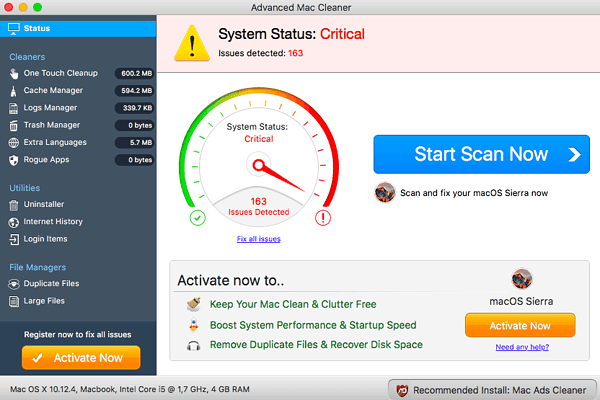
Advanced Mac Cleaner VIRUS!
How Viruses Affect Macs: What You Need to Know
If you’re wondering, “Do Apple Macs get viruses?”, it’s important to understand how these viruses can impact your device. While Macs are built with robust security, they can still be compromised by various forms of malware, including:
1. Trojan Horses
These are malicious programs disguised as legitimate software. Once installed, Trojan horses can provide hackers with access to your personal files, allowing them to steal sensitive information or plant additional malware.
2. Adware
Adware can slow down your Mac by flooding it with unwanted advertisements. This type of malware can also track your online activity, compromising your privacy.
3. Ransomware
Although more common on Windows, ransomware attacks on Macs have been rising. Ransomware locks you out of your system and demands a ransom to regain access to your files.
4. Spyware
Spyware collects information from your computer, including passwords, browsing history, and even keystrokes, without your knowledge.
Avast Mac Free Finding Viruses On An Apple Imac
Common Ways Macs Can Get Infected
Understanding the ways your Mac can become infected is key to protecting it from viruses. The answer to “Do Apple Macs get viruses?” becomes clearer when we look at the methods hackers use to target macOS.
1. Malicious Downloads
Downloading software or files from unreliable sources is one of the most common ways your Mac can get infected with malware. Many viruses hide in cracked software or free apps, waiting to infect your system when installed.
2. Phishing Emails
Even the most secure systems can fall victim to phishing attacks. Hackers send fake emails that appear to come from trusted sources, tricking you into clicking on malicious links or downloading harmful attachments.
3. Public Wi-Fi
Using unsecured public Wi-Fi networks can expose your Mac to potential threats, including viruses and hackers that can access your device remotely.
4. Browser Extensions
Infected browser extensions are a sneaky way for malware to enter your system. These extensions can monitor your online activity, steal your data, and even install additional malware.
So, do Apple Macs get viruses? Yes, and many of these attacks come from everyday activities like browsing, downloading, or opening emails.
How to Protect Your Mac from Viruses
Now that we’ve answered the question “Do Apple Macs get viruses?”, it’s time to discuss how you can protect your Mac from these threats. Here are some essential steps to ensure your device remains virus-free:
1. Keep Your macOS Updated
Apple frequently releases updates that include security patches to protect against newly discovered threats. Keeping your macOS up-to-date is one of the simplest ways to keep viruses at bay.
2. Use Antivirus Software
While macOS has built-in security, adding an extra layer of protection with antivirus software is a good idea. Programs like Malwarebytes or Avast Security can detect and remove viruses that macOS may miss.
3. Enable Firewall Protection
macOS includes a built-in firewall, but it’s not always enabled by default. Turning it on can help prevent unauthorized access to your device.
4. Avoid Downloading from Untrusted Sources
Be careful when downloading files or apps from unknown sources. Stick to trusted platforms like the Mac App Store or official websites.
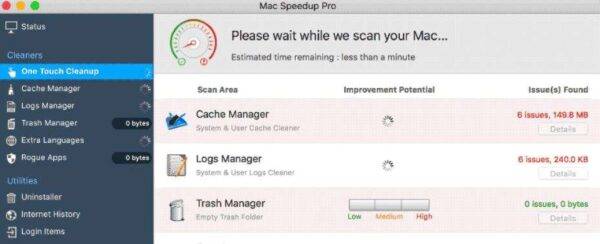
Mac Speedup Pro: Apple Mac Virus
Signs Your Mac Might Be Infected
Even with the best precautions, there’s always a chance your Mac could be infected. So, how do you know if your Mac has fallen victim to a virus? Here are some common signs:
Slow Performance: If your Mac is running slower than usual, it could be a sign that malware or adware is using up system resources.
Pop-Up Ads: If you’re seeing an unusual number of ads, especially when browsing trusted websites, adware may have infiltrated your system.
Unexplained Storage Usage: Viruses can take up large amounts of space, so check your storage to see if unknown files are eating up space.
Frequent Crashes: If your Mac is crashing frequently, it may be due to malicious software affecting the system.
If you’re noticing any of these symptoms, it’s a good idea to run a virus scan or consult a professional for help.
Conclusion: Do Apple Macs Get Viruses? Yes, But You Can Stay Protected
The myth that Apple Macs don’t get viruses is no longer valid. In reality, Macs face growing threats from malware, viruses, and other cyberattacks. By understanding how viruses can infect your Mac and following best practices for protection, you can keep your device secure and avoid falling victim to these threats.
If you’re unsure about the security of your Mac or need help removing a virus, contact the experts at Kingfisher Computers for professional support.
The Illusion of Stability in Modern Updates For most users, operating system updates are something that simply happen. They arrive quietly, often installing in the background, requiring little more than…
Macbook Neo, How Does It Compare To Air & Pro? Over the last few years the laptop market has experienced one of the most significant architectural changes in its history.…
Apple’s latest product announcements mark one of the most significant shifts in the Mac lineup in more than a decade. While Apple routinely updates its hardware with faster chips, incremental…
There is a particular kind of frustration that only a slow computer can produce. It is not dramatic. It is not urgent. It does not scream for attention. Instead, it…
In an era where nearly every aspect of personal computer maintenance and professional life is mediated through digital systems, your computer is no longer a luxury device — it is…
Phone says charging but battery not increasing is one of the most frustrating problems smartphone users face. You plug it in.The lightning bolt appears.It says “Charging.” But the battery percentage…
Apple’s rumour cycle always looks like a thousand disconnected leaks — until you line them up and notice the same themes repeating: AI-first silicon, camera and display differentiation, form-factor experiments (foldables / spatial…
Wi-Fi connected but no internet is one of the most frustrating messages you can see on a computer or laptop. The Wi-Fi icon shows full bars.It says “Connected.”But websites won’t…
Unfortunately, there was an error submitting your request.
Please try again later, or reach out to us directly. You can call us at +44 1429 280955 or email us at [email protected] for assistance. We’re here to help you get your computer back up and running!
We’ve received your booking, Our team will get in touch with you shortly to confirm the details. You’re one step closer to having your computer fixed! If you have any urgent questions, feel free to contact us. Otherwise, sit back, and we’ll handle the rest.