5 Signs Your Computer Needs Repair and What to Do Next
Adam Fornal
April 9th, 2025
Five signs your computer needs repair, with practical checks for slowdowns, heat, shutdowns, unusual noises and Windows errors before you book an assessment.
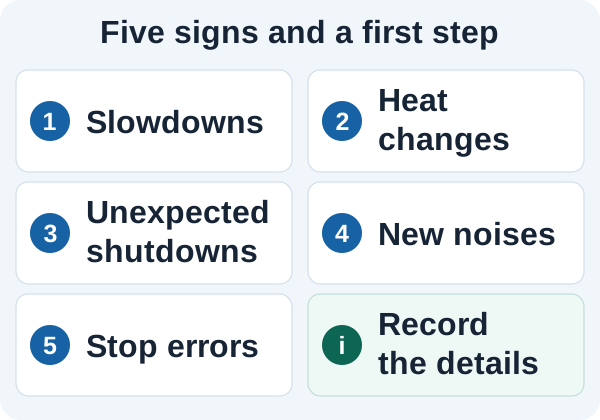
A persistent change in behaviour is a reason to investigate, not a reason to buy replacement parts without an assessment. These five signs help you describe the problem and decide what to do next.
Note what changed, when it happens and any error message to help explain the fault.
Table of Contents
1. Everyday tasks stay slow after an ordinary restart
A slow computer is frustrating, but it does not identify a failed part. Updates, a busy application, limited free storage and the demands of your work can all affect response times. Note whether the delay is at startup, when opening one program, during a game or while copying files. That distinction is more useful than saying the whole computer is slow.
On a computer that is otherwise stable, allow normal updates to finish and compare the same task after a restart. Avoid registry cleaners, random driver tools and promises of an instant speed boost. If the slowdown persists, our slow PC checks explain what to record. Diagnosis should establish whether maintenance, a repair or a suitable upgrade would help.
2. Heat or fan behaviour changes noticeably
Warmth and a faster fan can be normal during demanding work. What matters is a change from the device’s usual behaviour: fans staying loud during light use, repeated thermal warnings, a marked loss of performance or shutdowns. Use a laptop on a firm surface with its vents clear. Do not push tools into a running fan or remove a cooler just to see whether it helps.
A raised trackpad, a distorted case or a battery that appears swollen needs different attention from ordinary warmth. Stop using the device and ask for advice before further charging or testing. Do not press the case closed or try to puncture or flatten a battery. Dell’s swollen battery guidance (PDF) describes the signs and handling precautions.
3. The computer shuts down or restarts unexpectedly
An unexpected shutdown is worth recording, especially if it happens again under similar conditions. Note whether the computer was on mains power or battery, what was connected and which task was running. A power problem, cooling issue, driver or another fault can produce similar symptoms. An online symptom list cannot establish which one applies to your computer.
If it is stable enough to do so, check that important files have a usable backup. Do not repeatedly run a demanding game or stress test to reproduce a shutdown on an unstable device. Tell the repair team about recent changes, spills, damage or a replacement charger. These details help decide which checks should come first.
4. A new grinding, scraping or repeated clicking sound appears
Not every sound means a part is failing. Fans change speed, and a mechanical hard drive can make ordinary activity sounds. A new scraping noise, persistent hard clicking or a sound accompanied by missing files or a drive that disappears deserves investigation. A solid state drive has no spinning disk, so identify where a noise is coming from rather than assuming it is the storage.
If a mechanical drive is grinding or important files have become inaccessible, stop repeated attempts to start, scan or repair it and explain the data priority when asking for help. Continued use can worsen some physical drive faults. Seagate’s guide to hard drive sounds distinguishes routine activity from concerning noises. Ask about data recovery assessment before agreeing to a reinstall or drive replacement if the files matter.
5. Windows repeatedly stops with an error code
A Windows stop error may appear on a blue or black screen, depending on the version. Record the exact stop code and any named file, along with the task running at the time. One isolated error after an update is different from a repeatable crash. The code is a starting point for investigation, rather than proof that a particular component must be replaced.
Microsoft’s guidance on unexpected restarts and stop errors explains that hardware, drivers and software can be involved. Avoid making several changes at once or resetting Windows before considering the data and recovery implications. Bring a photograph of the message if it is difficult to read before the computer restarts.
Popups and account warnings need a separate check
Unexpected popups, browser redirects or a message demanding payment do not automatically mean a physical repair is needed. Do not call a number shown in a threatening popup, install a tool offered by an unknown caller or share a password or recovery code. Open a trusted service through its normal address if you need to check an account warning.
Our virus and spyware removal service is the relevant place to discuss a suspected infection. The computer security guide covers account protection, supported software and recoverable backups. Keep security concerns separate from an unconfirmed claim that the computer needs replacement parts.
What to tell us when you notice signs your computer needs repair
Give us the make and model, the main symptom, when it started and whether it happens every time. Include any exact error message, recent change and the files you most need to protect. You do not need to diagnose the fault yourself or choose a replacement part before contacting us.
Kingfisher Computers has provided computer repairs in Hartlepool since 2004. We assess the device, explain the findings and agree the repair work and its cost before proceeding. Contact the Hartlepool repair team to discuss what is happening, or see our PC repair service and laptop repair service for the relevant device.
The Illusion of Stability in Modern Updates For most users, operating system updates are something that simply happen. They arrive quietly, often installing in the background, requiring little more than…
Macbook Neo, How Does It Compare To Air & Pro? Over the last few years the laptop market has experienced one of the most significant architectural changes in its history.…
Apple’s latest product announcements mark one of the most significant shifts in the Mac lineup in more than a decade. While Apple routinely updates its hardware with faster chips, incremental…
There is a particular kind of frustration that only a slow computer can produce. It is not dramatic. It is not urgent. It does not scream for attention. Instead, it…
Small business computer maintenance planning starts with the work you cannot afford to lose. Identify the computers, accounts and files behind those tasks, then agree when maintenance can happen and…
Phone says charging but battery not increasing is one of the most frustrating problems smartphone users face. You plug it in.The lightning bolt appears.It says “Charging.” But the battery percentage…
Apple’s rumour cycle always looks like a thousand disconnected leaks — until you line them up and notice the same themes repeating: AI-first silicon, camera and display differentiation, form-factor experiments (foldables / spatial…
Wi-Fi connected but no internet is one of the most frustrating messages you can see on a computer or laptop. The Wi-Fi icon shows full bars.It says “Connected.”But websites won’t…
Unfortunately, there was an error submitting your request.
Please try again later, or reach out to us directly. You can call us at +44 1429 280955 or email us at sales@kingfishercomputers.co.uk for assistance. We’re here to help you get your computer back up and running!
We’ve received your booking, Our team will get in touch with you shortly to confirm the details. You’re one step closer to having your computer fixed! If you have any urgent questions, feel free to contact us. Otherwise, sit back, and we’ll handle the rest.
Contact Kingfisher Computers
No appointment required. You’re welcome to pop into the shop during opening hours.
ENQUIRY RECEIVED
Thank you
Monday–Friday
9am–5pm
Saturday
9am–4:30pm
Sunday
Closed
Bank holidays
Closed
38 Church Street, Hartlepool, TS24 7DG For home visits and callouts, please wait for us to arrange a time.
Contact Kingfisher Computers
No appointment required. You’re welcome to pop into the shop during opening hours.
ENQUIRY RECEIVED
Thank you
Monday–Friday
9am–5pm
Saturday
9am–4:30pm
Sunday
Closed
Bank holidays
Closed
38 Church Street, Hartlepool, TS24 7DG For home visits and callouts, please wait for us to arrange a time.