You’ve invested thousands of dollars in a powerful gaming rig with the latest graphics card, high-end processor, and premium components. Yet something feels off about your gaming experience. Frame rates seem inconsistent, visuals lack the crisp quality you expected, and competitive games don’t feel as responsive as they should. The culprit might surprise you: your system could be Bottlenecked by Your Monitor. This comprehensive guide explores how your display can limit your entire gaming setup’s potential and what you can do about it.
Understanding whether your gaming PC is Bottlenecked by Your Monitor requires examining the complex relationship between your computer’s output capabilities and your display’s ability to showcase that performance. Many gamers focus exclusively on internal components while overlooking the final link in the performance chain. Your monitor serves as the gateway between your system’s raw power and your visual experience. When this gateway becomes restrictive, even the most powerful gaming PC cannot deliver its full potential to your eyes.
The Hidden Impact of Monitor Bottlenecks on Gaming Performance
Modern gaming PCs generate hundreds of frames per second in many titles, but this impressive output means nothing if your display cannot keep pace. When your system is Bottlenecked by Your Monitor, you’re essentially watching a high-performance sports car crawl through heavy traffic. The power exists, but external limitations prevent you from experiencing it fully. This mismatch creates multiple problems that affect not just visual quality but also competitive performance and overall gaming satisfaction.
Monitor bottlenecks manifest differently than traditional hardware bottlenecks. While CPU or GPU limitations typically result in lower frame rates, being Bottlenecked by Your Monitor can cause screen tearing, input lag, stuttering, and visual artifacts even when your system produces sufficient frames. These issues occur because your display cannot properly process and present the high-speed data stream from your graphics card. Understanding these symptoms is crucial for identifying whether your monitor is holding back your gaming experience.
Common Signs Your Gaming Setup is Bottlenecked by Your Monitor
Recognizing when your system is Bottlenecked by Your Monitor requires attention to specific symptoms that many gamers mistake for other issues. Screen tearing represents one of the most obvious indicators, appearing as horizontal lines that split the image during fast motion. This occurs when your graphics card produces frames faster than your monitor can display them, creating a visual mismatch between frame generation and screen refresh.
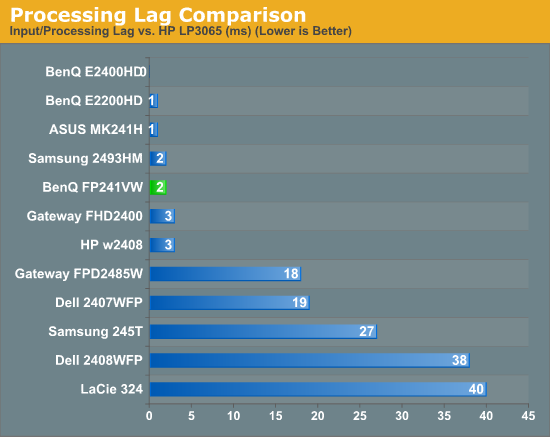
Input lag provides another telltale sign that your gaming PC is Bottlenecked by Your Monitor. When you press a key or move your mouse, the delay between your action and its appearance on screen can determine victory or defeat in competitive gaming. High input lag often results from monitor processing, especially in displays with extensive post-processing features or those not optimized for gaming performance.
Stuttering and inconsistent frame pacing also indicate potential monitor bottlenecks. Even when your system maintains high average frame rates, being Bottlenecked by Your Monitor can create uneven frame delivery that makes gameplay feel choppy or unresponsive. This phenomenon particularly affects fast-paced games where smooth motion is essential for tracking moving targets or navigating complex environments.
Understanding Monitor Specifications and Gaming Performance
The relationship between monitor specifications and gaming performance is more complex than many users realize. Refresh rate, resolution, response time, and panel technology all interact to determine whether your display will complement or constrain your Gaming PC’s capabilities. Learning to evaluate these specifications helps you identify if your current setup is Bottlenecked by Your Monitor and guides future upgrade decisions.
Refresh Rate: The Foundation of Smooth Gaming
Refresh rate represents perhaps the most critical specification for determining if your gaming PC is Bottlenecked by Your Monitor. Measured in hertz (Hz), refresh rate indicates how many times per second your monitor can display a new image. Traditional monitors operate at 60Hz, meaning they can show 60 unique frames each second. However, modern gaming monitors offer refresh rates of 120Hz, 144Hz, 240Hz, or even higher.
When your graphics card produces more frames per second than your monitor’s refresh rate can display, your system becomes Bottlenecked by Your Monitor. For example, if your GPU generates 200 frames per second in a competitive shooter but your monitor only refreshes 60 times per second, you’re only seeing roughly one-third of the visual information your system produces. This limitation not only wastes your hardware’s potential but can also put you at a disadvantage against opponents using higher refresh rate displays.
The Science Behind High Refresh Rate Gaming
Understanding why higher refresh rates matter requires examining human visual perception and reaction times. When your gaming PC is Bottlenecked by Your Monitor with a low refresh rate, you experience several disadvantages beyond simple visual smoothness. Higher refresh rates provide more frequent visual updates, allowing you to track moving objects more accurately and react more quickly to changing game states.
Motion clarity improves dramatically with higher refresh rates. At 60Hz, fast-moving objects often appear blurry due to sample-and-hold blur, where each frame is displayed for approximately 16.7 milliseconds. Higher refresh rate monitors reduce this persistence, creating clearer motion that’s less likely to leave your gaming PC Bottlenecked by Your Monitor. Professional esports players often report improved target tracking and reduced eye strain when using high refresh rate displays.
The psychological benefits of higher refresh rates extend beyond measurable performance gains. Many gamers report increased confidence and engagement when their system isn’t Bottlenecked by Your Monitor. This improved experience can translate to better performance even when the technical advantages are minimal, demonstrating how monitor specifications affect both objective and subjective gaming quality.
Resolution and Pixel Density Considerations
Resolution determines how much visual detail your monitor can display, but it also significantly impacts whether your gaming PC becomes Bottlenecked by Your Monitor. Higher resolutions require substantially more processing power to maintain smooth frame rates, creating a complex balance between visual fidelity and performance. Understanding this relationship helps you optimize your setup for your specific gaming priorities.
4K gaming represents the current pinnacle of visual fidelity, offering four times the pixel count of 1080p displays. However, pushing this many pixels can easily leave even high-end systems Bottlenecked by Your Monitor if the display cannot keep pace with the demanding processing requirements. Many gamers discover that their expensive graphics cards struggle to maintain consistent frame rates at 4K resolution, especially in newer AAA titles with demanding visual effects.
Determining the optimal resolution to avoid being Bottlenecked by Your Monitor depends on your gaming preferences, hardware capabilities, and competitive requirements. Competitive gamers often prioritize high refresh rates over resolution, choosing 1080p or 1440p displays that allow their systems to achieve maximum frame rates without being Bottlenecked by Your Monitor. These players recognize that seeing more frames per second provides a competitive advantage that outweighs the visual benefits of higher resolution.
Conversely, single-player gaming enthusiasts might prioritize visual fidelity over frame rate, accepting lower refresh rates to enjoy maximum detail in story-driven games. For these users, being Bottlenecked by Your Monitor in terms of refresh rate might be acceptable if they gain significant visual improvements. The key lies in matching your monitor specifications to your gaming priorities rather than simply pursuing the highest numbers across all categories.
Ultrawide monitors present another consideration for avoiding monitor bottlenecks. These displays offer increased horizontal field of view, which can provide competitive advantages in certain games while creating immersive experiences in others. However, the additional pixels can strain your graphics card, potentially leaving your system Bottlenecked by Your Monitor if you haven’t accounted for the increased processing demands.
Response Time and Input Lag Optimization
Response time and input lag represent crucial but often misunderstood aspects of monitor performance. These specifications directly impact whether your gaming PC feels Bottlenecked by Your Monitor in terms of responsiveness and competitive performance. Understanding the difference between these measurements and their practical implications helps you make informed decisions about monitor selection and configuration.
Response time measures how quickly individual pixels can change color, typically expressed in milliseconds. Faster response times reduce motion blur and ghosting, creating clearer images during fast movement. When your system is Bottlenecked by Your Monitor with slow response times, you’ll notice trailing effects behind moving objects, making it difficult to track targets accurately in fast-paced games.
Input lag encompasses the total delay between your input device action and its appearance on screen. This delay includes processing time from your graphics card, any image processing within the monitor, and the physical response of the display panel. High input lag can make your gaming PC feel Bottlenecked by Your Monitor even when frame rates remain high, creating a disconnect between your actions and their visual representation.
Measuring and Minimizing Display Latency
Professional measurement tools can accurately assess whether your gaming PC is Bottlenecked by Your Monitor in terms of input lag and response time. However, subjective testing often provides more practical insights for most gamers. Try moving your mouse cursor rapidly across the screen or performing quick actions in familiar games. If the display feels sluggish or disconnected from your inputs, you might be experiencing monitor-related bottlenecks.
Gaming mode settings on many monitors can significantly reduce input lag by bypassing unnecessary image processing. Enabling these modes can help prevent your system from being Bottlenecked by Your Monitor due to excessive processing delays. However, gaming modes sometimes reduce image quality by disabling color correction or other visual enhancements, requiring you to balance responsiveness against visual fidelity.
Overdrive settings offer another tool for optimizing monitor performance. These settings increase voltage to pixels to speed up color transitions, potentially reducing response times. However, excessive overdrive can create inverse ghosting or other artifacts, so finding the optimal setting requires testing different levels while monitoring for visual anomalies that might indicate your system is being Bottlenecked by Your Monitor in different ways.
Is Your Gaming Pc Bottlenecked By Your Monitor? 4
Advanced Monitor Technologies and Gaming Performance
Modern gaming monitors incorporate various technologies designed to enhance performance and reduce bottlenecks. Understanding these features helps you determine whether your current setup is Bottlenecked by Your Monitor and identify upgrade paths that address your specific limitations. From adaptive sync technologies to advanced panel types, each innovation targets different aspects of the gaming experience.
Adaptive Sync Technologies: Eliminating Tear and Stutter
Variable refresh rate technologies like FreeSync and G-Sync represent revolutionary solutions to traditional monitor bottlenecks. These systems dynamically adjust your monitor’s refresh rate to match your graphics card’s frame output, effectively eliminating the possibility of being Bottlenecked by Your Monitor due to refresh rate mismatches. This synchronization provides smooth gameplay even when frame rates fluctuate, creating a more consistent gaming experience.
Traditional fixed refresh rate monitors can only display frames at specific intervals, forcing your graphics card to either wait for the next refresh cycle or send frames that arrive between refresh periods. This timing mismatch creates the visual tearing and stuttering that indicates your system is Bottlenecked by Your Monitor. Adaptive sync technologies solve this problem by allowing the monitor to refresh whenever a new frame is ready, maintaining perfect synchronization between frame generation and display.
The practical benefits of adaptive sync extend beyond eliminating visual artifacts. When your gaming PC isn’t Bottlenecked by Your Monitor due to refresh rate limitations, you can experience smooth gameplay across a wider range of frame rates. This flexibility allows you to prioritize visual quality settings without worrying about maintaining specific frame rate targets to avoid tearing or stuttering.
Is Your Gaming Pc Bottlenecked By Your Monitor? 5
Choosing Between FreeSync and G-Sync
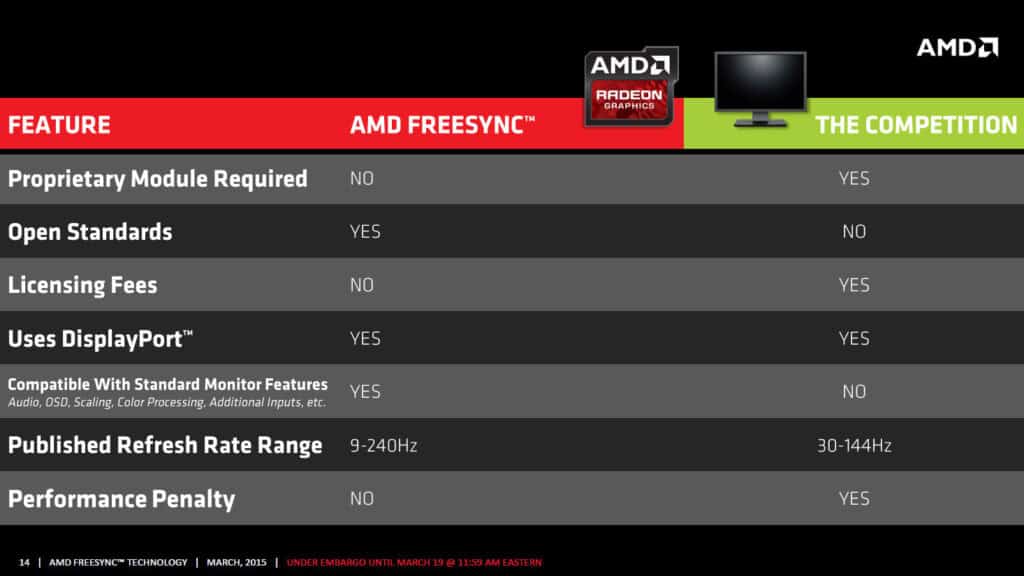
The choice between AMD FreeSync and NVIDIA G-Sync technologies depends partly on your graphics card manufacturer, but compatibility has expanded significantly in recent years. NVIDIA now supports many FreeSync monitors through G-Sync Compatible certification, reducing the likelihood that your gaming PC will be Bottlenecked by Your Monitor due to proprietary sync technology limitations.
G-Sync monitors traditionally offered superior performance consistency but at higher costs due to proprietary hardware modules. These modules ensured reliable operation across wide refresh rate ranges and included additional features like ultra-low motion blur. However, the premium pricing could make G-Sync monitors inaccessible to some users, potentially leaving their systems Bottlenecked by Your Monitor due to budget constraints rather than technical limitations.
FreeSync monitors offer broader availability and lower costs while providing similar fundamental benefits. The open standard allows monitor manufacturers to implement variable refresh rate support without expensive licensing fees, making these features accessible to more gamers. This affordability helps prevent situations where budget limitations leave your gaming PC Bottlenecked by Your Monitor due to lack of advanced sync technologies.
Is Your Gaming Pc Bottlenecked By Your Monitor? 6
Panel Technology and Gaming Applications
The underlying panel technology significantly impacts whether your gaming PC becomes Bottlenecked by Your Monitor in various gaming scenarios. TN, IPS, VA, and OLED panels each offer distinct advantages and limitations that affect different aspects of gaming performance. Understanding these differences helps you select monitors that complement rather than constrain your gaming setup.
TN (Twisted Nematic) panels offer the fastest response times and lowest input lag, making them popular choices for competitive gaming. These panels minimize the risk of your system being Bottlenecked by Your Monitor in terms of responsiveness, though they often sacrifice color accuracy and viewing angles. For competitive gamers who prioritize performance over visual quality, TN panels can provide the edge needed to avoid monitor-related bottlenecks.
IPS (In-Plane Switching) panels provide superior color accuracy and viewing angles but traditionally suffered from slower response times. Modern IPS gaming monitors have largely addressed these limitations, offering response times competitive with TN panels while maintaining better visual quality. This advancement reduces the compromise between avoiding being Bottlenecked by Your Monitor and enjoying accurate colors for immersive gaming experiences.
Emerging Panel Technologies
OLED gaming monitors represent the cutting edge of display technology, offering perfect black levels, infinite contrast ratios, and extremely fast response times. These characteristics virtually eliminate the possibility of being Bottlenecked by Your Monitor due to poor motion clarity or contrast limitations. However, OLED panels currently face limitations in peak brightness and potential burn-in concerns that may affect long-term gaming use.
Mini-LED backlighting technology provides a middle ground between traditional LCD panels and OLED displays. These monitors offer improved contrast ratios and local dimming capabilities while maintaining high brightness levels and reducing burn-in risks. For gamers seeking to avoid being Bottlenecked by Your Monitor while enjoying enhanced visual quality, Mini-LED displays provide compelling options that balance performance and image quality.
Quantum Dot technology enhances color reproduction in LCD panels, providing wider color gamuts and improved color accuracy. While this technology doesn’t directly address whether your gaming PC is Bottlenecked by Your Monitor in terms of performance, it can significantly enhance the visual experience for games that support wide color gamuts, making your investment in high-end graphics hardware more visually rewarding.
Optimizing Your Gaming Setup to Eliminate Monitor Bottlenecks
Once you’ve identified that your gaming PC is Bottlenecked by Your Monitor, several strategies can help optimize your current setup while planning for future upgrades. These approaches range from software configurations to hardware adjustments, each targeting specific aspects of monitor-related performance limitations.
Software Configuration and Settings Optimization
Proper software configuration can significantly reduce the impact of monitor bottlenecks without requiring hardware upgrades. Graphics driver settings, in-game options, and Windows configurations all influence whether your gaming PC remains Bottlenecked by Your Monitor. Understanding these settings helps you maximize performance within your current hardware limitations.
Graphics driver control panels offer numerous options for optimizing monitor performance. Enabling exclusive fullscreen modes can reduce input lag and improve frame pacing, helping to minimize situations where your system feels Bottlenecked by Your Monitor. Disabling unnecessary post-processing effects like image sharpening or color enhancement can also reduce processing delays that contribute to input lag.
Frame rate limiters provide another tool for managing monitor bottlenecks. When your graphics card produces significantly more frames than your monitor can display, limiting frame rates to just above your display’s refresh rate can reduce heat generation, power consumption, and potentially improve frame pacing. This approach helps prevent your system from working harder than necessary when Bottlenecked by Your Monitor.
In-Game Settings for Monitor Optimization
Game-specific settings often provide the most direct control over how your system interacts with your monitor. Disabling V-Sync in games while enabling adaptive sync through your graphics driver typically provides the best balance of smoothness and responsiveness. This configuration prevents the double-buffering delays that can make your gaming PC feel Bottlenecked by Your Monitor while maintaining tear-free visuals.
Resolution scaling options in many modern games allow you to render at higher resolutions than your monitor’s native resolution, then downscale the result. This supersampling can improve visual quality even when your system isn’t Bottlenecked by Your Monitor in terms of resolution, though it requires significant additional processing power that might impact frame rates.
Field of view settings deserve special attention when optimizing for monitor bottlenecks. Wider fields of view require rendering more of the game world, potentially reducing frame rates. However, they can also provide competitive advantages by showing more of your surroundings. Balancing these settings helps ensure your gaming PC isn’t unnecessarily Bottlenecked by Your Monitor while maintaining optimal gameplay experience.
Hardware Upgrades and System Matching
When software optimizations aren’t sufficient to address monitor bottlenecks, hardware upgrades become necessary. The key lies in matching your monitor’s capabilities with your system’s performance potential, ensuring that no component significantly limits the others. This balance prevents situations where expensive hardware investments are wasted due to being Bottlenecked by Your Monitor.
Graphics card upgrades should align with your monitor’s capabilities. Installing a high-end GPU with a 60Hz 1080p monitor will likely leave your system Bottlenecked by Your Monitor, wasting the graphics card’s potential. Conversely, pairing a modest graphics card with a 240Hz 4K monitor creates a GPU bottleneck that prevents you from utilizing your display’s capabilities. Matching these components ensures optimal performance across your entire system.
CPU performance also impacts monitor bottlenecks, particularly at high refresh rates. Fast refresh rate monitors can reveal CPU limitations that aren’t apparent with standard 60Hz displays. When your system is Bottlenecked by Your Monitor due to insufficient CPU performance, upgrading your processor might be necessary to fully utilize your display’s capabilities. This is especially true for competitive gaming where high frame rates are essential.
Building a Balanced Gaming Setup
Creating a balanced gaming setup requires considering your monitor as an integral part of your system rather than a passive output device. Your display’s specifications should guide your hardware choices, ensuring that your gaming PC isn’t Bottlenecked by Your Monitor while also preventing other components from becoming limiting factors.
Budget allocation plays a crucial role in building balanced systems. Many gamers spend the majority of their budget on internal components while treating the monitor as an afterthought. This approach often leaves systems Bottlenecked by Your Monitor despite powerful internal hardware. Consider allocating 25-30% of your total gaming budget to your display to ensure proper system balance.
Future-proofing considerations should also influence your monitor selection. Choosing a display with capabilities slightly beyond your current system’s output allows room for graphics card upgrades without immediately becoming Bottlenecked by Your Monitor. However, avoid excessive future-proofing that requires you to compromise current performance for hypothetical future benefits.
Professional Gaming and Monitor Requirements
Competitive gaming places unique demands on monitor performance that extend beyond casual gaming requirements. Professional esports players often use monitors with specifications that might seem excessive for regular gaming but are essential for maintaining competitive edges. Understanding these requirements helps determine whether your setup is Bottlenecked by Your Monitor for competitive play.
Refresh rates of 240Hz or higher are common in professional gaming environments, providing the smoothest possible motion and lowest input lag. These specifications ensure that player systems aren’t Bottlenecked by Your Monitor during crucial competitive moments where split-second reactions determine outcomes. The difference between 144Hz and 240Hz might be minimal for casual gaming but can be significant in professional contexts.
Color accuracy and consistent performance matter less in competitive gaming than raw speed and responsiveness. Professional players often use TN panels with modest color reproduction but excellent response times to avoid being Bottlenecked by Your Monitor in terms of competitive performance. This prioritization demonstrates how monitor requirements vary significantly based on gaming applications and performance goals.
Maximizing Your Gaming Potential Through Monitor Optimization
Understanding whether your gaming PC is Bottlenecked by Your Monitor represents a crucial step in optimizing your gaming experience. Many gamers invest heavily in internal components while overlooking the final link between their system’s performance and their visual experience. This oversight can leave even the most powerful gaming rigs unable to deliver their full potential to your eyes and competitive gaming performance.
Taking Action to Address Monitor Bottlenecks
Identifying that your system is Bottlenecked by Your Monitor is only the first step toward optimization. The strategies outlined in this guide provide multiple approaches for addressing these limitations, from software configurations that maximize your current setup’s potential to hardware upgrades that eliminate bottlenecks entirely. The key lies in matching your monitor’s capabilities with your gaming priorities and system specifications.
Remember that being Bottlenecked by Your Monitor isn’t always a problem that requires immediate solution. If your current setup provides satisfactory gaming experiences, major upgrades might not be necessary. However, understanding these limitations helps you make informed decisions about future improvements and ensures that you recognize when monitor bottlenecks are affecting your gaming performance.
Monitor technology continues evolving rapidly, with new features and capabilities regularly addressing traditional bottlenecks. Staying informed about these developments helps you plan upgrades that prevent your future systems from being Bottlenecked by Your Monitor. Whether you’re building a new gaming rig or upgrading an existing setup, considering your monitor as an integral system component rather than a passive output device will help you achieve optimal gaming performance and avoid the frustration of hardware limitations that prevent you from experiencing your system’s full potential.
The investment in addressing monitor bottlenecks pays dividends in improved gaming experiences, competitive performance, and overall system satisfaction. By ensuring your gaming PC isn’t Bottlenecked by Your Monitor, you unlock the full potential of your hardware investment and create a foundation for years of optimal gaming performance.
The Illusion of Stability in Modern Updates For most users, operating system updates are something that simply happen. They arrive quietly, often installing in the background, requiring little more than…
Macbook Neo, How Does It Compare To Air & Pro? Over the last few years the laptop market has experienced one of the most significant architectural changes in its history.…
Apple’s latest product announcements mark one of the most significant shifts in the Mac lineup in more than a decade. While Apple routinely updates its hardware with faster chips, incremental…
There is a particular kind of frustration that only a slow computer can produce. It is not dramatic. It is not urgent. It does not scream for attention. Instead, it…
In an era where nearly every aspect of personal computer maintenance and professional life is mediated through digital systems, your computer is no longer a luxury device — it is…
Phone says charging but battery not increasing is one of the most frustrating problems smartphone users face. You plug it in.The lightning bolt appears.It says “Charging.” But the battery percentage…
Apple’s rumour cycle always looks like a thousand disconnected leaks — until you line them up and notice the same themes repeating: AI-first silicon, camera and display differentiation, form-factor experiments (foldables / spatial…
Wi-Fi connected but no internet is one of the most frustrating messages you can see on a computer or laptop. The Wi-Fi icon shows full bars.It says “Connected.”But websites won’t…
Unfortunately, there was an error submitting your request.
Please try again later, or reach out to us directly. You can call us at +44 1429 280955 or email us at sales@kingfishercomputers.co.uk for assistance. We’re here to help you get your computer back up and running!
We’ve received your booking, Our team will get in touch with you shortly to confirm the details. You’re one step closer to having your computer fixed! If you have any urgent questions, feel free to contact us. Otherwise, sit back, and we’ll handle the rest.