SSD vs. HDD: Choosing the Best Storage Option for Your Needs
Adam Fornal
November 22nd, 2024
SSD vs. HDD: Choosing the Best Storage Option for Your Needs
When it comes to computer storage, there’s one question that continues to stump even the savviest tech enthusiasts: What is the best storage option for your setup? The debate between SSDs (solid-state drives) and HDDs (hard disk drives) has been ongoing for years, and for good reason—each has its own strengths and weaknesses.
If you’ve been wondering whether to stick with a trusty HDD, make the leap to an SSD, or perhaps combine the two, this blog will help you weigh your options. At Kingfisher Computers, we’re here to ensure you make the right decision for your needs.
Table of Contents
What Are SSDs and HDDs?
Before diving into the pros and cons, let’s take a quick look at what each type of storage offers:
HDD (Hard Disk Drive):
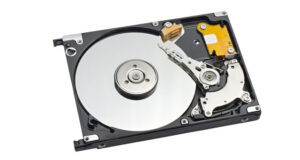
HDDs are the traditional storage devices that have been around since the dawn of computing. They use spinning disks and a mechanical arm to read and write data. Think of it as the vinyl record of computer storage.
Capacity: HDDs are available in larger storage capacities at a lower price.
Speed: Slower compared to SSDs due to their mechanical components.
Durability: More prone to physical damage due to moving parts.
Ssd Vs. Hdd: Choosing The Best Storage Option For Your Needs 3
SSD (Solid-State Drive):
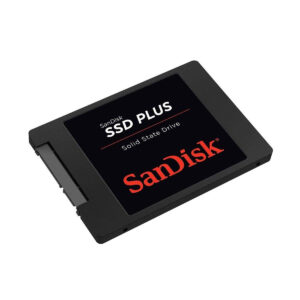
SSDs, on the other hand, are the modern solution to storage. They use flash memory, which means no moving parts. They’re fast, durable, and sleek—essentially the sports car of storage.
Speed: Lightning-fast read and write speeds.
Durability: With no moving parts, SSDs are more resistant to shock and physical damage.
Cost: Pricier per GB than HDDs.
Ssd Vs. Hdd: Choosing The Best Storage Option For Your Needs 4
Why Does Choosing the Best Storage Option Matter?
Your choice of storage impacts everything from your system’s performance to its reliability and even its cost-effectiveness. Whether you’re a gamer, a creative professional, or someone looking to keep family photos safe, identifying the best storage option is crucial.
SSDs: Pros and Cons
Let’s start with the SSD, a favorite among tech enthusiasts and anyone craving speed.
The Pros of SSDs:
Blazing Speed: SSDs can load your operating system, games, or applications in mere seconds. If you’re tired of watching loading bars, this is your answer.
Durability: No moving parts mean less chance of failure due to shock or wear and tear.
Energy Efficient: SSDs consume less power, making them ideal for laptops.
Quiet Operation: No spinning disks = no noise.
The Cons of SSDs:
Cost: SSDs are more expensive per GB compared to HDDs.
Limited Capacity at Lower Budgets: Affordable SSDs often come in smaller sizes.
Best for: Gamers, video editors, and professionals needing speed and reliability.
HDDs: Pros and Cons
Now let’s look at HDDs, the traditional choice for those who need a lot of storage without breaking the bank.
The Pros of HDDs:
Affordable: When it comes to cost per GB, HDDs are unbeatable.
High Capacity: Store terabytes of data without emptying your wallet.
Great for Backup: If you need to store files you don’t access often, HDDs are ideal.
The Cons of HDDs:
Slower Speeds: Expect longer loading times for games, applications, and boot-ups.
Fragile: Moving parts make HDDs more susceptible to damage.
Noisy: The spinning disks and mechanical arms can create noticeable noise.
Best for: Budget-conscious users, those needing large storage for files, and backup solutions.
Why Not Both? The Hybrid Approach
If you’re stuck choosing the best storage option, why not use both? Many modern computers and laptops combine SSDs and HDDs for the ultimate balance of speed and storage.
How It Works:
SSD for Speed: Use the SSD to house your operating system and frequently used programs.
HDD for Storage: Store files, photos, and videos on the larger, cheaper HDD.
This hybrid approach offers the best of both worlds, making it an excellent option for most users.
What to Consider When Choosing the Best Storage Option
When deciding between an SSD, HDD, or both, consider these factors:
Your Budget: SSDs are pricier but worth the investment for speed. HDDs are better for large storage needs on a tight budget.
Your Usage: Gamers, professionals, and multitaskers benefit most from SSDs. HDDs are great for storing large files.
Reliability: If durability is a concern, SSDs are the better choice.
At Kingfisher Computers, We Make Storage Decisions Easy
Still unsure about the best storage option for you? At Kingfisher Computers, we specialize in helping customers choose the right solutions for their needs. Our services include:
Expert Consultations: Not sure whether to go for an SSD, HDD, or hybrid setup? We’ll guide you.
Upgrades and Installations: Let us handle the hard work of upgrading your storage.
Custom Builds: Need a system tailored to your needs? We’ll design one with the perfect storage solution.
Looking for more information? Check out these helpful resources:
Final Thoughts: What’s the Best Storage Option for You?
Choosing the best storage option isn’t just about speed or capacity—it’s about finding the right fit for your needs. If you’re all about fast performance, an SSD is a no-brainer. If storage space and affordability are your top priorities, an HDD might be your perfect match. And for those who want the best of both worlds, a hybrid setup is a fantastic choice.
At Kingfisher Computers, we’re here to make the decision easier. Visit us for expert advice, top-quality upgrades, and custom solutions tailored to your needs. Whether you’re a gamer, a professional, or just someone looking to get more out of your computer, we’ll help you find the best storage option.
📞 Contact us today or visit Kingfishercomputer.co.uk to learn more about our services and let us help you optimize your system!
The Illusion of Stability in Modern Updates For most users, operating system updates are something that simply happen. They arrive quietly, often installing in the background, requiring little more than…
Macbook Neo, How Does It Compare To Air & Pro? Over the last few years the laptop market has experienced one of the most significant architectural changes in its history.…
Apple’s latest product announcements mark one of the most significant shifts in the Mac lineup in more than a decade. While Apple routinely updates its hardware with faster chips, incremental…
There is a particular kind of frustration that only a slow computer can produce. It is not dramatic. It is not urgent. It does not scream for attention. Instead, it…
In an era where nearly every aspect of personal computer maintenance and professional life is mediated through digital systems, your computer is no longer a luxury device — it is…
Phone says charging but battery not increasing is one of the most frustrating problems smartphone users face. You plug it in.The lightning bolt appears.It says “Charging.” But the battery percentage…
Apple’s rumour cycle always looks like a thousand disconnected leaks — until you line them up and notice the same themes repeating: AI-first silicon, camera and display differentiation, form-factor experiments (foldables / spatial…
Wi-Fi connected but no internet is one of the most frustrating messages you can see on a computer or laptop. The Wi-Fi icon shows full bars.It says “Connected.”But websites won’t…
Unfortunately, there was an error submitting your request.
Please try again later, or reach out to us directly. You can call us at +44 1429 280955 or email us at sales@kingfishercomputers.co.uk for assistance. We’re here to help you get your computer back up and running!
We’ve received your booking, Our team will get in touch with you shortly to confirm the details. You’re one step closer to having your computer fixed! If you have any urgent questions, feel free to contact us. Otherwise, sit back, and we’ll handle the rest.