Best Dual Monitor Setups for Productivity & Gaming
Adam Fornal
June 24th, 2025
Table of Contents
Best Dual Monitor Setups for Productivity & Gaming
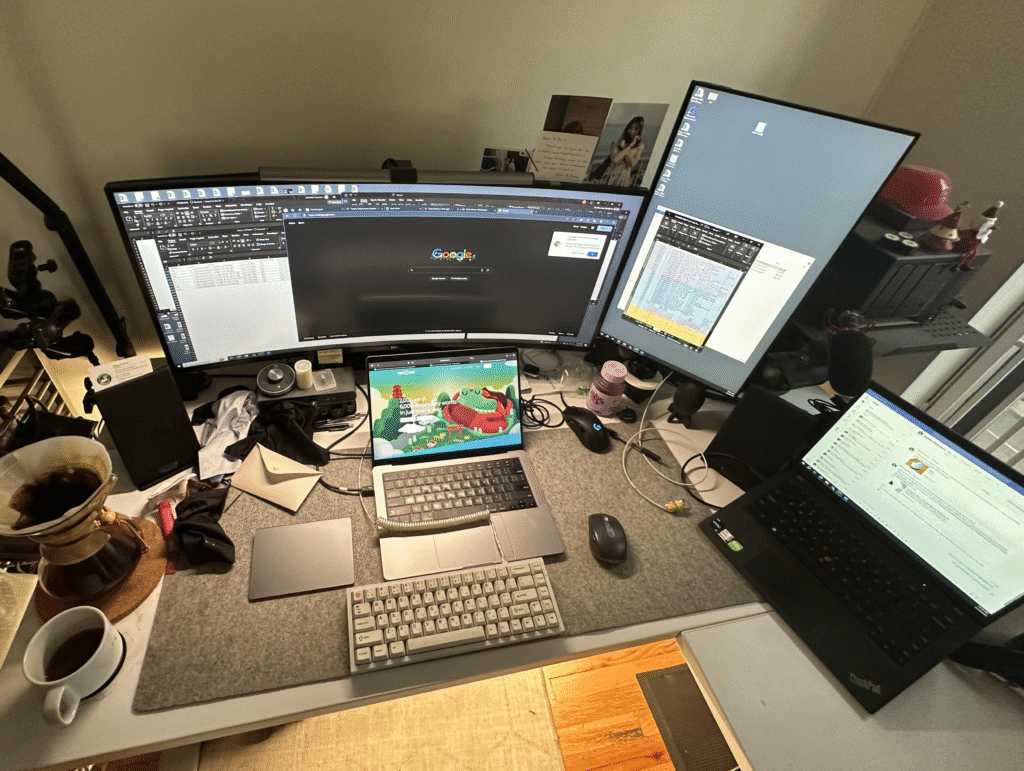
In today’s digital workspace, a single monitor often feels limiting. Whether you’re juggling multiple applications for work or seeking an immersive gaming experience, the Best Dual Monitor Setups can transform your computing experience. This comprehensive guide explores everything you need to know about creating the perfect dual monitor configuration for both productivity and gaming applications.
The transition from single to dual monitors represents one of the most impactful upgrades you can make to your workstation. With the Best Dual Monitor Setups, you’ll discover increased screen real estate, enhanced multitasking capabilities, and improved workflow efficiency. From professional content creators to casual users, dual monitor configurations offer tangible benefits that justify the investment.
Why Dual Monitor Setups Dominate Modern Workspaces
The popularity of dual monitor configurations stems from their ability to address fundamental limitations of single-screen computing. When you implement the Best Dual Monitor Setups, you eliminate the constant need to switch between applications, reduce mental fatigue from window management, and create dedicated spaces for different types of work.
Research consistently shows that users with dual monitor configurations complete tasks faster and with greater accuracy than those using single displays. The Best Dual Monitor Setups provide contextual awareness that single monitors cannot match, allowing users to reference information on one screen while working on another. This spatial separation reduces cognitive load and improves overall productivity metrics.
The Science Behind Dual Monitor Productivity
Studies examining the Best Dual Monitor Setups reveal measurable improvements in task completion times and accuracy rates. Users report feeling less stressed when working with multiple displays, as the additional screen space reduces the mental overhead of constant application switching. The ability to maintain visual context across multiple applications creates a more natural and efficient workflow.
Professional environments increasingly recognize dual monitors as essential equipment rather than luxury items. The Best Dual Monitor Setups have become standard in fields requiring extensive multitasking, data analysis, or creative work. Investment in proper dual monitor configurations often pays for itself through improved employee productivity and job satisfaction.
Evolution of Multi-Monitor Technology
The journey to today’s Best Dual Monitor Setups reflects decades of technological advancement. Early multi-monitor implementations required specialized graphics cards and complex configurations. Modern systems simplify dual monitor setup through improved graphics drivers, standardized connections, and operating system enhancements that make multi-display configurations accessible to average users.
Current Best Dual Monitor Setups benefit from mature display technologies, including high-resolution panels, consistent color reproduction, and reliable connectivity options. These improvements have eliminated many historical barriers to dual monitor adoption, making multi-display configurations practical for a broader range of users and applications.
Best Dual Monitor Setups For Productivity & Gaming 5
Essential Components for the Best Dual Monitor Setups
Creating effective dual monitor configurations requires careful consideration of several key components. The Best Dual Monitor Setups balance performance, compatibility, and budget constraints while delivering the enhanced functionality that makes multi-display computing worthwhile.
Monitor Selection Strategies
Choosing appropriate displays forms the foundation of successful Best Dual Monitor Setups. The ideal configuration depends on your specific use cases, available desk space, and budget considerations. Professional users often prioritize different characteristics than gamers, but certain fundamental principles apply across all scenarios.
For productivity-focused Best Dual Monitor Setups, screen size typically ranges from 24 to 32 inches per display. This range provides excellent visibility without overwhelming desk space or requiring excessive head movement. Resolution considerations should balance sharpness with graphics card capabilities, ensuring smooth performance across both displays simultaneously.
Display Technology Considerations
Modern Best Dual Monitor Setups benefit from several display technologies, each offering distinct advantages. IPS panels provide excellent color accuracy and viewing angles, making them ideal for creative work and general productivity. VA panels offer superior contrast ratios at lower costs, while OLED displays deliver exceptional color reproduction and response times for gaming applications.
When building Best Dual Monitor Setups, consider panel uniformity between displays. Mismatched color temperatures, brightness levels, or contrast ratios create visual discontinuity that can be distracting during extended use. Many users prefer identical monitors for consistency, though creative professionals sometimes combine different panel types for specialized workflows.
Connectivity and Port Requirements
The Best Dual Monitor Setups require adequate connectivity between your computer and displays. Modern graphics cards typically include multiple output ports, but older systems may require adapters or specialized cables. HDMI, DisplayPort, and USB-C connections each offer different capabilities regarding resolution, refresh rate, and feature support.
Planning connectivity for Best Dual Monitor Setups involves understanding your graphics card’s capabilities and your monitors’ input options. DisplayPort often provides the most flexibility for high-resolution displays, while HDMI offers broad compatibility with various devices. USB-C connections can simplify cable management while providing power delivery for compatible monitors.
Graphics Card Requirements
Your graphics processing unit significantly impacts the performance and capabilities of Best Dual Monitor Setups. Modern graphics cards easily handle dual monitor configurations for productivity tasks, but gaming and creative applications may require more powerful solutions to maintain smooth performance across both displays.
Entry-level graphics cards typically support Best Dual Monitor Setups for office productivity, web browsing, and media consumption. Mid-range cards handle creative applications, light gaming, and multi-display video playback without performance compromises. High-end graphics solutions enable the most demanding Best Dual Monitor Setups, including dual 4K gaming, professional video editing, and complex simulation environments.
Memory and Performance Considerations
The Best Dual Monitor Setups consume additional graphics memory compared to single-display configurations. Higher resolutions and refresh rates increase memory requirements, particularly when running graphics-intensive applications. Modern graphics cards with 8GB or more video memory comfortably handle most dual monitor scenarios without performance degradation.
When evaluating graphics cards for Best Dual Monitor Setups, consider both current and future needs. While basic productivity tasks require minimal graphics power, adding gaming or creative work later may necessitate more capable hardware. Investing in slightly more powerful graphics solutions provides upgrade flexibility and longer useful life for your dual monitor investment.
Mounting and Ergonomic Solutions
Physical positioning plays a crucial role in the effectiveness of Best Dual Monitor Setups. Proper mounting ensures optimal viewing angles, reduces neck strain, and maximizes available desk space. Desktop stands, wall mounts, and articulating arms each offer different advantages depending on your workspace configuration and preferences.
The Best Dual Monitor Setups position displays at eye level with the top of the screen approximately at or slightly below eye height. This positioning reduces neck strain during extended use and maintains comfortable viewing angles. Side-by-side configurations work well for most users, though some prefer stacked arrangements for specific workflows.
Desk Space Optimization
Implementing Best Dual Monitor Setups often requires thoughtful desk space planning. Monitor arms can free up valuable surface area by elevating displays above the desk surface. This approach creates room for keyboards, documents, and other workspace essentials while maintaining clean sight lines to both screens.
Consider cable management when planning Best Dual Monitor Setups to maintain organized, professional-looking workspaces. Cable trays, routing channels, and adhesive clips help contain the additional cabling that dual monitor configurations require. Clean cable management improves both aesthetics and functionality by preventing interference with desk accessories and workspace movement.
Best Dual Monitor Setups For Productivity & Gaming 6
Productivity-Focused Best Dual Monitor Setups
Professional users require Best Dual Monitor Setups that enhance workflow efficiency and reduce task completion times. These configurations prioritize screen real estate, application organization, and seamless multitasking capabilities over gaming-specific features like high refresh rates or variable sync technologies.
Professional Workflow Optimization
The Best Dual Monitor Setups for professional use enable several productivity-enhancing strategies. Primary applications can occupy one display while reference materials, communication tools, or monitoring applications remain visible on the secondary screen. This arrangement eliminates the productivity loss associated with constant application switching and context switching.
Creative professionals benefit from Best Dual Monitor Setups that separate creative canvases from tool palettes and reference materials. Video editors can dedicate one screen to timeline editing while using the second for preview windows or media libraries. Developers can code on one monitor while running applications, documentation, or debugging tools on the other.
Multi-Application Workflows
Modern professional work often involves coordinating multiple applications simultaneously. The Best Dual Monitor Setups accommodate these complex workflows by providing dedicated space for each application component. Spreadsheet analysts can view data on one screen while creating reports or presentations on another, maintaining visual context throughout the analysis process.
Email management becomes more efficient with Best Dual Monitor Setups that dedicate screen space to communication tools. Users can monitor incoming messages, calendar appointments, and team communications without interrupting primary work activities. This continuous awareness reduces response times and improves collaboration effectiveness.
Content Creation Configurations
Content creators require Best Dual Monitor Setups that balance creative workspace with technical tools and reference materials. Photo editors benefit from dedicating one high-quality display to image editing while using a second screen for file management, color reference, or client communication.
Video production workflows flourish with Best Dual Monitor Setups that separate timeline editing from preview windows. Color-critical work may require matching displays with accurate color reproduction, while general editing can accommodate mixed monitor configurations that prioritize screen real estate over perfect color matching.
Color-Accurate Display Considerations
Professional content creation demands Best Dual Monitor Setups with consistent color reproduction across both displays. Color-critical work requires calibrated monitors with wide color gamuts and accurate color temperature settings. Some creators invest in specialized color-accurate displays for primary creative work while using standard monitors for secondary applications.
The Best Dual Monitor Setups for color-sensitive work often combine high-end professional displays with standard productivity monitors. This approach balances color accuracy requirements with budget constraints while providing the multi-display benefits that enhance creative workflows. Regular calibration ensures consistent color reproduction across the dual monitor configuration.
Gaming-Optimized Best Dual Monitor Setups
Gaming applications present unique requirements for Best Dual Monitor Setups, emphasizing response times, refresh rates, and seamless gameplay experiences. These configurations balance immersive gaming with productivity capabilities, creating versatile setups that serve multiple purposes.
High-Performance Gaming Configurations
The Best Dual Monitor Setups for gaming prioritize low input lag, high refresh rates, and variable sync technologies. Gaming-focused configurations often feature matching monitors with identical specifications to ensure consistent performance across both displays. Some gamers prefer different monitor sizes, using a larger primary display for gaming and a smaller secondary screen for system monitoring or communication.
Modern gaming Best Dual Monitor Setups accommodate streaming, content creation, and social interaction alongside core gaming activities. Streamers can game on the primary display while monitoring chat, streaming software, and system performance on the secondary screen. This arrangement maintains gaming performance while enabling complex streaming workflows.
Refresh Rate and Response Time Optimization
Gaming-focused Best Dual Monitor Setups benefit from displays with high refresh rates and low response times. While 60Hz displays suffice for productivity tasks, competitive gaming often demands 144Hz or higher refresh rates for smooth motion rendering. Response times below 5ms help minimize motion blur and ghosting artifacts during fast-paced gaming.
The Best Dual Monitor Setups for gaming may combine different refresh rates when budget constraints prevent matching high-performance displays. Primary gaming monitors can feature high refresh rates while secondary displays use standard refresh rates for non-gaming applications. This approach balances performance requirements with cost considerations.
Multi-Genre Gaming Strategies
Different gaming genres benefit from various Best Dual Monitor Setups approaches. Strategy games and simulation titles often utilize both displays for expanded game interfaces, while first-person shooters typically focus on a single primary display with secondary screens for communication and system monitoring.
Racing simulators and flight simulation games can leverage Best Dual Monitor Setups for enhanced peripheral vision and immersive experiences. These applications benefit from matched displays with minimal bezels to create seamless visual continuity across both screens. Some enthusiasts extend these configurations to triple or quad monitor setups for maximum immersion.
Streaming and Content Creation Integration
Gaming content creators require Best Dual Monitor Setups that accommodate simultaneous gaming and streaming activities. These configurations separate gaming displays from streaming control interfaces, allowing creators to monitor audience engagement, chat interactions, and technical performance without disrupting gameplay.
The Best Dual Monitor Setups for gaming content creation often include specialized software for window management and application organization. Streaming applications, chat clients, and system monitoring tools can occupy dedicated screen space while maintaining gaming performance on the primary display.
Best Dual Monitor Setups For Productivity & Gaming 7
Advanced Configuration Techniques for Best Dual Monitor Setups
Maximizing the potential of Best Dual Monitor Setups requires understanding advanced configuration options and optimization techniques. These strategies help users customize their multi-display environments for specific workflows and preferences.
Software Configuration and Management
Operating systems provide various tools for managing Best Dual Monitor Setups, including display arrangement, resolution scaling, and application window management. Windows, macOS, and Linux each offer different approaches to multi-display configuration, with third-party applications providing additional customization options.
The Best Dual Monitor Setups benefit from window management utilities that automate application placement and sizing. These tools can snap windows to predefined locations, manage application switching across displays, and create virtual desktops that span multiple monitors. Keyboard shortcuts and gesture controls enhance efficiency by reducing reliance on mouse navigation.
Display Scaling and Resolution Management
Modern Best Dual Monitor Setups often combine displays with different resolutions or pixel densities. Operating system scaling features help maintain consistent interface sizing across mixed monitor configurations, though some applications may not handle scaling transitions smoothly. Understanding scaling limitations helps users choose compatible applications and optimize their multi-display workflows.
Resolution management becomes important when Best Dual Monitor Setups include 4K displays alongside standard resolution monitors. Some users prefer uniform pixel densities for consistent visual experience, while others leverage high-resolution displays for detailed work and standard resolution displays for general applications.
Troubleshooting Common Issues
Even the Best Dual Monitor Setups occasionally encounter technical challenges. Common issues include display detection problems, color inconsistencies, application window management difficulties, and performance degradation. Understanding troubleshooting approaches helps users resolve these issues quickly and maintain productive workflows.
Driver updates often resolve compatibility issues with Best Dual Monitor Setups, particularly when adding new displays or upgrading graphics hardware. Manufacturers regularly release driver updates that improve multi-display support, add new features, and resolve performance issues. Keeping graphics drivers current helps maintain optimal dual monitor functionality.
Performance Optimization Strategies
The Best Dual Monitor Setups require adequate system resources to maintain smooth performance across both displays. Users should monitor system memory usage, graphics card utilization, and processor load when running demanding applications across multiple screens. Resource bottlenecks can degrade the dual monitor experience and reduce overall productivity.
Power management settings can impact Best Dual Monitor Setups performance, particularly on laptops or energy-efficient desktop systems. Some power-saving modes reduce graphics performance or disable secondary displays to conserve battery life. Understanding these settings helps users balance performance requirements with energy consumption goals.
Budget Considerations for Best Dual Monitor Setups
Implementing Best Dual Monitor Setups involves various cost considerations, from initial hardware investments to ongoing operational expenses. Understanding budget implications helps users make informed decisions about their multi-display investments.
Cost-Effective Configuration Strategies
Building Best Dual Monitor Setups on limited budgets requires strategic component selection and phased implementation approaches. Users can start with a single quality monitor and add a second display later, or choose slightly smaller displays to reduce initial costs while maintaining dual monitor functionality.
Refurbished and previous-generation displays offer excellent value for budget-conscious Best Dual Monitor Setups. Many professional monitors retain excellent performance characteristics as newer models are released, creating opportunities to acquire high-quality displays at reduced prices. Some users successfully combine new and refurbished displays for cost-effective dual monitor configurations.
Upgrade Path Planning
The Best Dual Monitor Setups evolve over time as user needs change and technology advances. Planning upgrade paths helps users make initial investments that accommodate future enhancements without requiring complete system replacement. Modular approaches allow users to upgrade individual components while maintaining overall system compatibility.
Consider long-term costs when evaluating Best Dual Monitor Setups, including electricity consumption, replacement parts, and potential technology obsolescence. Energy-efficient displays reduce ongoing operational costs, while monitors with longer warranty periods provide better long-term value. These factors influence the total cost of ownership beyond initial purchase prices.
Return on Investment Analysis
Professional users can often justify Best Dual Monitor Setups through productivity improvements and time savings. Calculating return on investment involves comparing the cost of dual monitor hardware against the value of increased efficiency and reduced task completion times. Many businesses find that dual monitor investments pay for themselves within months through improved employee productivity.
The Best Dual Monitor Setups for home users provide less quantifiable but equally valuable benefits, including reduced frustration, improved multitasking capabilities, and enhanced computing experiences. These quality-of-life improvements justify dual monitor investments for many users, even when direct financial returns cannot be calculated.
Future Trends in Best Dual Monitor Setups
The landscape of Best Dual Monitor Setups continues evolving as display technologies advance and user requirements change. Understanding emerging trends helps users make informed decisions about current investments and future upgrade planning.
Emerging Display Technologies
Next-generation display technologies promise to enhance Best Dual Monitor Setups through improved image quality, reduced power consumption, and new form factors. OLED displays offer exceptional contrast ratios and color reproduction for professional applications, while mini-LED backlighting provides improved local dimming capabilities at lower costs than traditional OLED panels.
Curved displays are gaining popularity in Best Dual Monitor Setups, particularly for gaming and immersive applications. Some users prefer curved displays for their wraparound viewing experience, while others find flat panels more suitable for productivity tasks requiring precise straight-line alignment. Future dual monitor configurations may combine both curved and flat displays for optimized user experiences.
Best Dual Monitor Setups For Productivity & Gaming 8
Wireless and USB-C Integration
Wireless display technologies promise to simplify Best Dual Monitor Setups by eliminating complex cable routing and connection management. Current wireless solutions often introduce latency that makes them unsuitable for gaming or real-time applications, but improving standards may address these limitations in future implementations.
USB-C integration streamlines Best Dual Monitor Setups by providing power, data, and video connectivity through single cables. This simplification reduces cable clutter and enables more flexible workspace arrangements. Future monitors may offer enhanced USB-C capabilities, including higher power delivery and improved data transfer rates.
Workspace Evolution
Remote work trends continue influencing Best Dual Monitor Setups as employees seek to replicate office productivity in home environments. Portable dual monitor solutions enable flexible workspace configurations that adapt to changing work locations and requirements. Some manufacturers now offer lightweight, portable displays specifically designed for mobile dual monitor setups.
The Best Dual Monitor Setups increasingly integrate with smart home technologies and cloud-based applications. Future configurations may include seamless device switching, automatic workspace restoration, and intelligent application management across multiple displays and devices. These integrations promise to make dual monitor setups more versatile and user-friendly.
Conclusion: Maximizing Your Dual Monitor Investment
Implementing the Best Dual Monitor Setups represents a significant upgrade to any computing environment, offering measurable improvements in productivity, gaming experiences, and overall user satisfaction. Success requires careful planning, appropriate component selection, and ongoing optimization to maintain peak performance.
The Best Dual Monitor Setups balance various factors including budget constraints, workspace limitations, and specific use case requirements. Whether you prioritize professional productivity, gaming performance, or general computing enhancement, dual monitor configurations offer compelling benefits that justify their investment costs.
Creating effective Best Dual Monitor Setups requires systematic approaches that address hardware selection, software configuration, and workspace optimization. Start with clear goals for your dual monitor implementation, whether focused on productivity enhancement, gaming experiences, or creative workflows. Understanding your primary use cases guides hardware selection and configuration decisions.
The Best Dual Monitor Setups evolve over time as user needs change and technology advances. Plan for future upgrades and modifications during initial implementation to avoid costly replacements later. Consider modular approaches that allow component upgrades without complete system replacement.
Long-Term Value and Benefits
Users consistently report high satisfaction with Best Dual Monitor Setups once properly implemented and configured. The productivity benefits, enhanced gaming experiences, and improved workflow efficiency provide ongoing value that extends well beyond the initial investment period. Many users find it difficult to return to single monitor configurations after experiencing dual monitor advantages.
The Best Dual Monitor Setups represent one of the most impactful upgrades available to computer users across all experience levels and use cases. From professional environments to home offices and gaming setups, dual monitor configurations deliver tangible benefits that enhance daily computing experiences and justify their investment costs.
By following the guidance in this comprehensive guide, you can create Best Dual Monitor Setups that perfectly match your specific needs and budget requirements. Whether you’re building your first dual monitor configuration or upgrading an existing setup, the principles and strategies outlined here will help you maximize your investment and achieve optimal results from your multi-display computing environment.
The Illusion of Stability in Modern Updates For most users, operating system updates are something that simply happen. They arrive quietly, often installing in the background, requiring little more than…
Macbook Neo, How Does It Compare To Air & Pro? Over the last few years the laptop market has experienced one of the most significant architectural changes in its history.…
Apple’s latest product announcements mark one of the most significant shifts in the Mac lineup in more than a decade. While Apple routinely updates its hardware with faster chips, incremental…
There is a particular kind of frustration that only a slow computer can produce. It is not dramatic. It is not urgent. It does not scream for attention. Instead, it…
In an era where nearly every aspect of personal computer maintenance and professional life is mediated through digital systems, your computer is no longer a luxury device — it is…
Phone says charging but battery not increasing is one of the most frustrating problems smartphone users face. You plug it in.The lightning bolt appears.It says “Charging.” But the battery percentage…
Apple’s rumour cycle always looks like a thousand disconnected leaks — until you line them up and notice the same themes repeating: AI-first silicon, camera and display differentiation, form-factor experiments (foldables / spatial…
Wi-Fi connected but no internet is one of the most frustrating messages you can see on a computer or laptop. The Wi-Fi icon shows full bars.It says “Connected.”But websites won’t…
Unfortunately, there was an error submitting your request.
Please try again later, or reach out to us directly. You can call us at +44 1429 280955 or email us at sales@kingfishercomputers.co.uk for assistance. We’re here to help you get your computer back up and running!
We’ve received your booking, Our team will get in touch with you shortly to confirm the details. You’re one step closer to having your computer fixed! If you have any urgent questions, feel free to contact us. Otherwise, sit back, and we’ll handle the rest.