Critical Warning: Understanding Error 53 and Why Genuine Parts Matter
If you’re an Apple user, chances are you’ve heard of the dreaded error 53. This error, which often appears after unauthorized repairs, can leave your iPhone bricked and unresponsive. But what exactly causes the error, and how can you avoid it? The answer lies in using genuine Apple parts for your repairs.
In this article, we’ll break down what the error means, why it happens, and most importantly, how you can prevent it by ensuring your repairs are done with genuine Apple components. We’ll also explore the dangers of counterfeit parts and the long-term benefits of going the official route.
Table of Contents
What is Error 53?
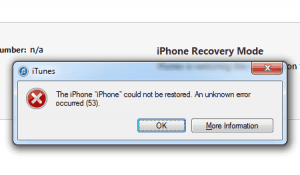
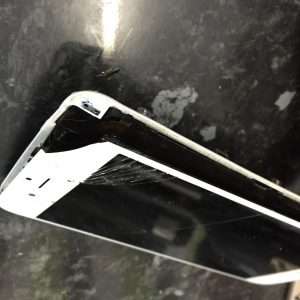
Error 53 is an iOS security feature designed to protect users from tampering. It typically occurs when unauthorized repairs—specifically screen replacements—are done using third-party parts or components not verified by Apple. The error is triggered when your iPhone fails a security check during a software update or restoration. As a result, the device becomes completely unresponsive, leaving users with a phone they can no longer use.
The primary cause of error 53 is related to the Touch ID sensor. Apple uses this sensor for fingerprint authentication and links it with your iPhone’s security features. When a non-genuine part is used, the system detects it and triggers the error, preventing the device from working.
Why Does Error 53 Happen?
Apple designed error 53 as a safeguard to prevent tampering with key security features. Since the Touch ID sensor is directly linked to your iPhone’s Secure Enclave, replacing it with a non-genuine part compromises the security of your phone.
Here’s a breakdown of why error 53 happens:
Tampered Security Features: The iPhone detects an unauthorized change to the Touch ID sensor or other hardware components.
Failed Security Check: During an iOS update or restoration, the device performs a security check. If it detects tampering, it activates error 53.
Third-Party Repairs: Using non-genuine parts, especially for critical components like the screen or Touch ID sensor, is a common cause of this error.
By triggering error 53, Apple ensures that your device remains secure, but this also means that any repairs done outside of authorized Apple service providers can leave your phone permanently damaged.
The Dangers of Non-Genuine Parts
While it might be tempting to choose cheaper third-party repairs, especially when faced with high costs from Apple, using non-genuine parts is a significant risk. Not only can it lead to error 53, but it can also compromise the overall functionality of your device.
Here are the main risks of using non-genuine parts:
Security Risks: Non-genuine components may not have the same security features as official Apple parts, leaving your device vulnerable to hacking or tampering.
Performance Issues: Cheaper parts often lead to poor performance. Your phone may slow down, overheat, or suffer from reduced battery life.
Voided Warranty: Using unauthorized repair services can void your Apple warranty, making future repairs more costly.
How to Avoid Error 53
The easiest way to avoid error 53 is by ensuring that your iPhone repairs are carried out by an authorized Apple service provider using genuine Apple parts. Here are some tips to prevent the error and maintain the security of your iPhone:
1. Always Choose Authorized Repair Services
When your iPhone needs repairs, always go to an Apple Store or an authorized service provider. Apple technicians are trained to use genuine parts, and repairs are guaranteed to pass the built-in security checks that prevent the error.
2. Avoid DIY or Unauthorized Repairs
While it might be tempting to fix your iPhone yourself or go to a cheaper repair shop, unauthorized repairs come with a high risk of error 53. The cost savings are not worth the potential for bricking your phone.
3. Check for Warranties and Guarantees
Authorized Apple repairs come with warranties that guarantee the longevity and performance of the parts used. This ensures that you won’t face issues like error 53 down the road.
The Importance of Genuine Apple Parts
Apple’s ecosystem is designed to function seamlessly, with each component playing a role in the security and functionality of your device. Using genuine parts not only prevents the error, but it also ensures that your phone performs optimally for years to come.
Here’s why using genuine Apple parts is essential:
Seamless Integration: Apple designs its parts to work perfectly with your iPhone’s operating system, reducing the risk of errors like error 53.
Enhanced Security: Genuine parts maintain your device’s security features, ensuring that your data remains protected.
Improved Longevity: Genuine Apple parts are built to last, meaning fewer repairs in the future and a longer lifespan for your device.
When faced with a repair, it’s always better to invest in genuine parts. Not only will you avoid error 53, but you’ll also enjoy better performance and long-term security.
What to Do If You Encounter Error 53
If you’ve already been affected by error 53, don’t panic. Here are the steps you can take to resolve the issue:
1. Contact Apple Support
Reach out to Apple Support or visit an authorized service provider. They may be able to resolve the issue by replacing the unauthorized part with a genuine Apple component.
2. Restore Your iPhone with iTunes
In some cases, you may be able to fix it by restoring your iPhone using iTunes. This won’t always work, especially if the issue is hardware-related, but it’s worth a try before seeking professional help.
3. Use Apple’s Repair Services
If the issue persists, the only guaranteed solution is to have your phone repaired by Apple using genuine parts. Once the unauthorized part is replaced, error 53 will be resolved, and your phone will function normally.
Conclusion: Prevent Error 53 by Using Genuine Parts
At the end of the day, the best way to avoid error 53 is by using genuine Apple parts for all repairs. Whether it’s a screen replacement or a new Touch ID sensor, using non-genuine components can lead to a bricked phone and a host of other issues.
If you need help with iPhone repairs or want to learn more about the dangers of counterfeit parts, contact the experts at Kingfisher Computers. We’ll ensure that your device is repaired with genuine parts, giving you peace of mind and keeping error 53 at bay.
The Illusion of Stability in Modern Updates For most users, operating system updates are something that simply happen. They arrive quietly, often installing in the background, requiring little more than…
Macbook Neo, How Does It Compare To Air & Pro? Over the last few years the laptop market has experienced one of the most significant architectural changes in its history.…
Apple’s latest product announcements mark one of the most significant shifts in the Mac lineup in more than a decade. While Apple routinely updates its hardware with faster chips, incremental…
There is a particular kind of frustration that only a slow computer can produce. It is not dramatic. It is not urgent. It does not scream for attention. Instead, it…
In an era where nearly every aspect of personal computer maintenance and professional life is mediated through digital systems, your computer is no longer a luxury device — it is…
Phone says charging but battery not increasing is one of the most frustrating problems smartphone users face. You plug it in.The lightning bolt appears.It says “Charging.” But the battery percentage…
Apple’s rumour cycle always looks like a thousand disconnected leaks — until you line them up and notice the same themes repeating: AI-first silicon, camera and display differentiation, form-factor experiments (foldables / spatial…
Wi-Fi connected but no internet is one of the most frustrating messages you can see on a computer or laptop. The Wi-Fi icon shows full bars.It says “Connected.”But websites won’t…
Unfortunately, there was an error submitting your request.
Please try again later, or reach out to us directly. You can call us at +44 1429 280955 or email us at sales@kingfishercomputers.co.uk for assistance. We’re here to help you get your computer back up and running!
We’ve received your booking, Our team will get in touch with you shortly to confirm the details. You’re one step closer to having your computer fixed! If you have any urgent questions, feel free to contact us. Otherwise, sit back, and we’ll handle the rest.