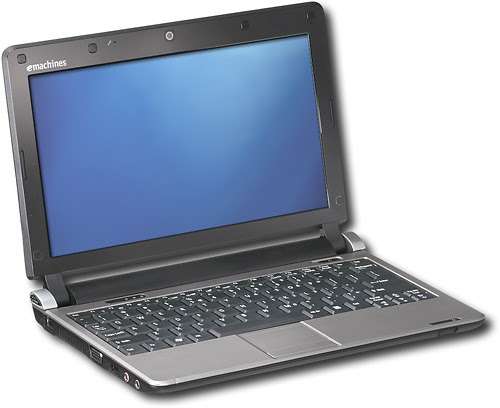
An eMachines EM350 RAM upgrade starts with the model label, the memory already fitted and the job you still need this older netbook to do. Extra RAM can help when a small working memory allowance is the restriction. It cannot repair a failing drive, change the processor or restore support for an obsolete operating system.
Use this guide to check compatibility and decide whether an assessment is worthwhile before ordering a part. Keep a copy of important files somewhere other than the netbook first.
Table of Contents
eMachines EM350 RAM upgrade: check the exact model
Kingston lists the EM350 NAV51 with 1 GB of removable memory, one socket and a 2 GB maximum. Its listed upgrade is a 200 pin DDR2 667 MT/s, 1.8 V SODIMM. Confirm those details against your own model and existing module rather than assuming every similarly named eMachines laptop is identical. See the Kingston EM350 NAV51 compatibility listing.
Check Your Own Netbook’s Model Label Before Selecting A Memory Module.
When extra memory could help
Describe the actual delay. Does a familiar application slow down only when several others are open, or is the netbook slow before you start anything? A machine that previously handled a small task may benefit from a modest upgrade if it is short of working memory. Repeated crashes, unusual drive noises or missing files need investigation first.
Checks before an eMachines EM350 RAM upgrade
Keep the old module until the replacement has been recognised and tested. Photograph the model label and any accessible memory label for reference. These checks help establish what to buy; they do not replace the service instructions for opening your particular machine.
1. Match the memory specification
Compare the generation, capacity, voltage and module format with the model’s supported specification. DDR3, DDR4 and desktop memory are not substitutes for the listed DDR2 SODIMM. Ask a supplier to confirm compatibility with the exact model before paying, particularly when buying older or used parts.
2. Shut down and disconnect power
Save your work and shut the netbook down fully. Disconnect its charger and follow the model’s instructions for removing its battery before internal work. Work away from liquids and handle a module by its edges. If you cannot identify the correct battery or access procedure, arrange help rather than opening it experimentally.
3. Confirm the access procedure
Do not assume there is a separate memory hatch underneath. Establish which covers, cables and fasteners the exact model requires you to remove. Stop if a cover resists or an internal cable is under tension. An upgrade is poor value if an avoidable opening mistake damages the machine.
4. Fit only the confirmed replacement
Use the model’s installation instructions and check the notch and retaining clips before seating the replacement. Never force a module that does not align. Kingston’s notebook memory support guidance explains compatibility and seating checks when new memory is not recognised.
5. Reassemble and verify the result
Reassemble the machine before reconnecting power. Check the installed memory reported by the system and try the ordinary task that prompted the upgrade. A successful startup alone does not demonstrate reliable operation. If a new fault appears, record what changed and ask for assessment; do not keep changing unrelated settings.
Set realistic performance expectations
Compare the same task before and after the change, using the same files and applications. The useful question is whether it now meets your needs. More memory does not turn an Atom netbook into a current laptop, and advertised improvements should not be treated as a guaranteed percentage speed increase.
Is this older netbook worth upgrading?
Consider the whole machine: its screen, keyboard, battery, storage, software and the availability of compatible parts. Microsoft ended support for Windows 7 in January 2020. More RAM does not restore those security updates. Check the support and hardware requirements of any proposed operating system separately.
A practical reason to keep it
An inexpensive upgrade may make sense for a specific existing task when the rest of the machine is sound. Write that task down first. If the aim is everyday online banking, current applications or dependable work use, discuss the complete supported setup rather than judging value from the memory price alone.
Compare the alternatives before spending
Choose the next step from the fault and the intended use. You may need a file transfer, a storage assessment, a software compatibility check or a different device. Buying memory first can leave the original problem unresolved.
Assess the storage separately
A storage change is a different job with its own fit, interface and data transfer checks. If files are difficult to read or the drive behaves unusually, protect the data before attempting migration. Discuss the combined cost rather than adding upgrades one at a time without a clear plan.
Include a supported replacement in the comparison
Compare the complete usable result, including software, file transfer and any accessories you need. A more recent device may suit the task better, but replacement is a decision to make after the current machine and your requirements are understood.
eMachines EM350 memory questions
Can the EM350 use more than 2 GB?
The NAV51 listing above specifies a 2 GB maximum. Do not buy a larger module on the assumption that it will work. If your label identifies a different variant, verify that model’s support information first.
What will the upgrade cost?
Ask for the cost of the confirmed part, fitting and testing together. Older parts vary in availability and condition, so this guide does not promise a fixed price. Tell us the model and what you want to improve so we can discuss whether further assessment is useful.
Will it solve slow performance?
Only if insufficient memory is part of the problem. Software demands, a storage fault and the limits of the original hardware can also cause delays. An upgrade should follow the evidence rather than replace diagnosis.
Bring the model details and a clear symptom
Tell our Hartlepool team the exact model, reported memory, operating system and task that is causing difficulty. Explain whether it has always been slow or has recently changed. Our computer upgrade planning guide helps you compare the next steps without assuming one replacement part fixes everything.
The Illusion of Stability in Modern Updates For most users, operating system updates are something that simply happen. They arrive quietly, often installing in the background, requiring little more than…
Macbook Neo, How Does It Compare To Air & Pro? Over the last few years the laptop market has experienced one of the most significant architectural changes in its history.…
Apple’s latest product announcements mark one of the most significant shifts in the Mac lineup in more than a decade. While Apple routinely updates its hardware with faster chips, incremental…
There is a particular kind of frustration that only a slow computer can produce. It is not dramatic. It is not urgent. It does not scream for attention. Instead, it…
Small business computer maintenance planning starts with the work you cannot afford to lose. Identify the computers, accounts and files behind those tasks, then agree when maintenance can happen and…
Phone says charging but battery not increasing is one of the most frustrating problems smartphone users face. You plug it in.The lightning bolt appears.It says “Charging.” But the battery percentage…
Apple’s rumour cycle always looks like a thousand disconnected leaks — until you line them up and notice the same themes repeating: AI-first silicon, camera and display differentiation, form-factor experiments (foldables / spatial…
Wi-Fi connected but no internet is one of the most frustrating messages you can see on a computer or laptop. The Wi-Fi icon shows full bars.It says “Connected.”But websites won’t…
Unfortunately, there was an error submitting your request.
Please try again later, or reach out to us directly. You can call us at +44 1429 280955 or email us at sales@kingfishercomputers.co.uk for assistance. We’re here to help you get your computer back up and running!
We’ve received your booking, Our team will get in touch with you shortly to confirm the details. You’re one step closer to having your computer fixed! If you have any urgent questions, feel free to contact us. Otherwise, sit back, and we’ll handle the rest.
Contact Kingfisher Computers
No appointment required. You’re welcome to pop into the shop during opening hours.
ENQUIRY RECEIVED
Thank you
Monday–Friday
9am–5pm
Saturday
9am–4:30pm
Sunday
Closed
Bank holidays
Closed
38 Church Street, Hartlepool, TS24 7DG For home visits and callouts, please wait for us to arrange a time.
Contact Kingfisher Computers
No appointment required. You’re welcome to pop into the shop during opening hours.
ENQUIRY RECEIVED
Thank you
Monday–Friday
9am–5pm
Saturday
9am–4:30pm
Sunday
Closed
Bank holidays
Closed
38 Church Street, Hartlepool, TS24 7DG For home visits and callouts, please wait for us to arrange a time.