PC freezes randomly: 7 critical reasons with no blue screen
Connor Boyle
February 6th, 2026
PC freezes randomly is one of the most confusing and frustrating problems we see in our repair shop.
The computer doesn’t crash. There’s no blue screen. No error message.
Everything just… stops.
The mouse freezes. The keyboard does nothing. The screen stays exactly as it is.
When a PC freezes randomly like this, it often feels harder to diagnose than a full crash — but in reality, this type of fault usually leaves very clear clues once you know what to look for.
This guide explains why a PC freezes randomly but shows no blue screen, what’s happening behind the scenes, and which fixes actually work.
What “PC freezes randomly” actually means
When a PC freezes randomly, Windows is still technically running in the background — but one or more critical components have stopped responding properly.
The operating system hasn’t failed in a dramatic way. Instead, it’s waiting for a response that never arrives.
Unlike a blue screen crash:
Windows does not shut down on its own
No crash report is created for you to see
The system doesn’t restart itself to recover
From the outside, everything looks normal. The screen stays on. Programs appear frozen exactly where they were. The mouse and keyboard stop responding, but the PC doesn’t power off.
In this state, Windows is effectively stuck in limbo. It’s not progressing, but it’s also not fully crashing.
That’s why the system can sit frozen indefinitely until the power is forced off manually. Windows simply doesn’t know how to recover from the situation on its own.
This tells us something important: 👉 the system hasn’t completely crashed — it has stalled, usually because Windows is waiting on a piece of hardware or software that isn’t responding the way it should.
Understanding this difference is key to diagnosing why a PC freezes randomly, and it’s why these issues often need a different approach than blue screen errors.
Why a PC freezes randomly feels harder to diagnose
Blue screens are dramatic, but they’re also helpful. When a system crashes with a blue screen, Windows usually provides an error code, a stop message, and a record in the system logs. As disruptive as they are, blue screens give technicians something solid to work with.
When a PC freezes randomly, however, it’s a very different experience.
There’s:
No warning
No error code
No crash message
No recovery screen
The system simply stops responding and stays that way until it’s forcibly powered off.
From a user’s point of view, this makes the problem feel completely unpredictable and much harder to understand. One moment everything is working normally, and the next the computer is frozen with no explanation of what went wrong or how to prevent it from happening again.
From a repair perspective, though, random freezes are rarely truly random. In almost every case, a PC that freezes randomly is reacting to an underlying issue that repeats under the same conditions. The pattern may not be obvious at first, but with proper testing and observation, it almost always reveals itself.
The most common reasons a PC freezes randomly
There isn’t one single cause.
A PC freezes randomly due to a breakdown in communication between software and hardware. That breakdown can happen for many reasons, which is why guessing rarely works.
PC freezes randomly due to memory (RAM) instability
This is one of the most common causes we see.
What happens
RAM is used constantly. If it becomes unstable, Windows can’t recover cleanly.
Instead of crashing, the system:
Locks up
Stops responding
Appears frozen
Common triggers
Faulty RAM sticks
XMP or memory overclocks
Mixed RAM kits
BIOS updates
Is this worth fixing?
✅ Yes
Memory issues are often fixable by:
Adjusting BIOS settings
Replacing faulty RAM
Removing incompatible modules
PC freezes randomly because of overheating
Modern CPUs and GPUs are designed to protect themselves from heat. Instead of immediately shutting the system down, they try to manage high temperatures in more subtle ways to prevent permanent damage.
When temperatures spike too high:
Performance is automatically reduced to lower heat output
Processes begin to slow or stall
The system may freeze temporarily instead of fully shutting down
This behaviour can make the problem feel random, especially because the PC often starts working again once it has cooled down.
Overheating-related freezes are particularly common during tasks that place sustained load on the system, such as:
Gaming, where both the CPU and GPU are working hard
Video editing, which stresses processing and memory continuously
Heavy multitasking, with many programs running at once
Common signs of overheating
There are usually warning signs before overheating becomes severe:
Fans suddenly ramp up and stay loud
Freezes only occur when the system is under load
The PC works normally again after being left to cool down
Because these symptoms don’t always cause a shutdown or blue screen, overheating is often overlooked as the cause of random freezes.
Is this worth fixing?
✅ Yes
Overheating issues are very often fixable. Simple maintenance such as internal cleaning, replacing dried-out thermal paste, or repairing or replacing faulty fans can restore normal temperatures and stop freezing without needing to replace the entire system.
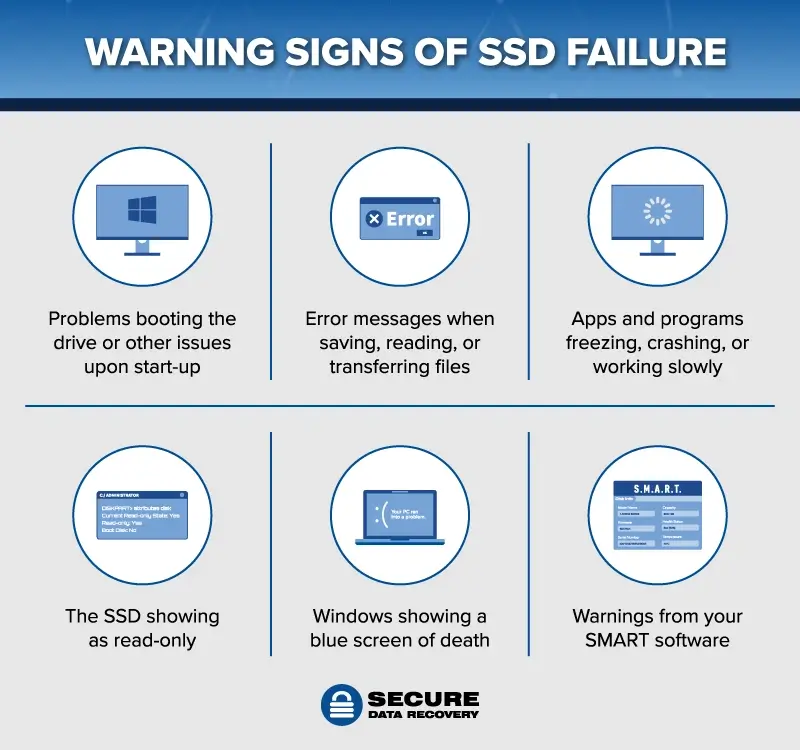
PC freezes randomly due to storage problems
Your storage drive is involved in everything Windows does.
If an SSD or HDD:
Struggles to read data
Times out
Drops communication
Windows may freeze while waiting for data that never arrives.
Warning signs
Freezes during file access
Programs stop responding
Long delays before freezing
Is this worth fixing?
⚠️ Depends
Sometimes it’s a software issue. Sometimes it’s early drive failure.
Drivers act as translators between Windows and hardware.
If a driver:
Is outdated
Is corrupted
Is incompatible
Windows may lock up instead of crashing.
Common drivers involved
Graphics drivers
Chipset drivers
Storage controllers
This often happens after:
Windows updates
GPU driver updates
Hardware changes
Is this worth fixing?
✅ Yes
Correcting or rolling back drivers often stops freezes immediately.
PC freezes randomly due to background software conflicts
Some software runs constantly in the background.
If two programs fight for the same resources, Windows may freeze rather than crash.
Common culprits
Antivirus software
Monitoring tools
RGB control software
Backup utilities
These freezes often appear “random” because the conflict only happens under certain conditions.
PC freezes randomly because of power issues
Unstable power doesn’t always cause shutdowns.
Instead, it can cause:
Voltage drops
Component desync
System stalls
Common causes
Failing power supply
Faulty laptop charger
Loose power connections
Is this worth fixing?
⚠️ Often yes
Power issues are common and frequently misdiagnosed.
Why a PC freezes randomly without showing a blue screen
Windows only shows a blue screen when it detects a fatal, known error.
When a PC freezes randomly:
Windows is waiting for a response
A component isn’t replying
No crash condition is triggered
So instead of stopping, Windows just hangs.
That’s why freezes often feel more mysterious — but they’re not unfixable.
How we diagnose a PC that freezes randomly
At Kingfisher Computers, we don’t rely on guesswork.
We test:
Memory stability
Temperature behaviour
Drive response times
Driver reliability
Power delivery
This lets us identify why the PC freezes randomly and whether the fix is worthwhile.
What you can safely try at home when a PC freezes randomly
BBefore assuming the system is failing completely, there are a few safe checks you can try yourself. These steps are low-risk, easy to do, and won’t make the problem worse when done carefully. In many cases, they can also help narrow down what’s actually causing the issue.
Fully restart the PC (not sleep or hibernate)
Sleep and hibernate don’t truly reset the system. They keep drivers, memory states, and background processes loaded so the PC can resume quickly.
When a PC freezes randomly, those saved states can carry the problem forward instead of clearing it.
A full restart forces Windows to reload everything from scratch, which can clear:
Temporary memory errors
Background processes that have become stuck
Driver glitches that only appear after long uptime
Always test with a proper restart before trying anything else. If the freezes stop after a clean restart, it’s a strong sign the issue is software-related rather than a serious hardware failure.
Check when the freezes actually happen
Freezes almost always follow a pattern, even if it doesn’t look like it at first.
Take note of:
What you were doing when the freeze occurred
Which programs were open at the time
Whether the PC was under heavy load or mostly idle
How long the system had been running since it was last restarted
These details matter more than people realise. A PC that freezes randomly during specific tasks is usually reacting to a trigger, not failing at random. Identifying that trigger makes diagnosis much faster.
Monitor temperatures during normal use
Overheating doesn’t always cause a PC to shut down or show an error message.
In many cases, excess heat causes:
Sudden freezes
System stalls
Short periods of total unresponsiveness
If a PC freezes randomly during gaming, video editing, or other demanding tasks, temperature is a strong suspect. Systems can appear stable at idle but struggle once heat builds up, especially if cooling hasn’t been maintained.
Checking temperature behaviour can quickly rule overheating in or out before more serious steps are taken.
What you should NOT do when a PC freezes randomly
Some actions can make diagnosing a freezing problem much harder or increase the risk of data loss, especially when the issue is already ongoing.
Don’t force power-offs repeatedly
When a PC freezes, the natural reaction is to hold the power button until it turns off. Doing this occasionally won’t usually cause harm, but repeating it over and over can create new problems.
Holding the power button repeatedly:
Increases the risk of system file corruption
Can damage storage over time, especially on older drives
Makes freezes more frequent by breaking files Windows depends on
Each forced shutdown interrupts Windows while it’s writing data in the background. Over time, this can turn a minor freezing issue into a much larger one.
If freezes are happening regularly, stop forcing shutdowns and focus on finding the underlying cause instead of repeatedly cutting the power.
Don’t ignore early warning signs
Random freezes are rarely “just a glitch.”
In most cases, they’re early warning signs that something isn’t working as it should. The system is struggling to cope, even if it hasn’t fully failed yet.
Ignoring repeated freezes can lead to:
Full system failure at a later stage
Increased risk of data loss
Permanent hardware damage if overheating or power issues are involved
A PC that freezes randomly is essentially asking for attention. Catching the problem early is often the difference between a simple fix and a much more expensive repair.
Don’t install “PC booster” or optimisation software
When searching online, many people are encouraged to install so-called “PC booster” or “performance optimisation” tools.
In reality, these programs:
Rarely fix freezing issues
Add extra background processes that increase system load
Introduce new conflicts with drivers and security software
Rather than helping, these tools often make random freezing worse and more frequent, while also making proper diagnosis harder.
If a PC freezes randomly, the solution is almost always fixing the underlying hardware or software issue — not adding more software on top.
When a PC freezes randomly becomes a data concern
Sometimes the focus shifts from fixing Windows to protecting your data.
This happens when:
Freezes become more frequent
Storage access slows down
Files stop opening properly
The PC freezes during startup
At this stage, protecting data becomes more important than optimisation.
How we fix a PC that freezes randomly at Kingfisher Computers
When a system comes into our repair shop with this issue, we don’t rely on guesswork or quick assumptions. A PC that freezes randomly needs a structured approach, because the cause is rarely obvious from the outside.
That’s why we follow a clear, step-by-step diagnostic process designed to pinpoint the real fault, not just mask the symptoms.
Our step-by-step diagnostic approach
We start by testing the system under controlled conditions and gradually narrowing things down. This allows us to see how the PC behaves when it’s placed under stress and when it’s idle.
During diagnostics, we check:
Memory stability under load, to see whether the RAM can operate reliably without errors
CPU and GPU temperatures, ensuring the system isn’t freezing due to thermal throttling or overheating
Drive response and overall health, looking for slow read times or timeouts that can cause Windows to hang
Power stability, including voltage consistency from the power supply or charger
Driver behaviour, checking for conflicts, crashes, or components that stop responding
Each of these tests helps rule out entire categories of faults and brings us closer to the real cause.
Clear advice, no guesswork
Once we’ve identified why the PC freezes randomly, we explain everything in plain English.
We’ll talk you through:
What’s actually causing the freezes, without technical jargon
What the fix involves, whether that’s a software repair, a hardware replacement, or a configuration change
What it will cost, so there are no surprises later
Whether it’s genuinely worth doing, based on the age, value, and condition of the system
If replacement makes more sense than repair, we’ll say so upfront. Our goal is to help you make the right decision, not to push repairs that don’t offer good long-term value.
When repairing a PC that freezes randomly makes sense
Final thoughts: a PC that freezes randomly is usually fixable
A PC freezes randomly issue can feel unpredictable, frustrating, and genuinely worrying — especially when there’s no warning, no error message, and no clear reason why it’s happening. From the outside, it can seem like the computer is failing at random, making it difficult to trust the system for work, study, or everyday use.
In reality, random freezing is often a sign that something specific is struggling, not that the entire system is broken.
In many cases:
Windows itself isn’t broken, but is being held up by a component or process that stops responding
The hardware simply needs attention, such as memory adjustments, cooling improvements, or drive checks
The fix is straightforward, once the underlying cause is correctly identified
The most important thing is catching the issue early. Identifying why a PC freezes randomly before the problem escalates can prevent data loss, avoid hardware damage, and save you from more expensive repairs later on.
Need help with a PC that freezes randomly?
If your computer keeps freezing with no blue screen, warning, or obvious pattern, it’s worth having it checked properly rather than hoping it goes away on its own.
Bring it into our repair shop and let us take a closer look. We’ll run proper diagnostics, explain exactly what’s causing the freezes in plain English, and help you decide on the best next step — whether that’s a repair, an upgrade, or simply peace of mind that everything is working as it should.
The Illusion of Stability in Modern Updates For most users, operating system updates are something that simply happen. They arrive quietly, often installing in the background, requiring little more than…
Macbook Neo, How Does It Compare To Air & Pro? Over the last few years the laptop market has experienced one of the most significant architectural changes in its history.…
Apple’s latest product announcements mark one of the most significant shifts in the Mac lineup in more than a decade. While Apple routinely updates its hardware with faster chips, incremental…
There is a particular kind of frustration that only a slow computer can produce. It is not dramatic. It is not urgent. It does not scream for attention. Instead, it…
In an era where nearly every aspect of personal computer maintenance and professional life is mediated through digital systems, your computer is no longer a luxury device — it is…
Phone says charging but battery not increasing is one of the most frustrating problems smartphone users face. You plug it in.The lightning bolt appears.It says “Charging.” But the battery percentage…
Apple’s rumour cycle always looks like a thousand disconnected leaks — until you line them up and notice the same themes repeating: AI-first silicon, camera and display differentiation, form-factor experiments (foldables / spatial…
Wi-Fi connected but no internet is one of the most frustrating messages you can see on a computer or laptop. The Wi-Fi icon shows full bars.It says “Connected.”But websites won’t…
Unfortunately, there was an error submitting your request.
Please try again later, or reach out to us directly. You can call us at +44 1429 280955 or email us at [email protected] for assistance. We’re here to help you get your computer back up and running!
We’ve received your booking, Our team will get in touch with you shortly to confirm the details. You’re one step closer to having your computer fixed! If you have any urgent questions, feel free to contact us. Otherwise, sit back, and we’ll handle the rest.