Why Upgrades Aren’t Always Worth It: The Honest Truth About PC Upgrades
Adam Fornal
January 22nd, 2026
Why PC Upgrades Sound Smarter Than They Often Are
When a computer starts slowing down, the first instinct most people have is to upgrade it. The logic feels solid. If the machine still turns on and technically works, why replace it when you can just improve it? Add more memory, swap the drive, maybe upgrade a component or two, and suddenly everything should feel fast again. At least, that’s the idea.
The problem is that PC upgrades do not work the way most people expect anymore. While upgrades used to be a reliable way to extend a computer’s life, modern systems are often designed with far more limitations than buyers realise. What looks like a sensible investment on the surface can quickly turn into wasted money with very little real-world improvement.
At Kingfisher Computers, we see this every week. Customers arrive convinced that a simple upgrade will fix their issues, only to find that their system cannot be upgraded properly, or that the upgrade delivers far less benefit than expected. This article explains why PC upgrades aren’t always worth it, how to recognise when an upgrade makes sense, and when replacing the system is the smarter option.
Why Upgrades Aren’t Always Worth It: The Honest Truth About Pc Upgrades 4
The Outdated Assumption Behind Most PC Upgrades
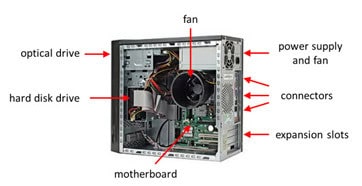
The biggest reason PC upgrades fail is because people are working from an outdated understanding of how computers are built. Years ago, computers were designed to be modular. Memory slots were accessible, storage drives were replaceable, processors could be upgraded, and power supplies had spare capacity. Upgrading was expected, not optional.
Modern computers are built very differently. Manufacturers prioritise thin designs, lower production costs, and simplified assembly. As a result, many systems now use soldered components, proprietary parts, and tightly integrated designs that severely limit future upgrades. These limitations are rarely obvious when buying the machine, which leads to incorrect assumptions later.
The result is a mismatch between expectation and reality. People plan PC upgrades based on how computers used to work, not how their specific system was actually designed.
Soldered Components: Why Many PC Upgrades Are Impossible
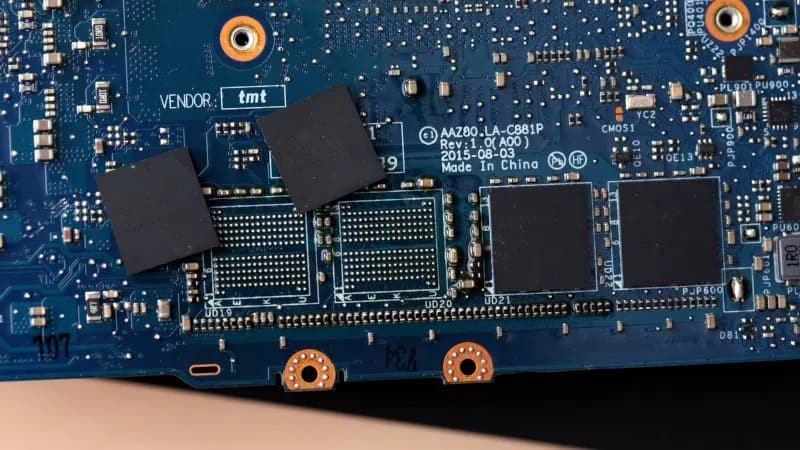
One of the biggest reasons PC upgrades are not worth it is the widespread use of soldered components. In many modern laptops, all-in-one PCs, and even some desktops, critical parts such as RAM and storage are permanently attached to the motherboard.
When RAM is soldered, it cannot be replaced or expanded. Whatever amount the computer shipped with is all it will ever have. This is particularly problematic because RAM is often the first component to become a performance bottleneck as software becomes more demanding. Once the system runs out of usable memory, performance drops sharply, and there is no upgrade path available.
Soldered storage creates an even bigger issue. If the SSD is permanently attached, you cannot increase capacity or replace it if it fails. In some cases, a single failed storage chip effectively kills the entire computer. From a PC upgrades perspective, soldered components turn what should be simple improvements into complete dead ends.
Why Upgrades Aren’t Always Worth It: The Honest Truth About Pc Upgrades 5
Independent teardown sites like iFixit regularly show how modern computers are designed with limited repairability and very restricted PC upgrade paths.
CPU Upgrades: Why They Rarely Deliver Value
Processor upgrades are another area where expectations no longer match reality. In laptops, CPUs are almost always soldered and cannot be replaced. If the processor is slow, the system has reached its ceiling, regardless of how much money you want to spend.
Desktop PCs can sometimes support CPU upgrades, but even here the value is often questionable. Motherboard chipsets limit which processors are supported, BIOS updates may be unavailable, and power or cooling systems may not be designed to handle faster CPUs. In many cases, upgrading the processor requires replacing the motherboard as well, which quickly snowballs into a near-full rebuild.
When PC upgrades involve replacing multiple core components just to support a single improvement, the cost often approaches that of a newer, better-balanced system.
Hardware publications such as Tom’s Hardware have repeatedly documented how chipset and BIOS restrictions prevent many CPU upgrades from working, even when the processor physically fits.
The Power Supply Problem Most People Miss
Power supplies are one of the most common reasons PC upgrades fail. Many prebuilt systems use low-wattage or proprietary power supplies that are designed only to handle the original components. There is no spare capacity for more powerful hardware.
This becomes a serious issue when attempting graphics card upgrades. Even if the card physically fits, the power supply may not support it, or may not be replaceable with a standard unit. The result is instability, shutdowns, or a system that will not boot at all.
From a practical standpoint, PC upgrades that require replacing the power supply, case, or motherboard to support one component are rarely cost-effective.
Cooling and Thermal Limits: The Invisible Barrier
Another reason PC upgrades often disappoint is cooling. Every system is designed around a specific thermal envelope. The cooling solution is built to handle a known amount of heat generated by the original components.
When a more powerful part is installed, heat output increases. If the cooling system cannot cope, the computer protects itself by reducing performance through thermal throttling. This can make upgrades feel pointless, as the system never reaches the performance levels expected on paper.
This is especially common in compact desktops, laptops, and all-in-one PCs, where airflow is already limited. Even when an upgrade technically works, thermal constraints can prevent any meaningful real-world improvement.
Real-world testing from sites like TechSpot shows how thermal throttling often wipes out the performance gains people expect from PC upgrades in compact systems.
Small Form Factor and All-in-One PCs: Poor Candidates for PC Upgrades
Small form factor PCs and all-in-one systems are often mistaken for upgrade-friendly desktops. In reality, they combine the limitations of laptops with the price of desktops.
These systems typically use:
Laptop-grade CPUs
Limited or soldered RAM
Custom motherboards
Minimal cooling
Proprietary power supplies
While minor upgrades may be possible in some models, meaningful PC upgrades are usually limited or impractical. Treating these systems as fully upgradeable almost always leads to disappointment.
When PC Upgrades Do Make Sense
Despite all these limitations, PC upgrades are not always a bad idea. They can be extremely effective when applied to the right systems.
PC upgrades tend to be worth it when:
The system uses standard desktop components
RAM and storage are replaceable
Power and cooling have spare capacity
The CPU is not already the main bottleneck
Why Upgrades Aren’t Always Worth It: The Honest Truth About Pc Upgrades 6
Upgrading from a mechanical hard drive to an SSD, increasing RAM in a supported system, or installing a suitable graphics card can dramatically extend the usable life of a well-designed PC.
This is why custom-built desktops and business-grade systems often respond far better to upgrades than consumer prebuilt machines.
Desktop systems that use standard components usually respond far better to PC upgrades, especially when they’re assessed properly beforehand. A professional PC and desktop repair service can quickly identify whether memory, storage, or graphics upgrades will deliver real-world improvements or whether the system has already reached its practical limits.
When PC Upgrades Are a Waste of Money
PC upgrades are usually not worth it when:
RAM or storage is soldered
The processor is already outdated
Power or cooling is maxed out
Proprietary parts limit compatibility
In these cases, money spent on upgrades often delivers minimal improvement while delaying the inevitable replacement. The system may feel slightly better for a short time, but the underlying limitations remain.
Throwing new parts at a fundamentally constrained machine rarely provides long-term value.
The Environmental Side of Smarter PC Upgrades
There is a strong environmental argument for PC upgrades when they are done correctly. Extending the life of a well-designed system reduces electronic waste and lowers the demand for new manufacturing.
However, failed or poorly planned upgrades create unnecessary waste. Incompatible parts, abandoned systems, and full replacements caused by non-replaceable components all contribute to the problem.
Smarter upgrade decisions benefit both your wallet and the environment.
Getting Professional Advice Before Upgrading
One of the simplest ways to avoid wasting money is to get proper hardware upgrade advice before buying parts. A quick compatibility check can reveal whether PC upgrades are actually viable or whether the system’s design makes upgrades ineffective or impossible.
At Kingfisher Computers, we regularly assess systems and advise customers honestly. Sometimes the best advice is not to upgrade, and that saves far more money than selling parts that won’t deliver results.
Why PC Upgrades Aren’t Always the Answer
PC upgrades are not pointless. They are not outdated. But they are no longer a guaranteed solution.
Modern computers are often designed with fixed specifications, limited flexibility, and short upgrade windows. Understanding those limits before spending money is the difference between a successful upgrade and a frustrating waste of cash.
At Kingfisher Computers, we believe the smartest upgrade is the one that actually makes sense — even if that means not upgrading at all.
The Illusion of Stability in Modern Updates For most users, operating system updates are something that simply happen. They arrive quietly, often installing in the background, requiring little more than…
Macbook Neo, How Does It Compare To Air & Pro? Over the last few years the laptop market has experienced one of the most significant architectural changes in its history.…
Apple’s latest product announcements mark one of the most significant shifts in the Mac lineup in more than a decade. While Apple routinely updates its hardware with faster chips, incremental…
There is a particular kind of frustration that only a slow computer can produce. It is not dramatic. It is not urgent. It does not scream for attention. Instead, it…
In an era where nearly every aspect of personal computer maintenance and professional life is mediated through digital systems, your computer is no longer a luxury device — it is…
Phone says charging but battery not increasing is one of the most frustrating problems smartphone users face. You plug it in.The lightning bolt appears.It says “Charging.” But the battery percentage…
Apple’s rumour cycle always looks like a thousand disconnected leaks — until you line them up and notice the same themes repeating: AI-first silicon, camera and display differentiation, form-factor experiments (foldables / spatial…
Wi-Fi connected but no internet is one of the most frustrating messages you can see on a computer or laptop. The Wi-Fi icon shows full bars.It says “Connected.”But websites won’t…
Unfortunately, there was an error submitting your request.
Please try again later, or reach out to us directly. You can call us at +44 1429 280955 or email us at [email protected] for assistance. We’re here to help you get your computer back up and running!
We’ve received your booking, Our team will get in touch with you shortly to confirm the details. You’re one step closer to having your computer fixed! If you have any urgent questions, feel free to contact us. Otherwise, sit back, and we’ll handle the rest.