How to Choose the Right Gaming Mouse for Your Playstyle
Adam Fornal
July 10th, 2025
Table of Contents
How to Choose the Right Gaming Mouse for Your Playstyle
Gaming performance depends heavily on the precision and comfort of your peripheral equipment, and nothing impacts your gameplay more directly than your mouse. Choosing the Right Gaming Mouse can mean the difference between victory and defeat, between hours of comfortable play and hand fatigue. This comprehensive guide will help you navigate the complex world of gaming mice to find the perfect match for your specific gaming needs and preferences.
The market offers hundreds of gaming mice, each claiming to be the ultimate solution for competitive gaming. However, the Right Gaming Mouse for you depends on numerous factors including your preferred game genres, hand size, grip style, and budget. Understanding these variables and how they interact will empower you to make an informed decision that enhances your gaming experience for years to come.
Understanding Gaming Mouse Fundamentals
Before diving into specific recommendations, it’s crucial to understand what makes a gaming mouse different from a standard office mouse. Gaming mice are engineered for precision, speed, and durability under intense use conditions. They feature specialized sensors, customizable settings, and ergonomic designs tailored to extended gaming sessions. Knowing these fundamentals will help you identify the Right Gaming Mouse that meets your performance requirements.
Gaming mice typically feature higher DPI (dots per inch) sensors, allowing for more precise tracking and faster cursor movement. They also include additional programmable buttons that can be customized for specific game functions, reducing the need to reach for keyboard shortcuts during critical moments. The build quality is generally superior, with components designed to withstand millions of clicks and rapid movements that would quickly wear out standard mice.
The Importance of Sensor Technology
Modern gaming mice use either optical or laser sensors, each with distinct advantages. Optical sensors generally provide more consistent tracking across different surfaces and are preferred by most competitive gamers. When selecting the Right Gaming Mouse, consider that optical sensors typically offer better precision at lower DPI settings, while laser sensors can achieve higher maximum DPI values but may have slight accuracy variations on certain surfaces.
The sensor’s polling rate, measured in Hz, determines how frequently the mouse reports its position to your computer. Higher polling rates like 1000Hz provide smoother cursor movement and reduced input lag, crucial factors in competitive gaming. However, these higher rates consume more system resources, so finding the Right Gaming Mouse involves balancing performance needs with system capabilities.
Ergonomics and Build Quality Considerations
Comfort during extended gaming sessions depends heavily on mouse ergonomics. The Right Gaming Mouse should feel natural in your hand and not cause strain during long play sessions. Consider factors like mouse weight, button placement, and overall shape when evaluating options. Some mice feature adjustable weights, allowing you to customize the feel to your preference.
Build quality directly impacts longevity and consistent performance. Look for mice with high-quality switches rated for tens of millions of clicks, durable cable construction, and robust housing materials. The Right Gaming Mouse should maintain its performance characteristics even after months or years of intensive use. Pay attention to reviews that mention long-term reliability, as this information often isn’t apparent from specifications alone.
How To Choose The Right Gaming Mouse For Your Playstyle 9
Matching Mouse Features to Gaming Genres
Different gaming genres place varying demands on your mouse, and understanding these requirements is essential for choosing the Right Gaming Mouse. First-person shooters require precise tracking and quick movements, while real-time strategy games benefit from multiple programmable buttons and consistent performance during rapid clicking sequences.
First-Person Shooter (FPS) Gaming Requirements
FPS games demand exceptional precision and responsiveness from your mouse. The Right Gaming Mouse for FPS gaming typically features a high-quality optical sensor with consistent tracking at various DPI settings. Many professional FPS players prefer mice with DPI ranges between 400-1600, as these settings provide the precision needed for accurate aiming while maintaining enough sensitivity for quick turns and movement.
Weight is particularly important in FPS gaming, as lighter mice allow for faster movements and reduced fatigue during extended sessions. Look for mice weighing between 70-100 grams, as this range provides good balance between control and maneuverability. The Right Gaming Mouse for FPS should also feature a comfortable grip that doesn’t slip during intense gaming moments, often achieved through textured surfaces or rubberized coatings.
Button Layout and Customization for FPS
While FPS games don’t require as many programmable buttons as other genres, the Right Gaming Mouse should still offer some customization options. Side buttons are particularly useful for functions like melee attacks, grenade throws, or weapon switching. The primary left and right buttons should have crisp, responsive clicks with minimal travel distance to ensure rapid-fire capabilities when needed.
Many FPS-focused mice include on-the-fly DPI adjustment buttons, allowing you to quickly switch between different sensitivity settings during gameplay. This feature is particularly valuable for games that require different sensitivities for different weapons or situations. The Right Gaming Mouse for FPS gaming should make these adjustments seamless and intuitive, without disrupting your gameplay flow.
How To Choose The Right Gaming Mouse For Your Playstyle 10
Real-Time Strategy (RTS) and MOBA Gaming Needs
RTS and MOBA games place different demands on your mouse compared to FPS games. These genres require numerous programmable buttons for quick access to unit commands, building construction, and ability activation. The Right Gaming Mouse for RTS gaming typically features 6-12 programmable buttons positioned for easy access without requiring significant hand movement.
Precision remains important in RTS games, but the focus shifts toward consistent performance during rapid clicking sequences and multi-tasking scenarios. The Right Gaming Mouse should maintain accurate tracking while you rapidly select units, issue commands, and navigate the battlefield. Durability becomes particularly crucial, as RTS games often involve sustained periods of rapid clicking that can quickly wear out lower-quality switches.
How To Choose The Right Gaming Mouse For Your Playstyle 11
Macro Programming and Advanced Features
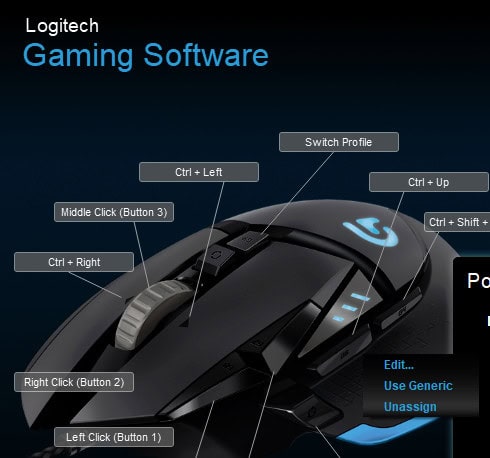
Advanced customization options distinguish the Right Gaming Mouse for RTS gaming from basic models. Look for mice with robust software that allows complex macro programming, multiple profile storage, and easy switching between different game configurations. Some mice can store profiles in onboard memory, ensuring your settings remain consistent across different computers.
Gaming mice designed for RTS often include features like adjustable click resistance and specialized scroll wheel modes. The Right Gaming Mouse might offer a free-spinning scroll wheel mode for rapid map navigation alongside a tactical mode for precise unit selection. These features can significantly improve your efficiency and performance in complex strategic scenarios.
MMO and RPG Gaming Considerations
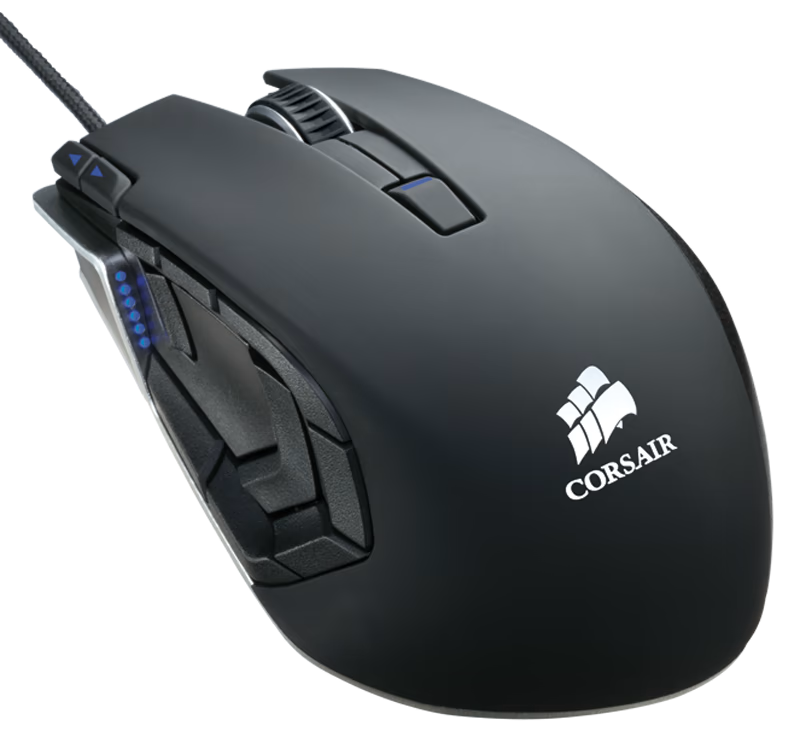
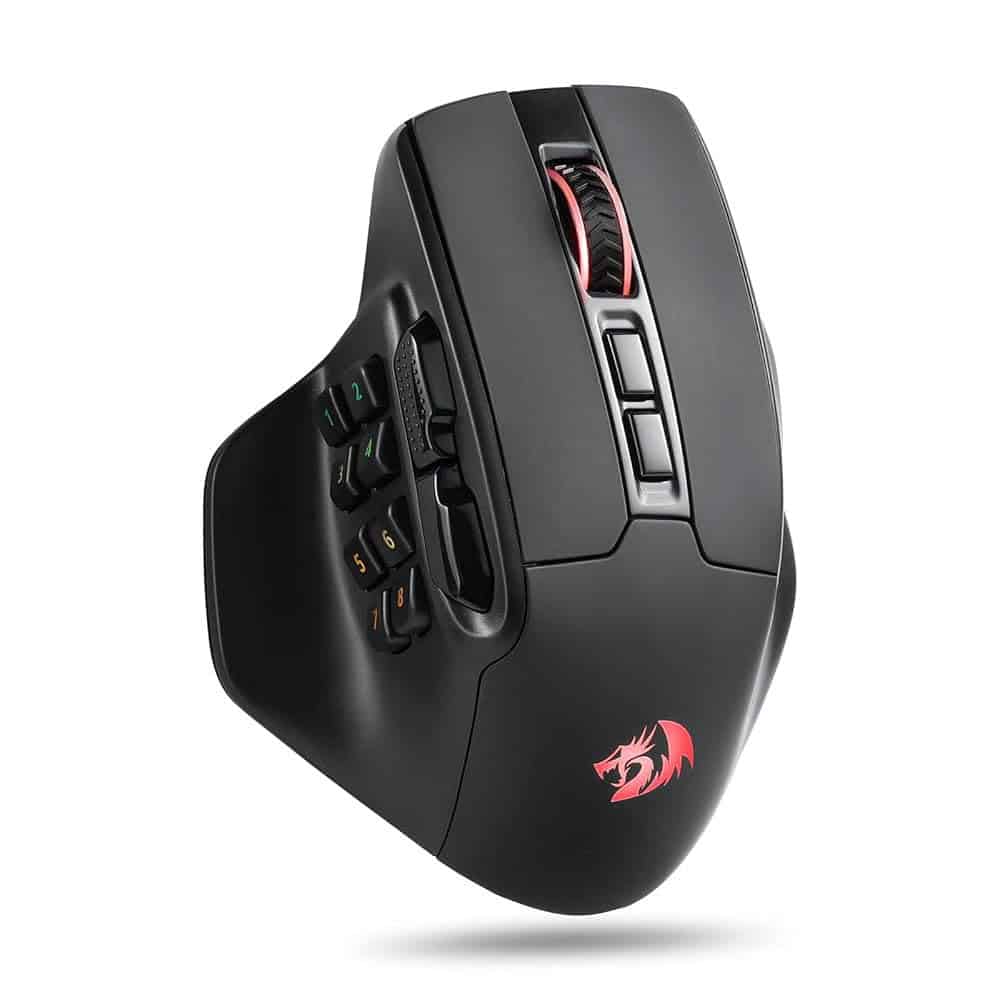
Massively multiplayer online (MMO) and role-playing games (RPGs) demand mice with extensive customization options and numerous programmable buttons. The Right Gaming Mouse for MMO gaming typically features 12-20 programmable buttons, often arranged in a grid pattern on the side of the mouse for easy thumb access. This layout allows you to access complex ability rotations and inventory management without removing your hands from the standard gaming position.
Comfort becomes particularly important for MMO gaming, as play sessions often extend for several hours. The Right Gaming Mouse should provide excellent ergonomic support and maintain comfort even during extended use. Consider mice with adjustable rest positions and customizable button layouts that accommodate your specific hand size and grip style.
Profile Management and Software Integration
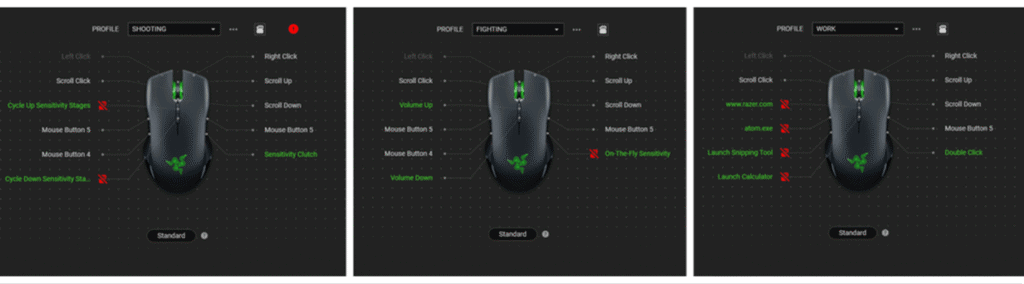
MMO games often require different button configurations for different characters or situations. The Right Gaming Mouse should include sophisticated software that allows you to create and manage multiple profiles, each optimized for specific games or characters. Automatic profile switching based on running applications can streamline your gaming experience by ensuring the correct settings are always active.
How To Choose The Right Gaming Mouse For Your Playstyle 12
Integration with popular MMO games can further enhance your experience. Some gaming mice include pre-configured profiles for popular MMO titles, providing optimized button layouts and settings developed by experienced players. The Right Gaming Mouse for MMO gaming should offer both these convenient presets and the flexibility to create your own custom configurations.
Understanding the technical specifications that define mouse performance is crucial for selecting the Right Gaming Mouse. These metrics directly impact your gaming experience, and knowing how to interpret them will help you make informed decisions based on your specific needs and preferences.
DPI, Polling Rate, and Sensor Technology
DPI (dots per inch) measures how far your cursor moves on screen relative to physical mouse movement. Higher DPI values allow for faster cursor movement with less physical motion, but the Right Gaming Mouse isn’t necessarily the one with the highest DPI. Most gamers find optimal performance in the 400-3200 DPI range, with many competitive players preferring lower values for better precision.
Polling rate, measured in Hz, determines how frequently your mouse reports its position to your computer. Common rates include 125Hz, 500Hz, and 1000Hz, with higher rates providing smoother movement and reduced input lag. The Right Gaming Mouse should offer adjustable polling rates, allowing you to balance performance with system resource usage based on your computer’s capabilities.
Sensor Types and Surface Compatibility
Modern gaming mice use either optical or laser sensors, each with distinct characteristics. Optical sensors generally provide more consistent tracking across different surfaces and are preferred for competitive gaming. Laser sensors can achieve higher maximum DPI values but may have slight accuracy variations on certain surfaces. The Right Gaming Mouse depends on your preferred gaming surface and accuracy requirements.
Surface compatibility varies significantly between different sensor types and implementations. Some mice perform best on hard surfaces like glass or plastic mouse pads, while others excel on cloth surfaces. The Right Gaming Mouse should be compatible with your preferred gaming surface and maintain consistent performance across different environments you might encounter.
How To Choose The Right Gaming Mouse For Your Playstyle 13
Switch Technology and Durability
The mechanical switches beneath your mouse buttons directly impact click feel, response time, and longevity. High-quality switches like those from Omron or Razer typically offer crisp, responsive clicks with minimal pre-travel and are rated for 50-100 million clicks. The Right Gaming Mouse should feature switches that match your preferred click feel while providing long-term reliability.
Switch response time, measured in milliseconds, affects how quickly your clicks register in games. Premium gaming mice often feature switches with sub-millisecond response times, providing a competitive advantage in fast-paced games. The Right Gaming Mouse should offer response times that meet or exceed your gaming requirements without sacrificing durability or click quality.
Cable and Wireless Considerations
Connection type significantly impacts your gaming experience. Wired mice provide consistent performance without battery concerns, while wireless mice offer freedom of movement at the cost of occasional charging requirements. Modern wireless gaming mice have largely eliminated latency concerns, making the Right Gaming Mouse more about personal preference than performance limitations.
For wired mice, cable quality affects both durability and user experience. Braided cables resist tangling and provide better durability, while lighter cables reduce drag during movement. The Right Gaming Mouse should balance cable durability with flexibility to avoid interference during gameplay. Some mice include cable management solutions or detachable cables for convenient storage and transport.
Weight and Balance Optimization
Mouse weight significantly impacts control and comfort during extended gaming sessions. Lighter mice (60-80 grams) allow for faster movements and reduced fatigue, while heavier mice (100-130 grams) provide more stability and control for precise movements. The Right Gaming Mouse weight depends on your gaming style, hand strength, and personal preferences.
Many gaming mice feature adjustable weight systems, allowing you to customize the feel to your preference. These systems typically use removable weights that can be added or removed to achieve your desired balance. The Right Gaming Mouse might include weight adjustment options that let you fine-tune the feel for different gaming scenarios or as your preferences evolve over time.
Grip Styles and Ergonomic Considerations
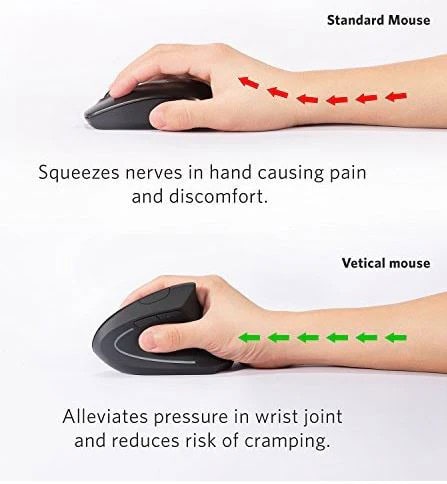
Your natural grip style significantly influences which mouse design will provide optimal comfort and performance. Understanding the three primary grip styles—palm, claw, and fingertip—will help you identify the Right Gaming Mouse that matches your natural hand position and movement patterns.
Palm Grip Optimization
Palm grip involves resting your entire hand on the mouse, with your palm making contact with the back of the mouse body. This grip style provides excellent stability and is ideal for larger hands or users who prefer relaxed positioning during extended gaming sessions. The Right Gaming Mouse for palm grip users typically features a larger, more contoured body that provides full hand support.
Mice designed for palm grip often include pronounced curves and raised backs that naturally cradle your hand. The button placement is optimized for finger positioning when your hand is fully rested on the mouse. The Right Gaming Mouse for palm grip should feel comfortable without requiring you to stretch or strain your fingers to reach essential buttons and controls.
Size and Shape Considerations for Palm Grip
Hand size plays a crucial role in determining the Right Gaming Mouse for palm grip users. Larger hands require mice with greater length and width to provide adequate support, while smaller hands might find large mice awkward and difficult to control. Measure your hand length from wrist to fingertip and width across the knuckles to help identify appropriately sized mice.
The shape profile also matters significantly for palm grip comfort. The Right Gaming Mouse should provide natural curves that match your hand’s resting position without creating pressure points or gaps. Look for mice with ergonomic designs that support your arch and provide comfortable finger positioning on the primary buttons.
Claw Grip Characteristics
Claw grip involves arching your fingers while maintaining palm contact with the back of the mouse. This grip style provides excellent control and precision, making it popular among competitive gamers. The Right Gaming Mouse for claw grip users typically features a more compact design that allows for easy finger movement while maintaining palm support.
Mice optimized for claw grip often have slightly smaller bodies with pronounced humps that naturally support the palm while allowing finger freedom. The buttons are positioned to accommodate the arched finger position, providing crisp, responsive clicks without requiring significant finger movement. The Right Gaming Mouse for claw grip should balance stability with agility, allowing for both precise aiming and quick movements.
Button Accessibility and Control
Claw grip users benefit from mice with easily accessible side buttons positioned for thumb operation without requiring significant hand adjustment. The Right Gaming Mouse should place these buttons within natural thumb reach while avoiding accidental activation during normal use. The primary buttons should provide consistent feedback and short travel distances to accommodate the rapid clicking often associated with claw grip gaming.
Scroll wheel positioning and feel are particularly important for claw grip users, as the wheel must be easily accessible while maintaining the arched finger position. The Right Gaming Mouse should feature a scroll wheel with appropriate resistance and clear tactile feedback, allowing for precise control during gameplay without interfering with other button operations.
Fingertip Grip Requirements
Fingertip grip involves controlling the mouse using only your fingertips, with no palm contact. This grip style provides maximum agility and is favored by gamers who require rapid, precise movements. The Right Gaming Mouse for fingertip grip users typically features a smaller, lighter design that doesn’t interfere with finger movement and provides excellent responsiveness.
Mice designed for fingertip grip often prioritize low weight and compact dimensions over extensive ergonomic features. The focus is on providing excellent sensor performance and responsive buttons while minimizing bulk that might interfere with finger control. The Right Gaming Mouse for fingertip grip should feel almost weightless in your fingers while maintaining precise tracking and reliable button operation.
Precision and Responsiveness Optimization
Fingertip grip users require exceptional precision and responsiveness from their mice, as this grip style relies entirely on finger control for accuracy. The Right Gaming Mouse should feature high-quality sensors with consistent tracking at various speeds and excellent acceleration handling. The buttons should provide immediate feedback with minimal travel distance to ensure rapid response during critical gaming moments.
Surface texture becomes particularly important for fingertip grip users, as the mouse must provide adequate grip without becoming uncomfortable during extended use. The Right Gaming Mouse should offer textured surfaces or coatings that enhance grip without causing irritation or fatigue during long gaming sessions.
Selecting the Right Gaming Mouse involves balancing performance requirements with budget constraints. Gaming mice range from budget-friendly options under $30 to premium models exceeding $150, each offering different feature sets and performance levels. Understanding what features provide the best value for your specific needs will help you make an informed decision that maximizes your investment.
Entry-Level Gaming Mouse Options
Budget gaming mice can provide excellent value for casual gamers or those new to PC gaming. These mice typically feature basic gaming sensors, a few programmable buttons, and simple customization software. The Right Gaming Mouse at this price point focuses on essential gaming features without advanced customization options or premium materials.
Entry-level mice often use reliable but basic optical sensors that provide adequate performance for most gaming scenarios. While they may lack the precision of premium sensors, they offer significant improvements over standard office mice. The Right Gaming Mouse in this category should provide consistent performance, reasonable durability, and basic customization options at an affordable price point.
How To Choose The Right Gaming Mouse For Your Playstyle 14
Essential Features vs. Nice-to-Have Options
When working with a limited budget, focus on essential features that directly impact your gaming experience. The Right Gaming Mouse should prioritize sensor quality, button reliability, and basic ergonomics over advanced features like RGB lighting or extensive button arrays. A good sensor and comfortable grip will provide more gaming benefit than flashy features that don’t enhance performance.
Consider which features you’ll actually use regularly. If you primarily play FPS games, the Right Gaming Mouse might be a simple, lightweight model with an excellent sensor rather than a feature-rich MMO mouse with dozens of buttons you’ll never use. Identifying your core requirements helps you avoid paying for unnecessary features while ensuring you get the performance you need.
Mid-Range Performance and Features
Mid-range gaming mice typically offer the best balance of performance and value, featuring high-quality sensors, robust build quality, and comprehensive customization options. The Right Gaming Mouse in this category often includes premium features like adjustable weights, multiple profile storage, and advanced software without the premium price tag of flagship models.
These mice typically use the same sensor technology found in premium models but may have slightly fewer customization options or less premium materials. The Right Gaming Mouse in the mid-range category should provide excellent gaming performance while offering features that enhance your overall experience without breaking your budget.
How To Choose The Right Gaming Mouse For Your Playstyle 15
Long-term Value and Upgrade Considerations
Mid-range mice often provide excellent long-term value due to their balance of performance and durability. The Right Gaming Mouse should serve your needs for several years while maintaining consistent performance and reliability. Consider factors like warranty coverage, software support longevity, and the manufacturer’s reputation for long-term product support.
Think about how your gaming needs might evolve over time. The Right Gaming Mouse should offer some room for growth, whether through additional customization options, compatibility with different game genres, or features that support skill development. A mouse that can adapt to changing needs provides better long-term value than one optimized for current requirements only.
Premium Gaming Mouse Investment
High-end gaming mice represent the pinnacle of current technology, featuring cutting-edge sensors, premium materials, and extensive customization options. The Right Gaming Mouse at this level typically includes features like wireless connectivity with minimal latency, advanced sensor technology, and sophisticated software ecosystems that provide comprehensive control over every aspect of mouse behavior.
Premium mice often justify their cost through superior build quality, longer warranties, and access to exclusive features or software updates. The Right Gaming Mouse in this category should provide noticeable improvements in performance, comfort, or functionality that enhance your gaming experience in measurable ways.
How To Choose The Right Gaming Mouse For Your Playstyle 16
Professional and Competitive Gaming Requirements
For professional gamers or serious competitive players, the Right Gaming Mouse might justify a premium investment through improved performance and reliability. Features like tournament-grade sensors, professional-level customization options, and guaranteed performance consistency can provide competitive advantages that offset the higher cost.
Consider the total cost of ownership when evaluating premium mice. The Right Gaming Mouse might include features like replaceable switches, modular designs, or comprehensive warranty coverage that reduce long-term costs despite higher upfront investment. Professional-grade mice often provide better value over time due to their superior durability and performance consistency.
Testing and Final Selection Process
After narrowing down your options based on grip style, gaming needs, and budget considerations, the final selection process for the Right Gaming Mouse involves hands-on testing and evaluation. This critical step ensures that your chosen mouse performs as expected in real gaming scenarios and provides the comfort and performance you need for extended use.
In-Store Testing Strategies
Whenever possible, physically test potential mice before making your final decision. The Right Gaming Mouse should feel comfortable and natural in your hand immediately, without requiring significant adjustment or adaptation. Test the mouse using your natural grip style and evaluate how it feels during different types of movement patterns.
Pay attention to button placement and accessibility during testing. The Right Gaming Mouse should allow easy access to all essential buttons without requiring awkward hand positions or finger stretching. Test the scroll wheel operation, side button placement, and primary button click feel to ensure they meet your expectations and preferences.
Evaluating Comfort and Ergonomics
Extended comfort is crucial for gaming mice, as discomfort during long sessions can negatively impact performance and enjoyment. The Right Gaming Mouse should maintain comfort even during extended testing periods. If possible, spend at least 10-15 minutes using the mouse in a gaming position to identify any potential comfort issues.
Look for pressure points, areas where the mouse rubs against your hand, or positions that cause strain or fatigue. The Right Gaming Mouse should feel natural and supportive without creating tension in your hand, wrist, or arm. Consider how the mouse feels during different types of movements, from precise aiming to rapid sweeping motions.
Online Research and Reviews
When in-store testing isn’t possible, comprehensive online research becomes essential for selecting the Right Gaming Mouse. Focus on detailed reviews from reputable sources that test mice in real gaming scenarios rather than just listing specifications. Look for reviews that mention long-term use experiences, as initial impressions can differ significantly from long-term satisfaction.
Pay particular attention to reviews from gamers who play similar games or use similar grip styles. The Right Gaming Mouse for an FPS player might not be ideal for an MMO enthusiast, so seek out reviews that match your intended use cases. User reviews can provide valuable insights into real-world performance and durability that professional reviews might miss.
Community Feedback and Recommendations
Gaming communities often provide valuable insights into mouse performance and reliability. The Right Gaming Mouse often emerges from community discussions and recommendations from experienced gamers who have tested multiple options. Look for feedback from players at your skill level and gaming intensity, as their experiences are more likely to match your own.
Consider both positive and negative feedback when evaluating options. The Right Gaming Mouse should have consistently positive feedback across multiple sources, with any negative comments relating to personal preference rather than fundamental performance or quality issues. Be wary of mice with recurring complaints about specific issues like durability or software problems.
Making the Final Decision
After thorough research and testing, making the final decision on the Right Gaming Mouse involves weighing all factors against your specific needs and preferences. Consider not just immediate performance but also long-term satisfaction and value. The mouse you choose should serve your gaming needs for several years while maintaining consistent performance and comfort.
Trust your instincts during the final selection process. The Right Gaming Mouse should feel right immediately, without requiring significant rationalization or compromise. If you’re torn between multiple options, consider which mouse best addresses your primary gaming scenarios and most important comfort requirements.
Setting Up and Optimizing Your New Mouse
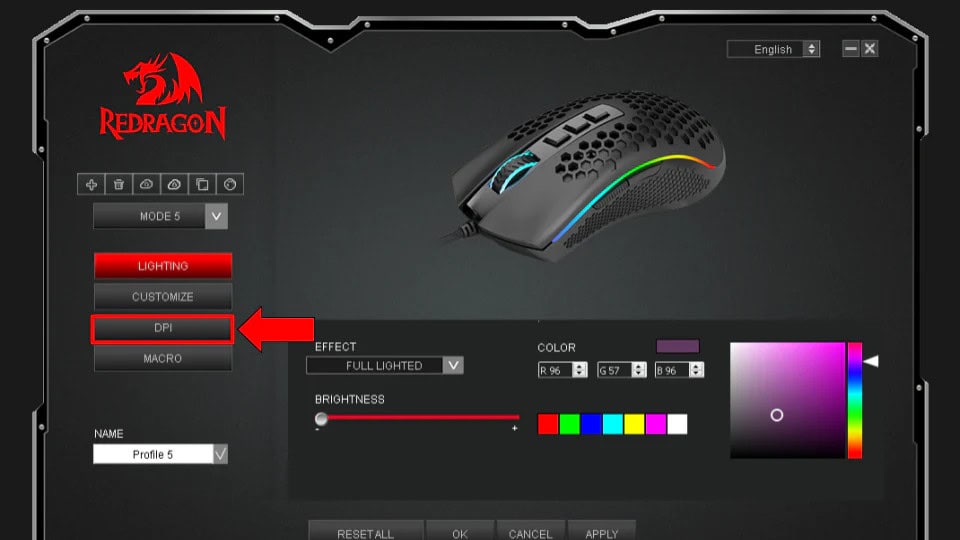
Once you’ve selected the Right Gaming Mouse, proper setup and optimization are essential for maximizing its potential. Install the manufacturer’s software and take time to configure settings that match your preferences and gaming style. Many mice include preset profiles for popular games, which can provide excellent starting points for your own customization.
Experiment with different DPI settings, button configurations, and sensitivity options to find what works best for your gaming style. The Right Gaming Mouse should feel like a natural extension of your hand once properly configured, providing precise control and comfortable operation during extended gaming sessions.
Conclusion: Your Perfect Gaming Mouse Awaits
Choosing the Right Gaming Mouse is a personal journey that depends on your unique combination of gaming preferences, physical characteristics, and performance requirements. The perfect mouse for you balances all these factors while providing the reliability and comfort needed for extended gaming sessions.
The investment in the Right Gaming Mouse pays dividends in improved gaming performance, enhanced comfort, and greater enjoyment of your favorite games. Whether you’re a casual player looking for basic improvements or a competitive gamer seeking every possible advantage, the right mouse can transform your gaming experience.
Remember that the Right Gaming Mouse is one that serves your needs consistently over time. Focus on finding a mouse that matches your grip style, supports your preferred games, and provides the features you’ll actually use. With proper research and consideration, you’ll find a mouse that enhances your gaming for years to come.
Final Recommendations for Every Gamer
For FPS enthusiasts, the Right Gaming Mouse typically emphasizes precision, light weight, and responsive buttons. Look for mice with high-quality optical sensors and simple, effective designs that don’t interfere with rapid movements. Comfort during extended aim training sessions should be a primary consideration.
MMO and RTS players benefit from mice with extensive customization options and multiple programmable buttons. The Right Gaming Mouse for these genres should provide easy access to complex command sets while maintaining comfort during long gaming sessions. Advanced software features and macro programming capabilities become essential for optimal performance.
Casual gamers have the most flexibility in choosing the Right Gaming Mouse, as their needs are typically less specialized. Focus on finding a mouse that provides good value, reliable performance, and the features you’ll actually use. A well-rounded mouse that performs adequately across multiple game genres often provides the best overall experience.
No matter your gaming style or budget, the Right Gaming Mouse is out there waiting to enhance your gaming experience. Take the time to research thoroughly, test when possible, and choose based on your specific needs rather than marketing claims or popular opinion. Your perfect gaming mouse will serve as a reliable partner in countless gaming adventures to come.
The Illusion of Stability in Modern Updates For most users, operating system updates are something that simply happen. They arrive quietly, often installing in the background, requiring little more than…
Macbook Neo, How Does It Compare To Air & Pro? Over the last few years the laptop market has experienced one of the most significant architectural changes in its history.…
Apple’s latest product announcements mark one of the most significant shifts in the Mac lineup in more than a decade. While Apple routinely updates its hardware with faster chips, incremental…
There is a particular kind of frustration that only a slow computer can produce. It is not dramatic. It is not urgent. It does not scream for attention. Instead, it…
In an era where nearly every aspect of personal computer maintenance and professional life is mediated through digital systems, your computer is no longer a luxury device — it is…
Phone says charging but battery not increasing is one of the most frustrating problems smartphone users face. You plug it in.The lightning bolt appears.It says “Charging.” But the battery percentage…
Apple’s rumour cycle always looks like a thousand disconnected leaks — until you line them up and notice the same themes repeating: AI-first silicon, camera and display differentiation, form-factor experiments (foldables / spatial…
Wi-Fi connected but no internet is one of the most frustrating messages you can see on a computer or laptop. The Wi-Fi icon shows full bars.It says “Connected.”But websites won’t…
Unfortunately, there was an error submitting your request.
Please try again later, or reach out to us directly. You can call us at +44 1429 280955 or email us at sales@kingfishercomputers.co.uk for assistance. We’re here to help you get your computer back up and running!
We’ve received your booking, Our team will get in touch with you shortly to confirm the details. You’re one step closer to having your computer fixed! If you have any urgent questions, feel free to contact us. Otherwise, sit back, and we’ll handle the rest.