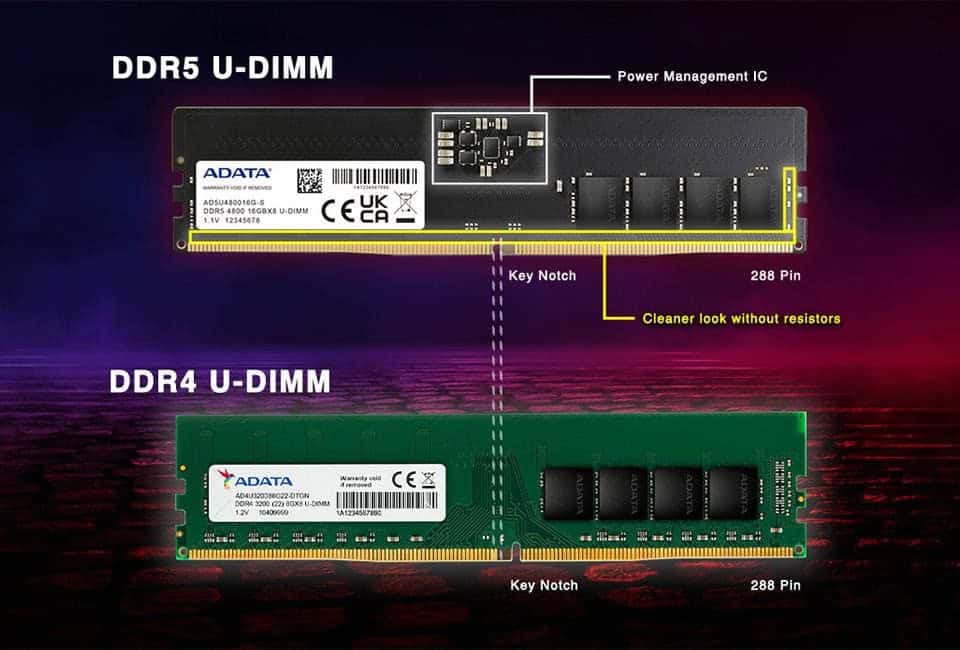
RAM Overclocking represents one of the most accessible yet misunderstood methods of improving computer performance. While many enthusiasts focus on CPU and GPU overclocking, memory overclocking often delivers significant performance gains with relatively low risk. This comprehensive guide explores everything you need to know about overclocking your memory, from basic concepts to advanced techniques that can transform your computing experience.
Memory performance directly impacts nearly every aspect of computer operation, from application loading times to gaming frame rates. Understanding RAM Overclocking opens doors to extracting maximum performance from your system without expensive hardware upgrades. Whether you’re a gamer seeking higher frame rates, a content creator working with large files, or simply someone who wants their computer to feel more responsive, memory overclocking offers tangible benefits that justify the learning curve.
Understanding Memory Overclocking Fundamentals
RAM Overclocking involves running your system memory at speeds higher than the manufacturer’s standard specifications. Unlike other overclocking methods that primarily focus on raw frequency increases, memory overclocking requires balancing multiple variables including frequency, timings, and voltage to achieve optimal performance. This complexity makes the process both challenging and rewarding for those willing to invest time in understanding the underlying principles.
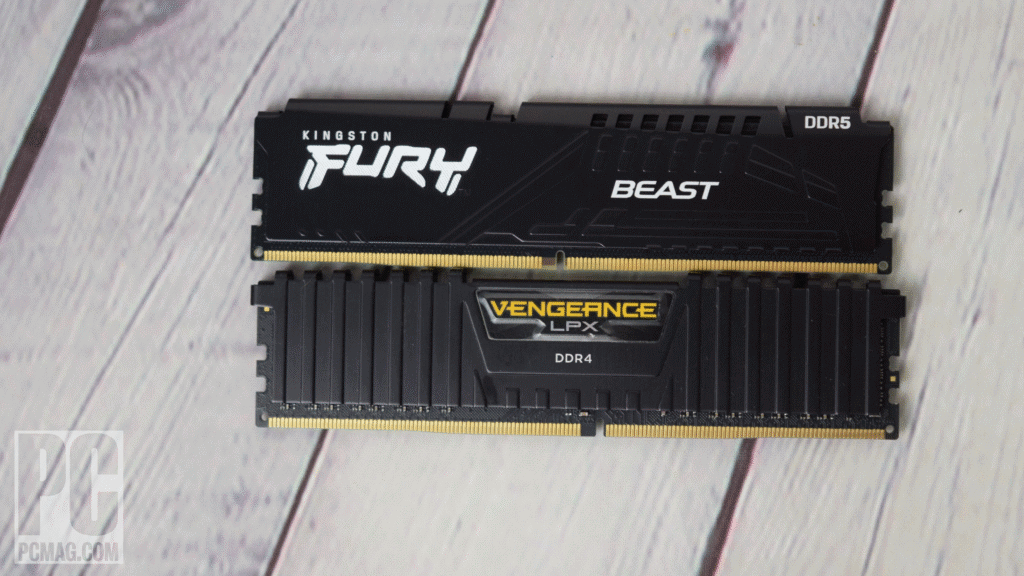
Modern DDR4 and DDR5 memory modules ship with conservative settings that prioritize compatibility over performance. These JEDEC standards ensure that memory works reliably across diverse hardware configurations, but they leave substantial performance on the table. RAM Overclocking unlocks this hidden potential by pushing memory subsystems beyond their default limitations while maintaining system stability.
The Science Behind Memory Performance
To appreciate why memory overclocking works, you must understand how memory interacts with your processor and other system components. Your CPU constantly requests data from system memory, and any delays in this process create bottlenecks that limit overall performance. Overclocking your RAM reduces these delays by increasing transfer speeds and optimizing timing parameters that control how quickly memory responds to requests.
Memory performance depends on three primary factors: frequency, latency, and bandwidth. Frequency determines how many operations memory can perform per second, while latency measures the delay between requesting data and receiving it. Bandwidth represents the total amount of data that can be transferred simultaneously. Successful RAM Overclocking requires optimizing all three factors rather than focusing solely on headline frequency numbers.
Common Misconceptions About Memory Overclocking
Many users avoid RAM Overclocking due to misconceptions about complexity and risk. While the process does require more attention to detail than simple plug-and-play solutions, modern tools and techniques have significantly simplified the approach. Unlike CPU overclocking, which can generate substantial heat and potentially damage components, memory overclocking typically involves minimal risk when approached systematically.
Another common misconception suggests that overclocking memory provides negligible real-world benefits. In reality, memory performance impacts numerous applications beyond synthetic benchmarks. Games, video editing software, and productivity applications all benefit from improved memory performance, though the magnitude varies depending on specific use cases and existing system configurations.
The Technical Aspects of Memory Optimization
Successful memory optimization requires understanding the technical parameters that control memory behavior. These settings work together to determine overall memory performance, and changing one parameter often necessitates adjusting others to maintain stability.
What Is Ram Overclocking And Is It Worth It? 6
Memory Frequencies and Speed Ratings
The most visible aspect of RAM Overclocking involves increasing memory frequency beyond standard specifications. DDR4 memory typically ships at 2133MHz, 2400MHz, or 2666MHz, though high-performance modules support much higher speeds. Overclocking can push these frequencies to 3200MHz, 3600MHz, or even higher depending on your specific hardware configuration and cooling capabilities.
However, frequency increases don’t always translate to proportional performance improvements. The relationship between memory frequency and system performance depends on numerous factors including CPU architecture, application workloads, and existing performance bottlenecks. Understanding these relationships helps you make informed decisions about target frequencies and expected benefits.
Memory Timing Parameters
Beyond frequency adjustments, RAM Overclocking involves optimizing timing parameters that control memory access patterns. These timings, expressed as sequences like 16-18-18-36, represent the number of clock cycles required for different memory operations. Lower timing values generally improve performance, but they require more aggressive approaches that may reduce stability or require higher voltages.
Primary timings include CAS latency (CL), RAS to CAS delay (tRCD), RAS precharge time (tRP), and active to precharge delay (tRAS). Each timing affects different aspects of memory performance, and enthusiasts spend considerable time fine-tuning these values to achieve optimal results. Secondary and tertiary timings provide additional optimization opportunities for advanced users willing to invest time in detailed tuning.
Voltage Considerations in Memory Optimization
Voltage management represents a critical aspect of safe overclocking practices. Memory modules require specific voltages to operate reliably, and exceeding safe limits can cause immediate failure or long-term degradation. Most DDR4 memory operates at 1.35V, though high-performance modules may require up to 1.45V or higher for maximum overclocking potential.
Voltage increases should be implemented gradually while monitoring system stability and temperatures. Unlike CPU overclocking, where voltage increases can dramatically affect heat generation, memory voltage adjustments typically have minimal thermal impact. However, excessive voltages can still damage memory modules or reduce their operational lifespan.
Understanding XMP and DOCP Profiles
Many memory modules include pre-configured overclocking profiles that simplify the process. Intel’s Extreme Memory Profile (XMP) and AMD’s Direct Over Clock Profile (DOCP) provide tested configurations that balance performance with stability. These profiles represent an excellent starting point for RAM Overclocking beginners, offering significant performance improvements with minimal manual configuration.
Activating XMP or DOCP profiles typically involves a single BIOS setting change, making this approach accessible to users uncomfortable with manual parameter adjustment. However, these profiles don’t always represent optimal settings for your specific hardware configuration, and further manual tuning may yield additional performance benefits.
System Stability and Testing Methods
Ensuring stability represents the most critical aspect of successful memory optimization. Unstable memory configurations can cause data corruption, system crashes, and other reliability issues that far outweigh any performance benefits. Comprehensive testing protocols help verify that your RAM Overclocking settings provide reliable operation under diverse workloads.
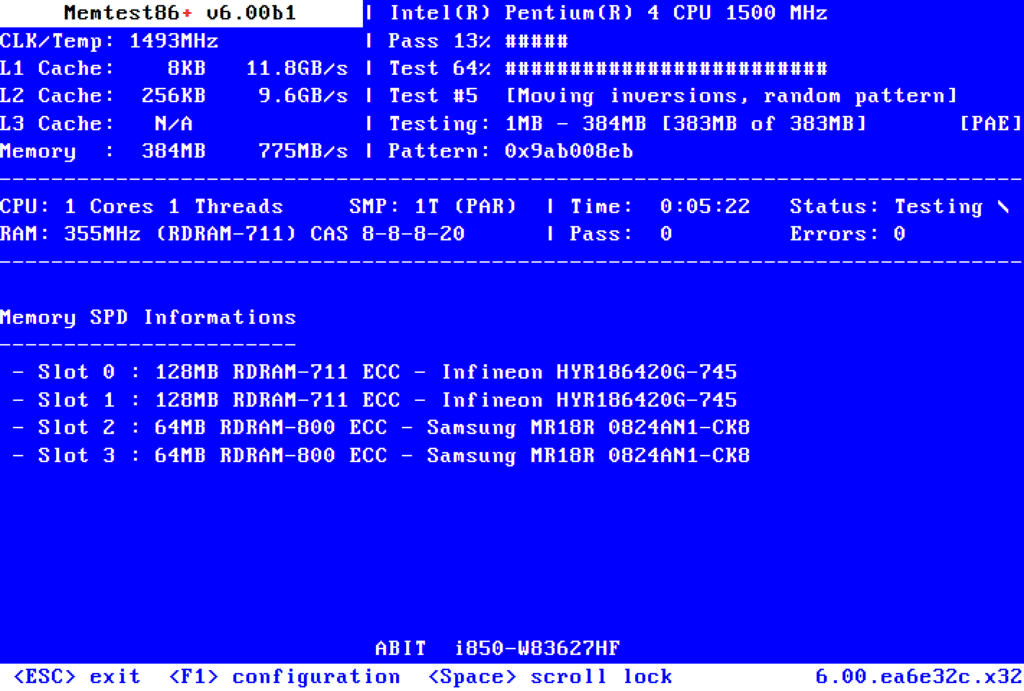
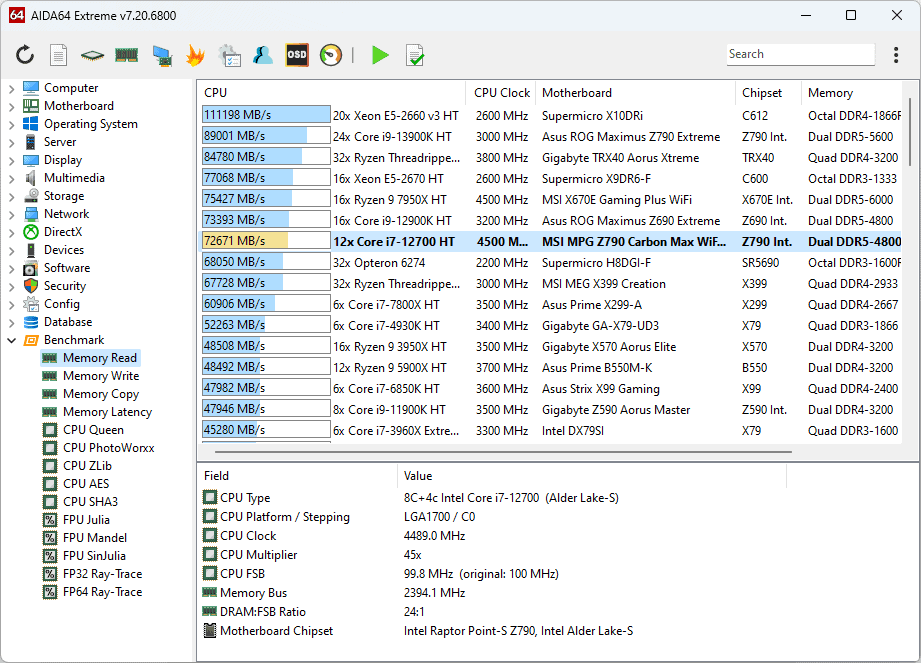
Memory testing should include both synthetic stress tests and real-world application usage. Tools like MemTest86, Prime95, and AIDA64 provide different stress patterns that can reveal stability issues not apparent during normal usage. Running these tests for extended periods helps ensure that your configuration remains stable even during demanding scenarios.
Identifying and Resolving Instability Issues
When configurations prove unstable, systematic troubleshooting helps identify and resolve the underlying causes. Common symptoms include system crashes, application errors, and data corruption. These issues typically result from excessive frequencies, aggressive timing settings, or insufficient voltage to support the desired performance levels.
Resolving instability usually involves backing down from aggressive settings until stability returns. This iterative process helps identify the maximum stable configuration for your specific hardware combination. Some users find that certain timing parameters are more sensitive than others, allowing for selective optimization that maintains stability while maximizing performance gains.
Performance Benefits and Real-World Applications
The practical benefits of RAM Overclocking extend far beyond benchmark scores, though the magnitude of improvement varies significantly depending on your specific applications and existing hardware configuration. Understanding these real-world impacts helps you make informed decisions about whether the process justifies the time investment required for proper implementation.
Gaming Performance Improvements
Memory overclocking can provide substantial gaming performance improvements, particularly in CPU-intensive titles and scenarios where the processor becomes the limiting factor. Modern games increasingly rely on fast memory access for texture streaming, physics calculations, and AI processing. RAM Overclocking reduces memory latency and increases bandwidth, allowing games to maintain higher frame rates and more consistent performance.
The gaming benefits are most pronounced in competitive titles where high frame rates and low input lag provide competitive advantages. First-person shooters, real-time strategy games, and racing simulations often show measurable improvements from optimized memory configurations. Additionally, overclocking can help maintain minimum frame rates during intensive scenes, reducing stuttering and improving overall gaming experience.
Impact on Different Gaming Scenarios
Benefits vary significantly across different gaming scenarios and hardware configurations. Systems with high-end graphics cards may see minimal gaming improvements from memory overclocking since the GPU becomes the primary bottleneck. Conversely, systems with powerful processors paired with mid-range graphics cards often benefit substantially since improved memory performance allows the CPU to better feed the graphics subsystem.
Resolution and graphics settings also influence how much RAM Overclocking improves gaming performance. Lower resolutions and settings that shift processing load toward the CPU typically benefit more from memory optimization. This relationship makes memory overclocking particularly valuable for competitive gamers who prioritize frame rates over visual quality.
Content Creation and Productivity Applications
Professional applications often show dramatic improvements from RAM Overclocking, particularly those that work with large datasets or perform memory-intensive operations. Video editing, 3D rendering, and photo processing applications frequently benefit from improved memory performance since these workflows involve constant data movement between system memory and processing units.
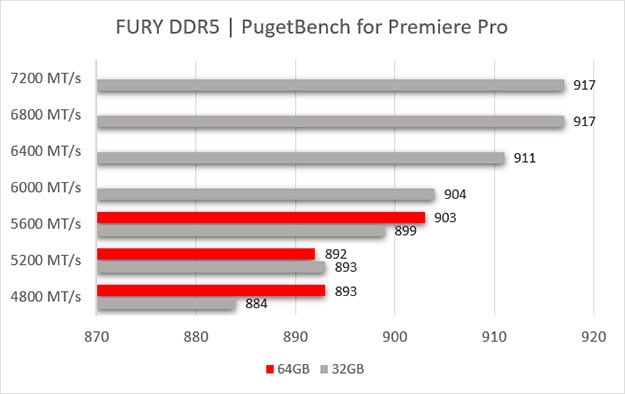
Overclocking can significantly reduce rendering times in applications like Adobe Premiere Pro, Blender, and DaVinci Resolve. These applications often process multiple streams of high-resolution video data simultaneously, creating intense memory bandwidth requirements. Optimized memory configurations help maintain smooth playback and reduce export times, directly improving productivity for content creators.
Scientific and Engineering Applications
Specialized applications in scientific computing, engineering simulation, and data analysis often show substantial benefits from memory optimization. These applications frequently work with large datasets that exceed CPU cache capacity, making system memory performance critical for overall application speed. RAM Overclocking can reduce simulation times and improve interactive performance in applications like MATLAB, AutoCAD, and various finite element analysis packages.
What Is Ram Overclocking And Is It Worth It? 7
Database applications and development environments also benefit from overclocking, particularly when working with large codebases or complex queries. Faster memory access speeds up compilation times, reduces query execution delays, and improves overall development workflow efficiency. These productivity improvements can justify investments even for users who don’t consider themselves enthusiasts.
System Responsiveness and Multitasking
Beyond specific application performance, RAM Overclocking often improves overall system responsiveness and multitasking capabilities. Faster memory access reduces delays when switching between applications, loading files, or performing system operations. These improvements create a more fluid computing experience that enhances productivity across diverse usage scenarios.
Memory optimization particularly benefits users who run multiple demanding applications simultaneously. Video conferencing while streaming, gaming with background applications, or content creation with multiple tools active all stress the memory subsystem. Optimized memory configurations help maintain responsive performance even under these demanding multitasking scenarios.
The Economics of Memory Optimization
Evaluating whether RAM Overclocking is worthwhile requires considering both the costs and benefits compared to alternative performance improvement methods. Unlike hardware upgrades that require significant financial investment, memory overclocking primarily demands time and effort rather than additional monetary expenditure.
Cost-Benefit Analysis
RAM Overclocking offers exceptional value since it extracts additional performance from existing hardware without requiring new purchases. The primary costs involve time spent learning overclocking techniques, testing configurations, and fine-tuning settings. For users comfortable with technical concepts, these time investments often yield performance improvements equivalent to hardware upgrades costing hundreds of dollars.
Comparing memory optimization to other performance enhancement options highlights its economic advantages. CPU upgrades, graphics card replacements, and storage improvements all require substantial financial investment while overclocking provides meaningful performance gains using existing components. This cost advantage makes the process particularly attractive for budget-conscious users seeking maximum performance from their current systems.
Long-term Value Considerations
The long-term value extends beyond immediate performance improvements. Understanding memory optimization techniques provides valuable knowledge that transfers to future system builds and upgrades. Users who master these skills often find that their systems remain competitive longer, delaying expensive hardware replacement cycles.
Additionally, RAM Overclocking skills become increasingly valuable as memory performance continues to play a larger role in overall system performance. As CPU and GPU manufacturers optimize their products for fast memory access, the benefits of memory overclocking are likely to increase rather than diminish over time.
Alternative Performance Improvements
When evaluating memory optimization, it’s important to consider alternative methods of improving system performance. Storage upgrades from traditional hard drives to solid-state drives often provide more dramatic improvements in system responsiveness than memory overclocking. Similarly, graphics card upgrades typically offer larger gaming performance improvements than RAM Overclocking alone.
However, memory optimization complements rather than competes with these other improvement methods. A balanced approach that combines storage upgrades, memory optimization, and appropriate hardware upgrades typically provides the best overall performance improvements. RAM Overclocking serves as an excellent foundation that maximizes the benefits of other system enhancements.
While RAM Overclocking involves minimal financial risk compared to other overclocking methods, understanding potential downsides helps you make informed decisions. The primary risks include system instability, potential data corruption, and time investment without guaranteed results. Proper testing procedures and conservative approaches can largely mitigate these risks.
Hardware damage from memory overclocking is extremely rare when using reasonable voltage levels and proper cooling. Modern memory modules include built-in protection mechanisms that prevent catastrophic failure, and system safeguards typically prevent dangerous operating conditions. However, aggressive overclocking or inadequate testing can still cause stability issues that affect productivity and data integrity.
Getting Started with Memory Optimization
For users ready to explore RAM Overclocking, a systematic approach maximizes success while minimizing frustration. Beginning with conservative settings and gradually increasing performance helps build confidence and understanding while avoiding common pitfalls that discourage newcomers.
Essential Tools and Software
Successful memory optimization requires appropriate tools for monitoring, testing, and adjusting memory settings. CPU-Z provides detailed information about current memory configuration and timing parameters. HWiNFO64 offers comprehensive system monitoring including memory temperatures and voltages. Memory testing utilities like MemTest86 and TestMem5 help verify stability after configuration changes.
What Is Ram Overclocking And Is It Worth It? 8
The process also benefits from stress testing applications that simulate real-world workloads. Prime95, AIDA64, and application-specific benchmarks help identify stability issues and quantify performance improvements. Having these tools installed and configured before beginning optimization streamlines the process and reduces troubleshooting time.
What Is Ram Overclocking And Is It Worth It? 9
BIOS and UEFI Configuration
Most adjustments occur through BIOS or UEFI interfaces, making familiarity with these systems essential. Modern motherboards typically include dedicated memory overclocking sections with user-friendly interfaces for adjusting frequencies, timings, and voltages. Understanding how to navigate these menus and save configurations prevents frustration during the optimization process.
Before attempting RAM Overclocking, ensure your BIOS is updated to the latest version available from your motherboard manufacturer. BIOS updates often include improved memory compatibility and additional overclocking options that can significantly impact your success. Additionally, familiarize yourself with clearing CMOS procedures in case aggressive settings prevent system startup.
Step-by-Step Process
Beginning memory optimization should follow a structured approach that builds performance gradually while maintaining system stability. Start by enabling XMP or DOCP profiles if available, as these provide tested configurations that offer immediate performance improvements with minimal risk. Test stability thoroughly before proceeding to manual adjustments.
Manual optimization typically begins with frequency increases while maintaining standard timing parameters. Increase memory frequency in small increments (100-200MHz) while monitoring system stability and performance. Once you identify maximum stable frequency, begin optimizing timing parameters to extract additional performance from your configuration.
Advanced Optimization Techniques
Experienced users can explore advanced techniques that provide additional performance improvements. These methods include optimizing secondary and tertiary timings, adjusting memory controller settings, and fine-tuning power delivery parameters. While these techniques require deeper technical knowledge, they can yield substantial performance improvements for users willing to invest the necessary time and effort.
Advanced RAM Overclocking also involves understanding how memory performance interacts with other system components. CPU overclocking, power delivery optimization, and cooling improvements can all impact memory overclocking potential. A holistic approach that considers these interactions often yields better results than focusing solely on memory parameters.
Troubleshooting Common Issues
Even experienced users encounter challenges during optimization, making troubleshooting skills essential for success. Common issues include system instability, boot failures, and performance regressions that can frustrate newcomers. Understanding these problems and their solutions helps maintain progress even when facing setbacks.
Boot failures represent the most common issue, typically resulting from excessive frequencies or aggressive timing settings. Most modern motherboards include automatic recovery features that revert to safe settings after multiple failed boot attempts. However, understanding manual CMOS clearing procedures provides a reliable fallback when automatic recovery fails.
Making the Decision
RAM Overclocking offers compelling benefits for users willing to invest time in learning proper techniques and testing procedures. The performance improvements, cost-effectiveness, and educational value make memory optimization an attractive option for enthusiasts and practical users alike. However, success requires patience, attention to detail, and realistic expectations about potential benefits.
Weighing the Pros and Cons
The advantages of RAM Overclocking include improved system performance, better value compared to hardware upgrades, and valuable technical knowledge acquisition. These benefits must be weighed against the time investment required, potential stability risks, and varying performance improvements across different applications and use cases.
For most users, memory optimization represents a worthwhile endeavor that provides tangible benefits with reasonable effort investment. The skills and knowledge gained through the process often prove valuable beyond the immediate performance improvements, making RAM Overclocking an excellent learning opportunity for those interested in understanding their computer systems more deeply.
Future Considerations
As computing technology continues evolving, memory optimization remains relevant and increasingly important. New memory technologies like DDR5 offer even greater overclocking potential, while applications continue becoming more memory-intensive. Understanding optimization principles now provides a foundation for taking advantage of future technological developments.
What Is Ram Overclocking And Is It Worth It? 10
The growing importance of memory performance in modern computing makes these skills increasingly valuable. Whether you’re building new systems, upgrading existing hardware, or simply trying to maximize current performance, knowledge provides tools for achieving optimal results within your budget constraints.
RAM Overclocking ultimately represents an excellent balance of performance improvement, cost-effectiveness, and educational value. For users with the patience and interest to learn proper techniques, memory optimization offers substantial benefits that justify the time investment. The combination of immediate performance improvements and long-term knowledge acquisition makes this a worthwhile pursuit for anyone serious about maximizing their computer’s potential.
The Illusion of Stability in Modern Updates For most users, operating system updates are something that simply happen. They arrive quietly, often installing in the background, requiring little more than…
Macbook Neo, How Does It Compare To Air & Pro? Over the last few years the laptop market has experienced one of the most significant architectural changes in its history.…
Apple’s latest product announcements mark one of the most significant shifts in the Mac lineup in more than a decade. While Apple routinely updates its hardware with faster chips, incremental…
There is a particular kind of frustration that only a slow computer can produce. It is not dramatic. It is not urgent. It does not scream for attention. Instead, it…
In an era where nearly every aspect of personal computer maintenance and professional life is mediated through digital systems, your computer is no longer a luxury device — it is…
Phone says charging but battery not increasing is one of the most frustrating problems smartphone users face. You plug it in.The lightning bolt appears.It says “Charging.” But the battery percentage…
Apple’s rumour cycle always looks like a thousand disconnected leaks — until you line them up and notice the same themes repeating: AI-first silicon, camera and display differentiation, form-factor experiments (foldables / spatial…
Wi-Fi connected but no internet is one of the most frustrating messages you can see on a computer or laptop. The Wi-Fi icon shows full bars.It says “Connected.”But websites won’t…
Unfortunately, there was an error submitting your request.
Please try again later, or reach out to us directly. You can call us at +44 1429 280955 or email us at sales@kingfishercomputers.co.uk for assistance. We’re here to help you get your computer back up and running!
We’ve received your booking, Our team will get in touch with you shortly to confirm the details. You’re one step closer to having your computer fixed! If you have any urgent questions, feel free to contact us. Otherwise, sit back, and we’ll handle the rest.