The Ultimate Guide to the Best Free AntiVirus Programs for Your Mac
When it comes to protecting your Mac, you don’t have to break the bank. While macOS is known for its strong security features, it’s still essential to have an antivirus program in place to guard against evolving online threats. But with so many options out there, how do you choose the Best Free AntiVirus for your Mac?
In this guide, we’ll explore four of the Best Free AntiVirus programs available for Mac users. Whether you’re worried about malware, ransomware, or phishing attacks, these antivirus programs can provide the protection you need without costing a dime.
Table of Contents
Why Do You Need an Antivirus for Your Mac?
It’s a common myth that Macs are immune to viruses and other cyber threats. However, as Macs have grown in popularity, they’ve become an increasingly attractive target for cybercriminals. Having the Best Free AntiVirus is a smart way to protect your personal information and keep your system running smoothly.
Here’s why you need the Best Free AntiVirus for your Mac:
Protection Against Malware: Even Macs can get infected with malware, and free antivirus programs are your first line of defense.
Phishing and Ransomware Protection: The Best Free AntiVirus software will help block malicious websites and prevent ransomware attacks.
Real-Time Scanning: Some free antivirus programs offer real-time scanning to detect and eliminate threats as they happen.
While macOS has built-in security features, they aren’t enough to cover all potential threats. Installing the Best Free AntiVirus is a crucial step to enhance your Mac’s security.
The 4 Best Free AntiVirus Programs for Your Mac
After extensive research and testing, we’ve narrowed it down to the Best Free AntiVirus options that offer excellent protection for your Mac. Let’s dive into each one and see what they have to offer.
1. Avast Free Mac Security
Avast Free Mac Security is widely considered one of the Best Free AntiVirus programs for Mac users. With real-time protection and automatic updates, Avast ensures that your Mac stays protected against the latest malware, ransomware, and phishing attacks.
Features:
Real-time protection from malware and viruses.
Web and email protection to prevent phishing attacks.
Wi-Fi security scan to detect vulnerabilities in your network.
Number 1 On Our List: Avast Mac Security For Mac
Why Avast?
Avast offers a simple, user-friendly interface that’s easy to navigate.
It provides excellent virus detection rates, even in its free version.
Limitations:
The free version does show ads, which can be annoying.
It can slow down your Mac slightly during full-system scans.
Despite these minor drawbacks, Avast remains one of the Best Free AntiVirus programs for macOS users.
Malwarebytes is another standout when it comes to the Best Free AntiVirus options for Mac users. Known for its powerful malware detection capabilities, Malwarebytes offers both real-time protection and quick scans to ensure your Mac stays virus-free.
Features:
Detects and removes malware, ransomware, and adware.
Offers real-time protection and manual scanning.
Light on system resources, ensuring your Mac doesn’t slow down.
Number 2 On The List: Malwarebytes For Mac
Why Malwarebytes?
Malwarebytes excels at detecting malware and adware, which are common threats to Macs.
The quick scan feature can identify and remove malware in minutes, making it convenient for daily use.
Limitations:
The free version only provides manual scans, with real-time protection available in the paid version.
Fewer features compared to other antivirus programs, but it makes up for it with its effectiveness.
If you’re looking for an efficient and effective solution for malware detection, Malwarebytes is one of the Best Free AntiVirus options available for your Mac.
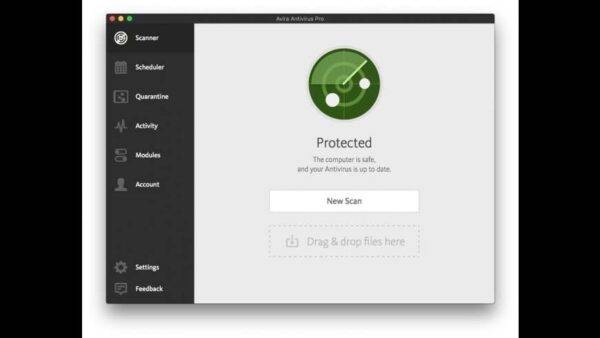
Avira Free Security for Mac is another top contender in the Best Free AntiVirus category. Known for its light footprint and strong malware detection, Avira offers a range of features to keep your Mac safe without slowing it down.
Features:
Real-time protection against viruses, ransomware, and malware.
Includes a privacy-focused browser extension to block phishing attempts and tracking.
System optimization tools to boost your Mac’s performance.
Number 3 On The List: Avira Free Antivirus For Mac
Why Avira?
Avira’s lightweight design ensures that it doesn’t impact your Mac’s performance.
The privacy-focused features, such as the anti-tracking browser extension, make it ideal for users concerned about online privacy.
Limitations:
The free version includes ads for Avira’s premium services.
The system optimization tools are somewhat limited in the free version.
Avira is a fantastic choice for users looking for strong malware protection with additional privacy features, making it one of the Best Free AntiVirus programs for Mac.
Bitdefender is a trusted name in cybersecurity, and its free virus scanner for Mac is no exception. While it doesn’t offer real-time protection like other options on this list, it’s still one of the Best Free AntiVirus tools for manual virus scans.
Features:
On-demand virus scanning to detect and remove malware.
Deep scans of specific files, folders, or the entire system.
Lightweight and fast, ensuring your Mac’s performance isn’t impacted.
4) Last On The List: Bitdefender For Mac
Why Bitdefender?
Excellent for manual virus scans and quick checkups on your system.
A lightweight tool that doesn’t slow down your Mac.
Limitations:
Lacks real-time protection, meaning you’ll need to manually run scans.
Doesn’t offer the extensive features found in other free antivirus programs.
If you’re looking for a lightweight and efficient virus scanner, Bitdefender is an excellent option in the Best Free AntiVirus category.
How to Choose the Best Free AntiVirus for Your Needs
With so many great options, how do you choose the Best Free AntiVirus for your Mac? Here are some key factors to consider:
Real-Time Protection: If you want ongoing protection against new threats, choose an antivirus that offers real-time scanning.
System Performance: Some antivirus programs can slow down your system, so it’s essential to pick one that balances protection with performance.
Ease of Use: Whether you’re a tech expert or a casual user, make sure the antivirus program is easy to install and use.
By considering these factors, you’ll be able to find the Best Free AntiVirus that fits your needs and provides the necessary protection for your Mac.
Conclusion: Protect Your Mac with the Best Free AntiVirus
When it comes to protecting your Mac from the latest cyber threats, having the Best Free AntiVirus installed is a must. Whether you choose Avast, Sophos, AVG, or Bitdefender, each of these programs offers excellent protection without costing a penny.
Take the time to assess your needs and pick the Best Free AntiVirus program that will keep your Mac safe from malware, ransomware, and phishing attacks.
For additional help with securing your Mac, visit Kingfisher Computers to get expert advice and support!
The Illusion of Stability in Modern Updates For most users, operating system updates are something that simply happen. They arrive quietly, often installing in the background, requiring little more than…
Macbook Neo, How Does It Compare To Air & Pro? Over the last few years the laptop market has experienced one of the most significant architectural changes in its history.…
Apple’s latest product announcements mark one of the most significant shifts in the Mac lineup in more than a decade. While Apple routinely updates its hardware with faster chips, incremental…
There is a particular kind of frustration that only a slow computer can produce. It is not dramatic. It is not urgent. It does not scream for attention. Instead, it…
In an era where nearly every aspect of personal computer maintenance and professional life is mediated through digital systems, your computer is no longer a luxury device — it is…
Phone says charging but battery not increasing is one of the most frustrating problems smartphone users face. You plug it in.The lightning bolt appears.It says “Charging.” But the battery percentage…
Apple’s rumour cycle always looks like a thousand disconnected leaks — until you line them up and notice the same themes repeating: AI-first silicon, camera and display differentiation, form-factor experiments (foldables / spatial…
Wi-Fi connected but no internet is one of the most frustrating messages you can see on a computer or laptop. The Wi-Fi icon shows full bars.It says “Connected.”But websites won’t…
Unfortunately, there was an error submitting your request.
Please try again later, or reach out to us directly. You can call us at +44 1429 280955 or email us at sales@kingfishercomputers.co.uk for assistance. We’re here to help you get your computer back up and running!
We’ve received your booking, Our team will get in touch with you shortly to confirm the details. You’re one step closer to having your computer fixed! If you have any urgent questions, feel free to contact us. Otherwise, sit back, and we’ll handle the rest.