Virgin media broadband outage – Virgin says no outage, our customers disagree.
Darren Waggott
November 19th, 2019
Virgin Media Broadband Outage: Our Experience and What You Need to Know
Despite Virgin Media‘s statement confirming “there is no national broadband outage,” many customers, including ourselves, have experienced major connectivity issues. Here’s our firsthand account of the incident and what we discovered during the Virgin Media broadband outage.
Virgin Media’s Denial vs. Customer Reality
On the morning of 19th November 2019, Virgin Media made an official statement claiming their broadband services were running smoothly with “no national broadband outage.” However, we and many of our customers strongly disagree.
At Kingfisher Computers, we began our day as usual—checking emails and ensuring our servers were up and running. But today, something was different. Our Virgin Media broadband was down—completely dead. No connection at all. Within minutes, we began receiving calls from distressed customers all reporting the same issue: “My Virgin Media internet isn’t working, but they’re telling me everything is fine.”
Table of Contents
Virgin Media Broadband Outage - Virgin Says No Outage, Our Customers Disagree. 4
How We Knew Virgin Media Was Having an Outage
As IT technicians, we immediately checked our Virgin Media router, analysing the upstream and downstream status, and found nothing—just a complete 100% outage. We decided to contact Virgin Media directly, only to be told that they were unaware of any issues. But we knew otherwise.
Temporary Solutions: Tethering Our Mobile Phones
Faced with a full broadband outage, we had to think fast. With no immediate solution from Virgin Media, we turned to our mobile phones for tethering.
While we once had a spare internet line, we had to remove it due to business cutbacks when Hartlepool Borough Council closed Church Street, affecting local businesses. So, we were left using mobile phone tethering to connect to the internet for the entire shop—an unexpected and inefficient workaround for a computer business.
How to Tether Your Mobile Phone for Internet Access
If you’re experiencing similar problems with Virgin Media broadband outages, you can set up a tethered connection using your mobile phone. Here’s how to do it:
Once we were back online using tethering, we continued to receive calls from frustrated customers facing the same issue. Still, Virgin Media denied any widespread outage. Curious about the extent of the problem, we searched Google for “Virgin Media broadband outage”—and the results were overwhelming.
Virgin Media Outage: What the Media is Reporting
To our surprise, nine different news outlets were reporting a massive Virgin Media broadband outage across the UK. Here are a few headlines from that day:
Despite these reports, Virgin Media’s status page was down, leaving many customers confused and in the dark about what was really happening.
Our Odd Experience: Not Everyone Was Affected
The situation took an unexpected twist when we received a call from one of our regular customers requesting remote support. She was using Virgin Media broadband—yet her connection was working perfectly. And to add to the confusion, she lived only five minutes away from our office. It became clear that the Virgin Media outage wasn’t affecting all customers uniformly, raising more questions about the scale and randomness of the issue.
What’s Different About This Outage?
National broadband outages are rare, and typically, broadband problems are localized. But this incident was unusual. Virgin Media customers across the UK were affected, yet the company was publicly denying the issue.
Why would Virgin Media deny the outage? Could it be connected to rumors of Vodafone’s acquisition of Virgin Media? There has been speculation that Vodafone is looking to expand its presence by buying Virgin Media, and perhaps the company wanted to keep things under wraps.
Virgin Media’s Customer Service: Why the Silence?
We’ve been loyal Virgin Media customers for over a decade and have generally received excellent service. Usually, any issues are resolved swiftly. However, the silence and denial surrounding this particular Virgin Media broadband outage were troubling, especially with major news outlets covering the issue.
The ultimate question remains: why did Virgin Media deny the outage when so many customers were clearly affected?
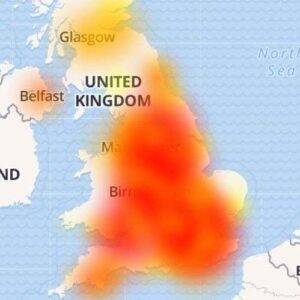
Virgin Media Outage Map
Conclusion: Virgin Media Outage Lessons
While Virgin Media may have denied a national outage, the customer reality told a different story. Whether this was a rare glitch or a part of larger issues within the company, the event highlighted the importance of having backup internet options.
If you’re a Virgin Media customer and have experienced similar issues, be prepared by learning how to set up mobile tethering or consider keeping a spare internet line as a backup.
For more support or help setting up your backup internet connection, feel free to contact Kingfisher Computers.
The Illusion of Stability in Modern Updates For most users, operating system updates are something that simply happen. They arrive quietly, often installing in the background, requiring little more than…
Macbook Neo, How Does It Compare To Air & Pro? Over the last few years the laptop market has experienced one of the most significant architectural changes in its history.…
Apple’s latest product announcements mark one of the most significant shifts in the Mac lineup in more than a decade. While Apple routinely updates its hardware with faster chips, incremental…
There is a particular kind of frustration that only a slow computer can produce. It is not dramatic. It is not urgent. It does not scream for attention. Instead, it…
In an era where nearly every aspect of personal computer maintenance and professional life is mediated through digital systems, your computer is no longer a luxury device — it is…
Phone says charging but battery not increasing is one of the most frustrating problems smartphone users face. You plug it in.The lightning bolt appears.It says “Charging.” But the battery percentage…
Apple’s rumour cycle always looks like a thousand disconnected leaks — until you line them up and notice the same themes repeating: AI-first silicon, camera and display differentiation, form-factor experiments (foldables / spatial…
Wi-Fi connected but no internet is one of the most frustrating messages you can see on a computer or laptop. The Wi-Fi icon shows full bars.It says “Connected.”But websites won’t…
Unfortunately, there was an error submitting your request.
Please try again later, or reach out to us directly. You can call us at +44 1429 280955 or email us at sales@kingfishercomputers.co.uk for assistance. We’re here to help you get your computer back up and running!
We’ve received your booking, Our team will get in touch with you shortly to confirm the details. You’re one step closer to having your computer fixed! If you have any urgent questions, feel free to contact us. Otherwise, sit back, and we’ll handle the rest.