Gaming on Wi-Fi? Here’s How to Get the Best Connection
Adam Fornal
July 3rd, 2025
Table of Contents
Gaming on Wi-Fi? Here’s How to Get the Best Connection
Gaming on Wi-Fi has become increasingly popular as wireless technology improves and gaming setups become more flexible. While many hardcore gamers still swear by wired connections, the reality is that millions of players enjoy excellent gaming experiences through wireless networks. The key to successful Gaming on Wi-Fi lies in understanding how to optimize your setup, minimize latency, and create the most stable connection possible.
Modern wireless technology has evolved significantly, making Gaming on Wi-Fi more viable than ever before. With the right equipment, configuration, and understanding of wireless principles, you can achieve gaming performance that rivals traditional wired connections. This comprehensive guide will walk you through everything you need to know about optimizing your wireless gaming experience, from choosing the right router to fine-tuning your network settings.
Understanding the Challenges of Gaming on Wi-Fi
Before diving into solutions, it’s important to understand why Gaming on Wi-Fi presents unique challenges compared to wired connections. Wireless signals can be affected by interference, distance, obstacles, and network congestion. Unlike wired connections that provide consistent data paths, wireless connections must navigate through air, competing with other devices and environmental factors that can impact performance.
The primary concerns for Gaming on Wi-Fi include latency (ping), packet loss, and connection stability. Latency refers to the time it takes for data to travel from your device to the game server and back. Even small increases in latency can significantly impact gaming performance, especially in competitive multiplayer games where split-second reactions matter. Understanding these challenges is the first step toward creating an optimal wireless gaming environment.
The Evolution of Wireless Gaming Technology
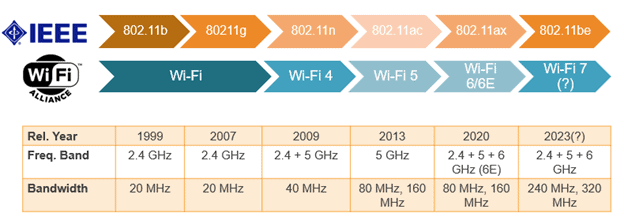
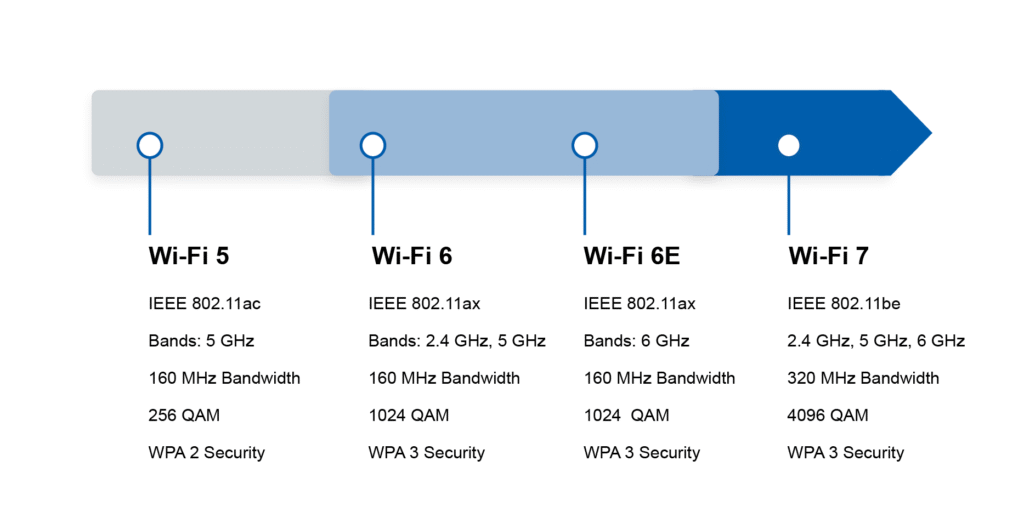
Gaming on Wi-Fi has become increasingly feasible thanks to advances in wireless standards and router technology. The introduction of Wi-Fi 6 (802.11ax) has brought significant improvements in speed, capacity, and efficiency. These newer standards include features specifically designed to handle the demands of modern gaming, such as improved Quality of Service (QoS) capabilities and better handling of multiple simultaneous connections.
Gaming-specific features in modern routers have also revolutionized Gaming on Wi-Fi experiences. Technologies like MU-MIMO (Multi-User, Multiple-Input, Multiple-Output) allow routers to communicate with multiple devices simultaneously, reducing congestion and improving overall network performance. Additionally, advanced antenna designs and beamforming technology help direct wireless signals more efficiently to gaming devices.
Gaming On Wi-Fi? Here's How To Get The Best Connection 7
Common Misconceptions About Wireless Gaming
Many gamers harbor misconceptions about Gaming on Wi-Fi that prevent them from exploring wireless options. One common belief is that wireless connections are inherently unreliable for gaming, but this perception is largely based on outdated technology. Modern wireless setups, when properly configured, can deliver gaming performance that satisfies even competitive players.
Another misconception is that Gaming on Wi-Fi always results in higher latency than wired connections. While physics dictates that wireless signals take slightly longer to travel than wired ones, the difference is often negligible in real-world scenarios. The total latency in online gaming is primarily determined by factors like server distance and internet connection quality rather than the small difference between wired and wireless transmission times.
Optimizing Your Router for Gaming on Wi-Fi
The foundation of excellent Gaming on Wi-Fi performance starts with your router. Your router acts as the gateway between your gaming devices and the internet, making it the most critical component in your wireless gaming setup. Choosing the right router and configuring it properly can dramatically improve your gaming experience.
Choosing the Right Gaming Router
Not all routers are created equal when it comes to Gaming on Wi-Fi. Gaming routers are specifically designed to handle the demands of online gaming, with features like advanced QoS controls, gaming-specific network optimization, and powerful hardware capable of handling multiple high-bandwidth connections simultaneously.
Key Features to Look for in Gaming Routers
When selecting a router for Gaming on Wi-Fi, prioritize models with Wi-Fi 6 or Wi-Fi 6E support. These newer standards offer significant advantages including higher theoretical speeds, better efficiency with multiple devices, and improved performance in congested wireless environments. Look for routers with multiple high-gain antennas and beamforming technology to ensure strong signal coverage throughout your gaming area.
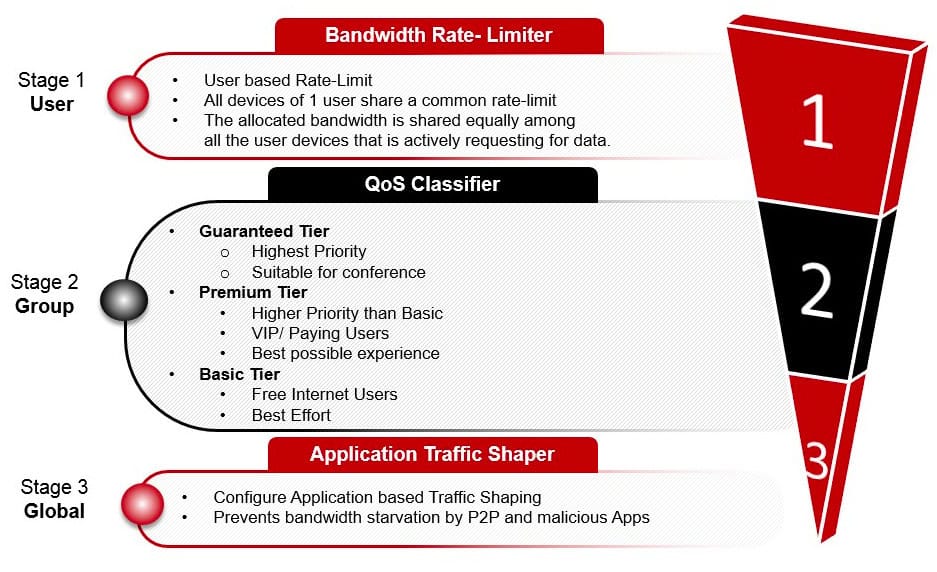
Advanced QoS features are essential for optimal Gaming on Wi-Fi performance. Gaming routers should offer the ability to prioritize gaming traffic over other network activities, ensuring that your gaming packets get preferential treatment even when other devices are using the network heavily. Some routers include adaptive QoS that automatically recognizes gaming traffic and adjusts priorities accordingly.
Router Placement and Environmental Considerations
The physical placement of your router significantly impacts Gaming on Wi-Fi performance. Position your router in a central location, elevated from the floor, and away from potential sources of interference like microwaves, baby monitors, and other wireless devices. Avoid placing routers in enclosed cabinets or behind large obstacles that can block or reflect wireless signals.
For multi-story homes, consider whether your router’s placement provides adequate coverage to your gaming area. Gaming on Wi-Fi performance degrades significantly with distance and obstacles, so you may need to invest in a mesh network system or wireless access points to ensure consistent coverage throughout your home.
Gaming On Wi-Fi? Here's How To Get The Best Connection 8
Advanced Router Configuration for Gaming
Once you’ve selected an appropriate router, proper configuration is crucial for maximizing Gaming on Wi-Fi performance. Most gaming routers include setup wizards that automatically configure basic settings, but manual fine-tuning can provide additional performance benefits.
Quality of Service (QoS) Settings
QoS configuration is perhaps the most important aspect of optimizing Gaming on Wi-Fi performance. QoS allows you to prioritize gaming traffic over other network activities, ensuring that your gaming sessions aren’t disrupted by streaming videos, file downloads, or other bandwidth-intensive activities on your network.
Most modern gaming routers offer multiple QoS modes, including gaming-specific presets that automatically prioritize common gaming applications and services. However, Gaming on Wi-Fi performance can often be improved by manually configuring QoS settings to match your specific usage patterns and gaming requirements.
Channel Selection and Bandwidth Management
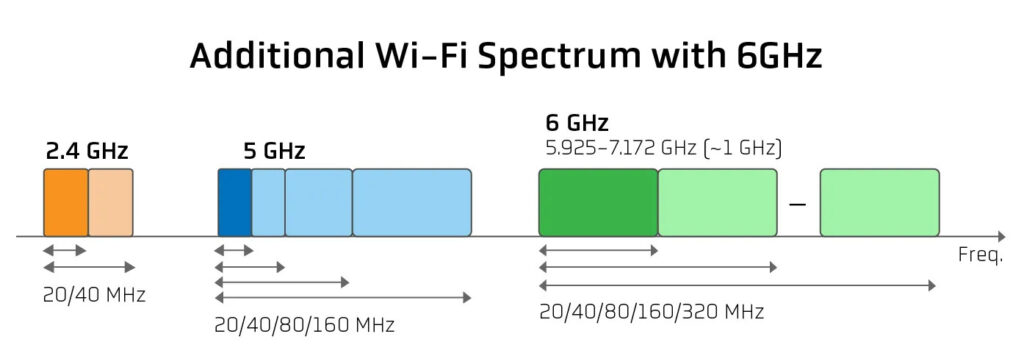
Wireless channels can become congested, especially in densely populated areas where multiple Wi-Fi networks overlap. For optimal Gaming on Wi-Fi performance, use Wi-Fi analyzer tools to identify the least congested channels in your area. The 5 GHz band typically offers more available channels and less congestion than the 2.4 GHz band, making it preferable for gaming applications.
Consider using the 6 GHz band if you have Wi-Fi 6E equipment, as this newer frequency band offers even more available channels and less congestion. However, remember that higher frequency bands have shorter range, so you may need to balance between performance and coverage depending on your gaming setup location.
Gaming On Wi-Fi? Here's How To Get The Best Connection 9
Network Security and Gaming Performance
Security settings can impact Gaming on Wi-Fi performance, so it’s important to choose security protocols that provide adequate protection without unnecessarily burdening your network. WPA3 is the most secure option available and should be used when all your devices support it. For older devices that don’t support WPA3, WPA2 remains acceptable for most gaming applications.
Firewall and Port Management
Proper firewall configuration is essential for both security and Gaming on Wi-Fi performance. Many games require specific ports to be open for optimal connectivity, and overly restrictive firewall settings can cause connection issues or increased latency. Gaming routers often include game-specific port forwarding presets that automatically configure the necessary ports for popular games.
UPnP (Universal Plug and Play) can simplify port management for Gaming on Wi-Fi by allowing games to automatically open the ports they need. However, UPnP can potentially create security vulnerabilities, so consider whether the convenience is worth the risk for your specific situation.
Device-Specific Optimization for Gaming on Wi-Fi
Different gaming devices have varying capabilities and requirements when it comes to Gaming on Wi-Fi. Understanding how to optimize each type of device can significantly improve your overall gaming experience.
Gaming PC Wi-Fi Optimization
Gaming PCs offer the most flexibility for Gaming on Wi-Fi optimization. Desktop PCs can accommodate high-performance Wi-Fi cards with multiple antennas and advanced features, while laptops may be limited by their built-in wireless adapters.
Wireless Adapter Selection and Configuration
For desktop PCs, investing in a high-quality Wi-Fi adapter can dramatically improve Gaming on Wi-Fi performance. Look for adapters that support the latest Wi-Fi standards (Wi-Fi 6 or Wi-Fi 6E) and include multiple antennas for better signal reception. PCIe Wi-Fi cards generally offer better performance than USB adapters, though high-end USB adapters can still provide excellent results.
Configure your wireless adapter’s power management settings to prioritize performance over battery life. Windows often defaults to power-saving modes that can impact Gaming on Wi-Fi performance by reducing the adapter’s transmission power or putting it into sleep modes during periods of low activity.
Gaming On Wi-Fi? Here's How To Get The Best Connection 10
Network Adapter Driver Optimization
Keeping your wireless adapter drivers updated is crucial for optimal Gaming on Wi-Fi performance. Driver updates often include performance improvements, bug fixes, and new features that can enhance your gaming experience. Check for driver updates regularly, either through Windows Update or directly from the adapter manufacturer’s website.
Some wireless adapters include gaming-specific features in their driver software, such as gaming mode profiles that automatically optimize settings for gaming applications. These features can provide additional performance benefits for Gaming on Wi-Fi without requiring manual configuration.
Console Gaming on Wi-Fi
Modern gaming consoles are designed with Gaming on Wi-Fi in mind, but there are still steps you can take to optimize their wireless performance. Each console platform has specific settings and features that can improve wireless gaming performance.
PlayStation and Xbox Wi-Fi Settings
Both PlayStation and Xbox consoles include network testing tools that can help you optimize Gaming on Wi-Fi performance. Use these tools to test your connection speed, latency, and packet loss. If you’re experiencing issues, the console’s network diagnostics can often identify specific problems and suggest solutions.
Consider using the consoles’ built-in QoS features if available. Some console models can automatically prioritize gaming traffic, improving Gaming on Wi-Fi performance when other devices are using the network simultaneously.
Nintendo Switch Wireless Optimization
The Nintendo Switch presents unique challenges for Gaming on Wi-Fi due to its portable nature and older wireless technology. The Switch uses an older Wi-Fi standard that may not perform as well as newer devices, but there are still ways to optimize its wireless performance.
Position your Switch closer to the router when possible, especially during online gaming sessions. The Switch’s wireless range is more limited than many other gaming devices, so Gaming on Wi-Fi performance can degrade significantly with distance or obstacles.
Advanced Techniques for Gaming on Wi-Fi
Beyond basic router and device optimization, several advanced techniques can further improve Gaming on Wi-Fi performance. These methods require more technical knowledge but can provide significant benefits for serious gamers.
Mesh Networks and Range Extenders
For larger homes or challenging wireless environments, mesh networks can provide more consistent Gaming on Wi-Fi performance throughout your space. Mesh systems use multiple access points to create a seamless wireless network that automatically routes traffic through the best available path.
Choosing Between Mesh and Traditional Extenders
Traditional range extenders can improve Gaming on Wi-Fi coverage but may introduce additional latency due to signal repeating. Mesh systems typically provide better performance for gaming applications because they’re designed to minimize latency and provide seamless roaming between access points.
When selecting a mesh system for Gaming on Wi-Fi, look for models that support dedicated backhaul connections. These systems use separate wireless channels for communication between mesh nodes, ensuring that your gaming traffic doesn’t compete with the mesh network’s internal communications.
Gaming VPN Considerations
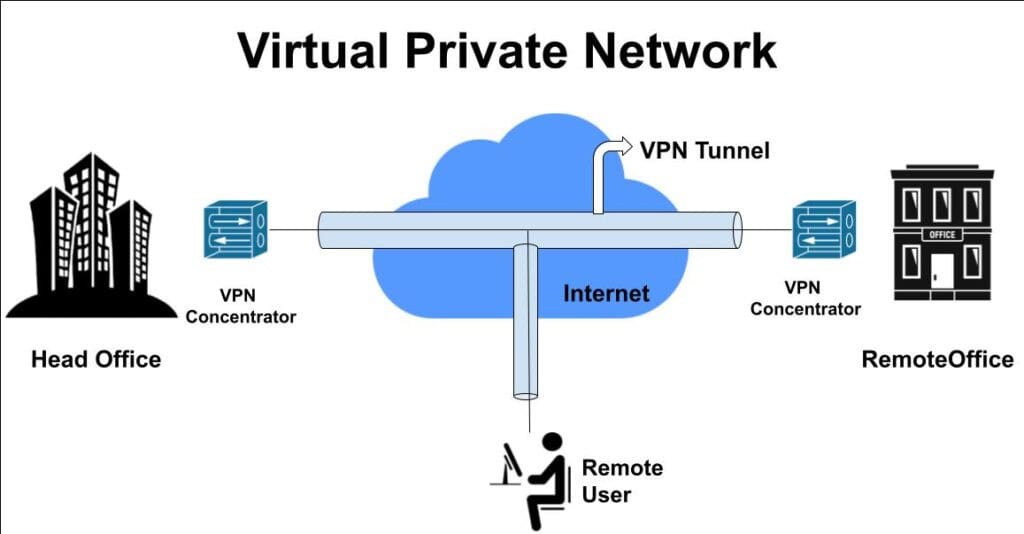
Virtual Private Networks (VPNs) can impact Gaming on Wi-Fi performance, but they may be necessary for accessing region-locked games or improving routing to game servers. When using a VPN for gaming, choose services that offer gaming-optimized servers and low-latency connections.
Gaming On Wi-Fi? Here's How To Get The Best Connection 11
Balancing Security and Performance
While VPNs can provide security benefits, they typically add latency to your connection, which can negatively impact Gaming on Wi-Fi performance. Consider whether the benefits of using a VPN outweigh the performance costs for your specific gaming needs.
Some gaming VPNs claim to improve performance by providing better routing to game servers, but results vary significantly depending on your location and internet service provider. Test different VPN services to determine whether they help or hurt your Gaming on Wi-Fi experience.
Monitoring and Troubleshooting Gaming on Wi-Fi
Regular monitoring of your Gaming on Wi-Fi performance can help you identify and resolve issues before they significantly impact your gaming experience. Understanding how to troubleshoot common wireless gaming problems is essential for maintaining optimal performance.
Network Monitoring Tools
Several tools can help you monitor Gaming on Wi-Fi performance and identify potential issues. Built-in operating system tools like Windows Network Diagnostics can identify basic connectivity problems, while third-party applications provide more detailed information about network performance.
Gaming-specific monitoring tools can track metrics like ping, packet loss, and jitter over time, helping you identify patterns that might indicate network issues. Some gaming platforms include built-in network monitoring features that can alert you to connection problems during gameplay.
Common Issues and Solutions
Gaming on Wi-Fi problems often stem from interference, congestion, or configuration issues. Learning to identify and resolve these problems can significantly improve your gaming experience. Keep a log of any performance issues you experience, including the time of day, specific games affected, and any error messages you encounter.
When troubleshooting Gaming on Wi-Fi problems, start with the simplest solutions first. Restarting your router and gaming devices can resolve many temporary issues. If problems persist, consider factors like network congestion during peak usage times or interference from other wireless devices.
Future-Proofing Your Gaming on Wi-Fi Setup
As gaming technology continues to evolve, ensuring your Gaming on Wi-Fi setup remains capable of handling future demands is important. Understanding emerging technologies and trends can help you make informed decisions about equipment upgrades and network improvements.
Emerging Wireless Technologies
Wi-Fi 7 (802.11be) represents the next generation of wireless technology and promises even better performance for Gaming on Wi-Fi applications. While Wi-Fi 7 equipment is still emerging, early implementations show significant improvements in latency, throughput, and network efficiency.
Gaming On Wi-Fi? Here's How To Get The Best Connection 12
Cloud Gaming and Wireless Requirements
Cloud gaming services like GeForce Now, Xbox Cloud Gaming, and Google Stadia place different demands on Gaming on Wi-Fi networks compared to traditional gaming. These services require consistent, high-bandwidth connections with low latency to provide acceptable gaming experiences.
Gaming on Wi-Fi for cloud gaming applications may require more robust wireless infrastructure than local gaming, as any network hiccups can immediately impact the gaming experience. Consider whether your current wireless setup can handle the demands of cloud gaming services you’re interested in using.
Investment Planning for Gaming Networks
Planning your Gaming on Wi-Fi equipment investments strategically can help you maintain optimal performance while managing costs. Rather than replacing all equipment simultaneously, consider which components provide the biggest performance improvements for your specific gaming needs.
Upgrade Priorities and Timing
When planning Gaming on Wi-Fi upgrades, prioritize components that directly impact gaming performance. Your router typically provides the biggest performance improvement, followed by gaming device wireless adapters. Consider the age and capabilities of your current equipment when planning upgrades.
Monitor the development of new wireless standards and gaming technologies to time your upgrades effectively. Gaming on Wi-Fi equipment tends to have a useful life of 3-5 years, so planning upgrades around this timeline can help you maintain optimal performance without unnecessary expenses.
Mastering Gaming on Wi-Fi
Success with Gaming on Wi-Fi requires understanding both the technical aspects of wireless networking and the specific demands of gaming applications. By carefully selecting equipment, optimizing configurations, and maintaining your network, you can achieve gaming performance that rivals traditional wired connections.
The key to excellent Gaming on Wi-Fi performance lies in taking a holistic approach that considers your router, gaming devices, network environment, and usage patterns. Regular monitoring and maintenance ensure that your wireless gaming setup continues to perform optimally as technology evolves and your gaming needs change.
Remember that Gaming on Wi-Fi optimization is an ongoing process rather than a one-time setup. As new games are released, wireless technologies improve, and your gaming habits evolve, you may need to adjust your network configuration to maintain optimal performance. Stay informed about developments in wireless gaming technology and don’t hesitate to experiment with different settings to find what works best for your specific situation.
With the right approach and equipment, Gaming on Wi-Fi can provide the flexibility and performance you need to enjoy your favorite games without the constraints of wired connections. Whether you’re a casual gamer or a competitive player, these strategies will help you get the most out of your wireless gaming experience.
The Illusion of Stability in Modern Updates For most users, operating system updates are something that simply happen. They arrive quietly, often installing in the background, requiring little more than…
Macbook Neo, How Does It Compare To Air & Pro? Over the last few years the laptop market has experienced one of the most significant architectural changes in its history.…
Apple’s latest product announcements mark one of the most significant shifts in the Mac lineup in more than a decade. While Apple routinely updates its hardware with faster chips, incremental…
There is a particular kind of frustration that only a slow computer can produce. It is not dramatic. It is not urgent. It does not scream for attention. Instead, it…
In an era where nearly every aspect of personal computer maintenance and professional life is mediated through digital systems, your computer is no longer a luxury device — it is…
Phone says charging but battery not increasing is one of the most frustrating problems smartphone users face. You plug it in.The lightning bolt appears.It says “Charging.” But the battery percentage…
Apple’s rumour cycle always looks like a thousand disconnected leaks — until you line them up and notice the same themes repeating: AI-first silicon, camera and display differentiation, form-factor experiments (foldables / spatial…
Wi-Fi connected but no internet is one of the most frustrating messages you can see on a computer or laptop. The Wi-Fi icon shows full bars.It says “Connected.”But websites won’t…
Unfortunately, there was an error submitting your request.
Please try again later, or reach out to us directly. You can call us at +44 1429 280955 or email us at [email protected] for assistance. We’re here to help you get your computer back up and running!
We’ve received your booking, Our team will get in touch with you shortly to confirm the details. You’re one step closer to having your computer fixed! If you have any urgent questions, feel free to contact us. Otherwise, sit back, and we’ll handle the rest.