How to Read PC Part Specs (Without Getting Confused)
Adam Fornal
June 26th, 2025
Table of Contents
How to Read PC Part Specs (Without Getting Confused)
Building or upgrading a computer can feel overwhelming when you’re faced with endless technical specifications and confusing terminology. Understanding PC Part Specs is essential for making informed purchasing decisions, whether you’re assembling your first gaming rig or upgrading an existing system. This comprehensive guide demystifies the complex world of hardware specifications, teaching you how to interpret PC Part Specs like a seasoned professional.
The ability to read and understand PC Parts empowers you to make smart buying decisions, avoid compatibility issues, and get the best performance for your budget. Instead of relying on marketing buzzwords or sales recommendations, you’ll have the knowledge to evaluate components based on their technical merits. This skill becomes particularly valuable when comparing similar products from different manufacturers or determining which specifications matter most for your specific use case.
The Foundation of Understanding PC Part Specs
Modern computer components contain dozens of specifications that describe their capabilities, limitations, and compatibility requirements. Learning to read PC Part Specs requires understanding both the technical terminology and the practical implications of different values. Each specification tells part of the story about how a component will perform in real-world scenarios.
When manufacturers list PC Part Specs, they’re providing a technical blueprint that describes exactly what their product can do. However, these specifications often use abbreviations, technical jargon, and industry-specific measurements that can confuse newcomers. The key to mastering PC Part Specs lies in understanding which specifications are most important for your needs and how different values translate to actual performance differences.
Why PC Part Specs Matter More Than Marketing Claims
Marketing departments often emphasize flashy features while downplaying limitations that might affect your experience. Raw PC Part Specs provide objective measurements that allow for direct comparisons between products. While a graphics card might be marketed as “ultra-fast” or “gaming-ready,” the actual specifications reveal whether it can handle your target resolution and frame rates.
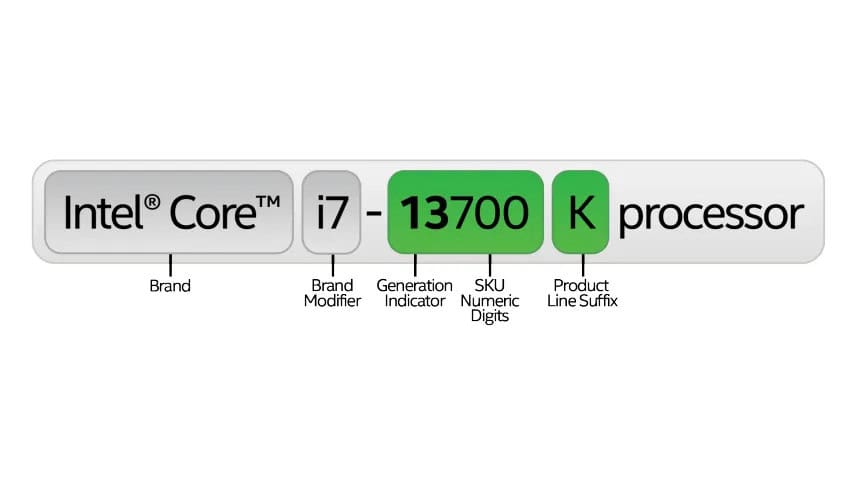
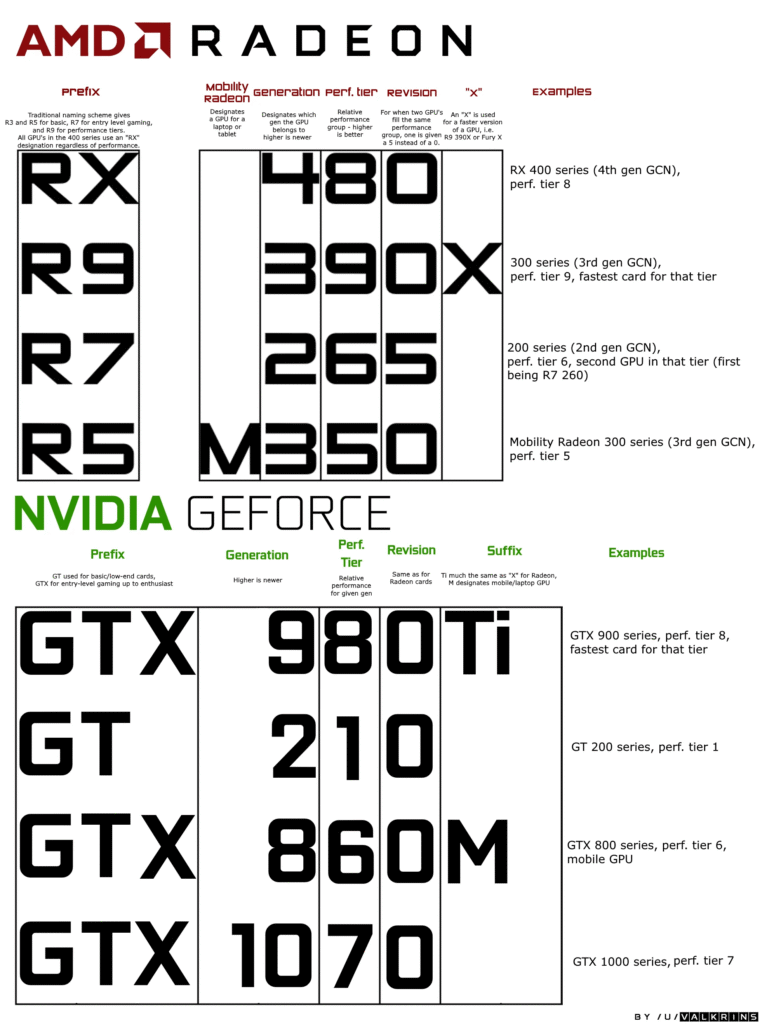
Understanding PC Part Specs also helps you identify when manufacturers are using confusing naming schemes or marketing tactics to make lower-end products appear more capable than they actually are. For example, a processor with a higher model number isn’t necessarily faster than one with a lower number if they’re from different product generations or architectural families.
Essential PC Part Specs for Every Component Category
Different types of computer components have unique specifications that determine their performance characteristics. Learning to interpret PC Parts for each component category helps you make informed decisions when building or upgrading your system.
Processor (CPU) Specifications Decoded
The central processing unit serves as your computer’s brain, and understanding CPU PC Part Specs is crucial for system performance. Modern processors feature complex architectures with multiple cores, varying clock speeds, and sophisticated cache systems that significantly impact overall system responsiveness.
Core Count and Threading Technology
When examining CPU PC Part Specs, core count represents the number of independent processing units within the chip. Modern processors typically feature between 4 and 24 cores for consumer applications. More cores generally enable better multitasking and improved performance in applications designed to utilize multiple cores simultaneously. However, not all software can effectively use multiple cores, making single-core performance equally important.
Threading technology, often called simultaneous multithreading or hyperthreading, allows each physical core to handle two instruction streams simultaneously. When reviewing PC Part Specs for processors, you might see specifications like “8 cores, 16 threads,” indicating 8 physical cores with threading technology enabled. This feature can improve performance in compatible applications but doesn’t double the processor’s capabilities.
Clock Speeds and Boost Frequencies
Base clock speed, measured in gigahertz (GHz), indicates how many cycles per second each core can execute under normal conditions. However, modern PC Part Specs also include boost clock speeds, which represent the maximum frequency individual cores can achieve under optimal conditions. The difference between base and boost clocks can be substantial, sometimes exceeding 1 GHz.
Understanding these PC Part Specs helps set realistic performance expectations. Boost clocks require adequate cooling and power delivery to maintain, and they typically only apply to a limited number of cores simultaneously. For sustained workloads, base clock speeds provide a more accurate representation of long-term performance capabilities.
Cache Memory and Architecture Details
Cache memory specifications in PC Part Specs describe high-speed memory integrated directly into the processor. Modern CPUs feature multiple cache levels (L1, L2, L3) with varying sizes and access speeds. Larger cache sizes generally improve performance by reducing the need to access slower system memory, particularly benefiting applications that work with large datasets.
Architecture names and manufacturing process nodes, common elements in PC Part Specs, indicate the underlying technology generation. Newer architectures typically offer improved performance per watt and additional features compared to older designs. Manufacturing process measurements (like 7nm or 5nm) generally correlate with efficiency improvements, though direct comparisons are only meaningful within the same manufacturer’s product lines.
How To Read Pc Part Specs (Without Getting Confused) 6
Graphics Card (GPU) Specifications Explained
Graphics processing units handle visual rendering and parallel computing tasks. GPU PC Part Specs can appear particularly complex due to the specialized nature of graphics processing and the variety of technologies involved in modern graphics cards.
Core Specifications and Processing Power
GPU PC Part Specs typically include stream processor or shader unit counts, which represent the number of small processing cores available for parallel computations. Unlike CPU cores, GPU cores are much simpler and designed to work together on similar tasks. Higher core counts generally indicate greater processing capability, though architectural differences between manufacturers make direct comparisons challenging.
Base and boost clock speeds for graphics processors follow similar principles to CPU clocks but operate at different frequency ranges. Modern GPU PC Part Specs often show boost clocks exceeding 2 GHz, though actual sustained frequencies depend on cooling and power limitations. Memory clock speeds, measured in effective frequencies, determine how quickly the graphics card can access its dedicated memory.
Memory Specifications and Bandwidth
Graphics card memory specifications in PC Part Specs include both capacity and type. Memory capacity, measured in gigabytes, determines how much visual data the card can store locally. Higher resolutions, complex textures, and multiple monitor setups require more memory. Memory type (GDDR6, GDDR6X, HBM) affects both performance and power consumption, with newer types generally offering better efficiency.
Memory bandwidth, calculated from memory clock speed and bus width, represents the maximum data transfer rate between the GPU and its memory. This specification significantly impacts performance at higher resolutions where large amounts of image data must be processed quickly. When comparing PC Part Specs between graphics cards, memory bandwidth often correlates strongly with gaming performance.
Modern high-performance graphics cards consume substantial amounts of power, making power specifications crucial elements of PC Part Specs. Total Graphics Power (TGP) or Total Board Power (TBP) indicates the maximum power consumption under full load. This specification determines the minimum power supply requirements and affects system heat generation.
Thermal Design Power (TDP) specifications in PC Part Specs help determine cooling requirements. Graphics cards with higher TDP values require more robust cooling solutions and may not fit in compact cases. Some manufacturers provide multiple cooling solutions for the same GPU, creating variations in size, noise, and thermal performance within the same product line.
How To Read Pc Part Specs (Without Getting Confused) 7
Memory (RAM) Specifications Demystified
System memory specifications determine how efficiently your computer can access and manipulate data. Understanding RAM PC Part Specs helps ensure compatibility and optimal performance across different usage scenarios.
Speed, Latency, and Timing Specifications
Memory speed specifications in PC Part Specs are typically expressed as data transfer rates (DDR4-3200, DDR5-5600). These numbers indicate the theoretical maximum data transfer rate in megatransfers per second. However, actual performance depends on both speed and latency characteristics, making timing specifications equally important.
Memory timings, often displayed as sequences like “16-18-18-38” in PC Part Specs, represent the number of clock cycles required for specific operations. Lower timing values generally indicate faster memory access, though the relationship between timings and real-world performance varies depending on the application and processor architecture.
Capacity and Configuration Options
Memory capacity specifications in PC Part Specs determine how much data your system can hold in fast-access storage. Modern systems typically require 16-32 GB for optimal performance, though specific needs vary based on usage patterns. Gaming and general productivity tasks generally perform well with 16 GB, while content creation and professional applications may benefit from 32 GB or more.
Memory configuration affects both performance and upgrade potential. Dual-channel configurations, achieved by installing matched pairs of memory modules, provide better performance than single-channel setups. When reviewing PC Part Specs for memory kits, look for specifications that indicate the modules are designed to work together at their rated speeds.
How To Read Pc Part Specs (Without Getting Confused) 8
Advanced PC Part Specs for Power Users
Beyond basic specifications, advanced users benefit from understanding more complex PC Part Specs that affect system stability, compatibility, and performance optimization. These specifications become particularly important when building high-performance systems or troubleshooting compatibility issues.
Storage Device Specifications and Performance Metrics
Modern storage devices use various technologies that significantly impact system responsiveness. Understanding storage PC Part Specs helps you choose the right balance between capacity, performance, and cost for your specific needs.
Interface Types and Connection Standards
Storage interface specifications in PC Part Specs determine how storage devices connect to your system and their maximum theoretical performance. SATA III interfaces provide up to 6 Gbps bandwidth, suitable for traditional hard drives and entry-level SSDs. NVMe interfaces, typically implemented through PCIe connections, offer much higher bandwidth potential, with PCIe 4.0 supporting up to 8 GB/s transfer rates.
When comparing storage PC Part Specs, interface compatibility with your motherboard is crucial. Older systems may not support newer NVMe standards, while newer systems might not include legacy IDE connections. Understanding these compatibility requirements prevents purchasing incompatible storage devices.
Performance Characteristics and Endurance Ratings
Sequential read and write speeds, prominent features in storage PC Part Specs, indicate maximum throughput for large file transfers. However, random access performance often matters more for system responsiveness, as operating systems and applications frequently access small files scattered across the storage device. Look for random IOPS (Input/Output Operations Per Second) specifications when evaluating storage performance.
Endurance ratings in SSD PC Part Specs predict how much data can be written to the device before wear mechanisms affect reliability. These specifications, often expressed as TBW (Terabytes Written) or DWPD (Drive Writes Per Day), help determine whether a storage device is suitable for write-intensive applications like video editing or database operations.
Power supply units provide electricity to all system components, making their specifications critical for system stability and efficiency. Understanding PSU PC Part Specs ensures adequate power delivery and helps optimize energy consumption.
Wattage Ratings and Efficiency Standards
Power supply wattage specifications in PC Part Specs indicate the maximum power output under ideal conditions. However, not all PSUs can maintain their rated output under all circumstances. Look for specifications that indicate continuous versus peak power ratings, as some units can only achieve maximum output for short periods.
Efficiency ratings, certified by programs like 80 PLUS, indicate how effectively PSUs convert AC power from the wall outlet to DC power used by computer components. Higher efficiency ratings (Bronze, Silver, Gold, Platinum, Titanium) reduce electricity consumption and heat generation. When reviewing PSU PC Part Specs, efficiency ratings become more important for high-power systems that operate for extended periods.
Modular Cabling and Protection Features
Cable management specifications in PC Part Specs indicate whether power supply cables are permanently attached or removable. Fully modular PSUs allow you to connect only necessary cables, improving airflow and aesthetics. Semi-modular units typically have permanent motherboard and CPU power cables with removable peripheral connections.
Protection features listed in PSU PC Part Specs safeguard your components against electrical problems. Over-voltage protection (OVP), under-voltage protection (UVP), over-current protection (OCP), and short-circuit protection (SCP) prevent damage during power anomalies. While most modern PSUs include basic protections, higher-quality units often provide more comprehensive safeguards.
How To Read Pc Part Specs (Without Getting Confused) 9
Motherboard Specifications and Expansion Options
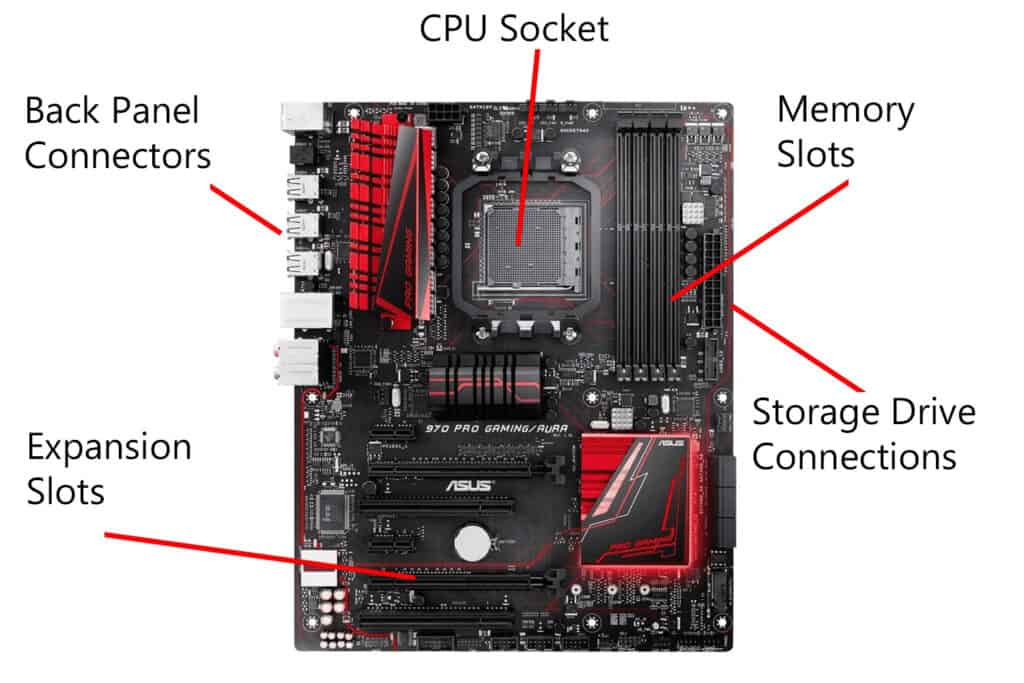
Motherboards connect all system components and determine upgrade potential. Understanding motherboard PC Part Specs helps ensure compatibility and provides insight into future expansion possibilities.
Socket Types and Processor Compatibility
Processor socket specifications in motherboard PC Part Specs determine which CPUs are compatible with the board. Different manufacturers use different socket designs, and socket types change periodically to accommodate new processor features. Intel and AMD use completely different socket designs, making cross-compatibility impossible.
When reviewing motherboard PC Part Specs, pay attention to supported processor generations within the same socket type. Some motherboards require BIOS updates to support newer processors, while others may not support the latest CPUs even if they use the same socket. Manufacturer compatibility lists provide definitive information about supported processors.
Expansion Slots and Connectivity Options
Expansion slot specifications in PC Part Specs determine what additional components you can install. PCIe slot configurations vary significantly between motherboards, with different slot sizes (x1, x4, x8, x16) and generations (PCIe 3.0, 4.0, 5.0) affecting compatibility and performance. Graphics cards typically require PCIe x16 slots, while other expansion cards may use smaller slots.
USB, network, and audio specifications in motherboard PC Part Specs determine connectivity options and performance capabilities. Look for USB 3.2 Gen 2 or USB-C ports for faster data transfer rates. Built-in Wi-Fi specifications indicate wireless networking capabilities, while audio specifications describe the quality of integrated sound processing.
How To Read Pc Part Specs (Without Getting Confused) 10
Practical Application of PC Part Specs Knowledge
Understanding PC Part Specs theory is only valuable when applied to real-world scenarios. This section explores how to use specification knowledge for practical decision-making, whether you’re building a new system or upgrading existing components.
Matching PC Part Specs to Your Needs
Different computing tasks emphasize different aspects of system performance. Learning to prioritize relevant PC Part Specs based on your intended use helps optimize your hardware budget and ensures satisfactory performance for your specific applications.
Gaming Performance Requirements
Gaming systems require balanced PC Part Specs across multiple components. Graphics card specifications typically have the largest impact on gaming performance, particularly at higher resolutions. However, processor specifications become important for games that utilize multiple cores or require high frame rates. Memory specifications matter less for gaming than for content creation, though insufficient memory can cause performance problems.
When building gaming systems, prioritize graphics card PC Part Specs that can handle your target resolution and frame rate. For 1080p gaming, mid-range graphics cards often provide excellent performance. Higher resolutions like 1440p or 4K require more powerful graphics cards with adequate memory. Processor specifications should emphasize single-core performance for older games and multi-core capability for newer titles.
Content Creation and Professional Workloads
Content creation applications often emphasize different PC Part Specs than gaming systems. Video editing benefits from processors with many cores and large amounts of system memory. 3D rendering applications can utilize both powerful processors and graphics cards with substantial memory. Photo editing typically requires fast storage devices and accurate color reproduction.
Professional workload PC Part Specs should prioritize component specifications that directly impact productivity. Large memory capacities enable working with complex projects without performance degradation. Fast storage devices reduce file loading and saving times. Multiple monitor support may require specific graphics card capabilities or additional expansion cards.
Common PC Part Specs Mistakes to Avoid
Even experienced builders sometimes misinterpret PC Part Specs or overlook important compatibility considerations. Understanding common mistakes helps avoid costly errors and ensures successful system builds.
Compatibility and Bottleneck Issues
One frequent mistake involves ignoring compatibility between PC Part Specs from different components. Memory specifications must match motherboard capabilities, including both speed and capacity limitations. Graphics cards require adequate power supply capacity and physical clearance within the case. Processor cooling solutions must be compatible with both the processor socket and case dimensions.
Performance bottlenecks occur when PC Part Specs are poorly matched between components. Pairing a high-end graphics card with an entry-level processor can limit gaming performance, while installing fast storage devices on older interfaces prevents achieving maximum transfer speeds. Understanding how different specifications interact helps create balanced systems that perform optimally.
Overlooking Future Upgrade Potential
Another common oversight involves choosing PC Part Specs that limit future upgrade options. Motherboards with minimal expansion slots or limited memory capacity may require complete replacement for significant upgrades. Power supplies with insufficient capacity may need replacement when adding more powerful components. Cases with poor airflow or limited space may not accommodate future component upgrades.
When evaluating PC Part Specs for long-term use, consider specifications that provide upgrade flexibility. Choose motherboards with additional expansion slots and memory slots beyond current needs. Select power supplies with capacity exceeding current requirements. These decisions may increase initial costs but provide better long-term value and upgrade potential.
Mastering PC Part Specs for Informed Decisions
Understanding PC Part Specs transforms computer hardware from mysterious black boxes into comprehensible components with measurable capabilities. This knowledge empowers you to make informed purchasing decisions, troubleshoot compatibility issues, and optimize system performance for your specific needs.
Building Confidence in PC Part Specs Analysis
The key to mastering PC Part Specs lies in regular practice and staying current with evolving technologies. As you gain experience reading specifications, patterns emerge that make the process faster and more intuitive. Component manufacturers continually introduce new features and specifications, making ongoing learning essential for staying current.
Start by focusing on PC Part Specs most relevant to your immediate needs, then gradually expand your knowledge to encompass other component categories. Online databases and comparison tools can help you practice interpreting specifications and understanding how different values translate to real-world performance differences.
The Long-term Value of Understanding PC Part Specs
Investing time in learning PC Part Specs provides long-term benefits that extend far beyond individual purchasing decisions. This knowledge helps you troubleshoot system issues, plan upgrades strategically, and avoid compatibility problems. As technology continues evolving, the fundamental principles of reading and interpreting specifications remain valuable skills.
Understanding PC Part Specs also enables you to help others make informed decisions about their computer hardware needs. Whether assisting friends with purchases or contributing to online communities, specification knowledge allows you to provide valuable guidance based on technical merit rather than marketing claims.
By mastering the art of reading PC Part Specs, you’ve gained a valuable skill that will serve you well throughout your computing journey. Use this knowledge to build better systems, make smarter upgrades, and enjoy the satisfaction that comes from understanding the technology that powers your digital life.
The Illusion of Stability in Modern Updates For most users, operating system updates are something that simply happen. They arrive quietly, often installing in the background, requiring little more than…
Macbook Neo, How Does It Compare To Air & Pro? Over the last few years the laptop market has experienced one of the most significant architectural changes in its history.…
Apple’s latest product announcements mark one of the most significant shifts in the Mac lineup in more than a decade. While Apple routinely updates its hardware with faster chips, incremental…
There is a particular kind of frustration that only a slow computer can produce. It is not dramatic. It is not urgent. It does not scream for attention. Instead, it…
In an era where nearly every aspect of personal computer maintenance and professional life is mediated through digital systems, your computer is no longer a luxury device — it is…
Phone says charging but battery not increasing is one of the most frustrating problems smartphone users face. You plug it in.The lightning bolt appears.It says “Charging.” But the battery percentage…
Apple’s rumour cycle always looks like a thousand disconnected leaks — until you line them up and notice the same themes repeating: AI-first silicon, camera and display differentiation, form-factor experiments (foldables / spatial…
Wi-Fi connected but no internet is one of the most frustrating messages you can see on a computer or laptop. The Wi-Fi icon shows full bars.It says “Connected.”But websites won’t…
Unfortunately, there was an error submitting your request.
Please try again later, or reach out to us directly. You can call us at +44 1429 280955 or email us at [email protected] for assistance. We’re here to help you get your computer back up and running!
We’ve received your booking, Our team will get in touch with you shortly to confirm the details. You’re one step closer to having your computer fixed! If you have any urgent questions, feel free to contact us. Otherwise, sit back, and we’ll handle the rest.