I wouldn’t go anywhere else in hartlepool for a computer repair. Always go above and beyond to perform the perfect service. These guys have always fixed my computers since my first pc tower to my laptops and now my more recent ipad.


Help with screens, charging and startup problems
A clear assessment before you decide
We assess your device, explain the fault and agree the repair costs with you before work begins.
If you decline the quoted repair after diagnosis has started, a £24 diagnostic fee, including VAT, covers our assessment time and technical expertise.
Approve the repair and there is no separate diagnostic fee.

Symptoms, model details and suitable options
MacBook Neo is a distinct MacBook family with a 13 inch display.
Identify it by its full product name rather than ordering parts for a MacBook Air or Pro.
Tell us the model and what you have noticed
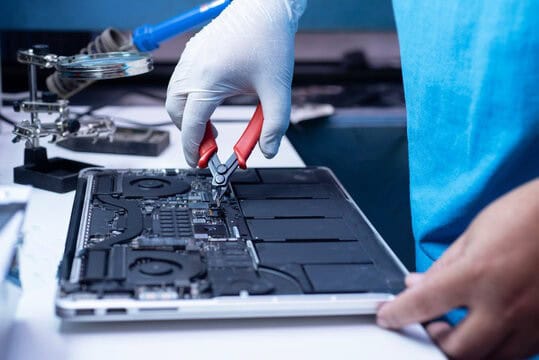
Describe screen, keyboard, charging or startup symptoms and any recent impact or liquid exposure. On a recent machine, check existing cover and discuss current parts availability before agreeing independent work.
If you are unsure which version you own, tell us what you can identify. Share serial numbers privately. We can discuss the information needed before you bring the device to the shop.

Understand the fault, the options and the proposed work
Understand the proposed work and decide what is right for your device.
Feedback about our repair service
Assessment, data and repair arrangements
Use these answers to prepare for an enquiry. Contact us about the exact device and fault before agreeing any work.
For MacBook Neo repairs in Hartlepool, tell us whether the problem concerns charging, the display, the keyboard or a connected device. The Neo is its own MacBook family. We identify the machine and the symptoms before discussing an assessment and suitable repair options.
The original 2026 MacBook Neo uses A18 Pro rather than an M series chip. Its parts should not be selected from a listing that simply says MacBook. Note the full model and storage configuration where available, together with any earlier repair or physical damage.
For a screen problem, explain whether the picture, brightness or normal lid movement is involved. For keyboard or trackpad trouble, describe the affected keys or action. A short account of what still works helps separate the reported fault from an assumption that the entire assembly needs replacing.
Apple’s Neo specifications describe two USB C ports with different data and display capabilities. Both support charging, while the USB 3 port also supports the specified external display connection. A monitor failing on the other port is not, by itself, proof of damage.
Tell us which port, charger, cable and adapter you normally use. Mention whether the issue affects charging, data transfer, a monitor or several functions together. If something works with one accessory but not another, include those details before parts are chosen.
For short battery life, record the applications in use and whether the problem appears immediately after startup or during a particular task. Do not assume that the advertised battery figure describes every workload. We discuss the checks needed for the behaviour you actually experience.
If the Neo is usable, check that important documents and photographs have a separate, accessible backup. Tell us if preserving files is the priority before discussing any work involving storage. Apple’s service preparation guide gives current preparation advice; account access should be handled privately for the agreed work.
We explain the findings, suitable parts, availability and price before you decide. Agree any checks that matter for your charger, external display or everyday applications. Our broader MacBook repair page helps when the exact family has not yet been identified. No password or verification code is needed in an ordinary enquiry.
You can contact the team or visit the shop during opening hours. Call ahead if you need to confirm suitable arrangements for a particular device or assessment.
A £24 diagnostic fee, including VAT, applies only if you decline the quoted repair after diagnosis has begun. It covers our assessment time and technical expertise.
If you approve the repair, there is no separate diagnostic fee. There is no diagnostic charge if diagnosis has not started. We agree the repair work and costs before proceeding.
Back up accessible files before assessment. If the device has liquid damage, is swollen or becomes unusually hot, stop using and charging it and contact us for handling advice. Tell us if preserving data is the main priority before any reset or installation is considered.
The fault, assessment and any suitable parts affect the timing. Tell us about deadlines and essential applications. We discuss the proposed work and expected timing before you decide.
Ask our team which payment methods and arrangements apply to the proposed work. Do not include payment details in a general enquiry.
Our repairs include a 30 day repair guarantee. Ask us about the cover that applies to the work and parts in your quotation. If the original problem returns, contact us with the repair details so we can assess it.
New replacement parts and upgrades include a 12 month manufacturer’s warranty. Replacement labour for a covered part is free during the first three months. After that period, we explain any applicable labour charge before further work is agreed.
Ask about the terms for the particular part in your quotation. This business warranty is in addition to your statutory rights.
Check any manufacturer, retailer or insurance cover before agreeing independent work. Ask the provider about its terms. We do not present independent repairs as work authorised or covered by Apple.
Tell us what documentation your insurer requires before the assessment. We can discuss whether the requested inspection or written information is appropriate for the device and fault.
Keep an independent backup of accessible files. Tell us if preserving data is the priority before any reset, installation or storage work. Keep account passwords and verification codes out of your enquiry.
We explain the findings and discuss practical alternatives if a repair is unsuitable. Tell us about important data so that the next step reflects your priorities.
We offer home visits, subject to suitable arrangements for your device, location and fault. Some work needs the workshop. Home visits are billed hourly, so confirm the rate and proposed work with the team before the visit.
First time customers receive 10% off their first home visit. Mention the offer when arranging the visit.
Repair options vary by model, fault and suitable parts. Choose the matching device guide and ask about your exact model; not every component can be repaired or upgraded.
Contact us with the repair details and the symptoms you have noticed. We can discuss the appropriate next step and the terms that apply to the original work.
I wouldn’t go anywhere else in hartlepool for a computer repair. Always go above and beyond to perform the perfect service. These guys have always fixed my computers since my first pc tower to my laptops and now my more recent ipad.
Even though the lads couldn’t fully diagnose the issue with my PC they did not charge me anything and gave some excellent advice. Nice friendly would highly recommend. 27-09-19

Contact the Hartlepool team with the symptoms and model details. We can discuss what information is needed and which assessment route is appropriate.

Help with faults, software and data
Browse our service guides for assessment, backup, software and repair advice. The model and the fault determine which work is suitable.
Computer advice and shop updates
Practical information for your devices
Choose whether you would like to receive updates from the shop. For help with a current fault, contact our team directly.
Computers, accessories and components
If you are comparing repair with replacement, browse the shop and ask about a suitable device for your applications and budget.
Find out about other customers’ experiences
Our published reviews describe the service customers received for their computers and devices. You can browse the feedback and ask us about your own repair.
Information about the award shown here
Visit the award organiser for information about the UK Enterprise Awards.


Comments from Google reviewers
Read customer feedback on our Google business profile and compare the experiences people describe.

Customer comments on FreeIndex
Our FreeIndex profile provides another place to read customer comments about the business.

Find feedback on Yell
Read feedback about Kingfisher Computers on our Yell business profile.
Published feedback about our work
Read customer experiences with our Hartlepool team. Each review describes that customer’s own device, circumstances and experience.
i needed my acer aspire 8930g laptop upgrading from vista to windows 7 as the likes of google chrome and other programs where not supported anymore… great price and great service

thankyou for resolving the popups and virus issues on my sony laptop
Booking an appointment was quick and easy, the no fix no fee diagnostic was fast and thorough, lovely employees with great customer service! My motherboard couldn’t be saved, however I got great advice on what to do next to get my computer back up and…

Apple MacBook Pro repaired I could not be happier with the service I received at Kingfisher Computers. My screen appeared black and wouldn’t turn on. I was on the edge of buying a new laptop and then last minute I thought to take it to the shop. The staff…
fixed my iPad and apple macbook pro and did a fantastic job
Fantastic online support, I needed to check if an item was in stock, Darren tried to locate it for us and said he would email once one has been located. Really quick, friendly response, thank you
did an amazing job on my MacBook Pro, have been several times when iv travelled back to the uk from livening and travelling in india.
Darren sorted out my iMac that had given up on me. Replaced memory, cleaned dust from fans, tidied it up, running a lot faster now. Well pleased with the service I received.
Brought in my knackered computer and it was repaired the same day. Professional company would recommend!
Find Honest Feedback from Real Customers




Darren Waggott founded Kingfisher Computers in 2004. It was his first business, and he has continued to run and develop it ever since, helping local people and businesses look after their computers.
Kingfisher and The Mining Shop are part of the same business group. Our work across everyday PCs, gaming computers, ASIC miner repairs and data centre hardware brings together complementary technical experience. Kingfisher remains focused on practical computer repair and clear advice from Hartlepool.
Find us at 38 Church Street, Hartlepool, TS24 7DG. Call 01429 280955 with your model and the symptoms before you travel.
Opening hours and visit information · Get directions · Contact our team
No appointment required. You’re welcome to pop into the shop during opening hours.
ENQUIRY RECEIVED
38 Church Street, Hartlepool, TS24 7DG
For home visits and callouts, please wait for us to arrange a time.
No appointment required. You’re welcome to pop into the shop during opening hours.
ENQUIRY RECEIVED
38 Church Street, Hartlepool, TS24 7DG
For home visits and callouts, please wait for us to arrange a time.