Great service, which was helpful and responsive. Darren researched a laptop charger that would suit my needs. What more can one ask.


Practical help for the MacBook you use every day
A clear assessment before you decide
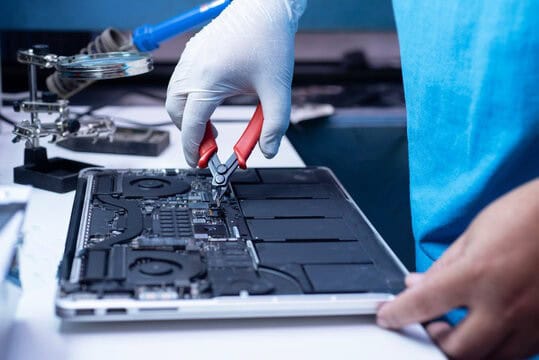
We assess your device, explain the fault and agree the repair costs with you before work begins.
If you decline the quoted repair after diagnosis has started, a £24 diagnostic fee, including VAT, covers our assessment time and technical expertise.
Approve the repair and there is no separate diagnostic fee.

Symptoms, model details and suitable options
M3 MacBook Air models were released in 13 and 15 inch sizes.
The family name alone does not identify a compatible replacement display or battery.
Tell us the model and what you have noticed
For an intermittent screen or accessory fault, note what happens with the lid open, with an external display and without a dock. Do not keep moving a damaged hinge or repeatedly reconnecting a visibly damaged port.
If you are unsure which version you own, tell us what you can identify. Share serial numbers privately. We can discuss the information needed before you bring the device to the shop.

Understand the fault, the options and the proposed work
Understand the proposed work and decide what is right for your device.
Feedback about our repair service
Assessment, data and repair arrangements
Use these answers to prepare for an enquiry. Contact us about the exact device and fault before agreeing any work.
For MacBook Air M3 repairs in Hartlepool, tell us whether the problem affects the display, charging, startup or a connected device. We use the symptoms and exact model to plan an assessment, then explain the findings and proposed work before you decide.
The 2024 range includes 13 and 15 inch models. If your Mac starts, open About This Mac from the Apple menu and note the model name. If it does not start, we can discuss how to identify it. Share serial numbers privately rather than in public comments.
The screen size matters when checking replacement displays, batteries and other parts. A part advertised simply for a MacBook Air may belong to a different generation.
If the screen flickers, goes dark or changes when the lid moves, tell us when it happens. Mention whether an external display still works and whether a dock is connected. Avoid repeatedly moving a damaged hinge to reproduce a fault.
M3 models have a MagSafe 3 connection and two Thunderbolt / USB 4 ports that support charging. Tell us which connection, charger and cable you use, and whether the problem affects power, accessories or both. Do not force a damaged connector or keep testing a device after a spill or signs of battery swelling.
If the Mac remains usable, check that you have a separate, accessible backup. Tell us which files matter most and whether a current backup exists. Diagnosis, repair and data recovery are different tasks, so discuss your data priorities before agreeing any work that could affect storage.
Memory and storage options need checking against the exact machine rather than assuming ordinary desktop upgrade parts will fit. We explain suitable repair options, parts availability and cost before you choose the next step.
Use Apple’s MacBook Air identification guide to check the model. Kingfisher Computers offers independent repair advice and is not presented here as an Apple authorised provider.
You can contact the team or visit the shop during opening hours. Call ahead if you need to confirm suitable arrangements for a particular device or assessment.
A £24 diagnostic fee, including VAT, applies only if you decline the quoted repair after diagnosis has begun. It covers our assessment time and technical expertise.
If you approve the repair, there is no separate diagnostic fee. There is no diagnostic charge if diagnosis has not started. We agree the repair work and costs before proceeding.
Back up accessible files before assessment. If the device has liquid damage, is swollen or becomes unusually hot, stop using and charging it and contact us for handling advice. Tell us if preserving data is the main priority before any reset or installation is considered.
The fault, assessment and any suitable parts affect the timing. Tell us about deadlines and essential applications. We discuss the proposed work and expected timing before you decide.
Ask our team which payment methods and arrangements apply to the proposed work. Do not include payment details in a general enquiry.
Our repairs include a 30 day repair guarantee. Ask us about the cover that applies to the work and parts in your quotation. If the original problem returns, contact us with the repair details so we can assess it.
New replacement parts and upgrades include a 12 month manufacturer’s warranty. Replacement labour for a covered part is free during the first three months. After that period, we explain any applicable labour charge before further work is agreed.
Ask about the terms for the particular part in your quotation. This business warranty is in addition to your statutory rights.
Check any manufacturer, retailer or insurance cover before agreeing independent work. Ask the provider about its terms. We do not present independent repairs as work authorised or covered by Apple.
Tell us what documentation your insurer requires before the assessment. We can discuss whether the requested inspection or written information is appropriate for the device and fault.
Keep an independent backup of accessible files. Tell us if preserving data is the priority before any reset, installation or storage work. Keep account passwords and verification codes out of your enquiry.
We explain the findings and discuss practical alternatives if a repair is unsuitable. Tell us about important data so that the next step reflects your priorities.
We offer home visits, subject to suitable arrangements for your device, location and fault. Some work needs the workshop. Home visits are billed hourly, so confirm the rate and proposed work with the team before the visit.
First time customers receive 10% off their first home visit. Mention the offer when arranging the visit.
Repair options vary by model, fault and suitable parts. Choose the matching device guide and ask about your exact model; not every component can be repaired or upgraded.
Contact us with the repair details and the symptoms you have noticed. We can discuss the appropriate next step and the terms that apply to the original work.
Great service, which was helpful and responsive. Darren researched a laptop charger that would suit my needs. What more can one ask.
I really needed a second opinion as things were quite Grey.. before putting my money down on expensive hardware and Kingfisher Computers really helped me out to the point I can actually give a 5 star review. Quick replys are an understatment and anyone wont…

Contact the Hartlepool team with the symptoms and model details. We can discuss what information is needed and which assessment route is appropriate.

Help with faults, software and data
Browse our service guides for assessment, backup, software and repair advice. The model and the fault determine which work is suitable.
Computer advice and shop updates
Practical information for your devices
Choose whether you would like to receive updates from the shop. For help with a current fault, contact our team directly.
Computers, accessories and components
If you are comparing repair with replacement, browse the shop and ask about a suitable device for your applications and budget.
Find out about other customers’ experiences
Our published reviews describe the service customers received for their computers and devices. You can browse the feedback and ask us about your own repair.
Information about the award shown here
Visit the award organiser for information about the UK Enterprise Awards.


Comments from Google reviewers
Read customer feedback on our Google business profile and compare the experiences people describe.

Customer comments on FreeIndex
Our FreeIndex profile provides another place to read customer comments about the business.

Find feedback on Yell
Read feedback about Kingfisher Computers on our Yell business profile.
Published feedback about our work
Read customer experiences with our Hartlepool team. Each review describes that customer’s own device, circumstances and experience.
Great customer service, really quick and well priced

thanks guys, the other half has been torturing me for weeks, if i knew it was going to take you 30 minutes id have called you weeks ago! Thanks again

Great quality! Great service! Strongly recommend.
Worked with Darren at Hartlepool Computers on a couple of projects and was very impressed with his knowledge and professionalism, with not dealing with Apple Macs ourselves we needed a quality business in his area to deal with some work, he undertook the…
Unbelievable, wouldn’t go elsewhere. Fantastic service, great value, really helpful. Neil, Cleveland wholesale hartlepool.
thank you for fixing my hp laptop, quickly.
i tried to update to windows 10 myself after being asked by windows to upgrade, since then my problems have just got worse and worse. so i decided to call kingfisher as i have used them in the past to see if they could help….. now it works better than ever…
Superb service by Nathan and the team, broken MacBook Pro screen had a few quotes and this one was by far the cheapest which isn’t necessarily the best but I took laptop one day and was fixed for the same day , cannot recommend enough , speedy friendly…
After updating to windows 10 iv had nothing but problems, I tried other places but I just ended up in the same situation, I went to this shop and they got it working how I wanted and even took the time to show me at my home where I was going wrong. They even…

Find Honest Feedback from Real Customers




Darren Waggott founded Kingfisher Computers in 2004. It was his first business, and he has continued to run and develop it ever since, helping local people and businesses look after their computers.
Kingfisher and The Mining Shop are part of the same business group. Our work across everyday PCs, gaming computers, ASIC miner repairs and data centre hardware brings together complementary technical experience. Kingfisher remains focused on practical computer repair and clear advice from Hartlepool.
Find us at 38 Church Street, Hartlepool, TS24 7DG. Call 01429 280955 with your model and the symptoms before you travel.
Opening hours and visit information · Get directions · Contact our team
No appointment required. You’re welcome to pop into the shop during opening hours.
ENQUIRY RECEIVED
38 Church Street, Hartlepool, TS24 7DG
For home visits and callouts, please wait for us to arrange a time.
No appointment required. You’re welcome to pop into the shop during opening hours.
ENQUIRY RECEIVED
38 Church Street, Hartlepool, TS24 7DG
For home visits and callouts, please wait for us to arrange a time.